
VS Code Folder Picker • Cross‑Platform • Icons & Validation • Instant Navigation
✨ Fast, custom cross-platform folder picker and creator for VS Code with icons, validation, and instant navigation. 🎨
- ✨ Fast Folder Selection
- 🎨 Icons With Clear Visuals
- ⚡ Instant Navigation
- ✅ Path Validation
- 🛠️ Configurable Buttons
- 🎯 Custom Handlers & Events
- 📂 Create & Navigate Folders
- 🔔 Error & Action Callbacks
This module powers my New Folder VS Code extension.
It is under active development - expect breaking changes.
Provide a simple UI/UX for creating new folders when opening a new or blank VS Code instance, since that behavior is not built‑in.
- Works only if
files.simpleDialog.enableis set totrue(a global preference that changes the UX for all file/folder dialogs). - Limited to creating a single‑level child folder - no nested/recursive folder creation.
- I filed a feature request #127201 with @microsoft/vscode.
- The request was closed as by design.
I built my own UI and logic to overcome these limitations.
This project is the outcome of that effort.
Install it by executing any of the following, depending on your preferred package manager:
pnpm add @igorskyflyer/vscode-folderpickeryarn add @igorskyflyer/vscode-folderpickernpm i @igorskyflyer/vscode-folderpickerenum ResponseSpeedUsed for controlling the response speed of the InputBox of the QuickPick. Since v.2.0.0 callbacks for generating Actions are throttled/debounced when necessary and the picker now waits for the user to finish their input before generating available Actions for performance reasons. Throttling is provided by Zep().
Available values are: Instant, Fast, Normal (default), Lazy.
Setting this property to
ResponseSpeed.Instantdisables all throttling/debouncing!
showFolderPicker(directory: string, options?: Partial<IFolderPickerOptions>): voidParameters
directory: string - Initial directory to display in the picker.
options: Partial<IFolderPickerOptions> - Optional configuration to customize behavior and UI.
Options
-
[dialogTitle]: string = 'Pick a Folder' - Title text displayed at the top of the dialog. Defaults to'Pick a Folder'. -
[showIcons]: boolean = true - Whether to show icons next to folder items. Defaults totrue.
Be aware that the term icon is used here descriptively.
This property expects either:
- a single emoji (e.g.
📂), or - a VS Code ThemeIcon (string shorthand like
'$(gear)'or an object instancenew ThemeIcon('gear')).
To see the list of available ThemeIcons, look at the official Visual Studio Code documentation.
See the [Icons] section below.
-
[showConfigButton]: boolean = false - Whether to display a configuration (⚙️) button in the UI. Defaults tofalse. -
[autoNavigate]: boolean = false - Whether to auto navigate to a child folder when creating new child folders. Defaults tofalse. -
[responseSpeed]: ResponseSpeed | number = ResponseSpeed.Normal - Controls how quickly the picker responds to user input. Can be a predefinedResponseSpeedor a custom debounce interval in ms. See ResponseSpeed. Defaults toResponseSpeed.Normal. -
[ignoreFocusOut]: boolean = false - Whether the picker remains open when focus is lost. Defaults tofalse. -
[canPick]: boolean = true - Whether to enable picking of current folder in the Picker. Defaults totrue.
-
[iconFolder]: LabelIcon (string | ThemeIcon) = '' - Icon used for folder entries. -
[iconFolderUp]: LabelIcon (string | ThemeIcon) = '' - Icon used for the go up (parent folder) action. -
[iconCreate]: LabelIcon (string | ThemeIcon) = '' - Icon used for the create new folder action. -
[iconNavigate]: LabelIcon (string | ThemeIcon) = '' - Icon used for navigation actions. -
[iconPick]: LabelIcon (string | ThemeIcon) = '' - Icon used for the pick action. -
[iconClear]: LabelIcon (string | ThemeIcon) = '' - Icon used for the clear action.
-
[onCreateFolder]: FolderActionCallback - Fired when a new folder is created. -
[onPickFolder]: FolderActionCallback - Fired when a folder is picked/selected. -
[onNavigateTo]: FolderActionCallback - Fired when navigating into a folder. -
[onGoUp]: FolderActionCallback - Fired when navigating up to the parent folder. -
[onFetch]: FetchCallback - Fired before fetching folder contents. -
[onFetched]: FetchCallback - Fired after folder contents have been fetched. -
[onClose]: UICallback - Fired when the picker is closed. -
[onConfigButton]: UICallback - Fired when the configuration button is pressed. RequiresshowConfigButtonto be set totrue. -
[onError]: ErrorCallback - Fired when an error occurs (always receives anError). -
[onUnknownAction]: UnknownActionCallback - Fired for actions not covered by other handlers. Provides full access to the underlyingQuickPick.
// some magic code 🔮

import { showFolderPicker } from '@igorskyflyer/vscode-folderpicker'
import { ThemeIcon } from 'vscode'

showFolderPicker('/Users/igor/projects', {
  dialogTitle: 'Select a folder',
  onPickFolder: folderPath => {
    console.log('Picked folder:', folderPath)
  }
})

// even more magic code ✨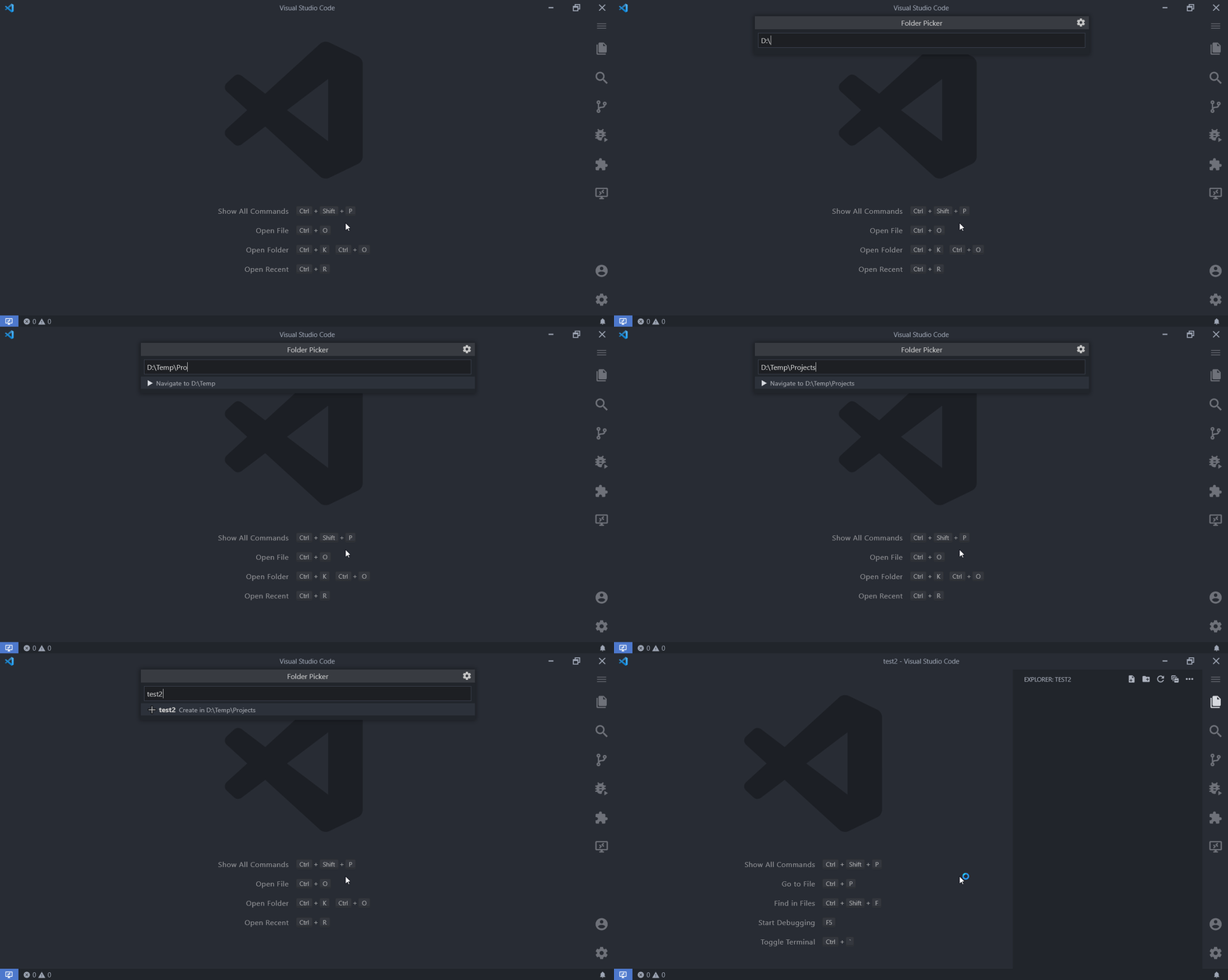
Figure 1. Command Palette creating a relative folder in the current directory
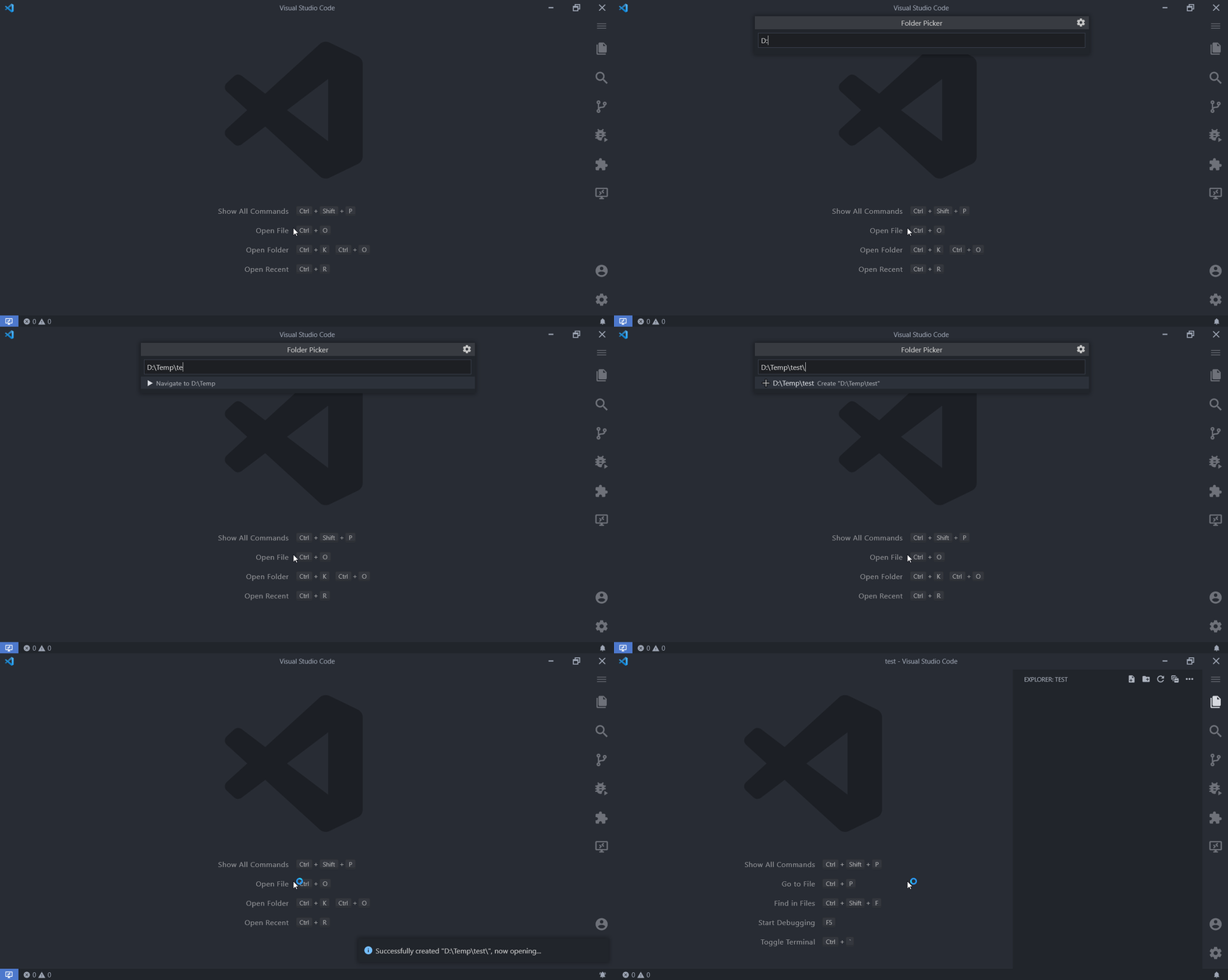
Figure 2. Command Palette creating a folder with an absolute path
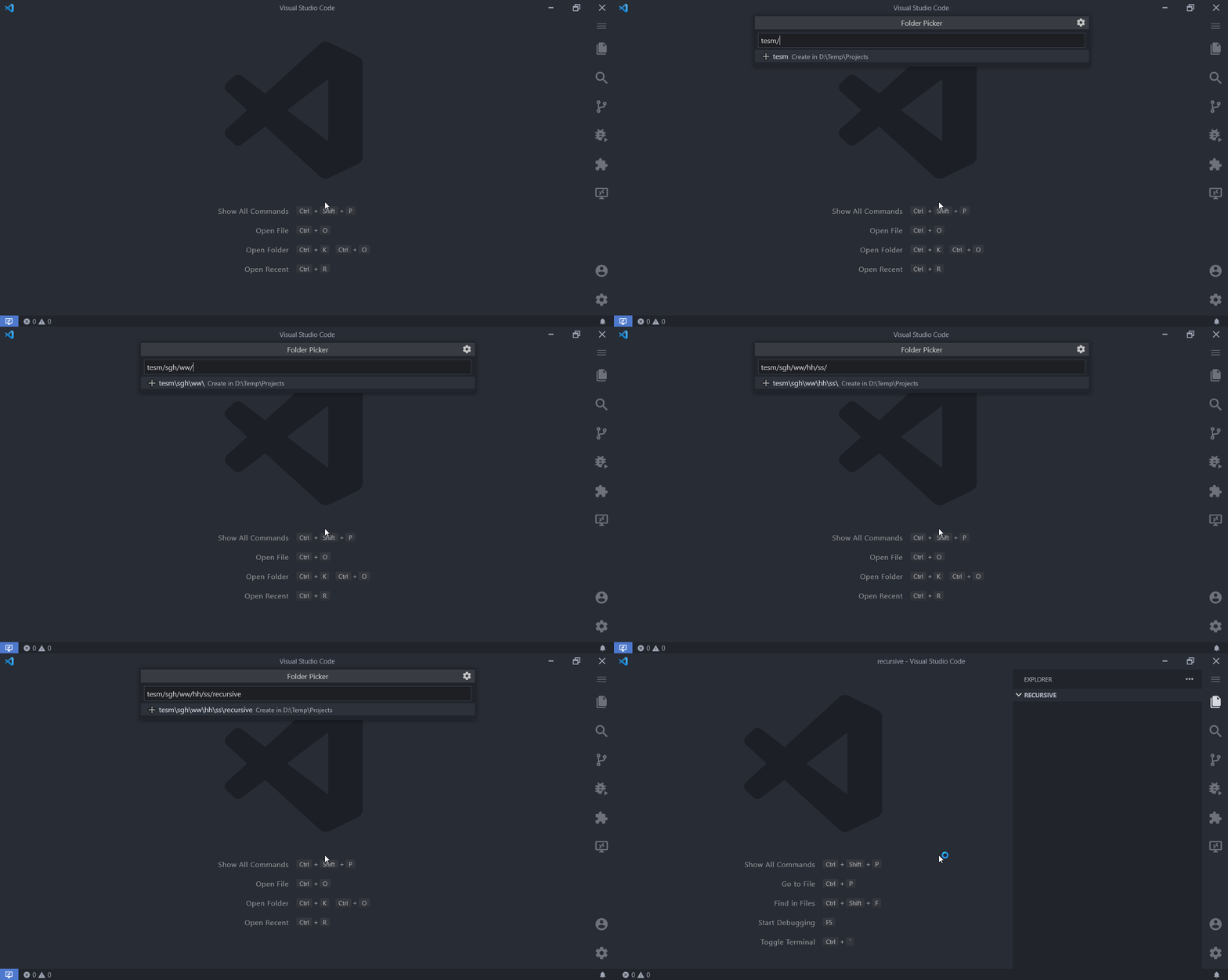
Figure 3. Command Palette creating folders recursively in the current directory
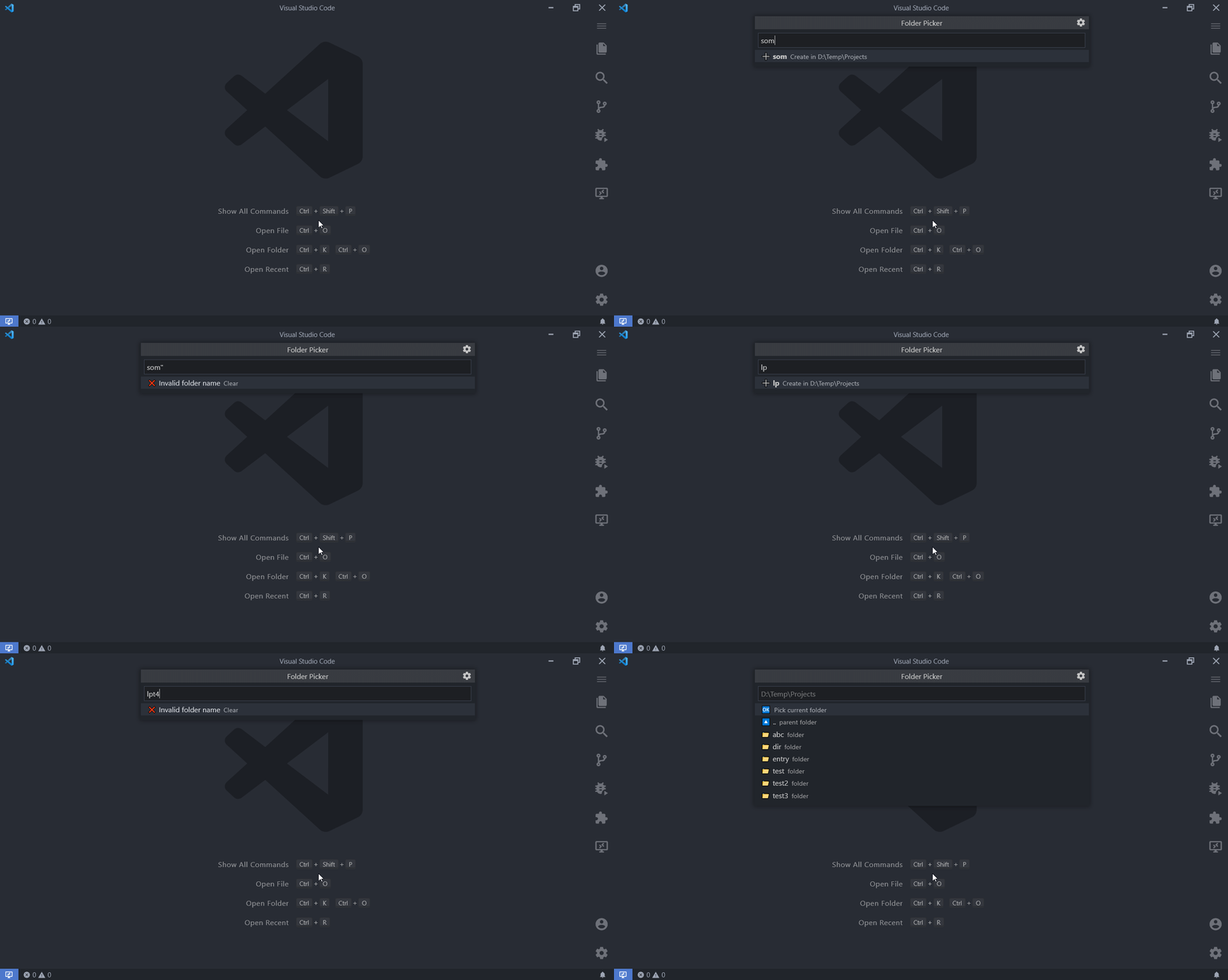
Figure 4. Invalid folder name supplied in the Command Palette
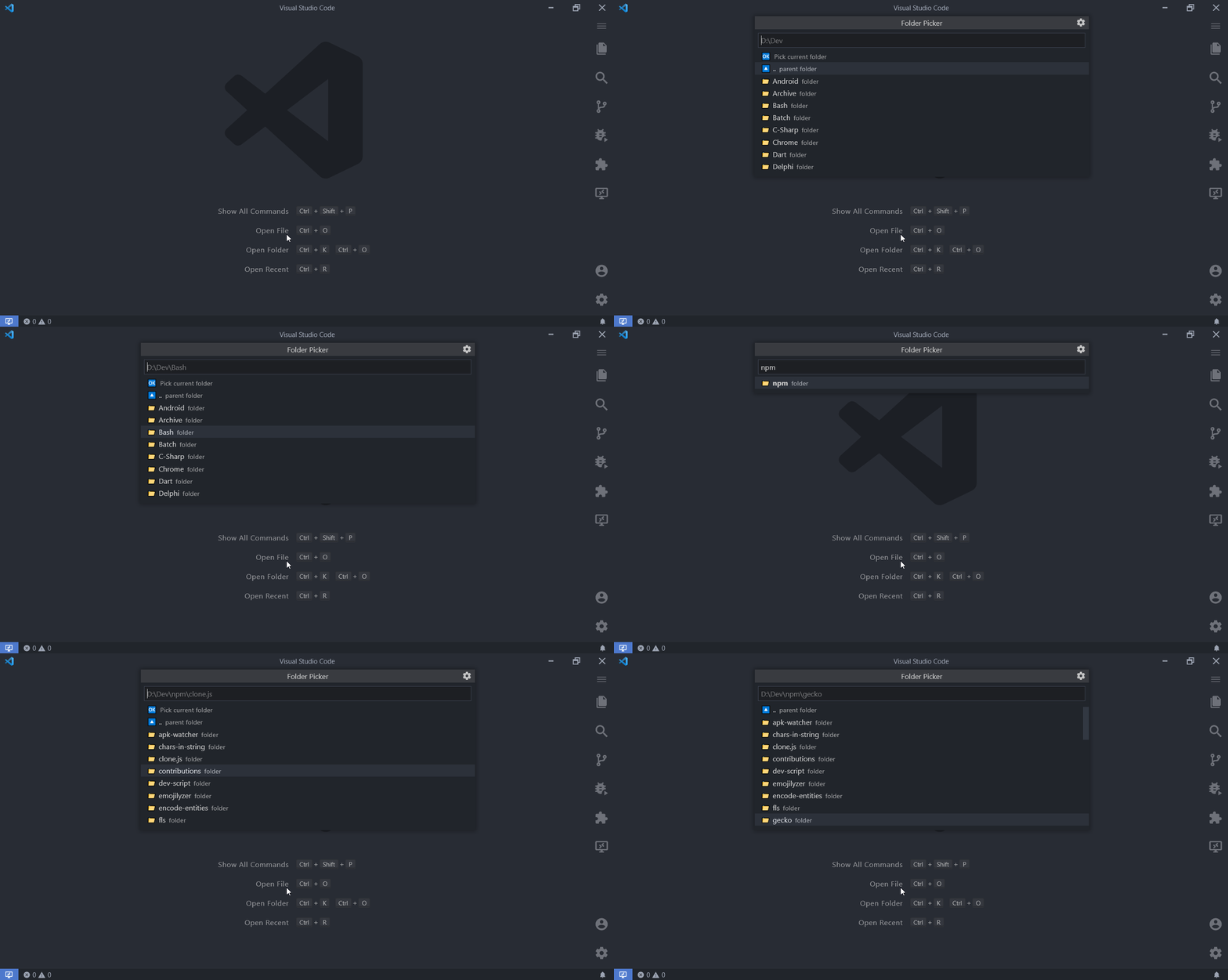
Figure 5. Navigation to relative‑path folders
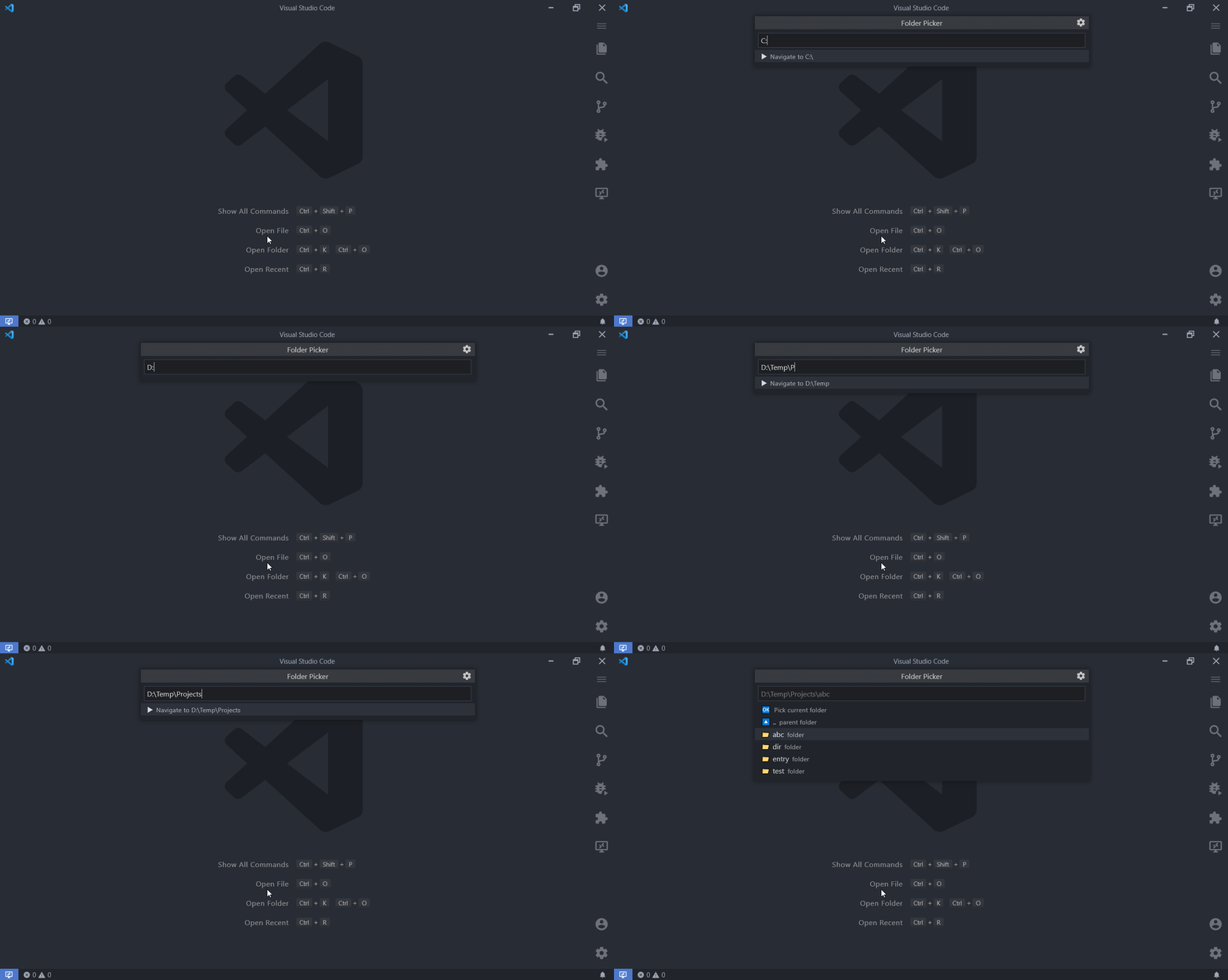
Figure 6. Navigation to absolute‑path folders
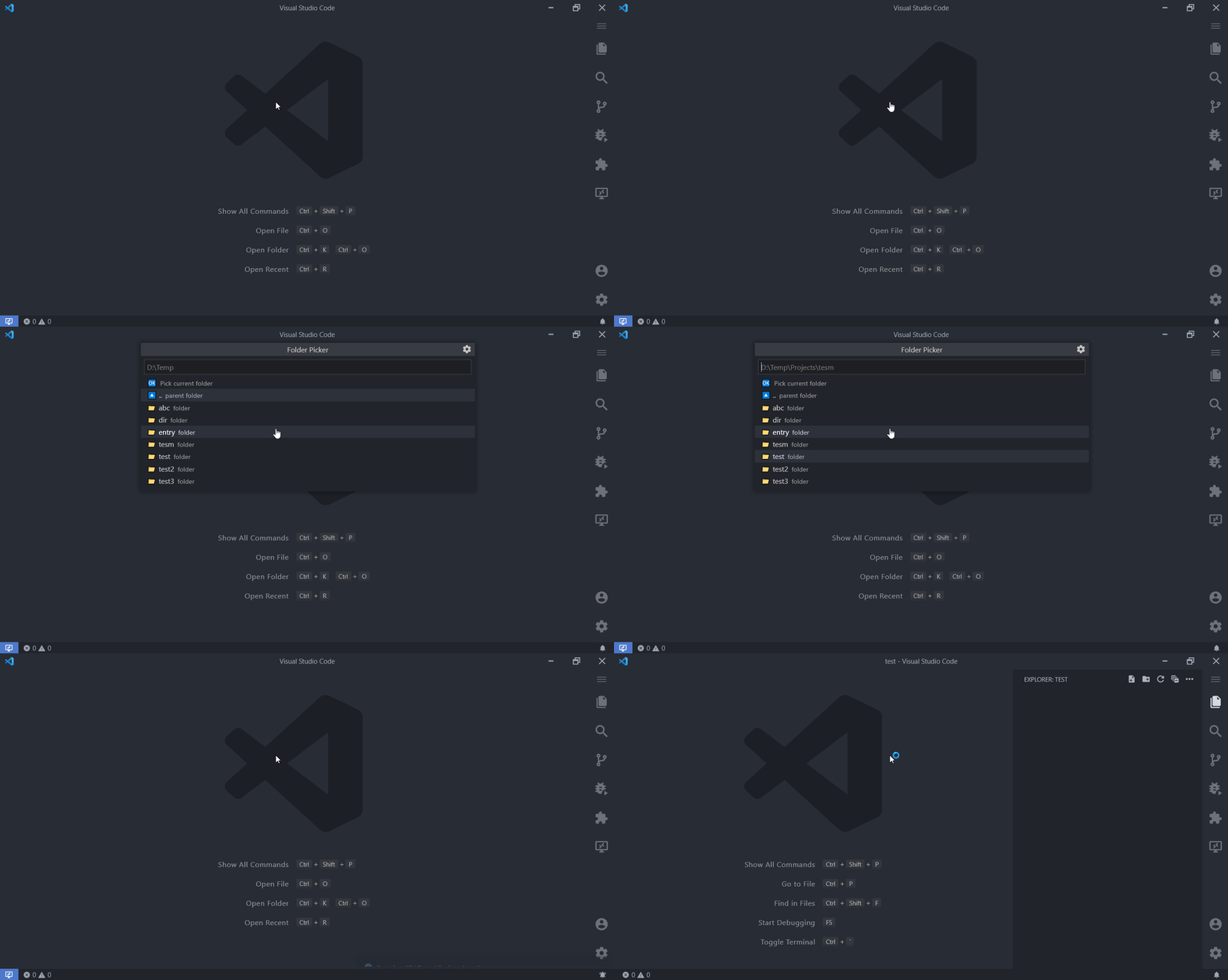
Figure 7. Picking a folder from the Command Palette
📑 Read about the latest changes in the CHANGELOG.
Licensed under the MIT license.
Consider buying me a coffee. ☕

Thank you for supporting my efforts! 🙏😊
@igorskyflyer/normalized-string
💊 NormalizedString provides you with a String type with consistent line-endings, guaranteed. 📮
🧰 Determines whether a given value can be a valid file/directory name. 🏜
📜 Formats the provided string as a comment, either a single or a multi line comment for the given programming language. 💻
🕶️ Reads a JSON file into a Map. 🌻
🔼 Checks whether the given path is the root of a drive or filesystem. ⛔
Created by Igor Dimitrijević (@igorskyflyer).
