


Git Merge Into is a plugin that helps you quickly merge the current branch into another branch — without leaving your IDE.
-
Keyboard shortcut: Press Alt+G, then I to trigger the merge action.
-
Action search: Press Ctrl+Shift+A (or ⌘+Shift+A on macOS), then type "Merge Into".
-
Git Open menu: If you have the Git Open plugin installed, Merge Into will automatically appear in the Git Open action group.
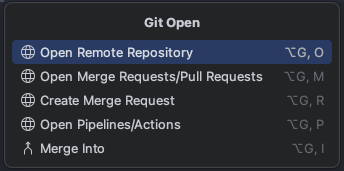
Once triggered, you'll see the merge process in action:

- Checks out the target branch
- Fetches and resets to the latest remote state
- Merges your current branch into it
- Optionally pushes the result
- Checks out back to your original branch
Go to Settings > Tools > Git Merge Into to configure:
- Target branch — the branch to merge into (default:
develop) - Push after merge — automatically push after a successful merge
- Run in background — run the merge process in the background
- Abort merge when conflicts — automatically abort and return to your branch on conflicts
You can also override the target branch per project under the Git Merge Into (Project) settings.
-
Using the IDE built-in plugin system:
Settings/Preferences > Plugins > Marketplace > Search for "Git Merge Into" > Install
-
Manually:
Download the latest release and install it manually using Settings/Preferences > Plugins > ⚙️ > Install plugin from disk...
Plugin based on the IntelliJ Platform Plugin Template.