A browser-based playground for exploring Uniform Resources (URs), Bytewords encoding, and animated QR codes. Convert between formats, decode multi-part URs, and inspect CBOR registry types.
Watch this video for an introduction to BC-UR concepts and a demonstration of the playground features:
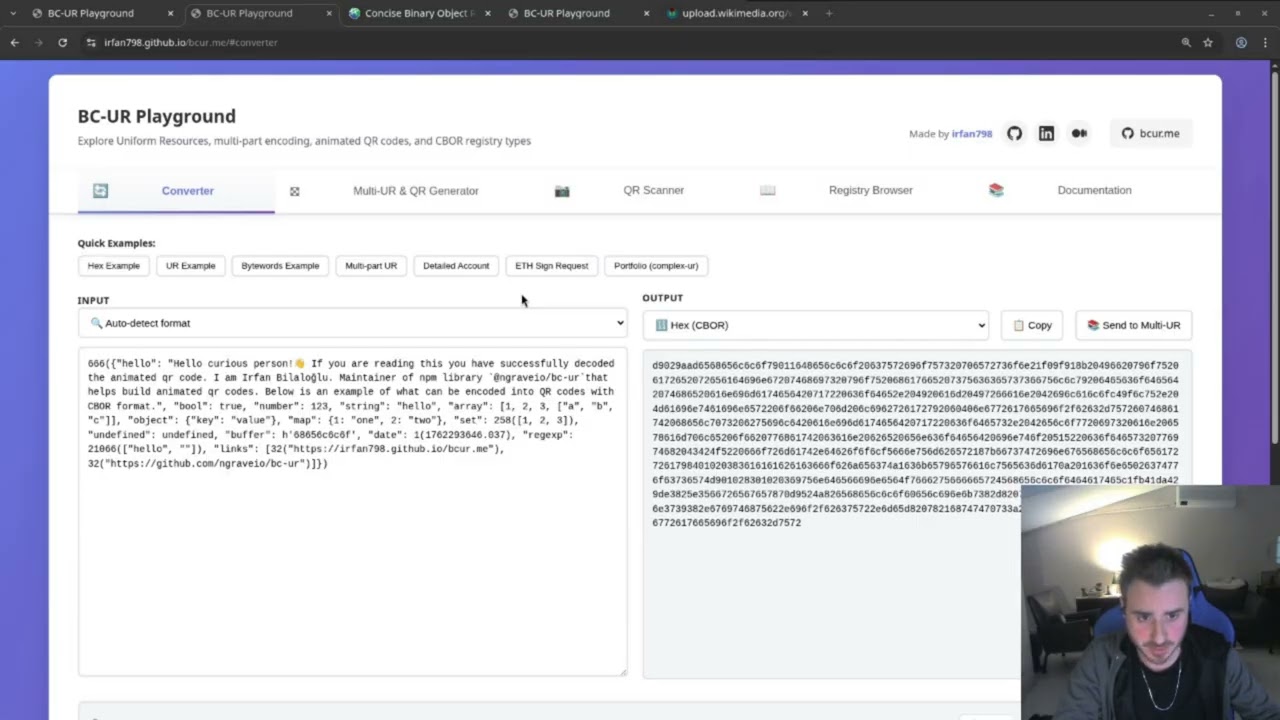
A client-side tool for developers and users to understand and debug BC-UR encoded data. No backend, no tracking—all processing happens in your browser.
Use Cases:
- Convert between UR, Bytewords, Hex, and CBOR formats
- Decode and assemble multi-part animated QR codes (fountain-encoded URs)
- Inspect CBOR-encoded data structures
- Verify wallet QR codes don't leak sensitive data (seeds, private keys)
- Debug BC-UR library implementations
URs are a standardized format for encoding binary data as text or QR codes, designed for interoperability across cryptocurrency wallets and blockchain tools.
Key Features:
- Self-describing format with type information (
ur:crypto-seed/...) - Efficient binary encoding using CBOR
- Multi-part support for large data (animated QRs)
- Human-readable via Bytewords encoding
- Optimized for QR code transmission
Example:
ur:crypto-seed/oeadgdstaslplabghydrpfmkbggufgludprfgmaotpiecffltnlpqdenos
Learn More:
CBOR is a binary data format that URs use internally. It's similar to JSON but more compact and supports binary data natively.
Why CBOR?
- Smaller size than JSON (saves QR space)
- Supports binary data, dates, and tags
- Deterministic encoding (same data = same bytes)
- Extensible via registered tags
Example (JSON vs CBOR):
// JSON: {"id": 123, "name": "John"}  →  25 bytes
// CBOR: a2626964187b646e616d65684a6f686e20446f65  →  20 bytes
CDDL (Concise Data Definition Language):
CDDL is a schema language for describing CBOR data structures. It's like TypeScript types or JSON Schema, but designed specifically for CBOR. UR registry types use CDDL to define their structure.
Example CDDL:
crypto-seed = {
  payload: bytes,        ; The seed bytes
  ? birthdate: uint      ; Optional creation date
}
Learn More:
- CBOR Playground & Tools - Online CBOR encoder/decoder and validator
Bytewords is a method for encoding binary data as four-letter English words, making URs human-readable and easier to manually transcribe.
Why Bytewords?
- All words are exactly 4 letters (uniform length)
- Minimal encoding uses first+last letter (2 chars per byte)
- Built-in CRC32 checksum for error detection
- Carefully chosen words for memorability
- Optimized for QR code "alphanumeric mode" (smaller QR size)
Example:
Standard:  able acid also apex aqua arch atom aunt ...
Minimal:   aeadaoaxaaahatataaat ...
URI:       able-acid-also-apex-aqua-arch-atom-aunt ...
Learn More:
Large data that won't fit in a single QR code is split into multiple parts using fountain codes (Luby transform codes). Each QR frame contains a fragment, and the decoder can reassemble the original data even if some frames are missed.
How It Works:
- Large UR is split into fragments
- Fragments are encoded as QR frames
- QR codes loop continuously (animated)
- Decoder tracks received fragments
- Original data reconstructed when enough fragments received
Example:
ur:crypto-psbt/1-3/lpadbb...  ← Frame 1 of 3
ur:crypto-psbt/2-3/lpaobb...  ← Frame 2 of 3
ur:crypto-psbt/3-3/lpaxbb...  ← Frame 3 of 3
Learn More:
- Convert between UR, Bytewords (minimal/standard/uri), Hex, and CBOR
- Auto-detect input format
- Multi-part UR assembly with progress tracking
- Decode CBOR to JSON, Diagnostic notation, or Registry Items
- Visual pipeline showing conversion flow
- Generate animated QR codes from URs
- Configure fountain encoder parameters
- Real-time QR animation
- Export parts as text or images
- Scan animated QR codes with device camera
- Real-time fountain decoder progress
- Block visualization (decoded vs pending)
- Auto-forward to converter when complete
- Browse registered UR types with CDDL schemas
- View type documentation
- Match decoded URs to registry
- Interact with decoded data via
window.$lastRegistryItem - Inspect CBOR structures with
window.$cborutilities - Access bc-ur library classes directly
Visit irfan798.github.io/bcur.me and paste a UR string to start exploring.
# Install dependencies
yarn install

# Start development server
yarn dev
Then open http://localhost:8000 in your browser.
This playground uses the following libraries:
- @ngraveio/bc-ur - TypeScript implementation of BC-UR
- @ngraveio/ur-registry - JavaScript UR registry packages
All libraries follow the official Blockchain Commons Research specifications.
MIT License - See LICENSE for details.
Specifications:
- UR Specification (BCR-2020-005)
- Bytewords (BCR-2020-012)
- Multipart UR (BCR-2024-001)
- Blockchain Commons Research
Developer Resources:
- Bytewords Overview
- Animated QRs Overview
- @ngraveio/bc-ur (TypeScript)
- @ngraveio/ur-registry (JavaScript)
Community: