Releases: ivan-hc/AM
"AM" 9.9.4

Report outdated apps, from archived sources, and potentially vulnerable
It's Valentine's Day, the holiday of lovers and... regrets!
I won't be here to comfort you about your failed relationships (I already have my own to think about)... but let's talk about apps.
Or rather, the apps you're fond of and whose relationship you're unaware of has stagnated. Or rather, how dated your relationship with them is.
As the title suggests, from now on, all apps from GitHub repositories will be checked (every two weeks) and listed based on:
- archive status (i.e., whether the repository has been archived)
- when the last update for that release was made (indicating the year, if no updates have been made in the last year)
Don't worry! There are 63 more programs available than in version 9.9.3... bringing the total to 2842 unique programs (2430 AppImage packages and 412 programs in other portable formats) that can "warm your heart", who knows?!
In the following examples, we'll use skype (a repository of mine that I archived in 2025) and akasha (whose last release dates back to 2018).
| OPTION | Screenshot |
|---|---|
-i or install |
 |
-a or about |
 |
-l or list |
 |
-u or update |
 |
-f or files |
 |
NOTE, -a and -l reports the info only if the app is installed. See "How can I get the version of a software without installing it?" to understand why.
You can see the lists of archived/obsolete apps down below:
- https://github.com/ivan-hc/AM/blob/main/programs/archived-apps
- https://github.com/ivan-hc/AM/blob/main/programs/obsolete-apps
As I write this, for the sake of intellectual honesty, I feel compelled to publish data on apps in the AM database that come from github.com and whose "release" section has not received any new updates in the last 10 years:

The lists are updated every two weeks, that is, every 14 days.
Option downgrade or --rollback, lists are now smaller (if you want)
From now on, you will be able to see shorter downgrade lists when the repository publishes releases as snapshots.
| app | before | after |
|---|---|---|
| anydesk |  |
 |
| brave |  |
 |
| filelight |  |
 |
A prompt will ask for confirmation to exclude "snapshot" versions.
In the examples: firefox, brave and filelight
Default is "Y" (exclude snapshots), press "n" to include snapshot versions
simplescreenrecorder-2026-02-08_00.45.53.mp4
Option -t or template
Now the prompt warns you that an appname already exists.
Also, for lazy users, it is possible to add the whole URL of the github repository or the releases section of the latter to extract the appname, where possible.
What's Changed
- Add openlibextended by @shuvashish76 in #2045
- Update Affinity script by @shuvashish76 in #2046
- Add ProxyPal by @shuvashish76 in #2049
- Replace GitHub Desktop with GitHub Desktop Plus by @shuvashish76 in #2048
- Add 19 apps by @Samueru-sama in #2056
- Add OpenCloud by @shuvashish76 in #2057
- Try to avoid multiple snapshots of the same version, in "downgrade" by @ivan-hc in #2060
- Update
eden-nightlyby @Samueru-sama in #2062 - Option -t, warn the user that an appname already exists by @ivan-hc in #2065
- Option -t, extract the appname from a github URL by @ivan-hc in #2066
- Add starship : SF64 PC Port. by @spinktvis in #2067
- Add 26 apps by @Link4Electronics in #2070
- Add flow by @SolitudeSF in #2071
- Add
openclawby @Link4Electronics in #2073 - Add LeShade by @dCo3lh0 in #2075
- Add
wipeout-rewriteby @Link4Electronics in #2080 - "AM" 9.9.4 - Check archived and obsolete github sources by @ivan-hc in #2079
New Contributors
- @spinktvis made their first contribution in #2067
- @Link4Electronics made their first contribution in #2070
Full Changelog: 9.9.3...9.9.4
Contributors


Assets 3
"AM" 9.9.3
Small changes... big numbers!
This release brings small changes to the way the CLI interacts with the system... but also an increase in the number of apps in the database.
There are 122 more programs available than in version 9.9.2, released three weeks ago... bringing the total to 2,779 unique programs (2,368 AppImage packages and 411 programs in other portable formats).
Small fix for LAUNCHERS_DIR when using appman
In custom setups that have alternate launcher locations (.desktop files) for locally installed apps, this change fixes the issue of apps disappearing from the menu.
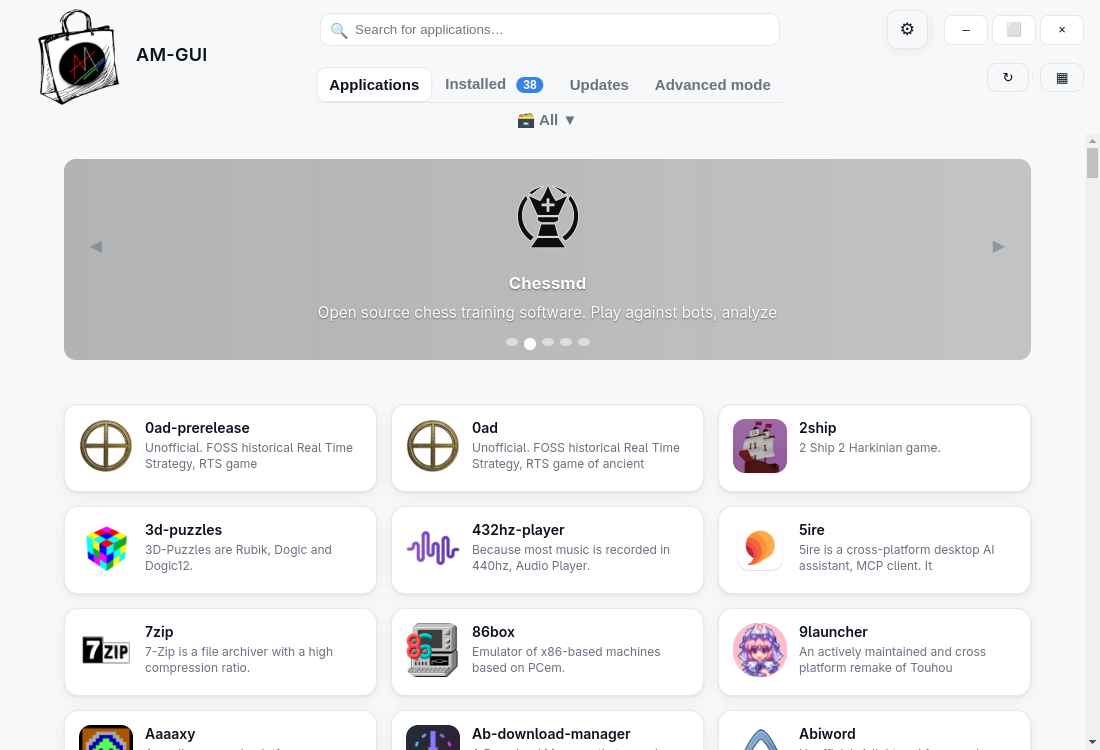
Add "AM-GUI"
Welcome to the first GUI for AM and AppMan, created by our collaborator @Shikakiben.
| Light theme | Dark theme |
|---|---|
 |
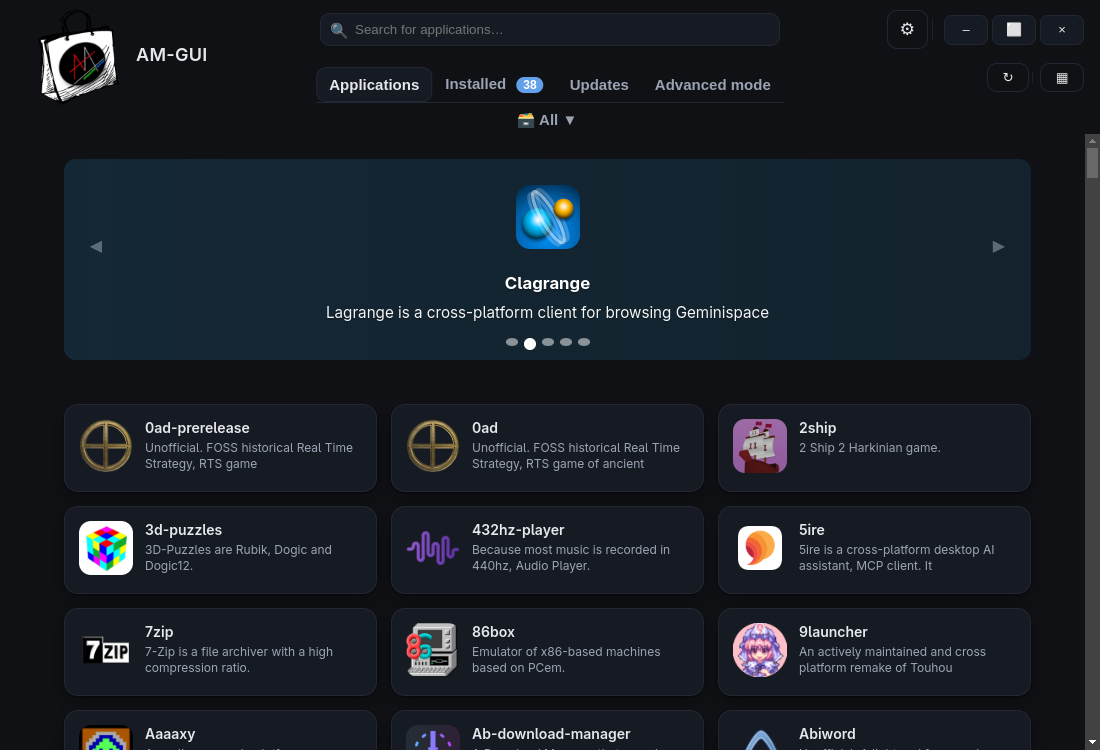 |
NOTE: This interface is still experimental and can be further improved.
To install/test it, use the command
am -i am-gui
or
appman -i am-gui
For more information and to report bugs and improvements, visit the link below.
https://github.com/Shikakiben/AM-GUI
Thanks @Shikakiben
Change the way to detect Namespaces restrictions
AM/AppMan and Archimage have one thing in common: a Namespace Restrictions check!
These restrictions have been active since 2023 on Ubuntu and many of its derivatives. They prevent the operation of many applications that use sandboxing alternatives to AppArmor, such as many Chromium-based programs... and Archimages, which can switch between using proot and bwrap if the latter doesn't have permissions.
Some changes in Ubuntu have eased these restrictions, but they have made it impossible to identify them.
To avoid blacklisting Ubuntu itself and any distribution based on it, we have changed this control in both AM/AppMan and Archimages (for which it will be effective with the next scheduled workflow run in their own repositories, starting from today).
Possible further solutions are welcome.
What's Changed
- Add a small fix for
LAUNCHERS_DIRwhen usingappmanby @fiftydinar in #2011 - Add AM-GUI by @dCo3lh0 in #2006
- add hellium by @Samueru-sama in #2012
- add
12to11by @Samueru-sama in #2014 - Delete filezilla-server by @ivan-hc in #2015
- Update gnome3-related apps by @ivan-hc in #2016
- Delete codexmonitor by @ivan-hc in #2019
- Noi by @prodigalshadow in #2020
- add multiple apps by @Samueru-sama in #2024
- Add mages AppImage by @shuvashish76 in #2037
- Add more apps by @fhaefele in #2036
- Dev by @ivan-hc in #2038
- Add DinoX AppImage by @shuvashish76 in #2039
- Add ObsidianIRC AppImage by @shuvashish76 in #2040
- Remove Polar Bookshelf by @shuvashish76 in #2042
- Add Edconv and Frame AppImages by @shuvashish76 in #2043
- "AM" 9.9.3 by @ivan-hc in #2044
New Contributors
- @shuvashish76 made their first contribution in #2037
- @fhaefele made their first contribution in #2036
Full Changelog: 9.9.2...9.9.3
Contributors


Assets 3
"AM" 9.9.2
First release of 2026
This release not only introduces 79 new apps, bringing the database to a total of 2657 unique apps (2250 AppImage packages and 407 programs in other portable formats) but also introduces some small changes.
Increased number of pages in Github after 5 failed attempts in -i or install
One of the most common bugs in GitHub releases concerns the management of pages in this section. Often, accessing them via the API defaults to displaying no further than page 3. With this change, after five failed attempts, the list will be expanded to 100 pages.
Improved identification of installed apps
Removed subshell in -f
In order to prevent unintentional program launches when testing variables (in function "_determine_args").
Improved speed in versions check and -f
Detect applications in symlinked paths
Fixed a bug related to apps installed in symbolically linked directories
Fix missing version in AM where apps are installed in multiple levels
Although not recommended, it is possible to install the same app both system-wide and locally with AM in AppMan mode. However, despite this being an edge case, running -f did not display the version in the first duplicate, the one installed system-wide.
This bug has been fixed #1991
Determine the directory of the launchers in Maemo Leste
In Maemo Leste, launchers are located in a subdirectory of "applications," unlike other Linux distributions. With this change, the launcher directory for the menu will be determined based on the presence of the hildon-home command (available in Maemo Leste).
What's Changed
- Add ryujinx-canary script by @BorjaRRR in #1940
- Add Cartridges AppImage by @fiftydinar in #1941
- fix: update session-desktop repo from oxen-io to session-foundation by @Aerilym in #1942
- Dev by @ivan-hc in #1944
- If 5 attempts fail, extend "releases" pages to 100 during installation by @ivan-hc in #1945
- add
kronosby @Samueru-sama in #1950 - add
qimgvby @Samueru-sama in #1951 - add dolphin-emu-nightly by @Shikakiben in #1953
- Improve detection of installed apps by @ivan-hc in #1957
- Option -f, remove subshell by @ivan-hc in #1958
- Improve speed in versions check and "-f" by @ivan-hc in #1959
- Detect applications in symlinked paths by @ivan-hc in #1960
- If apps directory is symlink, then use "find -L", else "find" by @ivan-hc in #1961
- add
epsxe,cursor-cliby @Samueru-sama in #1962 - Fix ryujinx-canary updater script by @BorjaRRR in #1963
- Filter out debug version of xemu by @SolitudeSF in #1964
- Add vector and clagrange, fix lagrange by @dCo3lh0 in #1966
- Add gearboy, gearcoleco, geargrafx, gearsystem by @SolitudeSF in #1967
- Add gerbil by @SolitudeSF in #1968
- Add gale by @SolitudeSF in #1969
- Add flightcore by @SolitudeSF in #1970
- Dev by @ivan-hc in #1971
- Add scrcpygui by @SolitudeSF in #1972
- Add Windows 11 Clipboard History For Linux by @dCo3lh0 in #1973
- Delete todesktop and transfernow by @ivan-hc in #1974
- switch discord appimage by @Samueru-sama in #1976
- add
system-monitoring-centerandstirling-pdfby @Samueru-sama in #1979 - add
oktetaby @Samueru-sama in #1981 - Allow Zed to handle
zed://links by @SolitudeSF in #1982 - Add
viber-enhancedandgraphsby @fiftydinar in #1986 - Add Fresh Editor by @dCo3lh0 in #1988
- Fix missing version in AM where apps are installed in multiple levels by @ivan-hc in #1991
- add
kaffeineandphoenix-x-serverby @Samueru-sama in #1997 - Add ReShade Installer by @dCo3lh0 in #1999
- FIxing official description of ReShade Installer for Linux by @dCo3lh0 in #2001
- Add OpenScreen by @dCo3lh0 in #2003
- update firedragon by @prodigalshadow in #2004
- Update 8 scripts by @ivan-hc in #2005
- Determine the directory of the launchers (in Maemo) by @ivan-hc in #2010
New Contributors
- @Aerilym made their first contribution in #1942
- @SolitudeSF made their first contribution in #1964
Full Changelog: 9.9.1...9.9.2
Contributors


Assets 3
"AM" 9.9.1
Introduction
When I publish a release, I want each one in this section to become a step-by-step guide to what I'm doing.
Even though it's been two months since v9.9, significant changes occur in the modules, which commonly function as secondary programs on their own.
Given that over 300 commits have been made in two months, and they are growing every day (also thanks to the increase in apps loaded, but we'll see this shortly), I risk forgetting some important changes while I write my "chapters", if we want to define every release that way.
That said, here are the changes that have occurred up to this release in chronological order, and not in order of importance. If it's "important" you decide.
More modular "help" message (option -h), for translations
The "help" message is now modular, each option has a dedicated variable to easily translate it option by option.
Made ZSH completion "optional"
Since ZSH has not a secure enough way to use shell-completion (if compared with BASH and FISH), a prompt will ask you to enable this useful feature if you use this type of SHELL.
Add "integrate" (alias --launcher) and "search" (alias -q)
Many people complain about the lack of options, also if they already exist. Maybe because they don't recognize an option name for what it does.
It's understandable, the project has grown a lot, and with it the number of options and documentation, in which you get lost. There is no point in writing in the issue templates "I declare that I have read the documentation" if the latter is too... too big! I understand it. I'm actually very lazy too, like many of you.
It is the case of the option to "integrate" local AppImages by drag/drop them to the terminal (--launcher, now also integrate) and the option to "search" keywords in the list of the available applications (-q or query, now also search).
„AM“ auf Deutsch
German Language Added by @Fluke667 in #1868
Improved SourceForge support in templates and set AppImages as default choice
I've been working on a common method for detecting programs from sourceforge.net, and then a set of mechanisms for creating installation scripts that are similar to each other. Expecially for AppImages
For portable apps instead is a bit different
I exposed all these discoveries in the template.am module, dedicated to the -t (or template) option, and I took advantage of it to make AppImage (choice "0") the default. Simply press ENTER to use the template dedicated to AppImages.
Determine if the argument is an installation script (option -i or install)
To prevent users from misusing the installation options, which are intended for scripts, not random files, the argument will be checked to see if it is a script, an AppImage, or another file type.

Option -t or template on "steroids"
Now all scripts will be created for x86_64 by default, but if an aarch64 program is in releases, -t will clone and edit the created x86_64 script to convert it into an aarch64 one
But this is not the only change:
- added instructions in the "list" file
- replace already listed item in the "list" file
- base the entire module on x86_64 as main architecture
- download x86_64-apps near the x86_64 directory
- if an aarch64 directory has been created, download also the aarch64-apps file
- fix descriptions with multiple lines
- fix syntax of apps description
- lowercase the first letter of the description and end it with a dot
- if a description is blank, open the prompt to create it also for apps hosted on GitHub
To resume all the above, in this example, I use a repository that has both x86_64 and aarch64 AppImages, and a repo without a description.
I'll repeat the second one two times:
- you will receive a prompt to add a custom description
- if the item already exists in "list", it will be overwrited
simplescreenrecorder-2025-11-25_20.22.08.mp4
Integrity check for broken download URLs (option -i or install)
The installation scripts include an exit 1 that is executed if a URL download (via wget) fails.
This error is often due to temporary connection drops.
This change checks whether the "tmp" directory created during installation still exists, and if so, checks whether it is empty. If it is empty, up to 5 download attempts will be made, spaced 5 seconds apart.
In this example, I'm testing an installation script from a repository where the "latest" release doesn't exist, but only pre-releases, https://github.com/niess/python-appimage
During the process, I'll modify the running script (they run in ~/.cache/appman or ~/.cache/am, in my case I use am -i --user, so its a local installation, like AppMan) so that it will search for, find, and install the first generic release it finds.
simplescreenrecorder-2025-11-26_22.28.27.mp4
This will also help me with false positives in https://github.com/ivan-hc/amcheck
The number of programs in third-party databases is now more "realistic" (option -l)
Previously, third-party databases considered the total number of packages (unlike the AM database, which only counts unique packages).
From now on, the total number of commands will appear, while the lists will continue to list variants of the same command.
| Before | After |
|---|---|
 |
 |
70 new apps added in two months
While I'm writing, here you are the numbers of the "AM" database for this release:
2578 unique programs available (+70 if compared with "AM" 9.9), of these, 2175 are AppImages and 403 are other portable formats.
What's Changed
- Added a separate installation script for the premium version of
dbgateby @kris3713 in #1828 - Fix: Correct application name variable in install script of
programs/x86_64/dbgate-premiumby @kris3713 in #1829 - Add raspberry-pi-imager by @Shikakiben in #1831
- Unify obs-studio and obs-studio-full in one script by @ivan-hc in #1833
- add
kdenlive-enhancedby @Samueru-sama in #1838 - Split the help message to translate each option one by one by @ivan-hc in #1839
- add
virt-managerby @Samueru-sama in #1840 - Add prompt for ZSH to confirm Shell completion without troubles by @ivan-hc in #1844
- add
cemu-enhancedby @Samueru-sama in #1846 - add rog ally builds to
eden-nightlyby @Samueru-sama in #1849 - add
uad-ng-appimageby @Samueru-sama in #1850 - add
servoby @Samueru-sama in #1852 - Renamed
shuttertoshutter-encoderto avoid confusion by @kris3713 in #1856 - add fbreader by @Shikakiben in #1857
- add
sound-space-plusby @Samueru-sama in #1860 - small change in thorium and mercury "choose version..." by @Shikakiben in #1865
- Add "integrate" (alias --launcher) and "search" (alias -q) by @ivan-hc in #1866
- German Language Added by @Fluke667 in #1868
- add
android-translation-layerby @Samueru-sama in #1870 - Add ymir emulator scripts by @BorjaRRR in #1871
- Switch deadbeef and deadbeef-nightly to AppImage by @ivan-hc in #1874
- Add Clapper AppImage by @fiftydinar in #1875
- add
touchhleby @Samueru-sama in #1877 - Update shadps4 by @ivan-hc in #1880
- add
pintaby @Samueru-sama in #1881 - add JDownloader2 by @Shikakiben in #1882
- Add NewsFlash AppImage by @fiftydinar in #1885
- Add Fretboard AppImage by @fiftydinar in #1886
- Add Impr...
Contributors


Assets 3
"AM" 9.9
Clone and share your configurations and relocate AppMan apps
This release brings two brand new options: one to pre-clone your configuration or install someone else's, and another long-awaited option for many AppMan users, and others. But let's proceed in order.
Option clone or --clone
The clone or --clone option allows you to detect or create a file called "am-clone.source" from which AM/AppMan can obtain the information needed to install apps from one system to another. This allows you to choose whether to keep distinct system and local installations, or whether to install everything system-wide or locally.
File detection starts (in order of priority):
- from the XDG_DESKTOP_DIR directory (usually Desktop)
- from the HOME directory (any directory except Thrash)
- from the entire system, starting from the root, and then from mounted devices (in case you want to install a configuration via USB stick)
If you want to create a new "am-clone.source" file, simply remove the other one or rename it.
This option supports both AM and third-party databases.
The basic command is
am clone
without arguments. This allows you to read the list.

By default, the new file is created in XDG_DESKTOP_DIR, or HOME as a fallback. It contains "dummy" paths to allow AM/AppMan to distinguish between locally and system-wide installed apps (depending on whether the line starts with /opt or not).
You can also set a different file by exporting the "$CLONE_FILE" variable and specifying a path and a text file with a different name, for example
export CLONE_FILE="/path/to/your/file.txt"
But make sure the paths begin with /opt if you want system installations.
But what we've seen so far is just a basic way to view and/or create/use the list.
The new clone option also supports flags.
To install the listed apps in their original layout, run
am clone -i
or
am clone install
A confirmation prompt will appear.

In AM, to install everything locally like AppMan, add the --user flag
am clone -i --user

While to install everything at system level, add the --system flag
am clone -i --system

Of course, AppMan only supports local installations, no apps will require root privileges or system installations.
Option relocate or --relocate
In AM, programs are always installed in /opt, following the LSB (Linux Standard Base) specifications. It is not possible to change this path.
In contrast, AppMan and "AM" in AppMan mode can install all programs locally or in non-privileged locations, chosen by the user. No root password is required for this.
The path chosen at first launch is specified in the $XDG_CONFIG_HOME/appman/appman-config file. Editing this file directly disconnects AM and AppMan from that location, thus removing any interaction with locally installed programs.
Furthermore, installed programs all have a symbolic link and (often) a .desktop file, which breaks if the program directory is moved.
The only solution is to run the relocate or --relocate option, which will allow you to:
- Identify local apps installed, even from third-party databases
- Remove these apps, noting the scripts used to install them
- Choose a different location to install the apps
- Reinstall the previously removed apps in the new location indicated
All this requires your confirmation in the prompt that appears.
Just run
am relocate
or
am --relocate
or
appman relocate
or
appman --relocate
simplescreenrecorder-2025-09-18_19.22.32.mp4
This is definitely the option that many AppMan users have been waiting for.
Among other changes
- Removed all "zsync" mentions from AppImage's stuff by @ivan-hc in #1768
- The
filecommand is now an optional dependency, so AM can run also on Maemo Leste by @ivan-hc in #1771 - Now updating third-party database lists is faster by @ivan-hc in #1774
- Replaced
gnome-calculatorwith the one from Pkgforge's repo by @fiftydinar in #1776 - Fix to
gpu-screen-recorderscript by @Samueru-sama in #1779 - Option
-f, startup times reduced by @ivan-hc in #1781 - Removed all Pake apps by @ivan-hc in #1792
- Fix puddletag script by @Samueru-sama in #1794
- Now the option
-tno longer creates catalog pages (they are created in automatic via github actions) by @ivan-hc in #1806 - "AM" 9.9 - clone configurations and relocate AppMan apps by @ivan-hc in #1818
New Contributors
- @tsuri21 made their first contribution in #1764
- @andy5995 made their first contribution in #1770
- @yzctzl made their first contribution in #1791
Full Changelog: 9.8.2...9.9
Contributors


Assets 3
"AM" 9.8.2
Push towards third-party databases and increase in software portfolio
I've been working for a while on improving the "am-extras" repository, dedicated to AM extensions, and after receiving the first contribution, I decided to revise the programs management in the AM database.
I started by delegating the management of all Python AppImage scripts to "am-extras", and the result was amazing: while for the x86_64 architecture alone, in the "AM" database the choice was between 11 Python versions, the new "python" database listed up to 4 for each version, extending the choice to 40 different AppImage packages, and without a dedicated installation script in the AM database.
This led me to work even harder to create a system that can make things easier for you! All of you! The users!
By creating dedicated third-party databases maintained by you in "am-extras", you'll have even more freedom in adding and choosing software.
To summarize, you need a table in Markdown format with five columns. Nothing else.
Here are all the databases with the numbers of all the apps currently installable via AM so far

With this approach, I've realized that AM's biggest dependency is me. Until now, to submit a simple AppImage, you've always had to wait for me to work on the script or approve a pull request.
I'll continue to do so as long as I can, but this new approach will definitely give you much more freedom to have as many apps as you want in AM, without asking my permission.
I invite you to visit https://github.com/ivan-hc/am-extras to learn more.
Help message and descriptions of third-party databases
In the footer of the output of am -h its now possible to read descriptions of the single third-party databases

SAS - Simple AppImage Sandboxing
@Samueru-sama He's been working hard on a POSIX shell rewrite of AISAP, and he's succeeded. Bubblewrap sandboxing will now be possible using another default application: sas
am -i sas
The new sandboxing scripts will detect both aisap and sas in the PATH, allowing you to leverage Bubblewrap sandboxing with an additional tool.
PS: I also invite you to visit his new repository dedicated to Ubuntu and the senseless restrictions applied by Canonical in recent years, at https://github.com/Samueru-sama/fix-ubuntu-nonsense
Among other changes
- added sanity tests for AM and module updates and for installing scripts from the database
- the workflow that automatically updates translations now takes into account changes in "main", no longer in "dev"
- fixed and improved the option
-aorabout - replaced several dependencies with their native shell counterpart
- reduced
curlcalls not to overload networking - code refactoring and other bug fixes
What's Changed
- Adds memoto to x86_64 programs by @RaphaelMartin83 in #1695
- Use shell built-ins for
basename&dirnameby @fiftydinar in #1700 - Option --launcher, fix icon when the latter is a broken symlink by @ivan-hc in #1707
- Remove "light" buidls from
eden-nightlyby @Samueru-sama in #1708 - Option -f, use "column -t" by default and "awk" as a fallback by @ivan-hc in #1715
- Option -f, show a bit more compact table by @ivan-hc in #1716
- Remove --no-sandbox nonsense in AppImage's templates by @ivan-hc in #1717
- Option -a, code rewrite for better detection of installed apps by @ivan-hc in #1721
- Option -a, detect script names after arguments by @ivan-hc in #1722
- Sandbox: share user fonts by default by @Samueru-sama in #1724
- Add an integrity check on main CLI, modules and lists by @ivan-hc in #1728
- Update database.am - reduce "curl" calls by @ivan-hc in #1729
- Update install.am - add integrity check and refactoring by @ivan-hc in #1730
- Add a dbin-powered template by @ivan-hc in #1731
- Add ghcr_dl.sh (by @Azathothas) by @ivan-hc in #1733
- Add support for ghrc-based scripts by @ivan-hc in #1734
- Update
scrcpyto more maintained and compatible version by @Samueru-sama in #1738 - Add
sasintegration by @Samueru-sama in #1742 - Add support for new "sas" sandboxing solution by @ivan-hc in #1744
- Add
karbonizedby @kris3713 in #1746 - Update sandboxes.am - set full path to sas/aisap in sandbox script by @ivan-hc in #1748
- Delete appflowy by @ivan-hc in #1749
- Improve known third-party extensions removal by @ivan-hc in #1754
- Add official TickTick appimage by @pricci1 in #1756
- Fix broken install of sas when appman is used by @Samueru-sama in #1757
- Add one "python" / remove all others to push "am-extras" by @ivan-hc in #1758
- "AM" 9.8.2 - a new step in favor of third-party databases by @ivan-hc in #1759
New Contributors
- @RaphaelMartin83 made their first contribution in #1695
- @pricci1 made their first contribution in #1756
Full Changelog: 9.8.1...9.8.2
Contributors


Assets 3
"AM" 9.8.1
Steam Deck / SteamOS support!
SteamOS is configured to prevent the user from accessing /usr/local. "AM" normally uses that directory to install symlinks in $PATH and launchers for the application menu. To solve this issue we have set "AM" to run only in AppMan mode, so that it can install and manage apps locally, and rootless, when osing SteamOS on Steam Deck.
photo by @Utopiah
 |
 |
|---|---|
am -l |
am -h |
The INSTALL script has also been updated to support Steam Deck. The "am" link to /opt/am/APP-MANAGER will be placed in the user's HOME directory, in ~/.local/bin, so that it can be used in $PATH, from the command line, along with all other programs.
Other changes
- Don't install desktop files for CLI AppImages by @fiftydinar in #1618 #1619
- Add lazygit, delta, taskwarrior, vicut by @00sapo in #1625 #1626 #1648 #1676
- Update italian locale / Add strings to translate by @ivan-hc in #1636
- Optimizations with shell builtins by @Samueru-sama in #1639
- Fix main-index point by @emmanuel-ferdman in #1643
- Improved option "about" by @ivan-hc in #1650 #1668
- Update
ppssppto upstream releases by @Samueru-sama in #1656 - Remove any AppDir and squashfs-root directories in -c and -i by @ivan-hc in #1663
- Improve option "-f" or "files" by @ivan-hc in #1667 #1669 #1670
- Add gpu-screen-recorder, transmission-qt by @Samueru-sama in #1674 #1677
- Update AM-SAMPLE-AppBundle - fix icons handler by @ivan-hc in #1678
- Update and fix Serbian translation by @fiftydinar in #1680 #1681
- "AM" 9.8.1 - add support for SteamOS by @ivan-hc in #1688
New Contributors
- @emmanuel-ferdman made their first contribution in #1643
Full Changelog: 9.8...9.8.1
Contributors


Assets 3
"AM" 9.8
Ti "AM" in tutte le lingue del mondo - I "AM" you in all the languages of the world
This title in Italian is a play on words, where "I love you" is said "ti amo", the sentence should be "ti amo in all the languages of the world". But mine is not a declaration of love... on the contrary: "AM" now supports languages other than the classic English you were used to!
Here are four screenshots of AM that performs updates in four different languages
 |
 |
 |
 |
|---|---|---|---|
| Spanish (es) | Czech (cs) | Serbian (sr) | Italian (it) |
From now on, you will be able to download and compile translations for your language with any .po editor (e.g. Poedit).
The source file is source.po, available in the new section "translations" of this repositoy.
All you need to do is add your .po file to this directory of the repository, via a pull request on the "dev" branch:
The workflow will do the rest, including synchronization with the source files, APP-MANAGER (the main AM script), modules and most importantly the creation of the .mo files needed to use the languages in "AM".
NOTE: Submitting the pull request to the "dev" branch is the only way to automatically create the .mo file needed to translate AM/AppMan
New option translate or --translate
A new option, translate or --translate, has also been introduced, it can be used with or without an argument. The input must be a "trusted" language code (e.g. "it" for Italian, "sr" for Serbian). Otherwise, "en" (English) will be set by default.
Likewise, if a language is not available in the database, "en" will be set by default. You will be notified when a new language pack is available for you, simply by updating AM/AppMan (option -s or sync or option -u or update).
If you want to use English as usual, and by explicit choice, you can run the command
am translate en
or
am translate
without an input.
You can also decide to switch between languages, for example, to switch to Italian from another language, in this way:
am translate it
or
am translate
and write "it".
Use one of the codes available here (see the name of the directories):
A list of reliable codes (even those not yet included in the database, just in case) is available here.
simplescreenrecorder-2025-06-03_13.35.14.mp4
Localization files are saved in $HOME, no root is needed to have and use them, and they are usable by both AM and AppMan
 |
 |
|---|
For more information on translations, click on the link below
https://github.com/ivan-hc/AM/tree/main/translations
My special thanks go to @zen0bit for the idea and the effort put into making this release.
Also here are the languages currently available:
- Czech (cs) by @zen0bit
- Serbian (sr) by @fiftydinar
- Spanish (es) by @xplshn
- Italian (it) by me, @ivan-hc
NOTE: Deutch (de) and Russian (ru) have been generated by AI, so they are subject to possible syntax errors, anyone who is expert in these languages is invited to review the translations... or rewrite them if necessary.
I'm waiting for your pull requests, GRAZIE!
Other changes
- AM users who use AppMan mode or install programs locally from AM will use AM modules instead of creating new ones for AppMan, avoiding duplication. Pure AppMan users will have their own modules as usual.
- added improvements for AM packaging in distributions that include it in their package manager, by @fiftydinar.
- added a message to warn users if their distro maintainer is distributing
wgetas a link towget2(see Fedora). - added a new template to select and install multiple variants of the same program, and based on this many scripts have been merged (see
mercuryandthorium) reducing the amount of dedicated scripts. - the update output (option
-u) is colored (see first four screenshots above, in various languages). - added support for the NO_COLOR variable, allowing users who set it to remove colors from AM output (for example, on systems that require screen readers).
Full Changelog: 9.7.1...9.8
Contributors


Assets 3
"AM" 9.7.1
Permanently remove notifications, if you want
With this release, you can simply run the existing command
am --disable-notifications
...to permanently remove update notifications, even for apps installed later.
Control of scripts requiring root
Fixed a bug with scripts named "remove", which in "AM" are set to run only with root privileges. By @Samueru-sama
Usage in Fedora Atomic
Added support for Fedora Atomic and distributions where /opt is a link in /var. By @fiftydinar
More AppImages, less portable apps
Started a transition where many standalone portable apps will have their own repository where they can be converted to AppImage packages, without alterations, and to allow isolation, sandboxing, and delta updates via appimageupdatetool (a big plus, especially for large packages).
Some examples, all the development branches of Blender, UrbanTerror, Telegram... but also Calibre, Floorp and Mullvad.
Among the communities open to this transition, there is portable-linux-apps, which you may already know from our catalog, https://portable-linux-apps.github.io
Rehost/reassembly of old, unmaintained (and badly maintained) AppImages
Some apps hosted on problematic hosting services and others that have poor maintenance (for example, Libreoffice and the AppImages of Firefox and Thunderbird) have been rehosted on github repositories.
AppImage is dying, again! Many upstreams are removing them!
"AM" serves not only as a centralized database, but also as a solution for daily monitoring of hosting services, sites and platforms that produce and distribute AppImage packages, with the intent of preserving their maintenance and adoption by developers. Monitoring is done through cataloging these packages and daily testing via "amcheck".
Unfortunately there is an alarming fact to report: many upstream developers have abandoned the AppImage format or have completely removed their historical builds from their archives, apparently to prevent users from using legacy versions of their apps.
My efforts and those of my collaborators seem to be of no use. The lack of information leads many upstream developers to move all their work to more renowned platforms, such as Flatpak and Snap, which guarantee centralization in an official way.
About AppImages, their unavailability and lack of centralization are their weakness.
I wrote "AM", 5 years ago. "AM" is not the arrival, but the starting point, if you want to continue supporting portable packages.
Probably also due to the low visibility of this project, which offers to provide a centralized solution for all portable apps and AppImages.
I invite you to promote "AM" to make people understand that you don't have to look for AppImages. They are (and will be) here, if you want them!
Contribute to our cause! Help us support AppImage!
New Contributors
- @candrapersada made their first contribution in #1522
- @CODJointOps made their first contribution in #1527
- @coyoteclan made their first contribution in #1544
Full Changelog: 9.7...9.7.1
Contributors


Assets 3
"AM" 9.7
Endless...
In this new release, support for torsocks has been removed in favor of proxies!
By default, the one provided by the PkgForge team will be used to update and install apps from this site, but it will be possible to set your own proxy by exporting the ALT_GH variable (HTTPS domain). In order not to force the proxy, an uncrossable limit of API calls will be granted for installations (10) and updates (5).
For the occasion, it is suggested to install the new fork of appimageupdatetool provided by the PkgForge team, as an alternative to the original one. The installation script will suggest you to install it by pressing 1 or to choose the original by pressing 2. The choice is yours.
Full Changelog: 9.6.2...9.7
Conclusions
For you who read this... try to hold on to the important things. Nothing is forever, except the regret of not having done enough...
If there is something I always have cared about, it is honesty, and what I do not lack is the desire to do things well, and the ever-increasing anger when I see things not going as they should.
After all, we all grew up with different stories, developing different characters and nuances... we are children of what we have learned.
I, personally, owe the desire to do things and the possibility of doing them to a single great person, who taught me to be humble. An honest, sociable person, loved by everyone... especially by me. A person with whom I spent most of my time and who now more than ever I miss, and I know I will miss him in the future.
A person, who I still struggle to believe I will never see again, since that damned April 7th in which, unexpectedly, he left an unfillable void in my life, and in that of my family.
That man was my father.
Ciao papà, ti voglio bene
Nothing will be the same again now that you are no longer here.