Backend API for Planticure app.
1. Install using NPM
npm install
npm install --save-dev
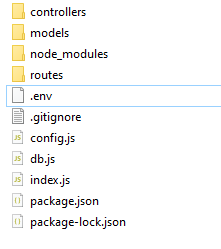
2. Put .env file
download .env file here
.env file
then place it on base directory (make sure the file named '.env').
How to run
npm run start-
URL
/register
-
Method
- POST
-
Request Body
- name : string
- email : string, must be unique
- password : string, must be at least 6 characters
-
Response
{
  "error" : false,
  "message": "User register success",
  "uid" : " ax1231zx...... "
}
-
URL
/login
-
Method
- POST
-
Request Body
- email : string
- password : string
-
Response
{
  "error" : false,
  "message": "Successfully logged in.",
}
-
URL
/plants
-
Method
- GET
-
Response
{
  "error" : false,
  "message": "Plants fetched successfully"
  "data" : [
    {
      ...
    }
  ]
}
-
URL
/plant/{name}
-
Method
- GET
-
Response
{
  "error" : false,
  "message": "Plants fetched successfully"
  "data" : [
    {
      ...
    }
  ]
}
-
URL
/plant/{name}/disease
-
Method
- GET
-
Response
{
  "error" : false,
  "message": "Plants fetched successfully"
  "data" : [
    {
      ...
    }
  ]
}