Extending With Stateful Services
There are times when we must extend our serverless architecture to work with existing stateful applications and services. This part of the training will focus on the following:
- Adding infrastructure components to support stateful services running in AWS Fargate
- Packaging a service as a container image (using Docker) and pushing it to AWS ECR
- Deploying a service that will be accessed through an internal network by serverless components
- Integrating our existing serverless application with the new stateful service
The following diagram illustrates the change to the architecture.
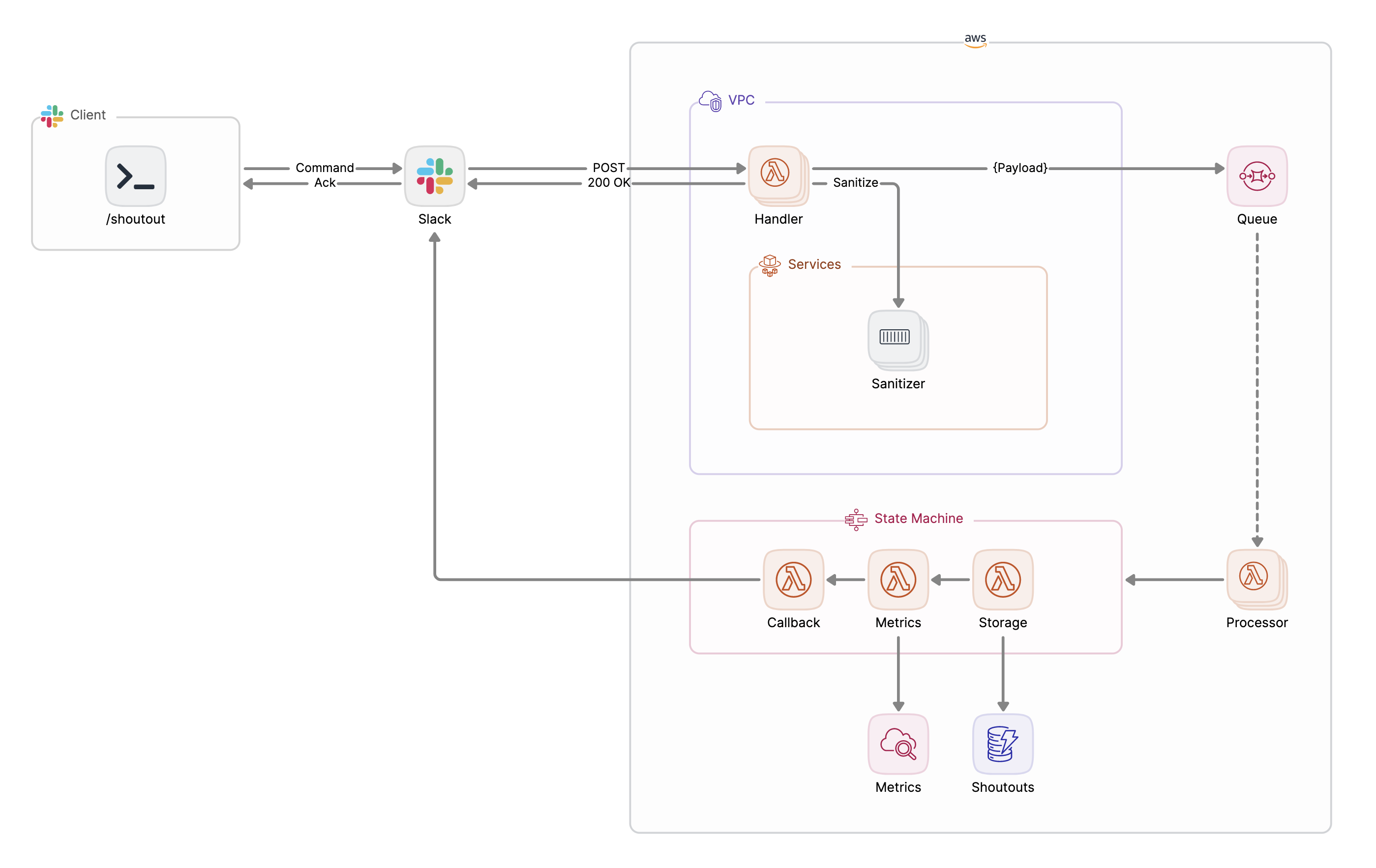
Let’s walk through it together:
- The Slack app to which our
/shoutoutcommand belongs will be updated to point to a new endpoint (more on this soon) - The new endpoint for our serverless infrastructure’s entry point will be provided by a Lambda Function URL, depicted as
Handlerhere. This is a change from the API Gateway-provided URL from before. - The
Handler’s job will expand to include calling on a long-lived service,Sanitizer, which running as a service in a Fargate cluster. The service will be accessible through an internal load balancer and have DNS configured so that it can be reached oversanitizer.internal. -
Sanitizer's job is to censor any offensive words that may be detected in a shoutout's comment. - All other components remain untouched.
Now that we’ve looked at the extended architecture of the application, it’s time to dive in and talk about how we assemble these pieces and deploy these updates.
First, let's checkout the add-sanitizer branch of the project's repo.
git fetch --all && git checkout add-sanitizer
Next up, explore deploy/services-base.yaml and notice the creation of these new components:
- VPC and supporting networking resources (subnets, routing, gateways, internal load balancer, ingress)
- ECS cluster where services will run
- ECR repository for container images used for task definitions
- Service discovery for services deployed in the cluster
- Supporting IAM roles
These components serve as the foundation for any stateful service we intend to deploy, which brings us to deploy/services-sanitizer.yaml.
AWSTemplateFormatVersion: "2010-09-09"
Transform: AWS::Serverless-2016-10-31

Parameters:
  paramsStackName:
    Type: String
    Description: "Stack name where SSM/SecretsManager params are defined"
    Default: shoutouts-params
  imageAndTag:
    Type: String
    Default: shoutouts/sanitizer:XXXX
    Description: Container image and tag (image:tag).

Resources:
  TaskDefinitionSanitizer:
    Type: AWS::ECS::TaskDefinition
    DeletionPolicy: Retain
    Properties:
      Family: sanitizer
      Cpu: .25 vCPU
      Memory: .5 GB
      NetworkMode: awsvpc
      RequiresCompatibilities: [FARGATE]
      ExecutionRoleArn: !ImportValue shoutout-services-task-execution-role
      TaskRoleArn: !ImportValue shoutout-services-task-iam-role
      ContainerDefinitions:
        - Name: sanitizer
          Image:
            !Join [
              "",
              [
                !Ref "AWS::AccountId",
                ".dkr.ecr.",
                !Ref "AWS::Region",
                ".amazonaws.com/",
                !Ref imageAndTag,
              ],
            ]
          Essential: true
          ReadonlyRootFilesystem: true
          LogConfiguration:
            LogDriver: awslogs
            Options:
              awslogs-group: !ImportValue shoutout-services-log-group-sanitizer
              awslogs-region: !Ref "AWS::Region"
              awslogs-stream-prefix: sanitizer
          PortMappings:
            - ContainerPort: 8080
              Protocol: tcp
          Environment:
            - Name: ADDR
              Value: ":8080"

  ServiceSanitizer:
    Type: AWS::ECS::Service
    Properties:
      LaunchType: FARGATE
      PlatformVersion: LATEST
      Cluster: !ImportValue shoutout-services-cluster
      TaskDefinition: !Ref TaskDefinitionSanitizer
      DesiredCount: 1
      NetworkConfiguration:
        AwsvpcConfiguration:
          Subnets:
            - !ImportValue shoutout-services-subnet-private
      DeploymentConfiguration:
        MinimumHealthyPercent: 0
      LoadBalancers:
        - ContainerName: sanitizer
          ContainerPort: 8080
          TargetGroupArn: !ImportValue shoutout-services-target-group-sanitizer
      ServiceRegistries:
        - RegistryArn: !ImportValue shoutout-services-service-discovery-service-sanitizer

  ShoutoutSanitizingHandlerFunction:
    Type: AWS::Serverless::Function
    Properties:
      Role: !ImportValue shoutouts-lambda-role
      CodeUri: ../build/sanitizing-handler.zip
      Handler: sanitizing-handler
      Runtime: go1.x
      Tracing: Active
      MemorySize: 128
      VpcConfig:
        SecurityGroupIds:
          - !ImportValue shoutout-services-vpc-default-security-group
        SubnetIds:
          - !ImportValue shoutout-services-subnet-private
      FunctionUrlConfig:
        AuthType: NONE
      Environment:
        Variables:
          SLACK_TOKEN: !Sub
            - "{{resolve:secretsmanager:/${paramsStackName}/slack-token}}"
            - { paramsStackName: !Ref paramsStackName }
          QUEUE_URL: !ImportValue shoutouts-queue-url
          TABLE_NAME: !ImportValue shoutouts-table-name

Outputs:
  ShoutoutSanitizingHandlerFunctionURL:
    Value: !GetAtt ShoutoutSanitizingHandlerFunctionUrl.FunctionUrl
The resources defined include:
- The ECS Task Definition needed to define the container that will be launched into the Fargate cluster and within which our
Sanitizerservice will be made available (TaskDefinitionSanitizer) - The ECS Service (
ServiceSanitizer) that depends on the Task Definition. An ECS Service is what allows the container to be launched and kept running. When the service launches, it joins the internal load balancer defined the base stack. - The lambda function that will now serve as the new entry point into the architecture (
ShoutoutSanitizingHandlerFunction). Pay special attention to this resource'sFunctionUrlConfigproperty as that is what leads to the URL being generated for this Lambda to be called from anywhere--Slack, included.
First, ensure that any exported properties from the original deploy/sam.yaml template are present by deploying it:
make deploy
Next, deploy the new base services stack:
make deploy-services-base
Lastly, the new sanitizer stack:
make deploy-sanitizer
While these stacks are deploying, let's take a look at the code for the long-lived service at cmd/sanitizer/*.
Instructor walk-through
The new function at cmd/sanitizing-handler/* provides the function that exposes the new URL that Slack will POST to.
Another notable change is in shoutouts.shoutoutCommand (/shoutout_command.go):
func (c *shoutoutCommand) sanitize(ctx context.Context, sanitizerEndpoint string, httpClient *http.Client) error {...}
This new function is where the interaction with the new sanitizer service takes place.
Once the deploys of the updated stack and the new stacks are complete, head over to the Slack app's configuration and update the URL endpoint that the app sends to. Once updated, switch to your Slack client and issue a /shoutout command that is likely to get sanitized (e.g. /shoutout @jboursiquot TF You're a badass!).
Head over to your AWS Console to trace the logging taking place with your new SanitizingHandlerFunction and the sanitizer service running in ECS.
You now have an end-to-end example for what integrating stateless and stateful components look like and how to deploy them. Tinker with the code and the stacks as much as you'd like but keep in mind that some of these components don't have a Free Tier from AWS. Don't forget to delete those stacks so you don't incur any unintended costs:
make destroy-sanitizer
make destroy-services-base
make destroy