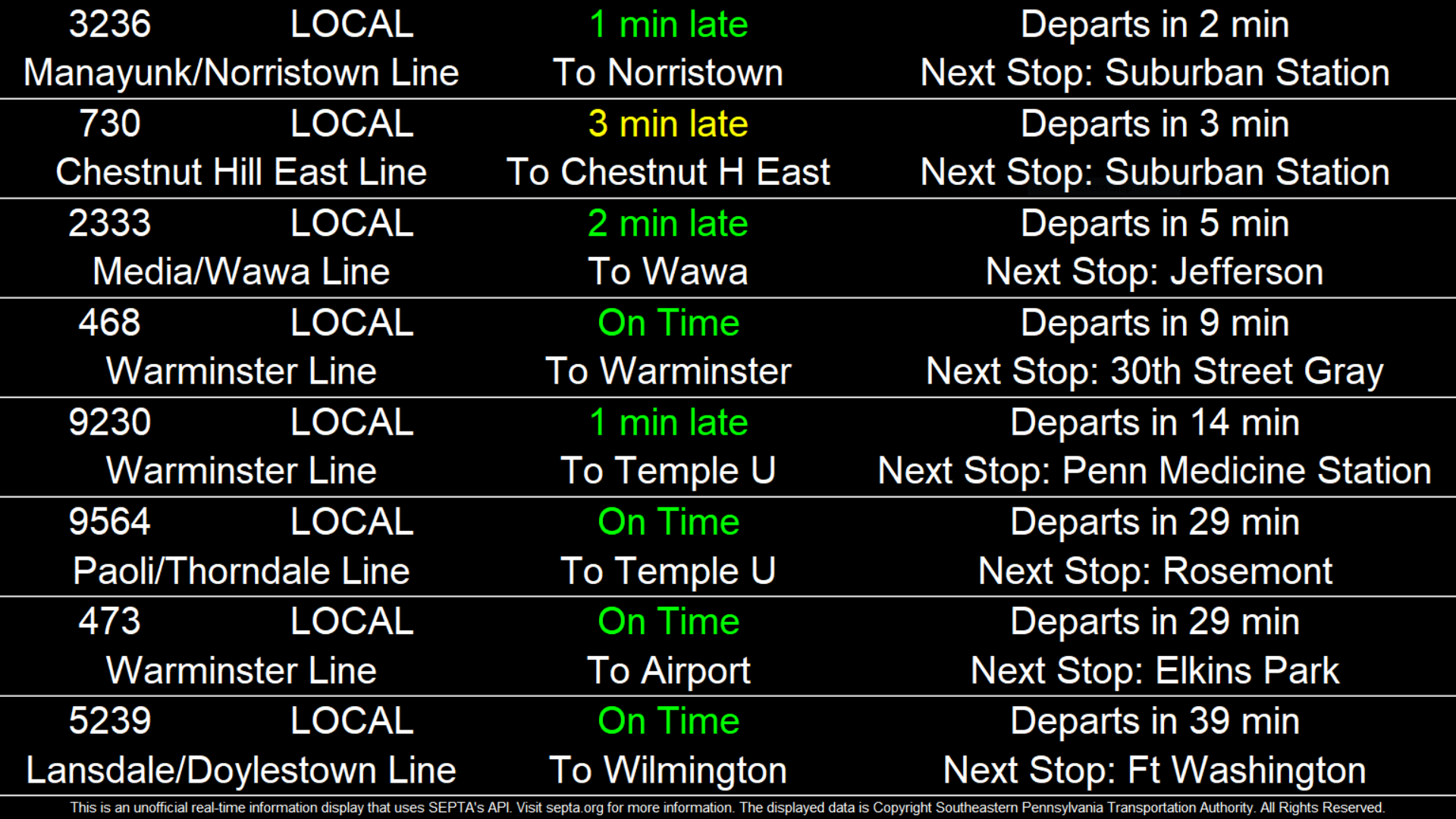
A visual display that contains live information about the next trains to depart a given SEPTA Regional Rail station.
To run this display, make sure that you have an internet connection and anything that can run Python files.
First, open settings.txt.
The first line is whether you want the window to be full screen. Enter "True" for full screen or "False" for an adjustable window.
The second line is the amount of trains to display. Make sure that you do not have too many or else the rows will overlap. A 1920x1080 display can fit around 8 trains.
The third line is the station that you want the train information for. Please note that SEPTA's API sometimes uses different names internally than what is displayed publicly. Please check this page to see if the name you are using has a different internal name.
By default, this displays trains in all directions. An optional fourth line can be added; add one of the following if you want to limit trains to one direction:
N - Limit display to trains traveling "northbound" (Gray 30th Street Station → Suburban Station → Jefferson Station → Temple University)
S - Limit display to trains traveling "southbound" (Temple University → Jefferson Station → Suburban Station → Gray 30th Street Station)
Make sure to save settings.txt and run NextTrainDisplay.py. If everything works, you should see something very similar to the screenshot above.
SEPTA for making the API that this project uses.