
This project creates a completely local "Chat with your Docs" retrieval augmented generation (RAG) application using Cohere's ⌘ R, served locally using Ollama. It also utilizes the Qdrant vector database (self-hosted) and Fastembed for embedding generation.
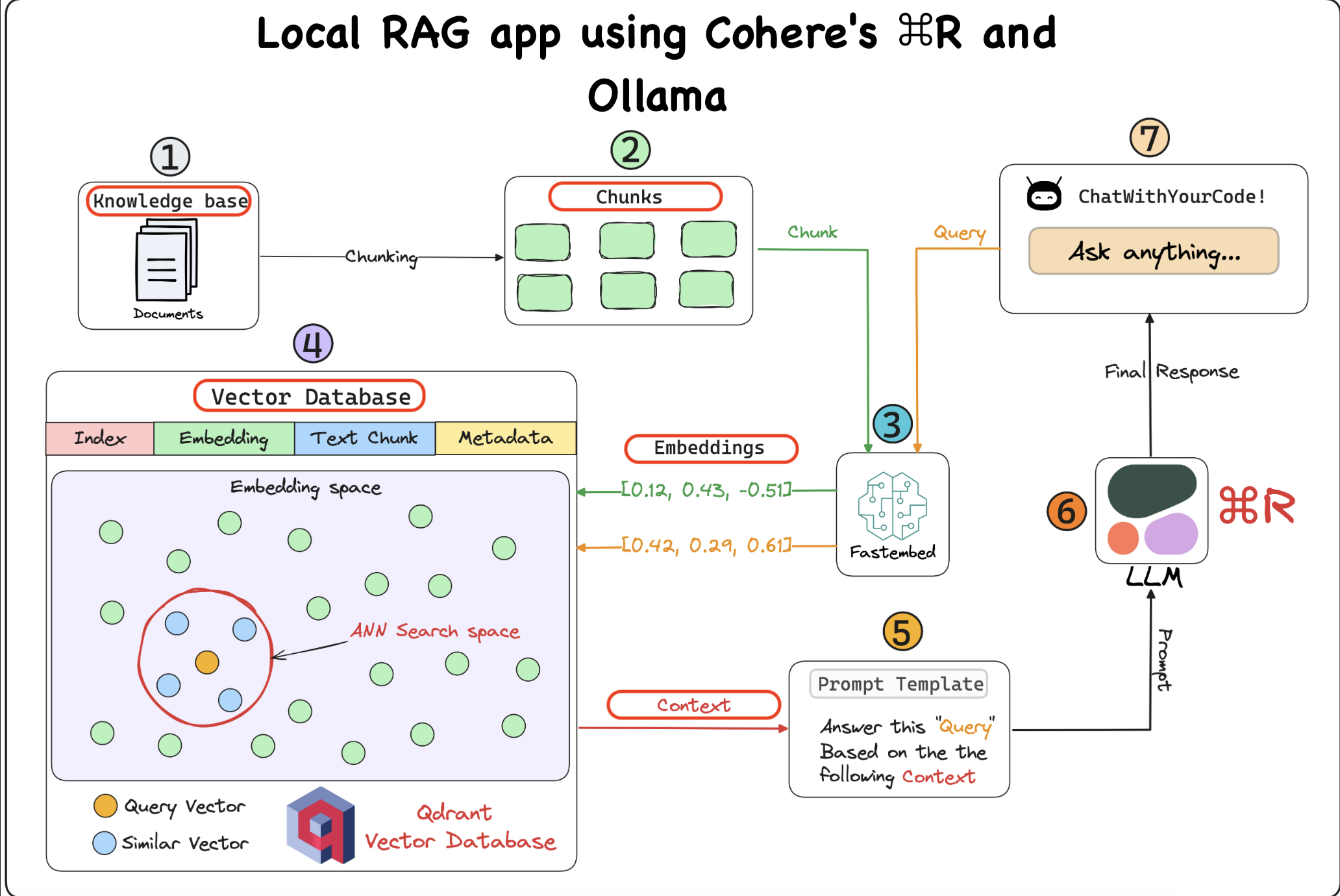
- High precision on RAG and tool use tasks.
- Low latency and high throughput.
- Long 128k-token context length.
- Strong multilingual capabilities across 10 key languages.
To set up the project, follow these steps:
- Clone the repository.
- Install the required dependencies.
- Set up Cohere's ⌘ R locally using Ollama.
- Configure the Qdrant vector database (self-hosted) (automatically set in LightningAI).
- Use Fastembed for embedding generation.
To run Ollama, execute the following command:
ollama serve


After Ollama is running, execute the following command to start the Streamlit app:

```bash
streamlit run app.pyTo run the project, follow these steps:
- Install Ollama by following the instructions on their website.
- Install the Cohere model for Ollama. You can find the model installation instructions on Cohere's website.
- Run Ollama by executing the following command:
ollama serve- After Ollama is running, install the dependencies:
pip install -r requirements.txt- Finally, start the Streamlit app:
streamlit run app.py- Open your web browser and navigate to the Streamlit app URL to interact with the "Chat with your Docs" application.
- Cohere's ⌘ R
- Ollama
- Qdrant vector database
- Fastembed
We welcome contributions to the project! Here's how you can contribute:
- Fork the repository.
- Create a new branch for your feature or fix.
- Make your changes and commit them.
- Push your changes to your fork.
- Submit a pull request.
Please follow the coding standards and guidelines used in the project.
If you encounter any issues or bugs, please report them here.
This project is licensed under the MIT License.
This version of the README provides clear instructions for installing, running, and contributing to the project.