
A lightweight Robot Framework listener that provides real-time progress updates directly on the command-line during test execution. The main design intention is you don't need to open the HTML files directly to debug failing tests.
- Displays test execution progress in the CLI.
- Provides a clear and concise overview of running tests.
- Provides a full, intuitive trace of any failing tests.
The listener supports three different usage models:
This is the easiest and recommended usage model.
pip install robotframework-tracerobot-trace path/to/testsYou don't need to remember any extra arguments to pass to Robot - the runner
automatically passes the correct arguments to Robot and bases its own command
line from the arguments you pass to Robot. This gives a drop-in replacement
for any existing robot command lines.
The robot-trace command is a very thin wrapper on top of robot - it passes all
arguments it receives straight through, while adding additional arguments to
ensure the listener output works properly.
Robot's standard --consolewidth and --consolecolors arguments control the
listener's output; their behavior matches Robot's documentation.
robot-trace also introduces its own custom arguments that are consumed (matching
Robot's argument parsing conventions
regarding case insensitivity and hyphenation) before passing the command line to
Robot:
--verbose: Sets the listener verbosity toDEBUGverbosity. Traces from all tests are printed.--quiet: Sets the listener verbosity toQUIETverbosity. Only traces from failing tests are printed. Passing tests that raise warnings or errors are not printed.--consoleprogress <value>: Controls where the progress box is printed. Valid values areAUTO,STDOUT,STDERR,NONE(to suppress it). Defaults toAUTO, which will print tostdoutorstderrif they haven't been redirected, or suppress it otherwise.--tracesubprocesses: Traces all lines printed by subprocesses (e.g. via the Run Process keyword) as 'TRACE' level messages. Note that this only emits them to the console log, not any of the output files.
If you want to keep using robot directly, you can use the listener as a
module.
pip install robotframework-traceWhen calling the listener directly, ensure you call Robot with --console=none
to avoid Robot's default console markers getting interleaved.
robot --listener robot_trace --console=none path/to/testsThe listener supports the following arguments:
verbosity=<value>: takes a string value to set the listener's verbosity. Valid values areDEBUG(print traces from all tests),NORMAL(print traces from failing, warning, and erroring tests),QUIET(print traces from failing tests). Defaults toNORMAL.colors=<value>: takes a string value to control whether or not the output is colorized. Valid values areAUTO,ON,ANSI,OFF. Values behave the same as Robot's--consolecolorsargument. Defaults toAUTO.console_progress=<value>: Controls where the progress box is printed. Valid values areAUTO,STDOUT,STDERR,NONE(to suppress it). Defaults toAUTO, which will print tostdoutorstderrif they haven't been redirected, or suppress it otherwise.trace_subprocesses=<value>: Traces all lines printed by subprocesses (e.g. via the Run Process keyword) as 'TRACE' level messages. Note that this only emits them to the console log, not any of the output files. Valid values areTrueorFalse. Defaults toFalse.width=<value>: Controls the width of the progress box. Defaults to120.
If you don't want to install the package, the listener is implemented as a
single file which you can deploy standalone. This is useful for minimal setups
or for embedding the listener in your own projects, but you lose the ability to
update via pip.
Copy robot_trace/RobotTrace.py to your project directory.
Usage is identical to option 2, except using the file not the module:
robot --listener RobotTrace.py --console=none path/to/testsYou may also consider calling robot or robot-trace with:
--maxerrorlines=10000to avoid truncating all but the longest error messages.--maxassignlength=10000to avoid truncating all but the longest variables.
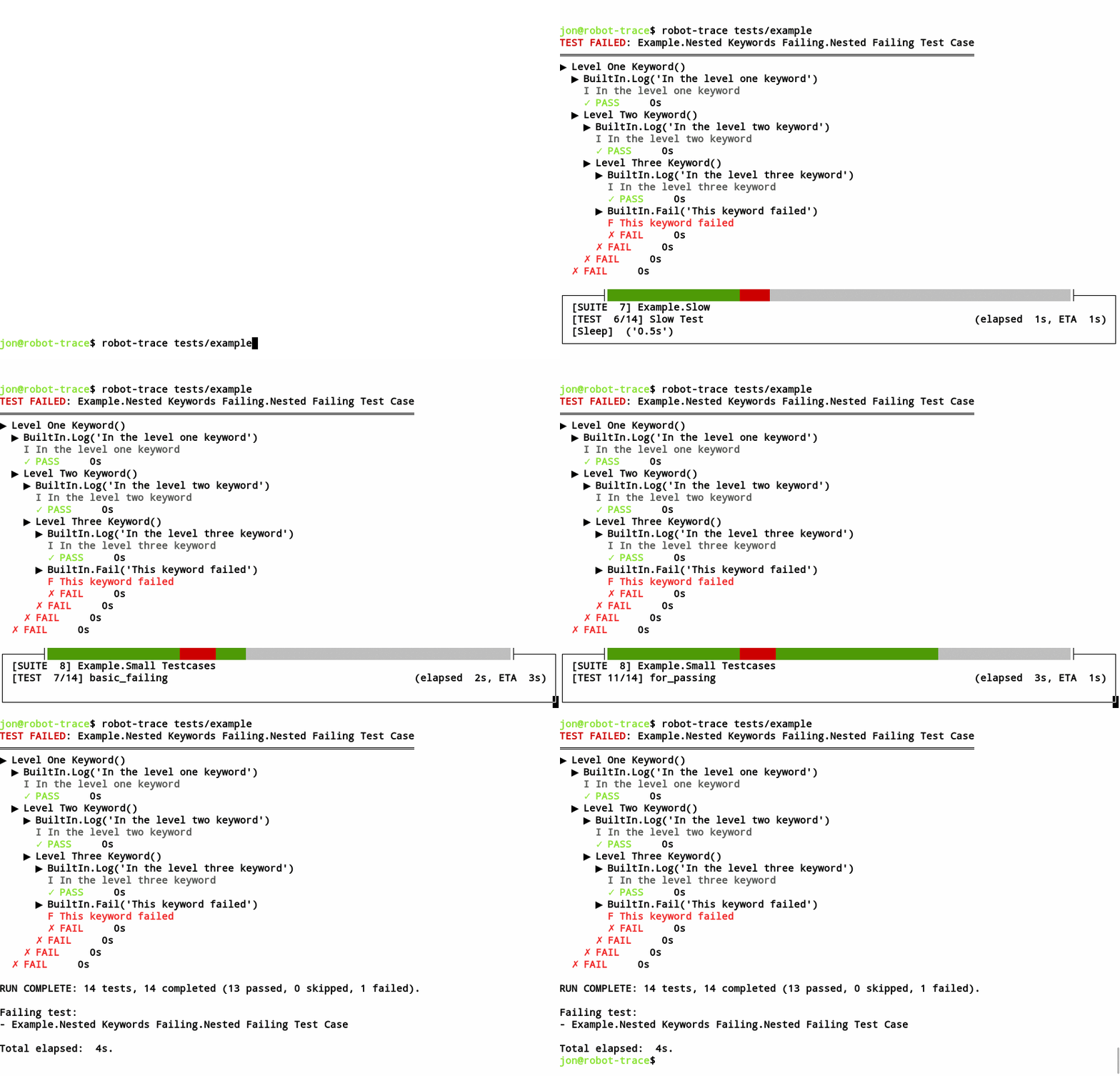
You can also redirect the output to a file to get the same output without the live progress reporting:
$ robot-trace tests/example | cat
TEST FAILED: Example.Nested Keywords Failing.Nested Failing Test Case
═════════════════════════════════════════════════════════════════════
▶ Level One Keyword()
  ▶ BuiltIn.Log('In the level one keyword')
    I In the level one keyword
    ✓ PASS     0s
  ▶ Level Two Keyword()
    ▶ BuiltIn.Log('In the level two keyword')
      I In the level two keyword
      ✓ PASS     0s
    ▶ Level Three Keyword()
      ▶ BuiltIn.Log('In the level three keyword')
        I In the level three keyword
        ✓ PASS     0s
      ▶ BuiltIn.Fail('This keyword failed')
        F This keyword failed
        ✗ FAIL     0s
      ✗ FAIL     0s
    ✗ FAIL     0s
  ✗ FAIL     0s

RUN COMPLETE: 13 tests, 13 completed (12 passed, 0 skipped, 1 failed).
Total elapsed: 3s.- Python 3.6+
- Robot Framework 5.0+
The script has no dependencies beyond the standard library. On Windows to get
colorized output, you need to install the colorama package, however the script
will work without it.
The script has no direct dependency on robotframework itself, but obviously it
doesn't do much without it installed.
Contributions, bugs, and feature requests are welcome! Please see the Contributing Guide for details on how to build the project locally and submit changes.
This project is licensed under the MIT License. See the LICENSE file for details.