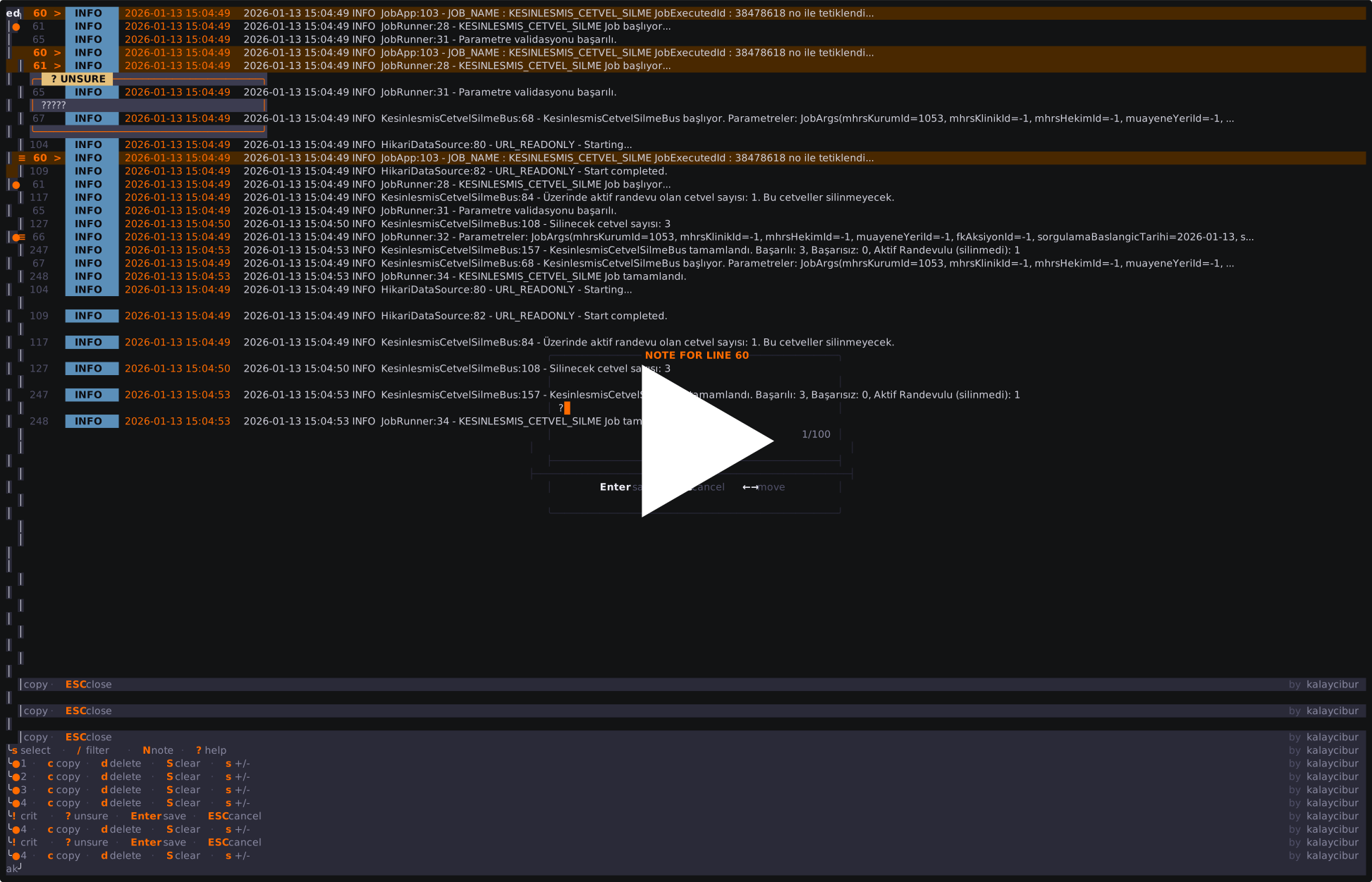
Terminal-based log analysis tool. Paste logs, filter, annotate, copy.
# From clipboard
lx

# From file
lx app.log

# From pipe
kubectl logs pod-name | lx

# Live stream
docker logs -f container | lx- Parses JSON and plain text logs
- Filters by text pattern and log level
- Lets you annotate lines with notes
- Copies logs with annotations to clipboard
- Runs offline analytics on error patterns
- Persist anything to disk
- Connect to external services
- Handle files larger than available RAM
- Replace grep for simple searches
Grab the latest release for your platform:
# Linux (amd64)
curl -L https://github.com/kalayciburak/lx/releases/latest/download/lx-linux-amd64 -o lx
chmod +x lx
sudo mv lx /usr/local/bin/

# macOS (Apple Silicon)
curl -L https://github.com/kalayciburak/lx/releases/latest/download/lx-darwin-arm64 -o lx
chmod +x lx
sudo mv lx /usr/local/bin/

# macOS (Intel)
curl -L https://github.com/kalayciburak/lx/releases/latest/download/lx-darwin-amd64 -o lx
chmod +x lx
sudo mv lx /usr/local/bin/

# Windows (PowerShell)
Invoke-WebRequest -Uri https://github.com/kalayciburak/lx/releases/latest/download/lx-windows-amd64.exe -OutFile lx.exego install github.com/kalayciburak/lx/cmd/lx@latestgit clone https://github.com/kalayciburak/lx
cd lx
go build -o lx ./cmd/lxRequires: Go 1.23+, terminal with Unicode support
| Key | Action |
|---|---|
j / k |
Move down / up |
g / G |
Jump to top / bottom |
Enter |
Toggle detail view |
z |
Maximize detail view |
| Key | Action |
|---|---|
/ |
Open filter input |
Tab |
Cycle level (ALL → ERROR → WARN → INFO → DEBUG → TRACE) |
Ctrl+R |
Clear filter |
Esc |
Close filter |
| Key | Action |
|---|---|
N |
Add/edit note on current line |
n |
Toggle note visibility |
m |
Show/hide all notes |
] / [ |
Jump to next/prev noted line |
D |
Delete note |
| Key | Action |
|---|---|
s |
Toggle selection on current line |
S |
Select all / clear selection |
c |
Copy selected lines (or current if none selected) |
y |
Copy all visible lines |
| Key | Action |
|---|---|
d |
Delete selected lines (or current) |
x |
Clear all lines |
u |
Undo delete |
U |
Redo delete |
p |
Paste from clipboard |
o |
Open file |
| Key | Action |
|---|---|
1 |
Error frequency (top errors by count) |
2 |
Lifetime (first/last occurrence of selected error) |
3 |
Burst detector (error spike detection) |
4 |
Diversity (error variety analysis) |
| Key | Action |
|---|---|
T |
New workspace |
W |
Close workspace |
Tab |
Next workspace (when multiple open) |
Shift+Tab |
Previous workspace |
| Key | Action |
|---|---|
Ctrl+L |
HTTP status code lookup |
? |
Help |
q |
Quit |
error           → lines containing "error"
!debug          → lines NOT containing "debug"
error timeout   → lines with both "error" AND "timeout"
error !debug    → "error" but NOT "debug"
- Case-insensitive
- Multiple terms use AND logic
- Prefix
!for exclusion - Filter applies to visible lines;
ycopies only filtered results
Notes are temporary annotations attached to log lines.
Add a note: Press N, type your note, press Enter
Note levels: Start with ! for critical, ? for unsure
!root cause         → marked as CRIT
?needs verification → marked as UNSURE
just a note         → normal
Copy behavior: When copying with c or y, notes are included:
=== NOTE (lx) ===
• [line 42] [CRIT] root cause

=== LOG ===
line 42: {"level":"error","msg":"connection refused"}
Persistence: Notes exist only in current session. Closing lx discards them.
Offline analytics for error patterns. No network, no database.
| Signal | What it shows |
|---|---|
1 Error Frequency |
Top 10 most common ERROR messages |
2 Lifetime |
First/last occurrence of selected message |
3 Burst Detector |
Detects error spikes in short time windows |
4 Diversity |
Ratio of unique errors to total errors |
Results are heuristic-based. False positives possible with unusual log formats.
| Limit | Value | Behavior when exceeded |
|---|---|---|
Copy all (y) |
1,000 lines | Shows error message |
Select all (S) |
3,000 lines | Shows error message |
| Text filter | 15,000 lines | Text filter disabled, level filter still works |
Large files: All logs are loaded into RAM. For files larger than available memory, use grep or head to reduce input size first.
Live streaming: Supported via pipe (docker logs -f container | lx). Exit with Ctrl+C.
Timestamps: Signal analysis requires parseable timestamps. Logs without timestamps show limited analytics.
JSON:
{"msg":"error","level":"error","time":"2024-01-15T10:30:45Z"}
{"message":"ok","severity":"info"}
Plain text:
2024-01-15 10:30:45 ERROR Database timeout
[WARN] Disk space low
Stack traces: Java, Go, Python patterns auto-detected.