Analyse Unicode Output of Installed Desktop Keyboards
Using Keyman Developer Test page to verify installed desktop Keyboards
This way testing was used initially to analyse a Keyman for Windows issue when using the Text Services Frame Work. However, it can be useful way to see Unicode character codes output when using an installed Keyman Desktop Keyboard.
-
Install Keyman Developer version 15 or greater.
-
Open the Keyman Developers Test page in Firefox. It must be
Firefox Browserif you want to test the TSF otherwise Chrome or Edge will work also.i. By default this is at
localhost:8008so you could type this location into the firefox address bar.ii. You can also access it by pressing the
Test package on webbutton found in theCompiletab for any keyboard package. -
On the
Keymand Developer Keyboard Test Pageuse theKeyboarddropdown to selectsystem keyboard -
Use the Keyman for Windows icon located in the
System Trayto select the desired Keyman for the Windows keyboard.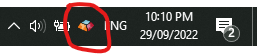
-
Typing text into the input field will now use the TSF(if using Firefox) with the keyboard selected in step 4.