REVIEW READY Feat/billing day one #437
There are no files selected for viewing
This file contains hidden or bidirectional Unicode text that may be interpreted or compiled differently than what appears below. To review, open the file in an editor that reveals hidden Unicode characters.
Learn more about bidirectional Unicode characters
| Original file line number | Diff line number | Diff line change |
|---|---|---|
| @@ -0,0 +1,42 @@ | ||
| --- | ||
| page_id: bd6757e3-81d5-48d6-89c8-dd4c222ac647 | ||
| title: About billing | ||
| sidebar: | ||
| order: 1 | ||
| relatedArticles: | ||
| - 9d1daf85-1a2c-4cc5-879a-230c950bed12 | ||
| - e6dde80d-2977-419f-a05a-62ad0a7ac6de | ||
| - 100f75f1-a0a4-459f-874f-da127f2d0615 | ||
| --- | ||
|
|
||
| Kinde billing gives you the ability to charge customers for your services and collect revenue. | ||
|
|
||
| As part of using this feature, you can: | ||
|
|
||
| - Create and manage plans, and make them visible to your customers | ||
| - Create and customize a pricing table for plan selection | ||
| - Implement specific pricing models to suit your product | ||
| - Use Stripe for secure handling of payments and invoicing | ||
| - Link organizations (B2B) and individual customers (B2C) to a plan | ||
| - Handle plan upgrade, downgrade, and cancellation | ||
| - Enable self-serve account management for customers | ||
| - Customize the pricing table to make the whole experience on-brand | ||
|
|
||
| Billing makes the Kinde platform _the_ essential development infrastructure for managing the customer lifecycle across every part of your business. From registration to plan selection, authorization to provisioning, releases to upgrades. | ||
|
|
||
| ## This is our first billing release | ||
|
|
||
| Billing is a really complex area of app development, so while this release is tested and ready, we are actively working on improvements from day one. | ||
|
|
||
| ### How to send feedback | ||
|
|
||
| It would be amazing if you can send any feedback you have [support@kinde.com](mailto:support@kinde.com) so we can quickly collect and prioritize improvements. | ||
|
|
||
| ## Known limitations | ||
|
|
||
| These are current limitations that we are aware of and are working on adding. | ||
|
|
||
| - Support for plan models with free trial periods | ||
| - Annual and quarterly subscriptions. Only monthly is available right now. | ||
| - Changes to the billing cycle (e.g. choose billing anniversaries, etc.) | ||
| - Add-ons and discounts that can be applied to individual subscriptions |
This file contains hidden or bidirectional Unicode text that may be interpreted or compiled differently than what appears below. To review, open the file in an editor that reveals hidden Unicode characters.
Learn more about bidirectional Unicode characters
| Original file line number | Diff line number | Diff line change |
|---|---|---|
| @@ -0,0 +1,41 @@ | ||
| --- | ||
| page_id: 9d1daf85-1a2c-4cc5-879a-230c950bed12 | ||
| title: Billing concepts & terms | ||
| sidebar: | ||
| order: 3 | ||
| relatedArticles: | ||
| - 100f75f1-a0a4-459f-874f-da127f2d0615 | ||
| - bd6757e3-81d5-48d6-89c8-dd4c222ac647 | ||
| --- | ||
|
|
||
| 'Billing' refers to the broad function of creating plans, setting pricing, collecting payments, etc. Here are some of the common concepts and terms you will come across. | ||
|
|
||
| ## Key concepts | ||
|
|
||
| - **Plan groups** - Plan groups organize multiple plans under a common category, helping segment offerings by use case, customer size, or market. A group is scoped to either organizations (B2B) or individual customers (B2C). You can have multiple plan groups, but each plan must belong to a group. | ||
| - **Plans** - Plans define the specific features, usage limits, and pricing tiers offered to customers in a SaaS product. | ||
| - **Features** - Plan features are the specific capabilities or entitlements included in a plan. They can be chargeable (incurring additional fees) or non-chargeable (included at no extra cost). Features can be metered (usage-based) or unmetered (fixed access). | ||
| - **Fixed charges**- Single chargeable items like the subscription base price and other stand alone recurring charges. | ||
| - **Pricing models** - Pricing models are the different methods of charging customers, such as flat-rate, usage-based, tiered, per-seat pricing, etc. Your pricing model is determined by your product and customer needs. Consider scalability and longevity when deciding this. | ||
| - **Payments gateway** - A payments gateway is a service that securely processes customer payments via credit cards, ACH, or other methods - such as Stripe. | ||
| - **Pricing table** - A pricing table is a visual representation of your different subscription plans, showcasing features and prices to help users compare options. You can build one in Kinde and then show it to your customers in the auth flow or self-service portal. | ||
| - **Self-serve account portal** - Kinde provides a self-serve portal. This allows customers to manage their subscriptions—such as upgrading plans, updating payment information, or cancelling. This reduces support overhead and improves user autonomy. In Kinde, you can decide what your customers can self-manage or remove the functionality completely. | ||
|
|
||
| ## Common billing terms | ||
|
|
||
| - **Agreement** - the term used in Stripe and the Kinde API to refer to a customer's subscription. Both terms are used throughout docs. | ||
| - **Base price** – The starting cost of a subscription plan, typically the cost for a core set of features or a minimum level of usage. | ||
| - **Chargeable / Non-chargeable feature** – | ||
| - **Chargeable feature**: Incurs an additional fee when used. Might be metered or per unit price. | ||
| - **Non-chargeable feature**: Add non-chargeable features for any included features which aren't independently chargeable, but need to be gated in your product. | ||
| - **Feature** – A specific function or capability of your SaaS product that you provision for app users. In context with a plan, these are chargeable or non-chargeable features that are provisioned to customers. | ||
| - **Fixed charge** – A recurring fee that does not change based on usage, often applied monthly or annually. Use this for a plan’s base price or other flat recurring fees. | ||
| - **Metered and unmetered feature** – Metered features are provisioned in units, often with pricing per unit, e.g. MAU. An unmetered feature is like a boolean, and is a basic feature with no pricing attached. | ||
| - **Multi-currency** – The ability to set plan prices in different currencies to support global customers. Kinde supports nearly all currencies, but you can currently only pick one as the default for all plans. | ||
| - **Plan** – A packaged offering of features, prices, and terms available for subscription, typically tiered across a group (e.g., Basic, Pro, Enterprise). | ||
| - **Plan group** – A collection of related plans, often grouped by customer type or usage level, allowing easier management and comparison. | ||
| - **Pricing model** – The structure used to determine how features in a plan are priced. E.g. fixed charge, tiered, per-user, or usage-based pricing. Kinde lets you use multiple pricing models within one plan. | ||
| - **Subscription** – The ongoing agreement where a customer pays for access to a SaaS product via a recurring plan. This is referred to as an agreement in Stripe. | ||
| - **Tiered pricing** – This refers to unit pricing that has different unit costs based on the volume of units purchased. E.g. $10 per unit for 1–10 units, $8 per unit for 11–50 units, $5 per unit over 51 units. | ||
| - **Unit price** – Where a price is set per unit of usage, e.g. a seat or license. Unit prices can also be applied to metered features, e.g. x per unit. Unit prices can also be tiered, e.g. x per unit up to 10 units, then y for 10+ units. | ||
| - **Usage-based** **price** – A billing method where charges vary based on the metered consumption of resources or services (e.g., API calls, storage). | ||
This file contains hidden or bidirectional Unicode text that may be interpreted or compiled differently than what appears below. To review, open the file in an editor that reveals hidden Unicode characters.
Learn more about bidirectional Unicode characters
| Original file line number | Diff line number | Diff line change | ||||||||||||||||||||
|---|---|---|---|---|---|---|---|---|---|---|---|---|---|---|---|---|---|---|---|---|---|---|
| @@ -0,0 +1,55 @@ | ||||||||||||||||||||||
| --- | ||||||||||||||||||||||
| page_id: e6dde80d-2977-419f-a05a-62ad0a7ac6de | ||||||||||||||||||||||
| title: The Kinde billing model | ||||||||||||||||||||||
| sidebar: | ||||||||||||||||||||||
| order: 2 | ||||||||||||||||||||||
| relatedArticles: | ||||||||||||||||||||||
| - bd6757e3-81d5-48d6-89c8-dd4c222ac647 | ||||||||||||||||||||||
| - 9d1daf85-1a2c-4cc5-879a-230c950bed12 | ||||||||||||||||||||||
|
Comment on lines
+4
to
+8
Contributor
There was a problem hiding this comment. Fix frontmatter indentation for relatedArticles sidebar:
order: 2
- relatedArticles:
- - bd6757e3-81d5-48d6-89c8-dd4c222ac647
- - 9d1daf85-1a2c-4cc5-879a-230c950bed12
+ relatedArticles:
+ - bd6757e3-81d5-48d6-89c8-dd4c222ac647
+ - 9d1daf85-1a2c-4cc5-879a-230c950bed12📝 Committable suggestion
Suggested change
🤖 Prompt for AI Agents |
||||||||||||||||||||||
| --- | ||||||||||||||||||||||
|
|
||||||||||||||||||||||
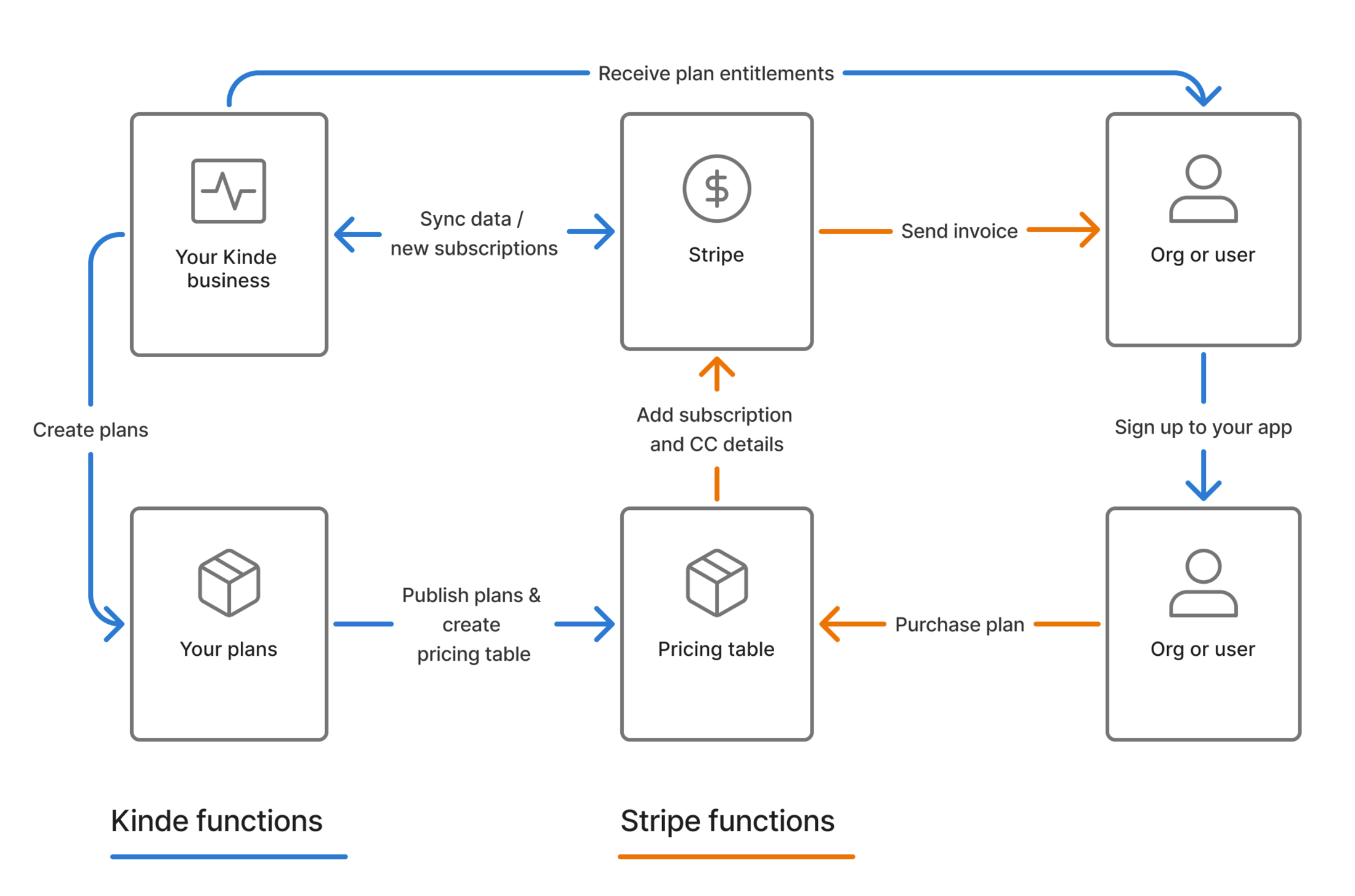
| In the Kinde model, we handle everything except the payment processing part of billing. Kinde integrates with a third-party payment gateway (Stripe) for secure payment processing. | ||||||||||||||||||||||
|
|
||||||||||||||||||||||
| This involves a continuous sync between Kinde and Stripe, to ensure that products, prices, subscription information, invoices and payments, are accurate in both systems. | ||||||||||||||||||||||
|
|
||||||||||||||||||||||
| Kinde does not store payment details, such as credit card information. This is exclusively managed by Stripe. | ||||||||||||||||||||||
|
|
||||||||||||||||||||||
| ## Billing for B2B, B2C and B2B2C | ||||||||||||||||||||||
|
|
||||||||||||||||||||||
| Kinde supports billing models for B2B, B2C and even B2B2C. Depending which you are setting up, you may need to do a few different tasks. Most of the setup is common, but we will call out tasks that are only relevant to one or the other. | ||||||||||||||||||||||
|
|
||||||||||||||||||||||
| - B2B - customers are companies, organizations, or groups. | ||||||||||||||||||||||
| - B2C - customers are individual users. | ||||||||||||||||||||||
| - B2B2C - the platform model, where you have a customer who is an organization, and then users who are customers of that organization. | ||||||||||||||||||||||
|
|
||||||||||||||||||||||
| ## Kinde and Stripe | ||||||||||||||||||||||
|
|
||||||||||||||||||||||
| Kinde integrates a single payment gateway (only Stripe for now) to handle the financial and payment management side of things. | ||||||||||||||||||||||
|
|
||||||||||||||||||||||
| Stripe uses the plan data and the customer info to create an agreement in Stripe. The customer is invoiced based on this agreement. Stripe securely stores your customer’s payment details and Kinde never sees credit card or other bank information. | ||||||||||||||||||||||
|
|
||||||||||||||||||||||
| Here’s what the billing feature looks like as a workflow. | ||||||||||||||||||||||
|
|
||||||||||||||||||||||
|  | ||||||||||||||||||||||
|
|
||||||||||||||||||||||
| Stripe is currently the only payment provider supported with Kinde. But we plan to expand to other providers in the near future. | ||||||||||||||||||||||
|
|
||||||||||||||||||||||
| ## Multi-currency support | ||||||||||||||||||||||
|
|
||||||||||||||||||||||
| Kinde has customers everywhere and almost every global currency is supported. | ||||||||||||||||||||||
|
|
||||||||||||||||||||||
| ## Transaction data and Stripe region | ||||||||||||||||||||||
|
|
||||||||||||||||||||||
| - When you connect your Stripe account to Kinde, you connect to our Stripe US account. We do this because Stripe US more widely supports global functionality. | ||||||||||||||||||||||
| - Regardless of your own Stripe account region, you can still select any currency for your plans in Kinde, and Stripe will do the hard part of exchange rate conversion, tax calculations, etc. | ||||||||||||||||||||||
| - Any fees you incur in Stripe for international transactions are your sole responsibility. | ||||||||||||||||||||||
|
|
||||||||||||||||||||||
| ## Billing and invoice cycles | ||||||||||||||||||||||
|
|
||||||||||||||||||||||
| By default, Kinde uses the following billing behavior, though some aspects can be customized depending on how you configure cancellations. | ||||||||||||||||||||||
|
|
||||||||||||||||||||||
| - Billing cycles are monthly, based on the customer's original sign-up date. | ||||||||||||||||||||||
| - Fixed charges (e.g. monthly subscription fees) are billed in advance, customers pay at the start of their billing period. | ||||||||||||||||||||||
| - Metered (usage-based) charges are billed in arrears, usage is tracked throughout the billing period, and charges appear on the next invoice. | ||||||||||||||||||||||
|
|
||||||||||||||||||||||
| You can also [set policies](/billing/get-started/setup-overview/) to control what happens when a customer cancels or changes their plan. | ||||||||||||||||||||||

This file contains hidden or bidirectional Unicode text that may be interpreted or compiled differently than what appears below. To review, open the file in an editor that reveals hidden Unicode characters.
Learn more about bidirectional Unicode characters
| Original file line number | Diff line number | Diff line change |
|---|---|---|
| @@ -0,0 +1,51 @@ | ||
| --- | ||
| page_id: 06bb544c-1b84-4660-ac55-ac80b50ae5be | ||
| title: Customize the plan sign-up experience | ||
| sidebar: | ||
| order: 2 | ||
| relatedArticles: | ||
| - 37d5ae8e-cfd1-4e5d-8333-387b6967ec23 | ||
| - 88e1773a-b681-441f-b4c7-d7d339116867 | ||
| - e6dde80d-2977-419f-a05a-62ad0a7ac6de | ||
| --- | ||
|
|
||
| There are three ways you can allow customers to sign up to a plan. | ||
|
|
||
| ## Option 1: Use your own plan selection screen | ||
|
|
||
| Display a plan selection screen in your own app or website. Once the user selects a plan, redirect them to Kinde to complete the payment flow. | ||
| To pre-select a plan, pass the `plan_interest` query parameter in the Kinde authentication URL. | ||
|
|
||
| ## Option 2: Use Kinde’s built-in plan selection | ||
|
|
||
| Let Kinde handle plan selection as part of the authentication flow. To enable this: | ||
|
|
||
| - [Create a pricing table](/billing/billing-user-experience/plan-selection/) in Kinde | ||
| - [Add and publish plans](/billing/manage-plans/create-plans/) | ||
| - Set the table to **Live** | ||
|
|
||
| Once this is done, use the relevant pricing table key in the authentcation URL and Kinde will display the plan selection screen during signup. | ||
|
|
||
| ## Option 3: Assign a plan via the Kinde Management API | ||
|
|
||
| Use the [Kinde Management API](https://docs.kinde.com/kinde-apis/management/#tag/billing-agreements/get/api/v1/billing/agreements) to assign a customer to a specific plan. | ||
| The next time the customer signs in, Kinde will automatically prompt them for payment details. | ||
|
|
||
clairekinde11 marked this conversation as resolved.
Show resolved
Hide resolved
|
||
| This is ideal for: | ||
|
|
||
| - Migrating customers from another system | ||
| - Assigning a plan without user input | ||
|
|
||
| ## Customize billing screens in the authentication flow | ||
|
|
||
| Depending on how you choose to onboard customers, users will see three different billing screens during the authentication flow. These screens can be customized: | ||
|
|
||
| 1. **Plan selection** - Displayed when a user signs up for the first time and multiple plans are available. | ||
|
|
||
| 2. **Payment details** - Shown after a user selects a plan—or if a plan was pre-selected before redirecting to Kinde. | ||
|
|
||
| 3. **Success** - Shown when sign up and payment are successfully completed. | ||
|
|
||
| By default, all screens will inherit branding and styling from the global Kinde [Design](/design/brand/global-brand-defaults/) settings. | ||
|
|
||
| If you want more control, you can [fully customize these screens using your own **HTML, CSS, and JavaScript**](/design/customize-with-code/customize-with-css-html/). | ||
This file contains hidden or bidirectional Unicode text that may be interpreted or compiled differently than what appears below. To review, open the file in an editor that reveals hidden Unicode characters.
Learn more about bidirectional Unicode characters
| Original file line number | Diff line number | Diff line change |
|---|---|---|
| @@ -0,0 +1,121 @@ | ||
| --- | ||
| page_id: 37d5ae8e-cfd1-4e5d-8333-387b6967ec23 | ||
| title: Build a pricing table | ||
| sidebar: | ||
| order: 1 | ||
| relatedArticles: | ||
| - 88e1773a-b681-441f-b4c7-d7d339116867 | ||
| - e6dde80d-2977-419f-a05a-62ad0a7ac6de | ||
|
Comment on lines
+6
to
+8
Contributor
There was a problem hiding this comment. Fix frontmatter indentation for sidebar:
order: 1
- relatedArticles:
- - 88e1773a-b681-441f-b4c7-d7d339116867
- - e6dde80d-2977-419f-a62de0f7ac6de
+ relatedArticles:
+ - 88e1773a-b681-441f-b4c7-d7d339116867
+ - e6dde80d-2977-419f-a05a-62ad0a7ac6de
🤖 Prompt for AI Agents |
||
| --- | ||
|
|
||
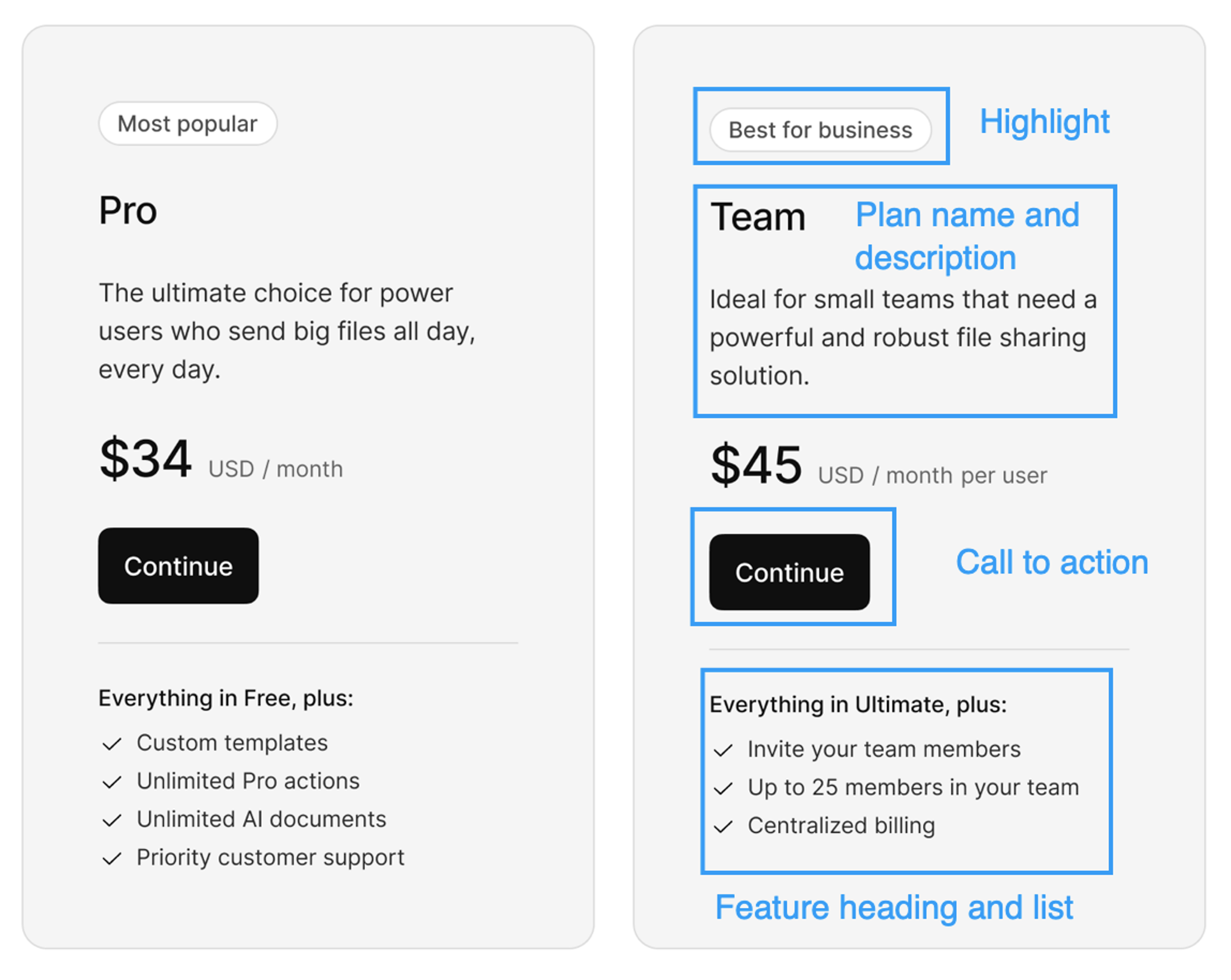
| You can build pricing tables to enable your customers to select plans and go through a payment flow as part of signing up to your app or site. | ||
|
|
||
| Kinde's pricing table builder can generate a pricing table from published plans, or you can start with a blank one. | ||
|
|
||
| You can also add and edit information and content in your preferred languages. You can create as many pricing tables as you want. | ||
|
|
||
|  | ||
|
|
||
| ## Create a pricing table | ||
|
|
||
| A pricing table can only have 4 plans. | ||
|
|
||
| 1. Go to **Billing > Pricing tables**. | ||
| 2. Select **Add pricing table**. | ||
clairekinde11 marked this conversation as resolved.
Show resolved
Hide resolved
|
||
| 3. Choose an option: | ||
| 1. **Generate** a pricing table from a plan group - this pre-populates the pricing table with basic details and the plans based on the plan group you select. Up to 4 plans can be included on a pricing table. If your plan group contains more, you may want to create a new pricing table. | ||
| 2. **Create new** pricing table. Manually build the pricing table and add plans from a plan group. This gives you a blank slate to start in. | ||
| 4. Select **Next**. | ||
| 1. **Generated** - select the group and then **Save**. | ||
| 2. **New** - complete the details in the window and **Save**. | ||
|
|
||
| ## Edit the pricing table | ||
|
|
||
| You can edit a pricing table, but they are not versioned. Whatever content you override, it cannot be reverted or recovered. | ||
|
|
||
| You cannot edit a plan price. This is inherited from the plan itself. | ||
|
|
||
| ## Change what plans show on a pricing table | ||
|
|
||
| You can add and remove plans from the pricing table when it is being worked on. | ||
|
|
||
| 1. Open the pricing table. | ||
| 2. Scroll to the **Plans** section. | ||
| 3. To remove a plan: | ||
| 1. Select the three dots on the plan card and select **Remove from pricing table**. | ||
| 2. Confirm you want to remove the plan. This removes all custom content you have added, in all languages you have added content in, on the pricing table. The plan is removed. | ||
| 3. Select **Save**. | ||
| 4. To add a plan, select **Add plan**. | ||
| 1. In the window that opens, select an available plan. Only plans from the same plan group are shown. | ||
| 2. Complete the details in the window for this plan. At minimum, you must enter a **Display name** and the **CTA button** content. This will be displayed in the pricing table. | ||
| 3. Select **Save**. The plan is added to the pricing table. | ||
|
|
||
| ## Change the order of plans on a pricing table | ||
|
|
||
| The display order of plans from left to right corresponds to the position listed in the **Plans** section of the pricing table. | ||
|
|
||
| 1. Open the pricing table. | ||
| 2. Scroll to the **Plans** section. | ||
| 3. Select the three dots menu on the plan you want to move. | ||
| 4. Select **Move up** or **Move down**, depending on the plan position. | ||
| 5. Select **Save**. | ||
|
|
||
| ## Add a features list to a plan on the pricing table | ||
|
|
||
clairekinde11 marked this conversation as resolved.
Show resolved
Hide resolved
|
||
| To promote the top features in a plan, add them manually to the pricing table. These features don't need to correspond exactly to your plan configuration, this is an opportunity to sell the most appealing product features and make plan choices easy for customers. | ||
|
|
||
| 1. Open the pricing table. | ||
| 2. Scroll to the **Plans** section. | ||
| 3. Select the three dots menu on the plan and select **Edit content**. | ||
| 4. In the top of the window, select the language you want to add features in. | ||
| 5. Add a **Features list heading**. This sits directly above the list. | ||
| 6. Add a list of features in the large text **Features list** field. Features will appear in the order they are listed. | ||
| 7. Select **Save**. | ||
|
|
||
| ## Highlight a plan on a pricing table | ||
|
|
||
| It’s common to want to call out or highlight something about a plan on the pricing table, for example, to highlight which plan is most popular. | ||
|
|
||
| 1. Open the pricing table. | ||
| 2. Scroll to the **Plans** section. | ||
| 3. Select the three dots menu on the plan and select **Edit content.** | ||
| 4. In the top of the window, select the language you want to add highlight content. | ||
| 5. Add a **Highlight label** and select **Save**. | ||
|
|
||
| ## Edit and translate pricing table content | ||
|
|
||
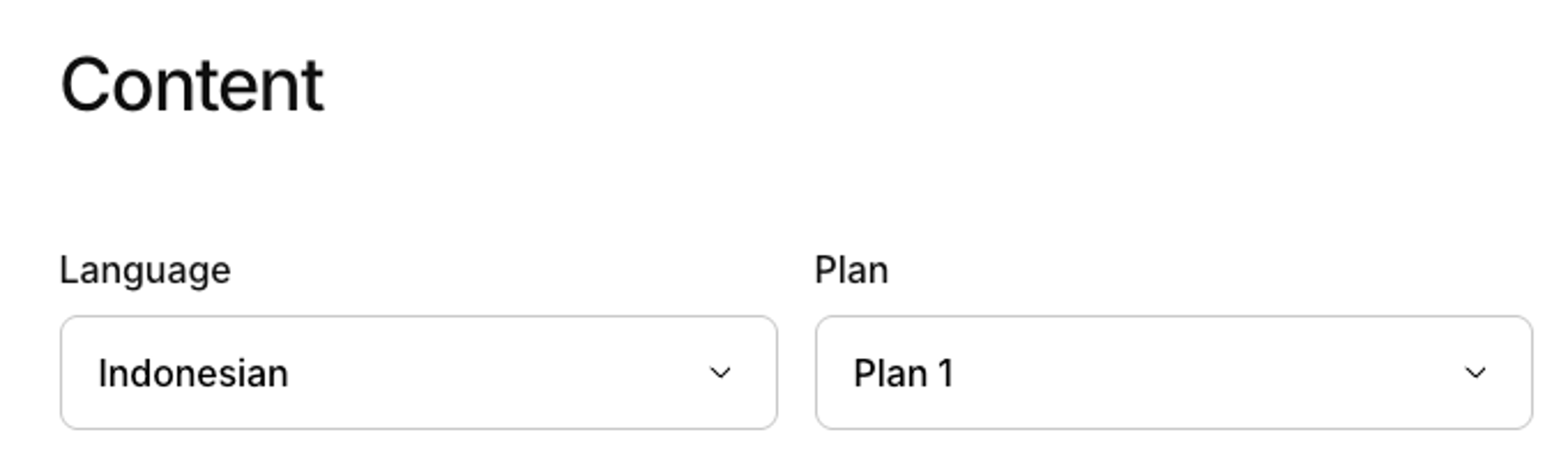
| If you want to display pricing tables in multiple languages, you can change add content translations to the plans on the pricing table. | ||
|
|
||
| 1. Open the pricing table. | ||
| 2. Scroll to the **Plans** section. | ||
| 3. Select the three dots menu on the plan and select **Edit content.** | ||
| 4. In the top of the window, select the language you want to add or edit content for. | ||
|
|
||
|  | ||
|
|
||
| 5. Enter or edit all the content you want in the chosen language. | ||
| 6. Select **Save**. | ||
|
|
||
| ## Make the pricing table live to customers | ||
|
|
||
| We recommend only doing this after your plans are finalized and published. | ||
|
|
||
| 1. Open the pricing table. | ||
| 2. Select **Make live**. | ||
| 3. Select **Save**. If a user passes the pricing table code in a URL, they will be able to sign up using it. | ||
|
|
||
| ## Set pricing table to show as default in register flow | ||
|
|
||
| You can set a pricing table to show by default, even if the code key is not passed in the URL during the normal sign up flow. | ||
|
|
||
| 1. Open the pricing table. | ||
| 2. Select **Show by default**. | ||
| 3. Select **Save**. If a user goes through the registration flow without a pricing table code key in the URL, this is the pricing table they will see. | ||
|
|
||
| ## Switch the pricing table off for the register flow | ||
|
|
||
| You can configure Kinde to hide pricing tables in the sign up flow, but still show them in the self-serve portal. You'd do this if you have designed your own pricing pages and you only want to show Kinde's pricing table for theself-serve upgrade or downgrade experience. | ||
|
|
||
| 1. Go to **Settings > Environment > Billing**. | ||
| 2. Switch off the **Show the pricing table when customers sign up** option. | ||
| 3. Select **Save**. | ||
Oops, something went wrong.
Add this suggestion to a batch that can be applied as a single commit.
This suggestion is invalid because no changes were made to the code.
Suggestions cannot be applied while the pull request is closed.
Suggestions cannot be applied while viewing a subset of changes.
Only one suggestion per line can be applied in a batch.
Add this suggestion to a batch that can be applied as a single commit.
Applying suggestions on deleted lines is not supported.
You must change the existing code in this line in order to create a valid suggestion.
Outdated suggestions cannot be applied.
This suggestion has been applied or marked resolved.
Suggestions cannot be applied from pending reviews.
Suggestions cannot be applied on multi-line comments.
Suggestions cannot be applied while the pull request is queued to merge.
Suggestion cannot be applied right now. Please check back later.
Uh oh!
There was an error while loading. Please reload this page.