This repository contains the helm charts for deploying the Astronomer Platform into a Kubernetes cluster.
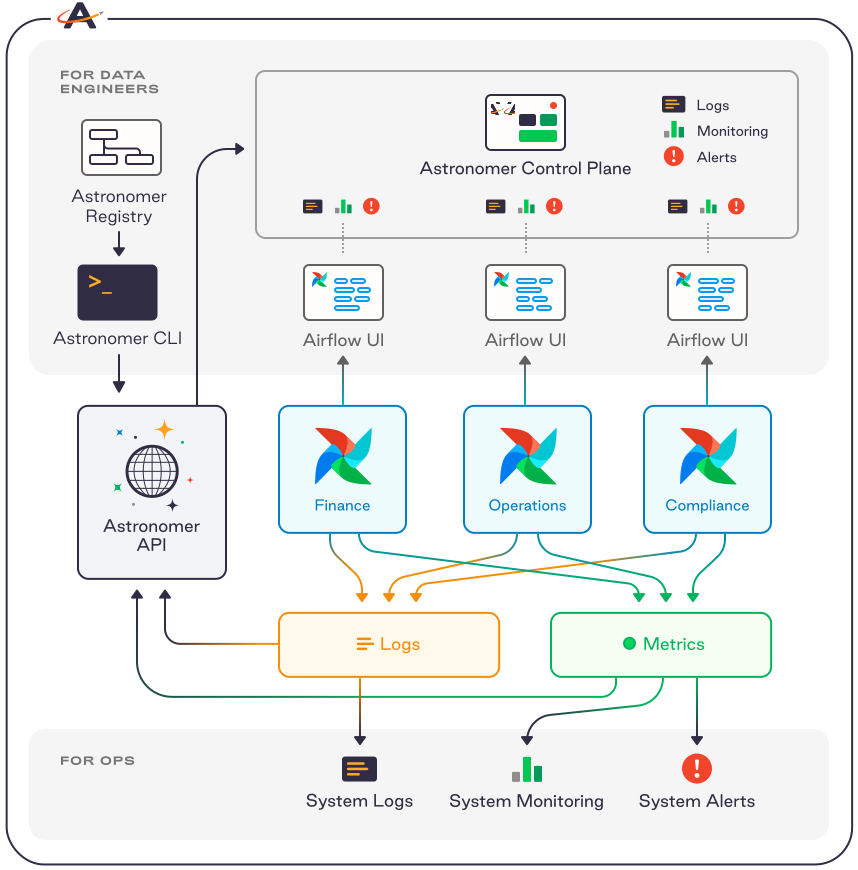
Astronomer is a commercial "Airflow as a Service" platform that runs on Kubernetes. Source code is made available for the benefit of our customers, if you'd like to use the platform reach out for a license or try out Astronomer Cloud.
Docker images for deploying and running Astronomer are currently available on Quay.io/Astronomer.
The Astronomer Platform documentation is located at https://www.astronomer.io/docs/
We welcome any contributions:
- Report all enhancements, bugs, and tasks as GitHub issues
- Provide fixes or enhancements by opening pull requests in GitHub
Install the following tools:
- docker (make sure your user has permissions - try 'docker ps')
- kubectl
- kind
- mkcert (make sure mkcert in PATH)
- helm
Run this script from the root of this repository:
bin/reset-local-devFor MacOS, if kind version >=0.8.1, use the following command
KIND_EXPERIMENTAL_DOCKER_NETWORK=bridge ./bin/reset-local-devEach time you run the script, the platform will be fully reset to the current helm chart.
Modify the "tags:" in configs/local-dev.yaml
- platform: core Astronomer components
- logging (large impact on RAM use): ElasticSearch, Kibana, Fluentd (aka 'EFK' stack)
- monitoring: Prometheus
- kubed: leave on
kind load docker-image $your_local_image_name_with_tagMake note of your pod name
kubectl get pods -n astronomerFind the corresponding deployment, daemonset, or statefulset
kubectl get deployment -n astronomerReplace the pod with the new image Look for "image" on the appropriate container and replace with the local tag, and set the pull policy to "Never".
kubectl edit deployment -n astronomer <your deployment>bin/reset-local-dev -K 1.16.3You need a powerful computer to run the HA testing locally. 28 GB or more of memory should be available to Docker.
Environment variables:
- USE_HA: when set, will deploy using HA configurations
- CORDON_NODE: when set, will cordon this node after kind create cluster
- MULTI_NODE: when set, will deploy kind with two worker nodes
Scripts:
- Use bin/run-ci to start the cluster
- Modify / use bin/drain.sh to test draining
Example:
export USE_HA=1
export CORDON_NODE=kind-worker
export MULTI_NODE=1
bin/run-ci
After the platform is up, then do
bin/drain.shThe code in this repo is licensed Apache 2.0 with Commons Clause, however it installs Astronomer components that have a commercial license, and requires a commercial subscription from Astronomer, Inc.