



BGG MCP provides access to the BoardGameGeek API through the Model Context Protocol, enabling retrieval and filtering of board game data, user collections, and profiles. The server is implemented in Go, using the GoGeek library, which helps ensure robust API interactions.
Price data is provided by BoardGamePrices.co.uk, offering real-time pricing from multiple retailers.
Game recommendations are powered by Recommend.Games, which provides algorithmic similarity recommendations based on BoardGameGeek data.

| Tool | Description |
|---|---|
bgg-search |
Search for board games with type filtering (base games, expansions, or all) |
bgg-details |
Get detailed information about a specific board game |
bgg-collection |
Query and filter a user's game collection with extensive filtering options |
bgg-hot |
Get the current BGG hotness list |
bgg-user |
Get user profile information |
bgg-price |
Get current prices from multiple retailers using BGG IDs |
bgg-trade-finder |
Find trading opportunities between two BGG users |
bgg-recommender |
Get game recommendations based on similarity to a specific game |
bgg-thread-details |
Get the full content of a specific BGG forum thread including all posts |
| Tool | Description |
|---|---|
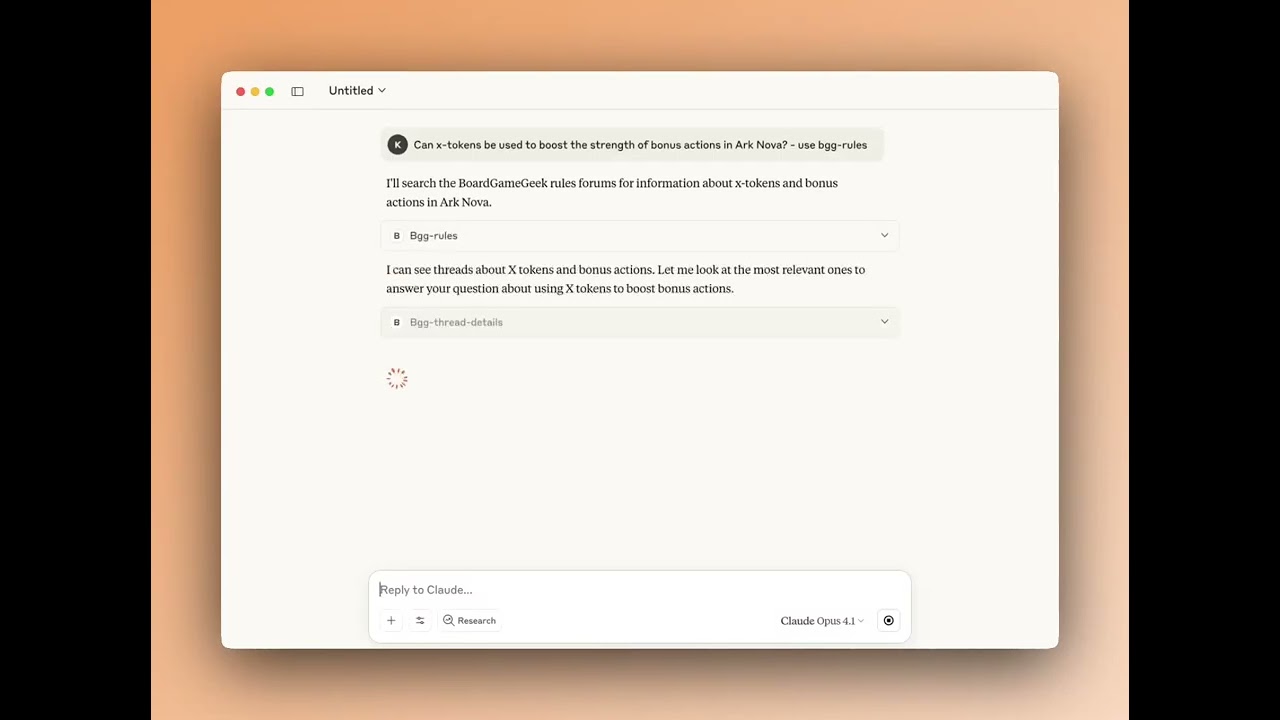
bgg-rules |
Answer rules questions by searching BGG forums for relevant discussions and clarifications |
BGG MCP exposes resources that AI assistants can access directly for contextual information:
| Resource | URI | Description |
|---|---|---|
BGG Hotness |
bgg://hotness |
Current BGG hotness list, always available |
My BGG Collection |
bgg://my-collection |
Your personal BGG collection (requires BGG_USERNAME to be set) |
BGG MCP includes pre-configured prompts for common workflows:
| Prompt | Description |
|---|---|
Trade Sales Post |
Generate a formatted sales post for your BGG 'for trade' collection with discounted market prices |
Game Recommendations |
Get personalized game recommendations based on your BGG collection and preferences |
Here are some example prompts you can use to interact with the BGG MCP tools:
"Search for Wingspan on BGG"
"How many expansions does Grand Austria Hotel have?"
"Search for Wingspan expansions only"
"Get details for Azul"
"Show me information about game ID 224517"
"What's the BGG rating for Gloomhaven?"
"Show me ZeeGarcia's game collection"
"Show games rated 9+ in kkjdaniel's collection"
"List unplayed games in rahdo's collection"
"Find games for 6 players in kkjdaniel's collection"
"Show me all the games rated 3 and below in my collection"
"What games in my collection does rahdo want?"
"What games does kkjdaniel have that I want?"
"Show me the current BGG hotness list"
"What's trending on BGG?"
"Show me details about BGG user rahdo"
"When did user ZeeGarcia join BGG?"
"How many buddies do I have on bgg?"
"Get the best price for Wingspan in GBP"
"Show me the best UK price for Ark Nova"
"Compare prices for: Wingspan & Ark Nova"
"Recommend games similar to Wingspan"
"What games are like Azul but with at least 1000 ratings?"
"Find 5 games similar to Troyes"
"[Your rules question about any board game] - use bgg-rules"
"How does [game mechanic] work in [game name]? use bgg-rules"
"Can I [specific action] in [game name]? use bgg-rules"
"What happens when [situation] in [game name]? use bgg-rules"
Note: Include "use bgg-rules" in your question to ensure the AI searches BGG forums for answers.
Authentication Required: Most BGG MCP tools require authentication to access BoardGameGeek's API. See the Configuration section below for setup instructions.
BGG MCP is published to Docker Hub and listed on the MCP Registry. Add the following to your claude_desktop_config.json (Claude Desktop) or settings.json (VS Code / Cursor):
"bgg": {
    "command": "docker",
    "args": ["run", "-i", "--rm",
        "-e", "BGG_API_KEY",
        "-e", "BGG_USERNAME",
        "kdaniel/bgg-mcp"
    ],
    "env": {
        "BGG_API_KEY": "your_api_key_here",
        "BGG_USERNAME": "your_bgg_username"
    }
}
See Configuration below for details on obtaining a BGG API key and setting up your username.
For more details on connecting MCP servers to your client, see the official MCP guide.
You will need to have Go installed on your system to build binary. This can be easily downloaded and setup here, or you can use the package manager that you prefer such as Brew.
The project includes a Makefile to simplify building and managing the binary.
# Build the application (output goes to build/bgg-mcp)
make build

# Clean build artifacts
make clean

# Both clean and build
make all
Or you can simply build it directly with Go...
go build -o build/bgg-mcpIn the settings.json (VS Code / Cursor) or claude_desktop_config.json add the following to your list of servers, pointing it to the binary you created earlier, once you load up your AI tool you should see the tools provided by the server connected:
"bgg": {
    "command": "path/to/build/bgg-mcp",
    "args": ["-mode", "stdio"]
}
More details for configuring Claude can be found here.
BGG MCP v2.0+ uses the GoGeek v2.0 library which requires authentication for reliable access to BoardGameGeek's API.
You can configure authentication using either BGG_API_KEY (recommended) or BGG_COOKIE:
Get an API key from BoardGameGeek's API application form and add it to your configuration:
"bgg": {
    "env": {
        "BGG_API_KEY": "your_api_key_here"
    }
}Alternatively, you can use cookie-based authentication:
"bgg": {
    "env": {
        "BGG_COOKIE": "bggusername=user; bggpassword=pass; SessionID=xyz"
    }
}Note: If both are provided, BGG_API_KEY will be used by default.
You can optionally set the BGG_USERNAME environment variable to enable "me" and "my" references in queries without needing to explicitly state your username:
"bgg": {
    "env": {
        "BGG_USERNAME": "your_bgg_username",
        "BGG_API_KEY": "your_api_key_here"
    }
}
This enables:
- Collection queries: "Show my collection" instead of specifying your username
- User queries: "Show my BGG profile"
- AI assistance: The AI can automatically use your username for comparisons and analysis
Note: When you use self-references (me, my, I) without setting BGG_USERNAME, you'll get a clear error message.