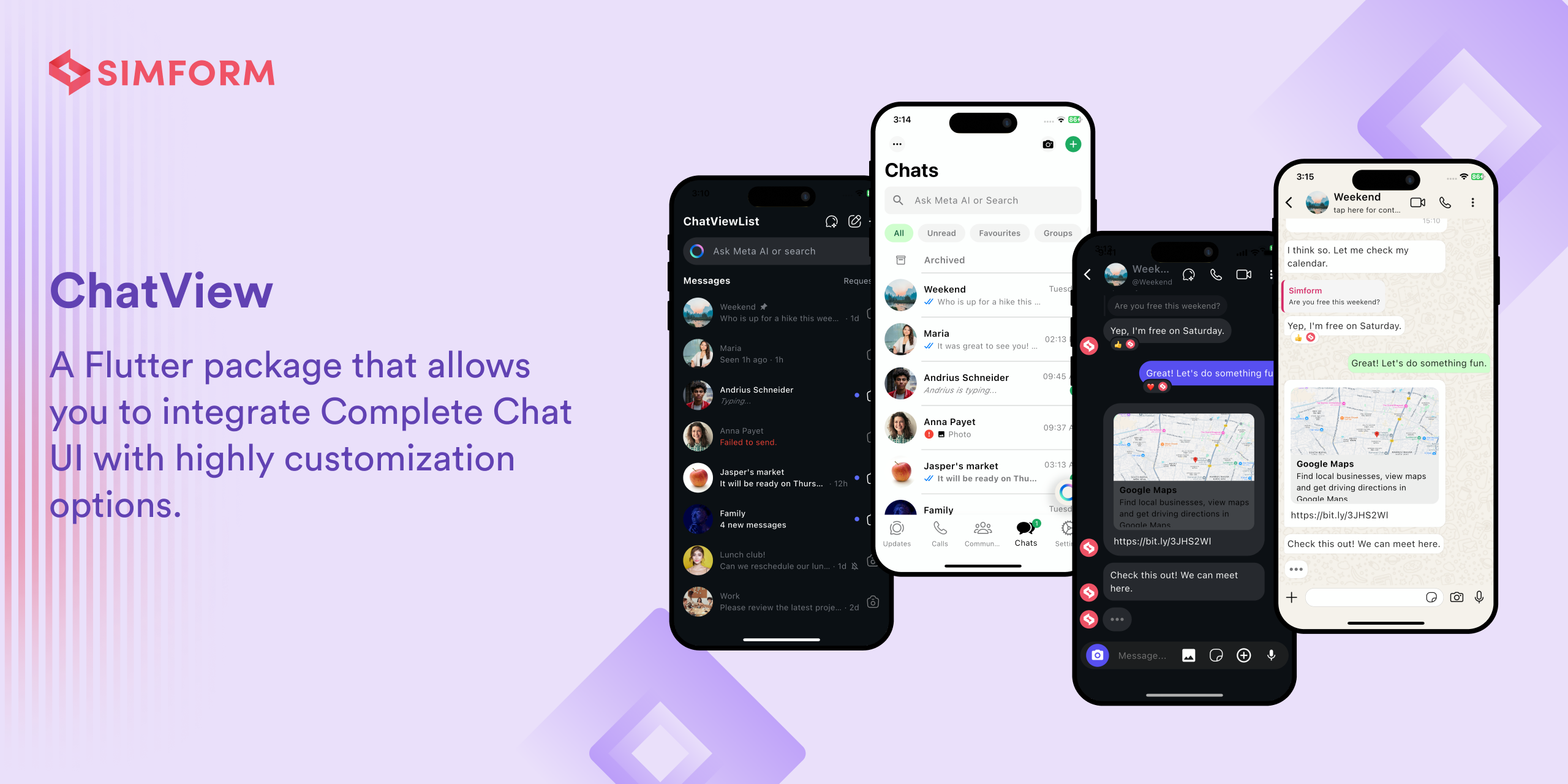


ChatView is a Flutter package that allows you to integrate a highly customizable chat UI in your Flutter applications with Flexible Backend Integration.
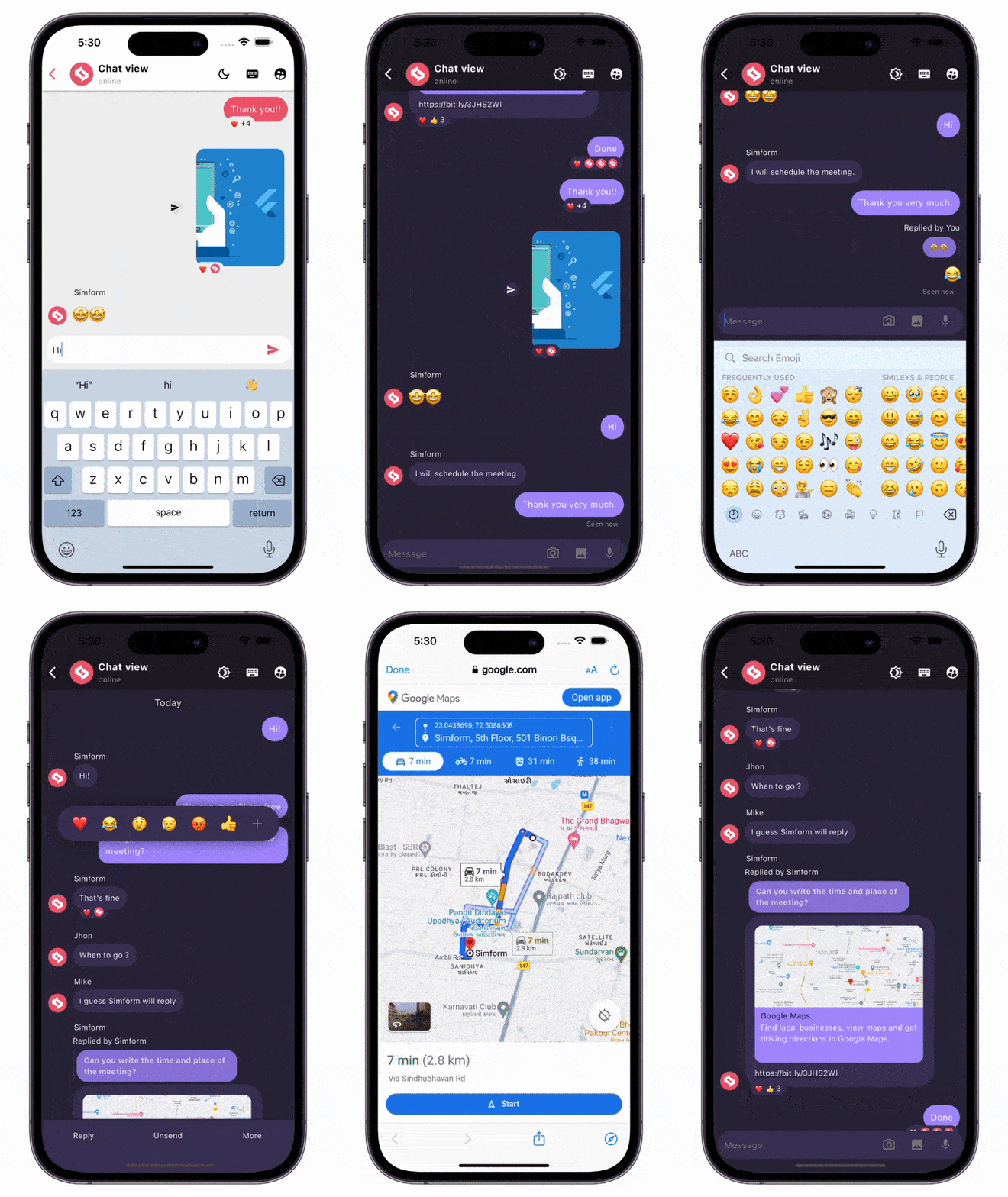
- One-on-one and group chat support
- Message reactions with emoji
- Reply to messages functionality
- Link preview for URLs
- Voice messages support
- Image sharing capabilities
- Custom message types
- Typing indicators
- Reply suggestions
- Message status indicators (sent, delivered, read)
- Highly customizable UI components
- Plug-and-play backend support using chatview_connect
Visit our documentation site for all implementation details, usage instructions, code examples, and advanced features.
-
Moved
currentUserfield fromChatViewwidget toChatControllerclass -
Updated
idvalue incopyWithmethod ofMessageto have correct value. -
Removed
showTypingIndicatorfield fromChatViewand replaced it withChatController.showTypingIndicator.Before:
ChatView(
  showTypingIndicator:false,
),
After:
/// use it with your [ChatController] instance.
_chatContoller.setTypingIndicator = true; // for showing indicator
_chatContoller.setTypingIndicator = false; // for hiding indicator
-
Updated
ChatUser,MessageandReplyMessageData Model'sfromJsonandtoJsonmethods:Before:
ChatUser.fromJson(
  {
    ...
    'imageType': ImageType.asset,
    ...
  },
),
After:
ChatUser.fromJson(
  {
    ...
    'imageType': 'asset',
    ...
  },
),
Before:
{
  ...
  imageType: ImageType.asset,
  ...
}
After:
{ ... imageType: asset, ... }Before:
Message.fromJson(
  {
    ...
    'createdAt': DateTime.now(),
    'message_type': MessageType.text,
    'voice_message_duration': Duration(seconds: 5),
    ...
  }
)
After:
Message.fromJson(
  {
    ...
    'createdAt': '2024-06-13T17:32:19.586412',
    'message_type': 'text',
    'voice_message_duration': '5000000',
    ...
  }
)
Before:
{
  ...
  createdAt: 2024-06-13 17:23:19.454789,
  message_type: MessageType.text,
  voice_message_duration: 0:00:05.000000,
  ...
}
After:
{ ... createdAt: 2024-06-13T17:32:19.586412, message_type: text, voice_message_duration: 5000000, ... }Before:
ReplyMessage.fromJson(
  {
    ...
    'message_type': MessageType.text,
    'voiceMessageDuration': Duration(seconds: 5),
    ...
  }
)
After:
ReplyMessage.fromJson(
  {
    ...
    'message_type': 'text',
    'voiceMessageDuration': '5000000',
    ...
  }
)
in
ReplyMessage.toJson:Before:
{
  ...
  message_type: MessageType.text,
  voiceMessageDuration: 0:00:05.000000,
  ...
}
After:
{
  ...
  message_type: text,
  voiceMessageDuration: 5000000,
  ...
}
- Add dependency to
pubspec.yaml
dependencies:
  chatview: <latest-version>
Get the latest version in the 'Installing' tab on pub.dev
- Import the package
import 'package:chatview/chatview.dart';- Adding a chat controller.
final chatController = ChatController(
  initialMessageList: messageList,
  scrollController: ScrollController(),
  currentUser: ChatUser(id: '1', name: 'Flutter'),
  otherUsers: [ChatUser(id: '2', name: 'Simform')],
);- Adding a
ChatViewwidget.
ChatView(
  chatController: chatController,
  onSendTap: onSendTap,
  chatViewState: ChatViewState.hasMessages, // Add this state once data is available.
)- Adding a messageList with
Messageclass.
List<Message> messageList = [
  Message(
    id: '1',
    message: "Hi",
    createdAt: createdAt,
    sentBy: userId,
  ),
  Message(
    id: '2',
    message: "Hello",
    createdAt: createdAt,
    sentBy: userId,
  ),
];- Adding a
onSendTap.
void onSendTap(String message, ReplyMessage replyMessage, MessageType messageType){
  final message = Message(
    id: '3',
    message: "How are you",
    createdAt: DateTime.now(),
    sentBy: currentUser.id,
    replyMessage: replyMessage,
    messageType: messageType,
  );
  chatController.addMessage(message);
}
Note: you can evaluate message type from messageType parameter, based on that you can perform operations.
| Message Types | Android | iOS | MacOS | Web | Linux | Windows |
|---|---|---|---|---|---|---|
| Text messages | ✔️ | ✔️ | ✔️ | ✔️ | ✔️ | ✔️ |
| Image messages | ✔️ | ✔️ | ✔️ | ✔️ | ✔️ | ✔️ |
| Voice messages | ✔️ | ✔️ | ❌ | ❌ | ❌ | ❌ |
| Custom messages | ✔️ | ✔️ | ✔️ | ✔️ | ✔️ | ✔️ |
- Add the following keys to your Info.plist file, located in
<project root>/ios/Runner/Info.plist:
    <key>NSCameraUsageDescription</key>
    <string>Used to demonstrate image picker plugin</string>
    <key>NSMicrophoneUsageDescription</key>
    <string>Used to capture audio for image picker plugin</string>
    <key>NSPhotoLibraryUsageDescription</key>
    <string>Used to demonstrate image picker plugin</string>
- Add this two rows in
ios/Runner/Info.plist
    <key>NSMicrophoneUsageDescription</key>
    <string>This app requires Mic permission.</string>
- This plugin requires ios 10.0 or higher. So add this line in
Podfile
platform :ios, '10.0'
- Change the minimum Android sdk version to 21 (or higher) in your android/app/build.gradle file.
minSdkVersion 21
- Add RECORD_AUDIO permission in
AndroidManifest.xml
<uses-permission android:name="android.permission.RECORD_AUDIO"/>
- Enable and disable specific features with
FeatureActiveConfig.
ChatView(
  ...
  featureActiveConfig: FeatureActiveConfig(
    enableSwipeToReply: true,
    enableSwipeToSeeTime: false,
  ),
  ...
)- Adding an appbar with
ChatViewAppBar.
ChatView(
  ...
  appBar: ChatViewAppBar(
    profilePicture: profileImage,
    chatTitle: "Simform",
    userStatus: "online",
    actions: [
      Icon(Icons.more_vert),
    ],
  ),
  ...
)- Adding a message list configuration with
ChatBackgroundConfigurationclass.
ChatView(
  ...
  chatBackgroundConfig: ChatBackgroundConfiguration(
    backgroundColor: Colors.white,
    backgroundImage: backgroundImage,
  ),
  ...
)- Adding a send message configuration with
SendMessageConfigurationclass.
ChatView(
  ...
  sendMessageConfig: SendMessageConfiguration(
    replyMessageColor: Colors.grey,
    replyDialogColor:Colors.blue,
    replyTitleColor: Colors.black,
    closeIconColor: Colors.black,
  ),
  ...
)- Adding a chat bubble configuration with
ChatBubbleConfigurationclass.
ChatView(
  ...
  chatBubbleConfig: ChatBubbleConfiguration(
    onDoubleTap: (){
       // Your code goes here
    },
    outgoingChatBubble: ChatBubble(      // Sender's message chat bubble
      color: Colors.blue,
      borderRadius: const BorderRadius.only(
        topRight: Radius.circular(12),
        topLeft: Radius.circular(12),
        bottomLeft: Radius.circular(12),
      ),
    ),
    incomingChatBubble: ChatBubble(      // Receiver's message chat bubble
      color: Colors.grey.shade200,
      borderRadius: const BorderRadius.only(
        topLeft: Radius.circular(12),
        topRight: Radius.circular(12),
        bottomRight: Radius.circular(12),
      ),
    ),
  )
  ...
)- Adding swipe to reply configuration with
SwipeToReplyConfigurationclass.
ChatView(
  ...
  swipeToReplyConfig: SwipeToReplyConfiguration(
    onLeftSwipe: (message, sentBy){
        // Your code goes here
    },
    onRightSwipe: (message, sentBy){
        // Your code goes here
    },
  ),
  ...
)- Adding messages configuration with
MessageConfigurationclass.
ChatView(
  ...
  messageConfig: MessageConfiguration(
    messageReactionConfig: MessageReactionConfiguration(),      // Emoji reaction configuration for single message
    imageMessageConfig: ImageMessageConfiguration(
      onTap: (){
          // Your code goes here
      },
      shareIconConfig: ShareIconConfiguration(
        onPressed: (){
           // Your code goes here
        },
      ),
    ),
  ),
  ...
)- Adding reaction pop-up configuration with
ReactionPopupConfigurationclass.
ChatView(
  ...
  reactionPopupConfig: ReactionPopupConfiguration(
    backgroundColor: Colors.white,
    userReactionCallback: (message, emoji){
      // Your code goes here
    }
    padding: EdgeInsets.all(12),
    shadow: BoxShadow(
      color: Colors.black54,
      blurRadius: 20,
    ),
  ),
  ...
)- Adding reply pop-up configuration with
ReplyPopupConfigurationclass.
ChatView(
  ...
  replyPopupConfig: ReplyPopupConfiguration(
    backgroundColor: Colors.white,
    onUnsendTap:(message){                   // message is 'Message' class instance
       // Your code goes here
    },
    onReplyTap:(message){                    // message is 'Message' class instance
       // Your code goes here
    },
    onReportTap:(){
       // Your code goes here
    },
    onMoreTap:(){
       // Your code goes here
    },
  ),
  ...
)- Adding replied message configuration with
RepliedMessageConfigurationclass.
ChatView(
   ...
   repliedMessageConfig: RepliedMessageConfiguration(
     backgroundColor: Colors.blue,
     verticalBarColor: Colors.black,
     repliedMsgAutoScrollConfig: RepliedMsgAutoScrollConfig(),
   ),
   ...
)- For customizing typing indicators use
typingIndicatorConfigwithTypeIndicatorConfig.
ChatView(
  ...

  typingIndicatorConfig: TypingIndicatorConfiguration(
    flashingCircleBrightColor: Colors.grey,
    flashingCircleDarkColor: Colors.black,
  ),
  ...
)
- For showing hiding typeIndicatorwidget use
ChatController.setTypingIndicaor, for more info seeChatController.
/// use it with your [ChatController] instance.
_chatContoller.setTypingIndicator = true; // for showing indicator
_chatContoller.setTypingIndicator = false; // for hiding indicator- Adding linkpreview configuration with
LinkPreviewConfigurationclass.
ChatView(
  ...
  chatBubbleConfig: ChatBubbleConfiguration(
    linkPreviewConfig: LinkPreviewConfiguration(
      linkStyle: const TextStyle(
        color: Colors.white,
        decoration: TextDecoration.underline,
      ),
      backgroundColor: Colors.grey,
      bodyStyle: const TextStyle(
        color: Colors.grey.shade200,
        fontSize:16,
      ),
      titleStyle: const TextStyle(
        color: Colors.black,
        fontSize:20,
      ),
    ),
  )
  ...
)- Adding pagination.
ChatView(
  ...
  isLastPage: false,
  featureActiveConfig: FeatureActiveConfig(
    enablePagination: true,
  ),
  loadMoreData: chatController.loadMoreData,
  ...
)- Add image picker configuration.
ChatView(
  ...
  sendMessageConfig: SendMessageConfiguration(
    enableCameraImagePicker: false,
    enableGalleryImagePicker: true,
    imagePickerIconsConfig: ImagePickerIconsConfiguration(
      cameraIconColor: Colors.black,
      galleryIconColor: Colors.black,
    )
  )
  ...
)- Add
ChatViewStatecustomisations.
ChatView(
  ...
  chatViewStateConfig: ChatViewStateConfiguration(
    loadingWidgetConfig: ChatViewStateWidgetConfiguration(
      loadingIndicatorColor: Colors.pink,
    ),
    onReloadButtonTap: () {},
  ),
  ...
)- Setting auto scroll and highlight config with
RepliedMsgAutoScrollConfigclass.
ChatView(
    ...
    repliedMsgAutoScrollConfig: RepliedMsgAutoScrollConfig(
      enableHighlightRepliedMsg: true,
      highlightColor: Colors.grey,
      highlightScale: 1.1,
    )
    ...
)- Callback when a user starts/stops typing in
TextFieldConfiguration
ChatView(
    ...
      sendMessageConfig: SendMessageConfiguration(

          textFieldConfig: TextFieldConfiguration(
            onMessageTyping: (status) {
                // send composing/composed status to other client
                // your code goes here
            },


        /// After typing stopped, the threshold time after which the composing
        /// status to be changed to [TypeWriterStatus.typed].
        /// Default is 1 second.
            compositionThresholdTime: const Duration(seconds: 1),

        ),
    ...
  )
)- Passing customReceipts builder or handling stuffs related receipts see
ReceiptsWidgetConfigin outgoingChatBubble.
ChatView(
   ...
      featureActiveConfig: const FeatureActiveConfig(
            /// Controls the visibility of message seen ago receipts default is true
            lastSeenAgoBuilderVisibility: false,
            /// Controls the visibility of the message [receiptsBuilder]
            receiptsBuilderVisibility: false),
       ChatBubbleConfiguration(
          incomingChatBubble: ChatBubble(
            onMessageRead: (message) {
              /// send your message reciepts to the other client
              debugPrint('Message Read');
            },

          ),
          outgoingChatBubble: ChatBubble(
              receiptsWidgetConfig: ReceiptsWidgetConfig(
                      /// custom receipts builder
                      receiptsBuilder: _customReceiptsBuilder,
                      /// whether to display receipts in all
                      /// message or just at the last one just like instagram
                      showReceiptsIn: ShowReceiptsIn.lastMessage
              ),
            ),
        ),

  ...

)- Flag
enableOtherUserNameto hide user name in chat.
ChatView(
   ...
      featureActiveConfig: const FeatureActiveConfig(
        enableOtherUserName: false,
      ),
   ...

)- Added report button for receiver message and update
onMoreTapandonReportTapcallbacks.
ChatView(
   ...
      replyPopupConfig: ReplyPopupConfiguration(
        onReportTap: (Message message) {
          debugPrint('Message: $message');
        },
        onMoreTap: (Message message, bool sentByCurrentUser) {
          debugPrint('Message : $message');
        },
      ),
   ...
)- Added
emojiPickerSheetConfigfor configuration of emoji picker sheet.
ChatView(
   ...
      emojiPickerSheetConfig: Config(
        emojiViewConfig: EmojiViewConfig(
          columns: 7,
          emojiSizeMax: 32,
          recentsLimit: 28,
          backgroundColor: Colors.white,
        ),
        categoryViewConfig: const CategoryViewConfig(
          initCategory: Category.RECENT,
          recentTabBehavior: RecentTabBehavior.NONE,
        ),
  ...

)- Configure the styling & audio recording quality using
VoiceRecordingConfigurationin sendMessageConfig.
ChatView(
    ...
      sendMessageConfig: SendMessageConfiguration(

            voiceRecordingConfiguration: VoiceRecordingConfiguration(
            iosEncoder: IosEncoder.kAudioFormatMPEG4AAC,
            androidOutputFormat: AndroidOutputFormat.mpeg4,
            androidEncoder: AndroidEncoder.aac,
            bitRate: 128000,
            sampleRate: 44100,
            waveStyle: WaveStyle(
                showMiddleLine: false,
                waveColor: theme.waveColor ?? Colors.white,
                extendWaveform: true,
            ),
        ),

    ...
  )
)- Added
enabledto enable/disable chat text field.
ChatView(
   ...
      sendMessageConfig: SendMessageConfiguration(
      ...
        textFieldConfig: TextFieldConfig(
          enabled: true // [false] to disable text field.
        ),
      ...
      ),
  ...

)- Added flag
isProfilePhotoInBase64that defines whether provided image is url or base64 data.
final chatController = ChatController(
  ...
    chatUsers: [
      ChatUser(
        id: '1',
        name: 'Simform',
        isProfilePhotoInBase64: false,
        profilePhoto: 'ImageNetworkUrl',
      ),
    ],
  ...
);

ChatView(
   ...
      profileCircleConfig: const ProfileCircleConfiguration(
        isProfilePhotoInBase64: false,
        profileImageUrl: 'ImageNetworkUrl',
      ),
   ...
)- Added
chatSeparatorDatePatterninDefaultGroupSeparatorConfigurationto separate chats with provided pattern.
ChatView(
    ...
      chatBackgroundConfig: ChatBackgroundConfiguration(
        ...
          defaultGroupSeparatorConfig: DefaultGroupSeparatorConfiguration(
            chatSeparatorDatePattern: 'MMM dd, yyyy'
          ),
        ...
      ),
    ...
)- Field
cancelRecordConfigurationto provide an configuration to cancel voice record message.
ChatView(
   ...
      sendMessageConfig: SendMessageConfiguration(
        ...
           cancelRecordConfiguration: CancelRecordConfiguration(
            icon: const Icon(
              Icons.cancel_outlined,
            ),
            onCancel: () {
              debugPrint('Voice recording cancelled');
            },
            iconColor: Colors.black,
           ),
        ...
      ),
   ...

)- Added callback of onTap on list of reacted users in reaction sheet
reactedUserCallback.
ChatView(
   ...
      messageConfig: MessageConfiguration(
      ...
        messageReactionConfig: MessageReactionConfiguration(
          reactionsBottomSheetConfig: ReactionsBottomSheetConfiguration(
            reactedUserCallback: (reactedUser, reaction) {
              debugPrint(reaction);
            },
          ),
        ),
      ...
      ),
  ...
),- Added a
customMessageReplyViewBuilderto customize reply message view for custom type message.
ChatView(
  ...
    messageConfig: MessageConfiguration(
      customMessageBuilder: (ReplyMessage state) {
        return Text(
        state.message,
        maxLines: 1,
        overflow: TextOverflow.ellipsis,
        style: const TextStyle(
          fontSize: 12,
          color: Colors.black,
          ),
        );
      },
    ),
  ...
)- Add default avatar for profile image
defaultAvatarImage, error builder for asset and network profile imageassetImageErrorBuildernetworkImageErrorBuilder, EnumImageTypeto define image as asset, network or base64 data.
ChatView(
  ...
      appBar: ChatViewAppBar(
        defaultAvatarImage: defaultAvatar,
        imageType: ImageType.network,
        networkImageErrorBuilder: (context, url, error) {
          return Center(
            child: Text('Error $error'),
          );
        },
        assetImageErrorBuilder: (context, error, stackTrace) {
          return Center(
            child: Text('Error $error'),
          );
        },
      ),
  ...
),- Added a
customMessageReplyViewBuilderto customize reply message view for custom type message.
ChatView(
  ...
    messageConfig: MessageConfiguration(
      customMessageBuilder: (ReplyMessage state) {
        return Text(
        state.message,
        maxLines: 1,
        overflow: TextOverflow.ellipsis,
        style: const TextStyle(
          fontSize: 12,
          color: Colors.black,
          ),
        );
      },
    ),
  ...
)- Added a
replyMessageBuilderto customize view for the reply.
ChatView(
  ...
    replyMessageBuilder: (context, state) {
      return Container(
        decoration: const BoxDecoration(
          color: Colors.white,
          borderRadius: BorderRadius.vertical(
            top: Radius.circular(14),
          ),
        ),
        margin: const EdgeInsets.only(
          bottom: 17,
          right: 0.4,
          left: 0.4,
        ),
        padding: const EdgeInsets.fromLTRB(10, 10, 10, 30),
          child: Container(
            padding: const EdgeInsets.symmetric(
              horizontal: 6,
            ),
            decoration: BoxDecoration(
              color: Colors.grey.shade200,
              borderRadius: BorderRadius.circular(12),
            ),
            child: Column(
              mainAxisSize: MainAxisSize.min,
              children: [
                Row(
                  mainAxisAlignment: MainAxisAlignment.spaceBetween,
                  children: [
                    Expanded(
                      child: Text(
                        state.message,
                        maxLines: 1,
                        overflow: TextOverflow.ellipsis,
                        style: const TextStyle(
                          fontWeight: FontWeight.bold,
                        ),
                      ),
                    ),
                    IconButton(
                      constraints: const BoxConstraints(),
                      padding: EdgeInsets.zero,
                      icon: const Icon(
                        Icons.close,
                        size: 16,
                      ),
                      onPressed: () => ChatView.closeReplyMessageView(context),
                    ),
                  ],
                ),
              ],
            ),
          ),
        );
    },
  ...
)- Reply Suggestions functionalities.
- Add reply suggestions
_chatController.addReplySuggestions([
      SuggestionItemData(text: 'Thanks.'),
      SuggestionItemData(text: 'Thank you very much.'),
      SuggestionItemData(text: 'Great.')
]);- Remove reply suggestions
_chatController.removeReplySuggestions();- Update suggestions Config
replySuggestionsConfig: ReplySuggestionsConfig(
    itemConfig: SuggestionItemConfig(
        decoration: BoxDecoration(),
        textStyle: TextStyle(),
        padding: EdgetInsets.all(8),
        customItemBuilder: (index, suggestionItemData) => Container()
    ),
    listConfig: SuggestionListConfig(
        decoration: BoxDecoration(),
        padding: EdgetInsets.all(8),
        itemSeparatorWidth: 8,
        axisAlignment: SuggestionListAlignment.left
    )
    onTap: (item) =>
        _onSendTap(item.text, const ReplyMessage(), MessageType.text),
    autoDismissOnSelection: true
),- Added callback
messageSorterto sort message inChatBackgroundConfiguration.
ChatView(
   ...
      chatBackgroundConfig: ChatBackgroundConfiguration(
      ...
        messageSorter: (message1, message2) {
          return message1.createdAt.compareTo(message2.createdAt);
        }
      ...
     ),
  ...
),- Use
ScrollToBottomButtonConfigto change the configuration of scroll to bottom button.
ChatView(
  ...
    scrollToBottomButtonConfig: ScrollToBottomButtonConfig(

),
  ...
),Check out blog for better understanding and basic implementation.
Also, for whole example, check out the example app in the example directory or the 'Example' tab on pub.dartlang.org for a more complete example.
 Vatsal Tanna |
 Dhvanit Vaghani |
 Ujas Majithiya |
 Apurva Kanthraviya |
 Aditya Chavda |
This project is licensed under the MIT License - see the LICENSE.