⚡ A blazing-fast, reliable, and feature-packed Telegram bot for streaming music in group voice chats — built with Go.



- 🎶 High-Quality Audio: Enjoy crystal-clear and uninterrupted playback.
- 🧠 Smart Queue System: Manage your playlist with ease — play, skip, or reorder.
- ⏯️ Full Playback Control: Commands for pause, resume, skip, seek, and replay.
- 🛡️ Admin Tools: Secure command access for group administrators.
- ⚙️ Fully Configurable: Customize everything through environment variables.
- 🪶 Lightweight & Efficient: Designed for performance even under heavy use.
Note
🔸 Video playback is not supported.
🔸 Only YouTube and Telegram audio files are supported.
Note
💡 To set up music downloading from YouTube, see the Configuration section below — it explains how to use the Fallen API or cookies for downloads.
- 🐹 Go: Version
1.24or higher - 🎧 FFmpeg: Required for audio processing
- Clone the Repository:
git clone https://github.com/TheTeamVivek/YukkiMusic.git
cd YukkiMusic
- Install FFmpeg:
sudo apt update && sudo apt install ffmpeg -y
- Configure:
cp sample.env .env
nano .env
Fill in the configuration variables as shown below.
- Install Dependencies & Run:
go mod tidy
bash setup_ntgcalls.sh
go build -o app ./cmd/app
./app
- Click the “Deploy to Heroku” button above.
- Fill in all required environment variables.
- Hit “Deploy app” — and you’re live! 🚀
All settings are managed using a .env file or environment variables.
| Variable | Description |
|---|---|
API_ID |
Telegram API ID — get it from my.telegram.org. |
API_HASH |
Telegram API Hash — get it from my.telegram.org. |
TOKEN |
Bot token from @BotFather. |
MONGO_DB_URI |
MongoDB connection string. |
STRING_SESSION |
Pyrogram session string for the assistant client. |
| Variable | Description | Default |
|---|---|---|
FALLEN_API_KEY |
API key for the Fallen API (YouTube downloader). You can get one from @FallenApiBot. If you are using cookies, you can leave this empty. | (empty) |
FALLEN_API_URL |
Base URL for the Fallen API. For most users, the default should work fine. | https://tgmusic.fallenapi.fun |
OWNER_ID |
User ID of the bot owner. | |
LOGGER_ID |
Chat ID for logging errors and events. | (empty) |
DURATION_LIMIT |
Maximum track duration in seconds. | 4200 (70 minutes) |
QUEUE_LIMIT |
Maximum queue size per chat. | 7 |
START_IMG_URL |
Start image URL for /start message. |
Default Image |
SUPPORT_CHAT |
Support group link. | @TheTeamVk |
SUPPORT_CHANNEL |
Update channel link. | @TheTeamVivek |
COOKIES_LINK |
The batbin.me link where you pasted your yt-dlp cookies file. If you are using the Fallen API, you can leave this empty. You can also skip this if you manually place your cookies .txt file in internal/cookies/. |
(empty) |
SET_CMDS |
Set bot commands automatically on startup. | false |
MAX_AUTH_USERS |
Max number of authorized users per chat. | 25 |

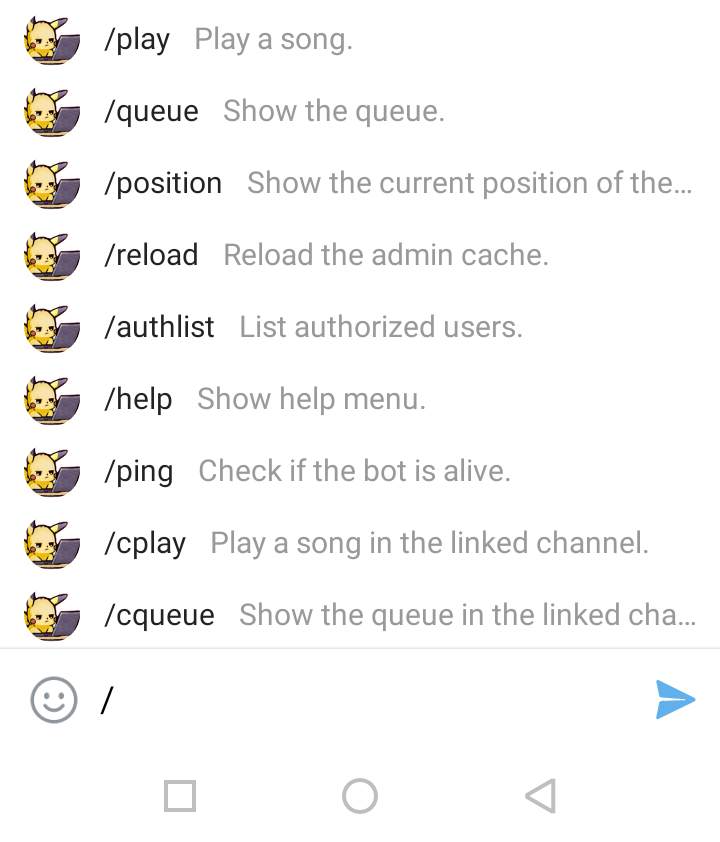
Type /help in your bot’s chat to view the complete list of available commands.
YukkiMusic supports multiple methods to handle YouTube downloads.
You can use any one of the following approaches depending on your setup.
If you have your own YouTube cookies files:
- Place one or more
.txtfiles inside:
internal/cookies/
- Each file should follow the format:
internal/cookies/<filename>.txt
- The bot will automatically detect and randomly use a cookie file from this directory at runtime.
💡 You can store multiple cookie files to reduce rate-limiting.
If you prefer to host your cookies online:
- Go to batbin.me.
- Paste your full cookies content there and save.
- Copy the resulting link (for example,
https://batbin.me/abcd1234). - Add it in your variables or in
.envfile like this:
COOKIES_LINK=https://batbin.me/abcd1234
⚙️ The bot will automatically fetch and save the cookies from your Batbin link into the
internal/cookies/folder during startup.
⚡ 3. Using Fallen API
The simplest and most reliable method for most users.
The Fallen API handles YouTube extraction and downloading on the server side — no cookies required.
- Get your API key from @FallenApiBot.
- In your
.envfile:
FALLEN_API_KEY=your_api_key_here
FALLEN_API_URL=https://tgmusic.fallenapi.fun
- If you don’t have a key, you can leave it empty.
💡 Recommended for users who don’t want to manage cookies manually.
If you have your own API endpoint or downloader implementation,
contact us at @TheTeamVk —
we’ll provide ready-to-use code templates that you can integrate directly for your setup.
✅ Summary:
- Use Fallen API for the easiest setup (paid).
- Use cookies if you don’t want to pay for an API.
- Or contact us for a custom solution if you want to use your own API.
YukkiMusic is powered by a modular Platform System — a flexible framework that allows it to fetch and download music from multiple sources like YouTube, Telegram, and more.
Each platform works independently but connects seamlessly through a priority-based registry, ensuring the bot always picks the most efficient source for every query. ⚙️
📖 Learn More:
➡️ 📘 YukkiMusic Platform System
💡 The Platform System is perfect for developers who want to add custom APIs, new music sources, or modify fetching logic without touching the bot’s core.
Contributions are welcome and appreciated!
- 🍴 Fork the repo
- ✨ Make your changes
- 💌 Submit a pull request
You can also open an issue if you find bugs or have feature requests.
💬 Telegram: @TheTeamVk
📂 GitHub Issues: Report a Problem
🧾 This project is licensed under the GNU GPLv3 License — see the LICENSE file for details.