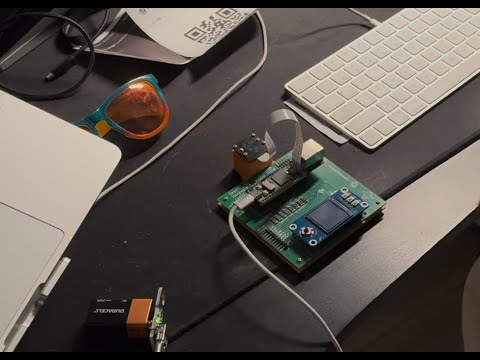
Port of the SeedSigner code to support the LuckFox Pico Linux board family. Since this device is still an embedded Linux device, like the Raspberry Pi, the changes are fairly minimal in order to access the buttons and the camera. This repo mostly pertains to the Buildroot OS build instructions, the KiCAD schematic and PCB design files, and 3D models of cases for the assembled device.
SeedSigner code fork: https://github.com/lightningspore/seedsigner/tree/0.8.5-luckfox
Most Recent Iteration: LuckFox Pico Mini B with no onboard SPI flash


Previous Iteration: LuckFox Pico Pro Max (More Flash, SPI Flash)


Check out the shopping list for a parts list of various LuckFox-based hardware configurations: here
These example builds can build a device for around $60.
The OS image is built using Buildroot in a Docker container. The complete build instructions, package requirements, and troubleshooting process are documented in OS-build-instructions.md.

Developing for the LuckFox Pico device is quite convenient since the devices never connect to the internet and you can access the device shell using adb. You can push files back and forth to your dev machine, and you can access the device as a shell easily.
# mac
brew install homebrew/cask/android-platform-tools

# linux
sudo apt install android-tools-adb
- Connect to the device:
# List connected devices
adb devices

# Connect to device shell
adb shell
- File Operations:
# Push files to device
adb push local_file.txt /remote/path/

# Sync the code repo for local development
adb push /repos/seedsigner/src /seedsigner

# Pull files from device
adb pull /seedsigner/config.json .

# List files on device
adb shell ls /path/to/directory
Notice the left device has an empty PCB footprint pattern on it. This is where the optional SPI flash is soldered on. For the SeedSigner project we don't want permanent storage, so avoid devices with soldered SPI flash.
LEFT:  LuckFox Pico Mini A -> No Flash
RIGHT: LuckFox Pico Mini B -> Soldered Flash

sudo dd bs=4M status=progress if=seedsigner-luckfox-pico-YYYYmmdd_hhmmss.img of=/dev/diskX
Replace /dev/diskX with your actual SD card device path.
We have forked the LuckFox Pico SDK in order to enable various hardware features like pull-up resistors, adjust video RAM, and other things.
The LuckFox devotes some of its memory for camera-related algorithms, but we don't use this feature. Particularly on the LuckFox Pico Mini device, which only has 64MB of RAM, it is beneficial for us to reclaim a bit of this memory.
Memory usage WITHOUT modification:
[root@luckfox ]# free -h
              total        used        free      shared  buff/cache   available
Mem:          33.0M       24.3M        1.4M      476.0K        7.3M        5.4M
Swap:             0           0           0
Memory usage WITH modification:
[root@luckfox ]# free -h
              total        used        free      shared  buff/cache   available
Mem:          53.0M       23.6M        1.9M      472.0K       27.5M       25.3M
Swap: 0 0 0Our current dev board has external pull-up resistors, since we didn't know how to enable these at the time, and it is always smart to plan ahead when designing PCBs. NOTE: Even with this commit and this change, the internal pull-ups don't seem to work.
While it is possible to send SPI data in chunks, you can increase the SPI buffer size to slightly increase throughput, which is useful for larger displays.
In order to control the LCD screen backlight and support true dimming of the display (instead of just changing the background color of the QR code, for example), we had to enable a PWM on a specific output pin.
If you find this project helpful and would like to support its development, you can buy me a coffee! Your support helps keep this project going and funds future improvements. Help decentralize Bitcoin hardware!
