Claude Code token usage & cost — always visible in your VS Code status bar.








vscode-claude-status is a Visual Studio Code extension that monitors your Claude Code usage in real time — without leaving your editor.
It reads session data from ~/.claude/projects/ locally (no extra network calls)
and queries the Anthropic API at most once per 5 minutes to fetch rate-limit
utilization headers. All token costs are calculated client-side using configurable
per-token rates (defaults: Claude Sonnet 4.x pricing).
Note
API calls are minimal and only happen while Claude Code is active.
The rate-limit API call fires only when a JSONL file was recently updated —
when you stop using Claude Code, the extension stops calling the API entirely.
Each call uses ≈ 9 tokens of claude-haiku-4-5 (≈ $0.00013).
Typical cost with default settings: < $0.01 / month.
Set claudeStatus.rateLimitApi.enabled: false to stop all new API calls.
If a prior cache exists, the last-fetched rate-limit % is still shown with a [Xm ago]
staleness indicator. Without any cache, the display falls back to cost-only.
Warning
Cost figures are estimates. Default rates are based on Anthropic's publicly
announced pricing at the time of implementation and may not reflect future changes.
If pricing changes, update the claudeStatus.pricing.* settings to match the
latest rates on the Anthropic pricing page.
Real-time usage summary pinned to the VS Code status bar.
| State | Example |
|---|---|
| Normal (% mode, Claude.ai Max) | 🤖 5h:45% 7d:62% |
| Warning ≥ 75% | 🤖 5h:78%⚠ 7d:84%⚠ |
| Rate limit hit | 🤖 5h:100%✗ |
| 5h-only plan (no 7d window) | 🤖 5h:45% |
| Cost mode | 🤖 5h:$14.21 7d:$53.17 |
| AWS Bedrock / API key (cost only) | 🤖 5h:$0.15 7d:$0.42 |
| With project cost | 🤖 5h:78% 7d:84% | my-app:$3.21 |
| Stale cache | 🤖 5h:78% 7d:84% [10m ago] |
| Not logged in | 🤖 Not logged in |
Hover for a detailed tooltip with full token breakdown and reset times.
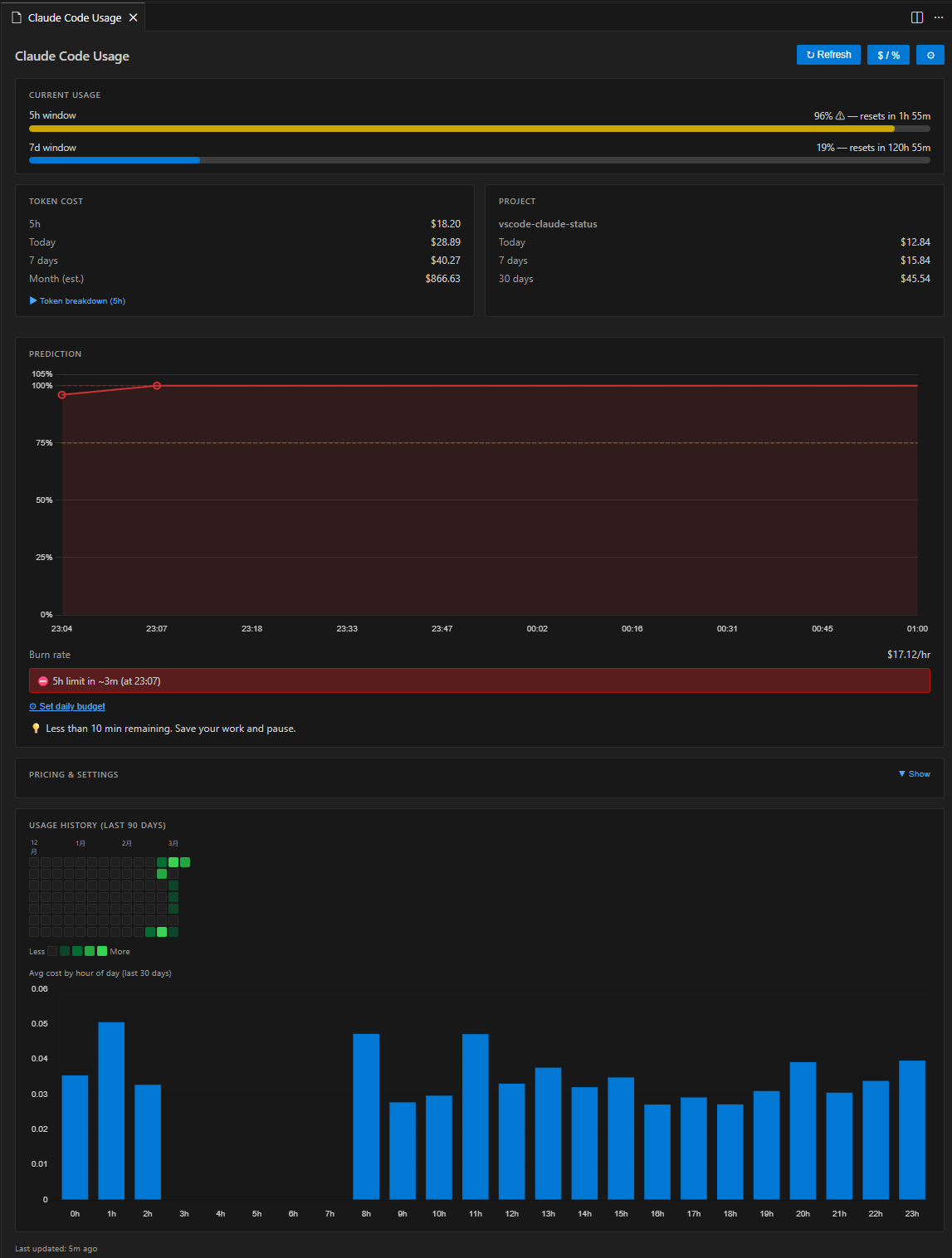
Click the status bar item to open a rich dashboard panel with:
- Current Usage — colour-coded progress bars for 5 h and 7 d windows
- Token Cost — 5 h / today / 7 d / month (est.) costs; expandable token breakdown shows per-type counts (input / output / cache read / cache create) with individual costs and cache hit ratio
- Project Cost — per-workspace breakdown (today / 7 days / 30 days)
- Prediction — burn rate ($/hr), time-to-exhaustion, daily & weekly budget tracking; Rate Limit Timeline chart visualises the projected 5 h utilization from now to reset
- Pricing & Settings — always-visible card showing current token pricing rates, provider, API state, and cache TTL; opens VS Code settings with one click
- Usage History — GitHub-style daily heatmap + hourly pattern bar chart
The panel supports light, dark, and high-contrast VS Code themes natively.
Automatically maps the open workspace folder to its Claude Code session directory and shows how much you've spent for that specific project — today, this week, and this month.
Multi-root workspaces are fully supported: each folder gets its own breakdown in the dashboard, and the status bar shows the aggregate.
🤖 5h:78% 7d:84% | my-app:$3.21          ← single workspace
🤖 5h:78% 7d:84% | PJ:$5.43              ← multi-root aggregate
Based on the last 30 minutes of activity, the extension predicts how long until the 5 h rate limit is exhausted and warns you before it happens.
- Burn rate — current consumption in $/hr (rolling 30-minute window)
- Time-to-exhaustion — estimated minutes until the 5 h window is full, capped at the next window reset time
- Safety indicator — "Safe to start heavy task" if > 30 min remains
- Daily budget — set an optional USD cap; progress bar and alerts fire when the configured threshold (default 80 %) is reached
- Weekly budget — optional USD weekly cap with progress bar (
claudeStatus.budget.weeklyUsd) - VS Code notifications — non-blocking warning at ≤ 30 min, error dialog at ≤ 10 min (with "Open Dashboard" action); budget alert fires once per window
Configure via Settings → Claude Status or the command palette:
Claude Status: Set Budget...
Understand your long-term usage patterns at a glance.
- Daily heatmap — GitHub Contributions-style grid for the last 30 / 60 / 90 days; green intensity reflects daily spend; hover any cell for exact date and cost
- Hourly bar chart — average cost per hour of day (last 30 days); shows when you typically use Claude Code most heavily
Number of days is configurable via claudeStatus.heatmap.days (30 / 60 / 90).
- VS Code 1.109 or newer
- Claude Code CLI with active sessions — the extension reads
~/.claude/projects/**/*.jsonlfor token cost data
Authentication is optional depending on your provider:
| Provider | Authentication | Display |
|---|---|---|
| Claude.ai subscription | claude login (creates ~/.claude/.credentials.json) |
Rate-limit % + cost |
| AWS Bedrock | AWS credentials (env vars or ~/.aws/) |
Cost only |
| Anthropic API key | ANTHROPIC_API_KEY env var |
Cost only |
Note: This extension is developed and tested by the author on a Claude.ai Pro plan (which provides both 5 h and 7 d rate-limit windows).
Other plans and providers — including AWS Bedrock, direct API key, Claude.ai Free, and any plan that exposes only a 5 h window — are supported on a best-effort basis via auto-detection. If you encounter unexpected behaviour on your plan, please open an issue and include your plan type. We will investigate and add support promptly.
Behaviour by plan type:
| Plan | Rate-limit display | 7d window |
|---|---|---|
| Claude.ai Pro / Max (5h + 7d) | 5h:45% 7d:32% |
✅ |
| Claude.ai Pro / any 5h-only tier | 5h:45% |
auto-hidden |
| AWS Bedrock | cost only (5h:$0.15 7d:$0.42) |
N/A |
| Anthropic API key | cost only | N/A |
If auto-detection does not work for your setup, set claudeStatus.claudeProvider
explicitly in VS Code Settings.
Search "Claude Status" in the Extensions panel, or:
code --install-extension long-kudo.vscode-claude-status- Download the
.vsixfrom the Releases page. - In VS Code: Extensions (Ctrl+Shift+X) → ⋯ → Install from VSIX…
git clone https://github.com/long-910/vscode-claude-status.git
cd vscode-claude-status
npm install
npm run package # → vscode-claude-status-*.vsixThe extension activates automatically on VS Code startup (onStartupFinished).
| Action | Result |
|---|---|
| Glance at status bar | Live utilization / cost |
| Click status bar | Open dashboard panel |
Ctrl+Shift+Alt+C (⌘⇧⌥C on Mac) |
Toggle % ↔ $ display mode |
| Claude Status: Refresh Now | Force API refresh |
| Claude Status: Open Dashboard | Open dashboard panel |
| Claude Status: Toggle % / $ Display | Switch display mode |
| Claude Status: Set Budget… | Set or disable daily USD budget |
All settings are under the claudeStatus namespace in VS Code Settings.
| Setting | Type | Default | Description |
|---|---|---|---|
claudeStatus.displayMode |
"percent" | "cost" |
"percent" |
Status bar display mode |
claudeStatus.statusBar.alignment |
"left" | "right" |
"left" |
Status bar position |
claudeStatus.statusBar.showProjectCost |
boolean |
true |
Show project cost in status bar |
claudeStatus.cache.ttlSeconds |
number (60–3600) |
300 |
API cache TTL in seconds |
claudeStatus.rateLimitApi.enabled |
boolean |
true |
Fetch rate-limit % from Anthropic API. When disabled, no new API calls are made; cached % is still shown with a staleness indicator ([Xm ago]) if available |
claudeStatus.realtime.enabled |
boolean |
false |
Poll rate-limit API every TTL seconds (requires rateLimitApi.enabled) |
claudeStatus.budget.dailyUsd |
number | null |
null |
Daily budget in USD (null = disabled) |
claudeStatus.budget.weeklyUsd |
number | null |
null |
Weekly budget in USD |
claudeStatus.budget.alertThresholdPercent |
number (1–100) |
80 |
Budget alert threshold % |
claudeStatus.notifications.rateLimitWarning |
boolean |
true |
Warn when rate limit is near |
claudeStatus.notifications.rateLimitWarningThresholdMinutes |
number (5–120) |
30 |
Minutes before limit to show warning |
claudeStatus.notifications.budgetWarning |
boolean |
true |
Warn when budget threshold exceeded |
claudeStatus.heatmap.days |
30 | 60 | 90 |
90 |
Days shown in usage heatmap |
claudeStatus.credentials.path |
string | null |
null |
Custom credentials file path |
claudeStatus.claudeProvider |
"auto" | "claude-ai" | "aws-bedrock" | "api-key" |
"auto" |
Provider type (auto-detect or explicit) |
claudeStatus.pricing.inputPerMillion |
number |
3.00 |
USD per 1M input tokens |
claudeStatus.pricing.outputPerMillion |
number |
15.00 |
USD per 1M output tokens |
claudeStatus.pricing.cacheReadPerMillion |
number |
0.30 |
USD per 1M cache-read tokens |
claudeStatus.pricing.cacheCreatePerMillion |
number |
3.75 |
USD per 1M cache-creation tokens |
| Feature | Status |
|---|---|
| Data layer (JSONL reader, API client, cache) | ✅ v0.1.0 |
| Status bar with % / $ display | ✅ v0.1.0 |
| WebView dashboard skeleton | ✅ v0.1.0 |
| Project-level cost tracking | ✅ v0.1.0 |
| Usage prediction & budget alerts | ✅ v0.2.0 |
| Session history heatmap | ✅ v0.3.0 |
| VS Code Marketplace publication | ✅ v0.3.0 |
| Rate Limit Timeline chart | ✅ v0.4.0 |
| Token breakdown with cache efficiency | ✅ v0.4.0 |
| Monthly cost projection | ✅ v0.4.0 |
| Weekly budget progress bar | ✅ v0.4.0 |
| Pricing & Settings card in dashboard | ✅ v0.4.0 |
| i18n — English / Japanese / Chinese | ✅ v0.4.1 |
- claude-tmux-status — tmux status bar version (same author, Python)
- vscode-view-charset — file encoding viewer (same author)
Contributions are welcome. See CONTRIBUTING.md for setup instructions, architecture overview, and release procedures.
MIT — © 2026 long-910
