Python plug-in for CGI Softwares.
It provide simple tools to create visually a hotbox menus, simply manage them and use them in the main software.
main coder: Lionel Brouyère, Herizo Ran
contributor: Vincent Girès
tester: David Vincze, Vincent Girès
| Software | Implementation state | Application as string | Hotkey setter |
|---|---|---|---|
| Autodesk Maya | done | 'maya' | available |
| Foundry Nuke | done | 'nuke' | available |
| Autodesk 3dsMax | planned | undefined | Not available |
| SideFX Houdini | done | 'houdini' | Not available |
| Rumba Animation | done | 'rumba' | available |
For each software who provide python and support PySide2/PyQt5, the implementation should be easy.
place the "hotbox_designer" folder into the maya script folder
| os | path |
|---|---|
| linux | ~/< username >/maya |
| windows | \Users<username>\Documents\maya |
| mac os x | ~/Library/Preferences/Autodesk/maya |
Place the "hotbox_designer" folder into ~/.nuke or make it available in PYTHONPATH
Add this script to menu.py or make it available in NUKE_PATH:
import nuke
import hotbox_designer
from hotbox_designer.applications import Nuke
from hotbox_designer.manager import HotboxManager

nuke_app = Nuke()
hotbox_manager = HotboxManager(nuke_app)

nuke_menu = nuke.menu('Nuke')
menu = nuke_menu.addMenu('Hotbox Designer')
menu.addCommand(
    name='Manager',
    command=hotbox_manager.show)
nuke_app.create_menus()
Hotkeys are saved in ~/.nuke/hotbox_hotkey.json.
To delete it, right now, the only way is to delete it in the file.
Important: A bug appear on some windows version. Nuke execute the init file before to create his guy, which fail the hotbox designer execution. This initialization has to be delayed later. Then read this page to find the actual solution found: #10
soon
Locate the "hotbox_designer" folder and make it available in
RUMBA_USER_PLUGINS environment variable.
Add this script in a python file menu.py and make it available in
RUMBA_USER_PLUGINS environment variable.
"""Hotbox Designer integration for Rumba."""

import rumbapy
from PySide2 import QtCore
from rumbapy.WidgetPlugins import register_ui, UIPluginOptions


class HotboxDesigner(QtCore.QObject):

    def __init__(self, parent=None):
        super(HotboxDesigner, self).__init__(parent)
        from hotbox_designer.applications import Rumba
        rumba_app = Rumba()
        rumba_app.create_menus()


register_ui(HotboxDesigner, "Hotbox Designer", UIPluginOptions(
    auto_create=True))
Hotkeys are saved in ~/.rumba/hotbox_hotkey.json.
import hotbox_designer
hotbox_designer.launch_manager('maya') # or any other available application name as stringfrom hotbox_designer import load_json, HotboxWidget
# it can be integrated in a layout of an parent widget
widget = HotboxWidget()
# That can be changed interactively
hotbox_data = load_json(r"your exported hotbox as json filepath")
widget.set_hotbox_data(hotbox_data)Example of an template explorer
from hotbox_designer import HotboxWidget, load_templates
from PySide2 import QtWidgets, QtCore

class HotboxTemplateNavigator(QtWidgets.QWidget):
    def __init__(self, *args, **kwargs):
        super(HotboxTemplateNavigator, self).__init__(*args, **kwargs)
        self.templates = load_templates()
        items = [d['general']['name'] for d in self.templates]
        self.combo = QtWidgets.QComboBox()
        self.combo.addItems(items)
        self.combo.currentIndexChanged.connect(self.combo_index_changed)
        self.hotbox_widget = HotboxWidget()

        self.layout = QtWidgets.QVBoxLayout(self)
        self.layout.addWidget(self.combo)
        self.layout.addWidget(self.hotbox_widget)
        self.layout.addStretch(1)

    def combo_index_changed(self):
        index = self.combo.currentIndex()
        data = self.templates[index]
        self.hotbox_widget.set_hotbox_data(data)
        size = QtCore.QSize(data["general"]["width"], data["general"]["height"])
        self.hotbox_widget.setFixedSize(size)
        self.adjustSize()


hotbox_template_navigator = HotboxTemplateNavigator(None, QtCore.Qt.Window)
hotbox_template_navigator.show()The application is separated in three parts:
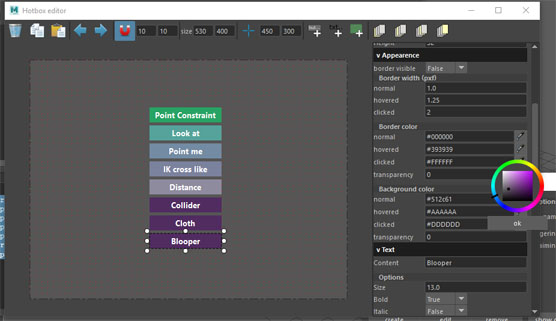
this is the hotbox design part. It look like a simple version of QtDesigner
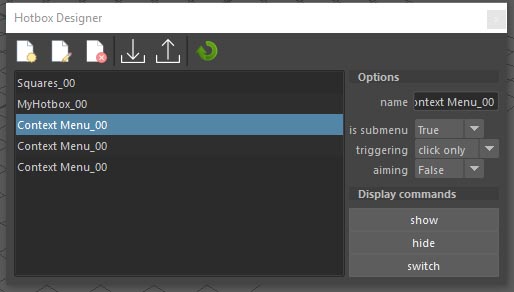
its a simple ui who let manage multiple hotboxes and save them
this contains the final hotbox widget. That's what is called when you use your menu as final product.