This is a function for opening (or flattening (or normalizing)) struct fields in a pyspark dataframe.
import pyspark.sql.types as T
import pyspark.sql.functions as F
import builtins as b

def StructNormalizer(df):
  def SchemaIterator(schema, root=True, prefix=[]):
    f = []
    for c in schema:
      if c.dataType.typeName() == "struct":
        f += SchemaIterator(schema=c.dataType, root=False, prefix=[*prefix, c.name])
      elif not root:
        f.append([*prefix, c.name])
    return f
  nested_cols = SchemaIterator(df.schema)
  s = []
  for c in df.columns:
    if c not in [x[0] for x in nested_cols]:
      s.append(F.col(c))
    else:
      s += [F.col(".".join(x)).alias("_".join(x)) for x in b.filter(None, [x if x[0] == c else None for x in nested_cols])]
return df.select(*s)Let's say that you have this dataframe:
import pyspark.sql.types as T
import pyspark.sql.functions as F

df = spark.createDataFrame([
  {
    "id": "1",
    "address": {
      "street": "av paulista",
      "number": "1005",
      "location": {"country": "Brasil", "state": "São Paulo", "city": "São Paulo"}
    },
    "bio": {"name": "Paulo", "gender": "masculino"},
    "telefones": [
      {"code": "11", "number": "999887766"},
      {"code": "11", "number": "33445566"}
    ],
    "references": ["Joao Joanesson", "Maria Marilda"]
  },
  {
    "id": "2",
    "address": {
      "street": "av central",
      "number": "444",
      "location": {"country": "Brasil", "state": "Parana", "city": "Curitiba"}
    },
    "bio": {"name": "Ana", "gender": "feminino"},
    "telefones": [
      {"code": "44", "number": "991919292"},
      {"code": "44", "number": "41235678"}
    ],
    "references": ["Marcos Marques", "Felipe Felipino", "Carlos Carolino"]
  }
], schema=T.StructType([
  T.StructField("id", T.StringType(), True),
  T.StructField("address", T.StructType([
    T.StructField("street", T.StringType(), True),
    T.StructField("number", T.StringType(), True),
    T.StructField("location", T.StructType([
      T.StructField("country", T.StringType(), True),
      T.StructField("state", T.StringType(), True),
      T.StructField("city", T.StringType(), True)
    ]), True)
  ]), True),
  T.StructField("bio", T.StructType([
    T.StructField("name", T.StringType(), True),
    T.StructField("gender", T.StringType(), True),
  ]), True),
  T.StructField("telefones", T.ArrayType(T.StructType([
    T.StructField("code", T.StringType(), True),
    T.StructField("number", T.StringType(), True)
  ])), True),
  T.StructField("references", T.ArrayType(T.StringType()), True)
]))
The current schema contains struct fields, in other words, nested values. If you print it, you will se this:
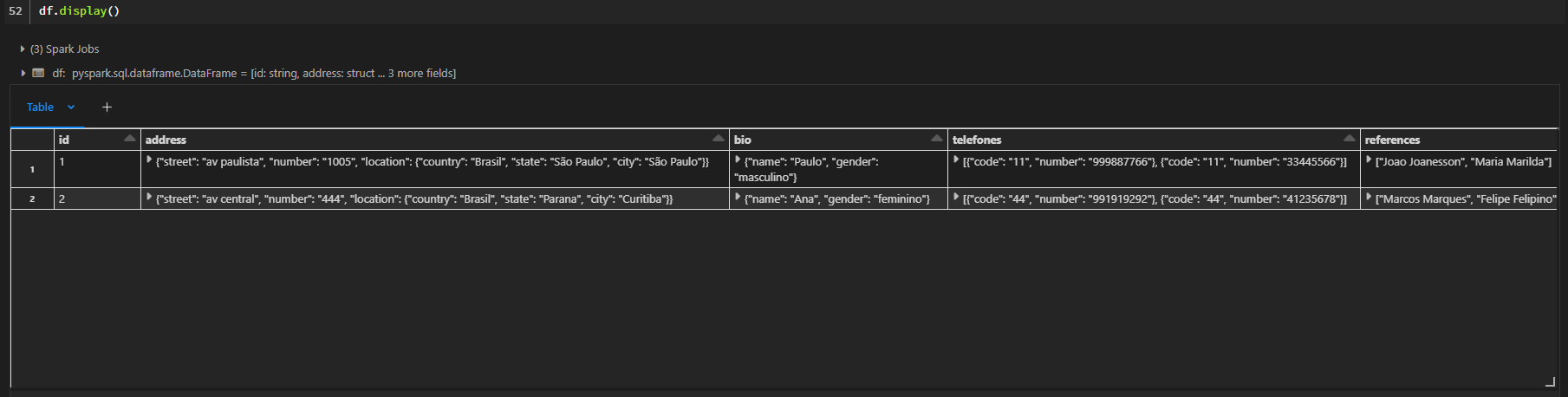
If you want to take all those values out, you will need to normalize the dataframe, you can use the function in this way:
new_df = StructNormalizer(df)And by doing that, all the struct fields will be avaliable at simple columns in the dataframe, preserving their data types:

And its done!
The normalize function don't explode any array fields, it will stop at any field of this type. That's because the explode strategy needs to be carefully chosed with the data context in mind. If you need to go further, normalize the dataframe first and then apply the chosed explode strategy in each column that you want, and if you want, you can use the function again for normalize any struct field inside those new exploded columns.