A real-time computer vision system that analyzes football (soccer) shooting technique using a single camera. The system detects shots, tracks player pose and ball movement, and provides biomechanical feedback on shooting form.
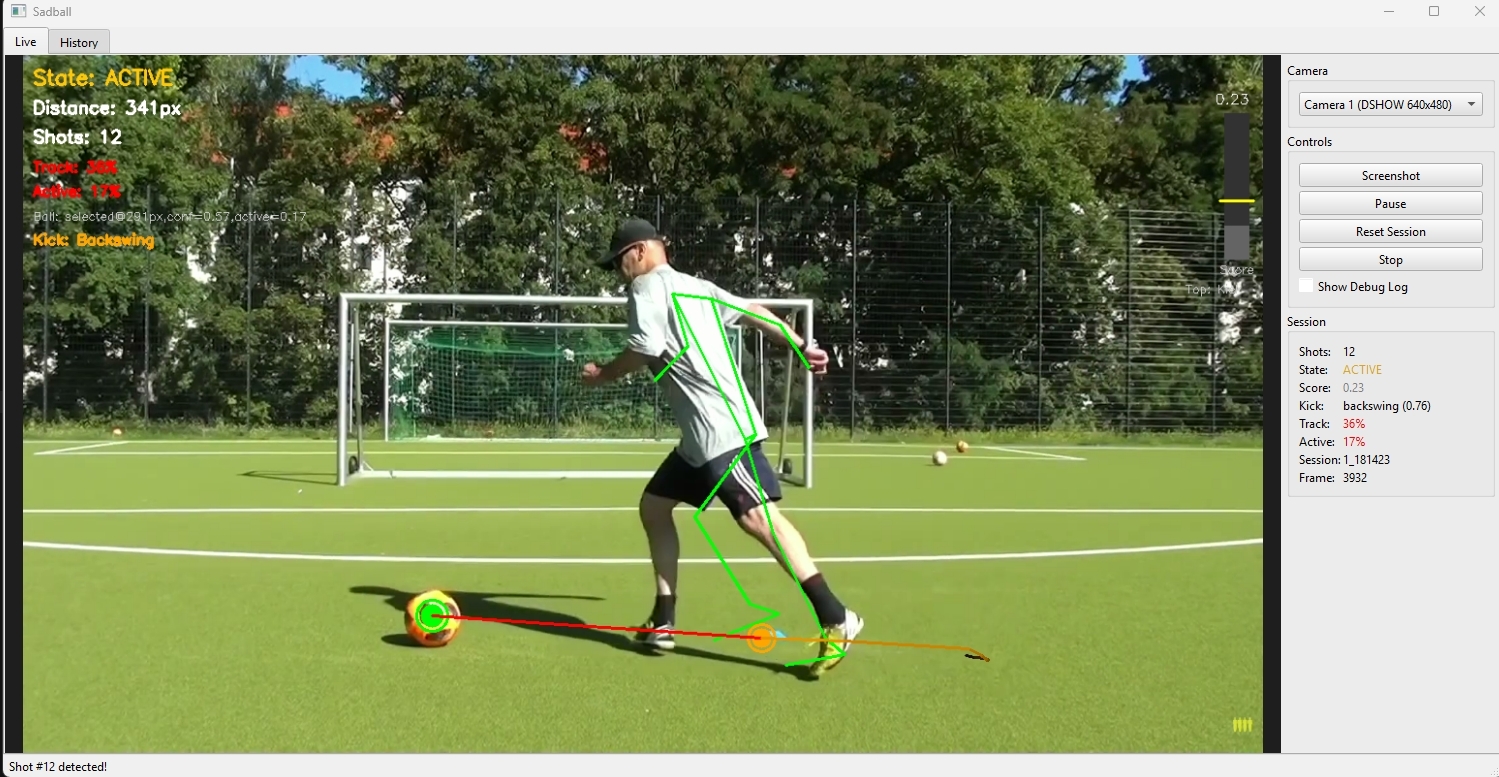
| Area | Status | Notes |
|---|---|---|
| Core Pipeline | ✅ Production | Pose + ball tracking, two-tier shot detection, form analysis |
| UI (PySide6) | ✅ Production | Live view, history browser, shot detail pages, notes |
| AI Feedback | ✅ Production | OpenAI, Gemini, Anthropic with --ai-feedback |
| TCN ML Pipeline | 🧪 Experimental | Record temporal windows → label → train → optional inference |
| Physics Validation | ✅ Production | Ball acceleration, foot speed, momentum, scoring |
| Biomechanics | ✅ Production | Joint angles, kinetic chain, DSI23-Capstone improvements |
| Configuration | ✅ Production | .env for YOLO_MODEL_PATH, CAMERA_ID, AI_PROVIDER, BALL_TRACKER_CONFIG |
Recent additions:
- TCN (Temporal Convolutional Network) – Records 15-channel temporal windows during sessions; optional ML-based shot confirmation (
models/shot_tcn.onnxormodels/shot_tcn.pt) when trained model is present - Training tools –
training/label_shots.py,training/train_tcn.py,training/evaluate_tcn.pyfor ML pipeline - DSI23-Capstone improvements – Enhanced joint angles (ankles, knees, hips, shoulders) and polynomial feature engineering; see
IMPROVEMENTS.md
Core Principle: The system follows a measurement → analysis → feedback pipeline where:
- Computer vision extracts structured data (pose, ball position, velocities)
- Two-tier shot detection validates shot events (Tier 1: skeleton-only detection, Tier 2: physics-based validation)
- Biomechanical rule-based analysis evaluates technique against professional standards
- Optional AI-powered feedback generates personalized coaching advice
Camera → Frame Capture → Pose Tracking + Ball Tracking → Shot Detection (Two-Tier) → Form Analysis → AI Feedback (Optional) → Logging
- Modular Components: Each subsystem (tracking, detection, analysis) is independent
- Shared YOLO Model: Single YOLO instance shared between ball and person detection for efficiency
- Two-Tier Detection: Tier 1 uses skeleton-only detection, Tier 2 validates with pose+physics scoring
- Physics-Based Scoring: Continuous scoring validates shots using momentum transfer evidence
- Multi-Signal + Multi-Frame: No single frame can define a shot - requires temporal consistency
- Adaptive Thresholds: Distance and velocity thresholds adapt to player size/scale
- UI System: Full PySide6 (Qt) UI with live view, history browser, and shot detail pages
- AI-Powered Feedback: Optional AI integration (OpenAI, Gemini, or Anthropic) for personalized coaching
- ✅ Automatic shot detection - Two-tier detection with physics-based validation
- ✅ Pose tracking - MediaPipe for 33 joints with OneEuroFilter smoothing
- ✅ Ball tracking - YOLO detection + ByteTrack-inspired algorithm + Kalman filtering
- ✅ Physics metrics - Force, power, momentum transfer, energy efficiency estimates
- ✅ Biomechanical analysis - Joint angles, kinetic chain, balance assessment
- ✅ Pro comparison - Technique compared against elite player standards
- ✅ AI-powered feedback - Multi-provider AI coaching: OpenAI, Gemini, or Anthropic (optional)
- ✅ Shot logging - Screenshots, metadata, and detailed analysis saved
- ✅ Full UI - Live view, history browser, shot detail pages with PySide6 (Qt)
- ✅ Notes system - Add notes to individual shots
- ✅ Debug visualization - Real-time score bar, tracking quality, and state indicators
- ✅ Adaptive thresholds - Automatically adjusts to player size and camera distance
- Python 3.9+ (Python 3.10+ recommended)
- Webcam or video source
- A trained YOLO model for football/soccer ball detection (see Training Your Own Model below)
- MediaPipe pose model files (see Required Model Files)
- API key for OpenAI, Gemini, or Anthropic (optional, for AI feedback)
python -m venv venv
venv\Scripts\activate
pip install -r requirements.txtpython3 -m venv venv
source venv/bin/activate
pip install -r requirements.txt# Copy environment file
cp .env.example .env
# Edit .env with your settings:
# - YOLO_MODEL_PATH: Path to YOLO ball model (default: ./models/best.pt)
# - CAMERA_ID: Camera device ID (default: 0)
# - AI_PROVIDER: openai | gemini | anthropic | auto (for --ai-feedback)
# - BALL_TRACKER_CONFIG: Path to ball tracker YAML (default: config/ball_tracker.yaml)
# - OPENAI_API_KEY / GEMINI_API_KEY / ANTHROPIC_API_KEY: Optional, for AI coaching- YOLO weights: Place your trained model file as
models/best.pt(see Training Your Own Model) - MediaPipe pose model: Download from MediaPipe and place in
task_files/:pose_landmarker_lite.task(fastest, lower accuracy)pose_landmarker_full.task(balanced)pose_landmarker_heavy.task(slowest, highest accuracy)
This project requires a YOLO model trained to detect footballs/soccer balls. The model weights are not included in this repository — you need to train your own.
- Get a dataset: Use a football/soccer ball detection dataset from Roboflow Universe or create your own
- Train the model:
# Install ultralytics if not already installed
pip install ultralytics

# Train YOLO on your dataset (example with YOLOv8 nano)
yolo train model=yolov8n.pt data=path/to/your/dataset.yaml epochs=100 imgsz=640
- Copy the weights: After training, copy
runs/detect/train/weights/best.pttomodels/best.pt
The model should detect the sports ball class (COCO class 32) or a custom football/soccer ball class.
python main.py# Beginner level with detailed logs
python main.py --level beginner --detailed-logs
# Advanced level with AI feedback
python main.py --level advanced --ai-feedback
# Custom model path and camera
python main.py --model ./path/to/your/model.pt --camera 1
# Full options
python main.py --level intermediate --detailed-logs --ai-feedback --model ./models/best.pt --camera 0| Argument | Default | Description |
|---|---|---|
--level |
intermediate |
Player skill level: beginner, intermediate, advanced |
--model |
./models/best.pt |
Path to YOLO model weights file |
--camera |
0 |
Camera device ID |
--ai-feedback |
off | Enable AI-powered coaching feedback |
--ai-provider |
auto |
AI provider: openai, gemini, anthropic, or auto |
--detailed-logs |
off | Enable detailed shot detection algorithm logs |
--no-ui |
off | Run in terminal-only mode (no GUI) |
qor ESC: Quit session- Mouse: Click buttons and navigate UI
- Scroll: Scroll through shot history
- View real-time camera feed with analysis overlay
- Sidebar shows session stats and shot count
- Real-time pose skeleton and ball tracking visualization
- Shot detection score bar with threshold indicator
- Click "History" button to view captured shots
- Click "Quit" button to exit
- Browse all captured shots as thumbnails
- Click any shot to view details
- Scroll to see more shots
- Click "Back" to return to live view
- View full-size screenshot of shot
- Physics metrics display (force, power, momentum, efficiency)
- Biomechanics metrics display (joint angles, kinetic chain)
- Technique corrections list
- AI feedback display (if enabled)
- Phase timeline visualization (approach, backswing, contact, follow-through)
- Notes editor - add/edit notes about the shot
- Navigation to previous/next shot
- Click "Back" to return to history
- Continuous camera feed at configurable FPS (default: 60)
- Maintains 2-second rolling buffer for temporal analysis
- Timestamps all frames
- MediaPipe Pose extracts 33 joint positions
- OneEuroFilter smoothing reduces jitter while maintaining responsiveness
- Computes joint angles (knee, hip, ankle)
- Calculates body centers (hip, shoulder)
- Tracks foot positions for contact detection
- YOLO detection - Shared model for ball and person detection
- Multi-stage filtering:
- Quality gates (confidence, size constraints)
- Foot proximity filter (primary signal)
- Horizon filter (rejects sky detections)
- Temporal consistency (2 of last 4 frames)
- Target switch detection (prevents false tracking of background balls)
- Kalman filtering - 6-state filter with adaptive noise:
- Position, velocity, acceleration tracking
- Adaptive process/measurement noise based on ball speed
- Jitter suppression for stationary balls
- Target selection - Chooses ball closest to feet
- Switch detection - Detects when tracker jumps to different ball
Key Innovation: Two-tier detection maximizes recall (Tier 1) and precision (Tier 2).
- Uses only pose data (no ball tracking required)
- Detects kicking motion patterns via
KickingPatternAnalyzer - Triggers when foot speed spike + foot-to-hip proximity detected
- High recall but may have false positives
- Activates when Tier 1 fires
- Requires ball tracking to be active
- Validates with physics-based scoring from
ShotScorer - Uses temporal buffers for multi-frame validation
- Filters out false positives from Tier 1
Physics Scoring Formula:
score = w_d × distance_score + w_f × foot_speed_score + w_a × ball_accel_score +
        w_θ × alignment_score + w_τ × temporal_score + w_c × causality_score
Features Scored:
- Ball-foot distance (closer = higher score)
- Foot speed (normalized, must be >100 px/s)
- Ball acceleration (critical signal, distinguishes shot from dribble)
- Direction alignment (foot pointing toward ball)
- Temporal alignment (foot peaks before ball accelerates)
- Directional causality (foot toward ball AND ball away from foot)
State Machine:
- IDLE: Waiting for foot to approach ball
- TRACKING: Foot near ball, accumulating evidence
- CONFIRMING: Score above threshold × 0.8, multi-frame validation
- SHOT: Shot confirmed, 1-second cooldown
Requirements for Detection:
- Tier 1 must detect kicking motion
- Tier 2 must validate with physics scoring
- Score > 0.40-0.45 for 2+ consecutive frames
- Local maximum exists within window
- Hard requirement: Ball must accelerate (>500 px/s² minimum)
Rolling buffers (15 frames) maintain:
- Ball position, velocity, acceleration history
- Foot position and speed for both feet
- Contact point marking
- Pre-contact velocity retrieval
- Kicking motion detection
- Impulse detection for kick events
Purpose: Retrospectively identifies the exact contact frame after a shot is detected.
Algorithm:
- Search backward from detection frame to find velocity spike onset
- Use ball acceleration impulse detection
- Cross-reference with foot position history
- Return precise contact frame index for accurate form analysis
Phases Detected:
- Approach: Player moving toward ball
- Backswing: Kicking leg preparing to strike
- Contact: Foot-ball contact
- Follow-Through: Leg extension after contact
Physics Metrics:
- Ball speed (m/s and km/h)
- Estimated force (Newtons) and power (Watts)
- Momentum transfer efficiency (0-1)
- Energy efficiency (0-1)
- Estimated contact time (ms)
Biomechanics Metrics:
- Joint angles (kicking leg and support leg)
- Kinetic chain score (sequential activation 0-1)
- Hip-shoulder separation
- Balance assessment (COM over base)
- Muscle activation estimates
Pro Comparison: Technique compared against elite standards:
- Instep drive: knee angle 140-165°, hip 150-175°, speed 90-130 km/h
- Side foot: knee angle 130-150°, hip 140-160°, speed 50-80 km/h
- Power shot: knee angle 150-175°, hip 160-180°, speed 100-140 km/h
If enabled and an API key is configured (OpenAI, Gemini, or Anthropic):
- Generates comprehensive coaching feedback
- Provides physics and biomechanics explanations
- References professional players
- Adapts language to player level (beginner/intermediate/advanced)
- Generates session summaries with trends
- Fallback to template-based feedback if API unavailable
Every detected shot saves:
- Screenshot at shot moment (
shots/screenshots/) - Shot metadata (
shots/shot_log.json) - Detailed analysis (
shots/detailed_analysis_log.json) - Ball tracker debug info (
shots/ball_tracker_debug.json) - Detection logs (
shots/detection_logs/shot_detection_log.json)
- Add/edit/delete per-shot text notes
- Persistent storage with shot logs
- UI integration for note editing in detail page
.
├── main.py                              # Main entry point, session orchestrator
├── requirements.txt                     # Python dependencies
├── LICENSE                              # MIT license
├── .env.example                         # Environment variable template
├── cameras.py                           # Camera utilities
├── capture/
│   └── camera.py                        # Camera capture and frame buffering
├── tracking/
│   ├── pose_tracker.py                  # MediaPipe pose estimation + OneEuroFilter
│   ├── ball_tracker.py                  # YOLO ball detection + Kalman + multi-stage filtering
│   ├── person_detector.py               # YOLO person detection
│   └── touch_detector.py               # Touch/contact detection utilities
├── logic/
│   ├── shot_detector.py                 # Two-tier shot detection + optional TCN inference
│   ├── shot_scorer.py                   # Physics-based continuous scoring
│   ├── temporal_buffers.py              # Temporal buffers for multi-frame analysis
│   ├── contact_finder.py                # Retrospective contact frame identification
│   ├── kicking_analyzer.py              # Skeleton-only kicking pattern detection
│   ├── shot_logger.py                   # Shot logging and screenshots
│   ├── feature_extractor.py             # Feature extraction from shot data
│   ├── notes_manager.py                 # Per-shot notes management
│   ├── pose_landmarks.py                # Foot anchor and pose landmark helpers
│   └── tcn_data_recorder.py             # TCN temporal window recorder for ML training
├── analysis/
│   ├── form_analyzer.py                 # Physics + biomechanics + pro comparison
│   ├── phase_segmenter.py               # Shot phase segmentation
│   ├── temporal_analyzer.py              # Multi-phase temporal analysis
│   ├── technique_rules.py               # Rule-based technique analysis
│   └── ball_tracker_log_analyzer.py     # Debug log analysis tool
├── feedback/
│   ├── llm_client.py                    # AI-powered coaching feedback
│   ├── providers.py                     # Multi-provider AI support
│   └── image_utils.py                   # Image handling for AI feedback
├── ui/
│   ├── main_window.py                   # Main application window (PySide6)
│   ├── live_widget.py                   # Live video view with overlay
│   ├── history_widget.py                # Shot browser with thumbnails
│   ├── detail_widget.py                 # Shot detail with full analysis
│   └── frame_worker.py                  # Background frame processing
├── training/                             # ML training pipeline (experimental)
│   ├── label_shots.py                   # Label TCN windows for shot/near-miss
│   ├── train_tcn.py                     # Train ShotTCN with stratified CV
│   ├── evaluate_tcn.py                  # Evaluate TCN vs baseline classifier
│   ├── baseline_classifier.py           # Phase 0 baseline for comparison
│   └── tcn_model.py                     # ShotTCN PyTorch model + ONNX export
├── config/
│   ├── ball_tracker.yaml                # Ball tracker configuration
│   └── bytetrack_football.yaml          # ByteTrack tracker configuration
├── models/
│   ├── best.pt                          # Your trained YOLO model (not included)
│   ├── shot_tcn.onnx                    # Optional: trained TCN for inference
│   └── shot_tcn.pt                      # Optional: trained TCN (PyTorch)
├── task_files/
│   └── pose_landmarker_*.task           # MediaPipe pose models (not included)
├── TRAINING_GUIDE.md                    # YOLO/ball detection training guide
├── IMPROVEMENTS.md                      # DSI23-Capstone improvement notes
└── shots/                               # Generated at runtime
    ├── screenshots/                     # Shot screenshots
    ├── shot_log.json                    # Shot metadata
    └── detection_logs/                  # Detection algorithm logs
In tracking/ball_tracker.py:
MIN_CONFIDENCE = 0.40(adaptive: 0.28-0.40 based on ball speed)MAX_FOOT_DISTANCE_RATIO = 0.45(45% of frame diagonal)STRICT_FOOT_DISTANCE = 350pixelsHORIZON_RATIO = 0.15(top 15% is sky)TEMPORAL_WINDOW = 4framesmax_lost_frames = 18
In logic/shot_detector.py:
shot_threshold = 0.40-0.45confirm_frames = 2cooldown = 1.0seconds
In logic/shot_scorer.py:
min_ball_accel = 500.0px/s² (hard minimum)min_foot_speed = 100.0px/s
In logic/kicking_analyzer.py:
FOOT_SPEED_SPIKE_THRESHOLD = 300.0px/sMAX_FOOT_HIP_DISTANCE = 200.0pxMIN_HIP_ROTATION = 15.0degrees
Scoring Weights:
DEFAULT_WEIGHTS = {
    'distance': 0.15,
    'foot_speed': 0.20,
    'ball_accel': 0.30,  # Highest - most discriminative
    'alignment': 0.15,
    'temporal': 0.10,
    'causality': 0.10,
}Configurable via --camera CLI argument:
- Default camera ID: 0 (override with
--camera <id>) - Resolution: 1280x720
- FPS: 60
- Buffer duration: 5.0 seconds
- Pose Tracking: ~30 FPS on modern CPU with GPU acceleration
- YOLO Inference: Runs every 2 frames (~30 FPS effective)
- Shot Detection: <10ms per frame
- UI Rendering: 30 FPS independent of camera FPS
- Overall: Near real-time performance (~30-60 FPS depending on hardware)
- AI Feedback: ~1-2s per shot (async, doesn't block main loop)
- Single Camera: No 3D pose estimation (2D only)
- Fixed Frame of Reference: Assumes stationary camera
- Training Context: Designed for training sessions, not match footage
- Ball Detection: YOLO-based, may need model fine-tuning for different ball types
- Physics Estimates: Force/power calculations are estimates based on 2D data
- AI Feedback Cost: GPT-4 API calls have associated costs
- UI Requirement: Requires display (not headless compatible)
Potential enhancements:
- Multi-camera 3D pose estimation
- Temporal ML models for phase detection
- Player-specific model fine-tuning
- Database for session history and progress tracking
- Web/mobile UI
- Real-time voice feedback
- Video replay with annotations
- Training plan generation
- Integration with wearable sensors
- Cloud-based session storage
Each module can be tested independently:
# Test shot scorer
from logic.shot_scorer import ShotScorer
from logic.temporal_buffers import BallTrackingBuffer, FootTrackingBuffer

scorer = ShotScorer(fps=30.0)
ball_buffer = BallTrackingBuffer()
foot_buffer = FootTrackingBuffer('right')
# Add test data...
shot_detected, event, features = scorer.process_frame(...)

# Test ball tracker
from tracking.ball_tracker import BallTracker
tracker = BallTracker(debug_logging=True)
# Test with frames...
tracker.save_debug_log()

# Test kicking analyzer
from logic.kicking_analyzer import KickingPatternAnalyzer
analyzer = KickingPatternAnalyzer()
# Test with pose data...
is_kicking, reason = analyzer.detect_kicking_motion(foot_buffer, pose_buffer)- Enable
--detailed-logsfor shot detection algorithm analysis - Check
shots/detection_logs/shot_detection_log.jsonfor detection decisions - Check
shots/ball_tracker_debug.jsonfor ball tracking decisions - Check
shots/shot_log.jsonfor all detected shots - Check
shots/detailed_analysis_log.jsonfor physics/biomechanics data - Visual overlay shows:
- Score bar with threshold line
- Current state and distance
- Ball tracking quality
- Dominant feature contributing to score
- Cooldown remaining
Contributions are welcome! Feel free to:
- Fork the repository
- Create a feature branch (
git checkout -b feature/your-feature) - Commit your changes (
git commit -m 'Add your feature') - Push to the branch (
git push origin feature/your-feature) - Open a Pull Request
This project is licensed under the MIT License - see the LICENSE file for details.