








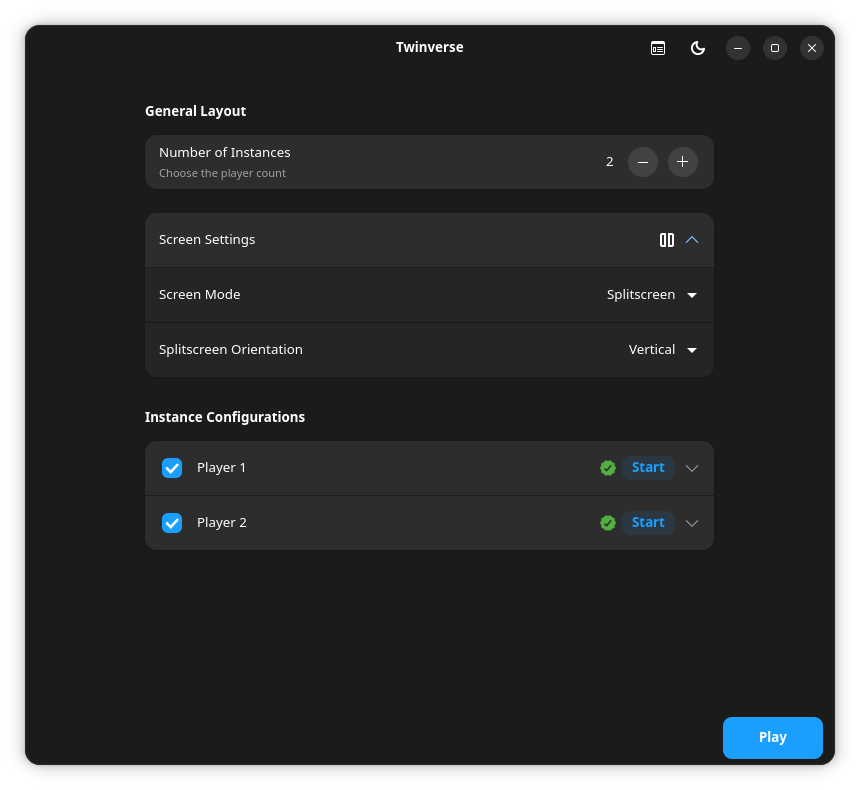
Twinverse is an tool for Linux/SteamOS that allows you to create and manage multiple instances of Steam Big Picture simultaneously. This enables multiple players to enjoy their game library on a single computer, either in split-screen mode or each with their own display, along with dedicated audio output and input devices.
Warning
This project does not support piracy; all players must own the game in their Steam libraries to be able to play it.
Note
Mouse/Keyboard can only be assigned to one instance at a time
Twinverse is designed as a flexible solution for splitscreen gaming on Linux. Here are some of its main features:
-
Multiple Instances: Run multiple instances of Steam Client simultaneously
-
Device Assignment: Assign specific mouse, keyboard, and controller to each game instance
-
Dedicated Audio Channels: Direct audio from each instance to a separate audio output device
-
Dedicated Home Directory: Twinverse allows you to have a dedicated home directory for each instance, enabling individual customization of settings and files
-
Shared Game Folder: Share the Steam game directory across multiple instances, so you don’t need to download the game again for each instance, saving disk space
-
Use Any Proton: Twinverse lets you use any version of Proton to run your games, including custom protons like ProtonGE
-
Play What You Want: Instances are not limited to running the same game; each instance can run a different game
-
Flexible Display Modes: Choose between split screen (up to 4 instances per monitor) or full screen (1 instance per monitor)
horizontal-demo.webm
To use Twinverse without issues, ensure the following requirements are met:
You need to have the native gamescope and steam packages from your distribution installed.
For Gamescope to function correctly, based on your GPU, you will need:
- AMD: Mesa 20.3 or newer
- Intel: Mesa 21.2 or newer
- NVIDIA: Proprietary drivers 515.43.04 or newer, or NVIDIA Open Kernel Module drivers
Note
SteamOS (AMD) and Bazzite generally have all dependencies included by default.
The recommended way to install Twinverse is via Flatpak, which provides a sandboxed environment and easier updates.
Install from a .flatpak file
-
Download the Latest .flatpak file: Go to the Releases page and download the latest
.flatpakfile. -
Install the Flatpak: You can install the Flatpak with the following command:
flatpak install --user Twinverse-*.flatpak
Note
Make sure you have the bubblewrap package installed.
Alternatively, you can use the AppImage version. This single file works on most modern Linux distributions without requiring system installation.
-
Download the Latest AppImage: Go to the Releases page and download the latest
.AppImagefile. -
Make it Executable: After downloading, right-click the file, go to "Properties," and check the "Allow executing file as program" box. Alternatively, you can use the terminal:
chmod +x Twinverse-*.AppImage -
Run the Application: Run the AppImage and enjoy. That's it!
For better system integration (e.g., adding a menu entry), you can use a tool like Gear Lever to manage your AppImage.
The run.sh script provides a quick way to set up a local environment and run the application. It will automatically create a virtual environment and install the necessary dependencies.
# Clone the repository
git clone https://github.com/mall0r/Twinverse.git
cd Twinverse

# Run the launch script
./run.shAccess our Guide for more information on how to use Twinverse.
Twinverse uses Gamescope (which creates the gaming environment and manages composition) and Bubblewrap (bwrap – a tool for building sandbox environments) to isolate each Steam Client instance. In this project, bwrap is used with an extra layer of isolation on top of Gamescope, providing a more robust sandbox and allowing granular control over what should or should not be exposed or masked inside the container. This makes it possible to ignore devices unnecessary for that session or to recreate a dedicated home directory per instance. This allows each Steam to run in its own separate, independent environment. Thus, the instance cannot interfere with your desktop, and your desktop cannot interfere with it.
The final command line is assembled dynamically based on the user's configuration, following a nested structure where Gamescope is the outermost layer, which runs bwrap, which, in turn, launches Steam.
If you wish to contribute to Twinverse, please refer to the CONTRIBUTING for detailed instructions on how to get started, development workflows, and code standards.
This project is licensed under the GNU General Public License v3.0 (GPL-3.0). For more details, see the LICENSE.
Note
Twinverse is an independent open-source project and is not affiliated with, endorsed by, or in any way officially connected to Valve Corporation or Steam.
This tool acts as an orchestration layer that leverages sandboxing technologies to run multiple isolated instances of the official Steam client. Twinverse does not modify, patch, reverse engineer, or alter any Steam files or its normal operation. All Steam instances launched by this tool are the official, unmodified versions provided by Valve.
Users are solely responsible for complying with the terms of the Steam Subscriber Agreement.
This project was inspired by the work of:
- NaviVani-dev and their script dualscope.sh.
- Tau5 and their project Co-op-on-Linux.
- wunnr and their project Partydeck (I recommend using it if you're looking for an approach closer to Nucleus Co-op).
