



A production-ready, batteries-included starter template for building long-lived React applications. It provides opinionated guidelines for the key decisions every team faces at scale:
- Folder structure -- Vertical slice architecture for maintainability and easy extraction into a monorepo.
- State management -- Redux Toolkit 2 for predictable, traceable state with clear separation of concerns.
- Release automation -- Semantic-release for hands-off versioning, changelogs, and tags.
- Code quality -- Biome for blazing-fast linting and formatting in a single tool.
- UI system -- Radix + shadcn/ui + Tailwind CSS 4 for accessible, headless, minimal-dependency components.
- Testing -- Vitest + Testing Library for unit/integration, Cucumber + Playwright for E2E.
- Error tracking -- Sentry with Redux state replay for production debugging.
| Category | Stack |
|---|---|
| Build | Vite 7 + React 19 + SWC + pnpm + TypeScript 5.9 |
| State | Redux Toolkit 2 (includes RTK Query, Immer, Reselect) |
| UI | Radix + shadcn/ui + Tailwind CSS 4 |
| Linting & formatting | Biome |
| Release | Husky + Commitlint + Semantic-release |
| API mocking | MSW (browser + test, powered by @mswjs/data) |
| Unit & integration tests | Vitest 4 + Testing Library |
| E2E tests | Cucumber + Playwright |
| Monitoring | Sentry |
| Security | CodeQL analysis on every push/PR |
| AI-Ready | AGENTS.md — architecture rules and coding conventions for AI assistants |
| Requirement | Version | Notes |
|---|---|---|
| Node.js | 24.x | Defined in .nvmrc. Use fnm or nvm: fnm use / nvm use |
| pnpm | 10.x | corepack enable to activate the bundled version |
npx degit marcoturi/react-redux-boilerplate my-app
cd my-app

pnpm install       # Install dependencies
pnpm create:env    # Create .env from .env.example
pnpm dev # Start dev server at http://localhost:5173| Command | Description |
|---|---|
pnpm dev |
Start development server with HMR |
pnpm build |
Type-check + production build (output in dist/) |
pnpm preview |
Preview the production build locally |
pnpm test |
Run unit and integration tests (Vitest) |
pnpm test:coverage |
Run tests with V8 coverage report |
pnpm e2e:local |
Run E2E tests (start dev server first in another terminal) |
pnpm e2e:debug |
Run only @only-tagged E2E scenarios with --fail-fast |
pnpm check |
Biome lint/format check + TypeScript type check |
pnpm check:fix |
Auto-fix lint/format issues, then type check |
pnpm format |
Format all files with Biome |
pnpm lint |
Lint all files with Biome |
pnpm type:check |
TypeScript type check only (tsc --noEmit) |
pnpm update:interactive |
Update dependencies interactively |
TL;DR -- Embrace vertical slice architecture. Each feature owns its components, state, API calls, and tests.
src/
├── main.tsx                  → App entry point
├── AppProvider.tsx            → Providers (Suspense, Redux, Radix Theme, ErrorBoundary, Router)
├── assets/                   → Static files (images, fonts, etc.)
├── routes/                   → Route definitions + page components (lazy-loaded via React.lazy)
│   ├── index.tsx             → Route tree
│   ├── Home/
│   └── Subscriptions/
├── shared/
│   ├── config/               → Environment variables, Sentry setup
│   ├── helpers/              → Generic utilities (localStorage, style utils, etc.)
│   └── store/                → Redux store setup, base RTK Query API, typed hooks
├── UI/
│   ├── Elements/             → Reusable UI components (shadcn/ui based)
│   └── Layout/               → Page layouts, Header, global CSS
├── features/                 → Feature slices
│   └── <feature>/
│       ├── store/            → Redux slice, selectors, effects, types, specs
│       ├── components/       → Feature-specific React components
│       ├── hooks/            → Feature-specific React hooks
│       └── services/         → Services consumed by Redux
└── test/                     → MSW handlers, mock DB, test utilities
Why vertical slices over alternatives like Atomic Design or Feature-Sliced Design?
- Less navigation -- Feature code lives in one folder, not scattered across layers.
- Easy extraction -- A feature folder can move to a monorepo package with minimal refactoring (helped by
@/path aliases). - Parallel development -- Teams can work on different features without conflicts.
- Simpler testing -- Each feature can be tested in isolation.
Q: What if the features/ folder grows too large?
A: Group related features inside scope folders (e.g., features/billing/invoices/). Aim for no more than ~6 folders at the same level.
Q: I only have a Redux slice with no components. Where does it go?
A: Still in features/. It may grow components later, and a consistent location makes it easy to find.
TL;DR -- Redux keeps state changes predictable and traceable. Combined with Sentry, you get full replay of every user action in production.
Redux Toolkit 2 enforces a clear separation of responsibilities:
| Layer | Responsibility |
|---|---|
| Components | Dispatch actions, display data via selectors. Zero business logic. |
| Selectors & Reducers | Business and domain logic. Pure functions -- easy to test and compose. |
| RTK Query / Thunks / Listener Middleware | Side effects (API calls, async flows, cross-slice reactions). |
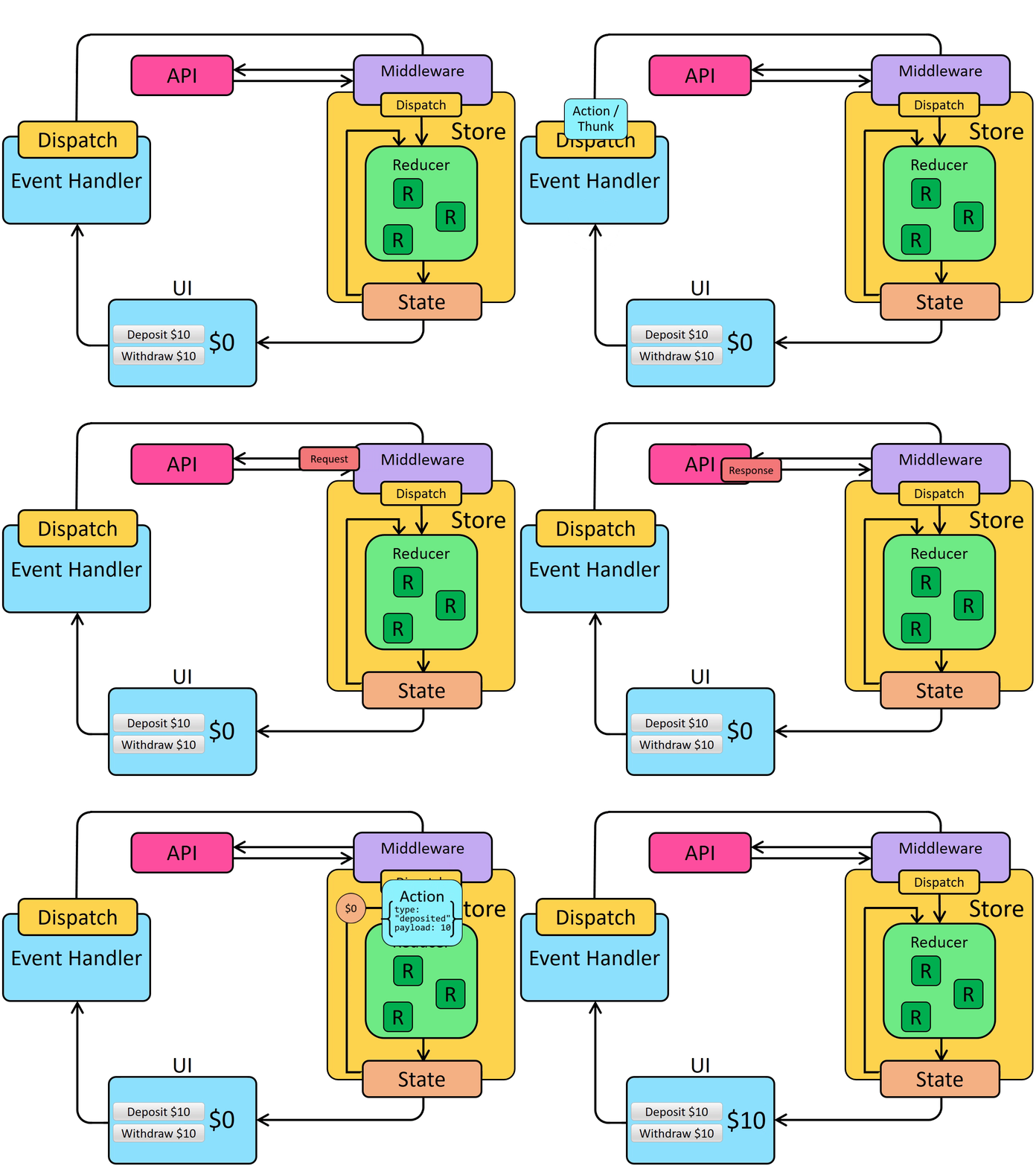
Newer state management solutions often trade boilerplate for ambiguity about where business logic belongs. Without a clear, project-defined location, domain logic gravitates into UI components -- making them large, hard to test, and hard to maintain.
With Redux, typed hooks (useAppDispatch, useAppSelector) and pure selectors keep components thin and logic centralized.
TL;DR -- Pick a headless UI library with few dependencies. Encapsulate it so you can replace it later.
- Minimal dependencies -- Components are copied into your project, not installed as a black-box package.
- Separation of design and behavior -- shadcn/ui provides unstyled primitives you own and customize.
- Accessible by default -- All components adhere to WAI-ARIA patterns. See this talk for details.
Components live in src/UI/Elements/ and are managed via the shadcn CLI (npx shadcn@latest add <component>).
Tailwind CSS 4 is used via the @tailwindcss/vite plugin -- no PostCSS config needed. Key benefits:
- Utility-first -- Consistent styling with zero CSS files to maintain.
- Design tokens -- Theme defined as CSS variables in
src/UI/Layout/global.cssusing@theme inline. - Built-in responsive and a11y -- First-class responsive utilities and accessibility helpers.
- Tree-shaken -- Only used classes end up in the production bundle.
Tests use Vitest 4 with Testing Library and jsdom. Test files live next to the code they test with a .spec.ts / .spec.tsx suffix.
API mocking uses MSW with @mswjs/data for a realistic, in-memory database that powers both development and tests.
E2E tests use Cucumber (Gherkin syntax) with Playwright as the browser automation engine.
# First time setup
pnpm exec playwright install

# Run (dev server must be running)
pnpm dev &
pnpm e2e:localProduction builds use vendor chunk splitting for optimal caching:
| Chunk | Contents |
|---|---|
vendor-react |
React, React DOM, React Router, React Redux |
vendor-redux |
Redux Toolkit (RTK Query, Immer, Reselect) |
vendor-radix |
Radix UI primitives and themes |
vendor-sentry |
Sentry SDK |
vendor-ui |
CVA, clsx, tailwind-merge, Lucide icons |
Routes are lazy-loaded via React.lazy() for automatic code splitting.
TL;DR -- Merge to
mainand everything else is automated.
The release pipeline is fully automated with semantic-release:
- Developer merges a PR into
main. - CI runs tests and E2E.
- semantic-release analyzes commits, determines the version bump, generates the changelog, creates a GitHub release and git tag.
No manual version bumps. No manual changelog edits.
| Tool | Purpose |
|---|---|
| Commitlint | Enforces Conventional Commits format (feat:, fix:, chore:, etc.) |
| Husky | Runs commitlint + tests on pre-commit |
| Semantic-release | Automates versioning, changelogs, GitHub releases, and git tags |
- Automated changelogs -- Commit messages drive what goes into
CHANGELOG.md. - Semantic versioning --
feat= minor,fix= patch,BREAKING CHANGE= major. - Readable history -- Anyone can scan
git logand understand the nature of each change at a glance.
TL;DR -- One tool, one config. Biome handles linting, formatting, and import sorting.
Biome replaces the traditional ESLint + Prettier combo with a single, Rust-powered tool. It provides:
- 300+ lint rules covering correctness, style, complexity, and suspicious patterns
- Built-in formatter for TypeScript, JSX, JSON, and CSS
- Automatic import sorting and
import typeenforcement - Sub-second execution on the entire codebase
Configuration lives in biome.json. The pre-commit hook runs biome check --staged automatically.
TL;DR -- When Redux is used correctly, every user action is traceable in production.
Sentry is integrated with the Redux store enhancer, which means:
- In development -- Redux DevTools shows every state transition in real time.
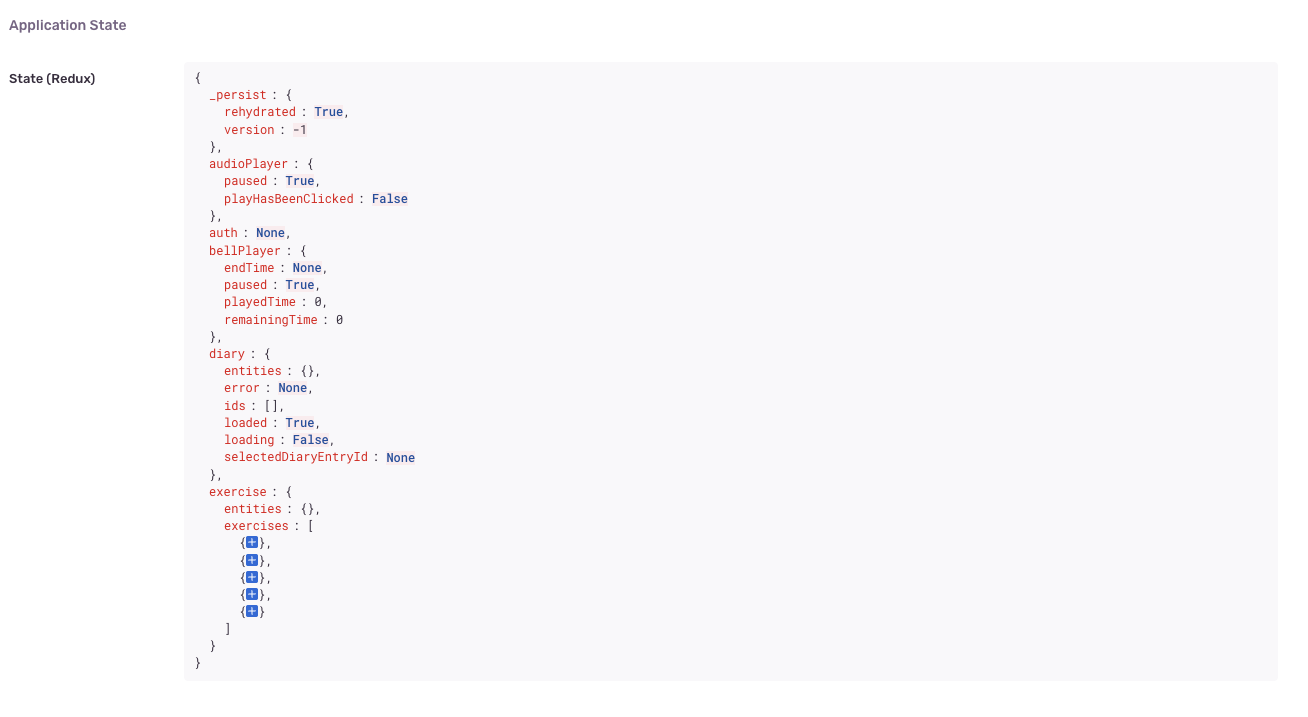
- In production -- Sentry captures the full sequence of dispatched Redux actions leading up to an error, plus the application state at the moment of the crash.
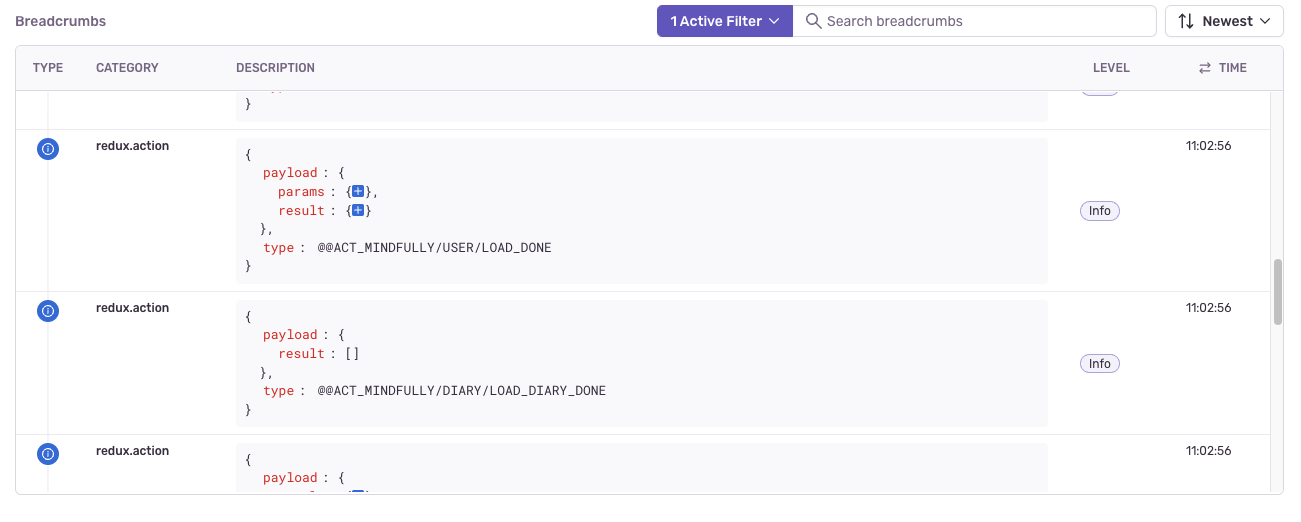
This allows you to reproduce issues by replaying the exact action sequence, or even rehydrating the state snapshot:
These are not included in the boilerplate but are recommended additions depending on your needs:
| Need | Recommendation | Notes |
|---|---|---|
| Dates | date-fns | Modular, tree-shakeable. Moment.js is in maintenance mode. |
| Forms | react-hook-form | Zero dependencies, excellent performance and DX. |
Contributions are welcome! To get started:
- Clone the repo and install dependencies (
pnpm install) - Create a branch:
git checkout -b feat/your-feature - Make your changes
- Verify:
pnpm check(lint, format, types) andpnpm test - Commit using Conventional Commits (enforced by the pre-commit hook)
- Open a Pull Request
This project includes an
AGENTS.mdfile with detailed instructions for AI coding agents.