A compact, single-page Angular application for loading, inspecting, querying and visualizing synthetic log files from multiple formats.
Created for Mini Hackathon 3.0 (June 2024) by Kevin Chromik. Youtube: @KevinChromik
Table of contents
- Overview
- Key features
- Demo and purpose
- Prerequisites
- Quick start (development)
- Build and run (production)
- Working with sample logs
- Query language (brief)
- Repository layout
- Available scripts
- Notes, limitations and status
- Author and contact
- Acknowledgements
Overview
Log Chaos Visualizer is a proof-of-concept Angular application intended to demonstrate client-side parsing, indexing and visualization of large, mixed-format log files. It was implemented as a one-week hackathon/demonstration project and is not intended for production use.
Key features
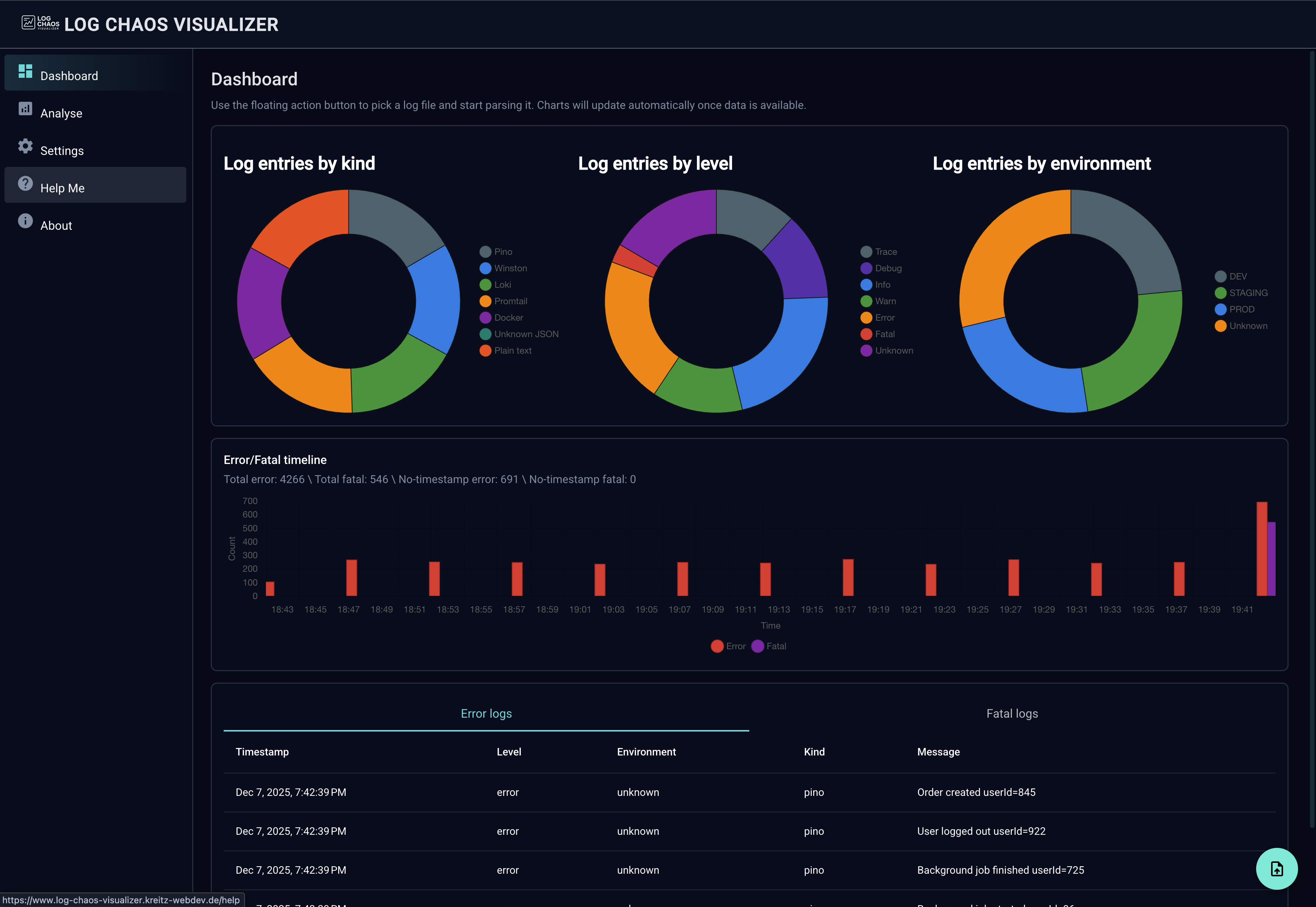
- Support for multiple log formats: Pino, Winston, Loki/Promtail, Docker JSON, and plain text.
- Interactive charts and tables showing log level distribution, kinds, and timelines.
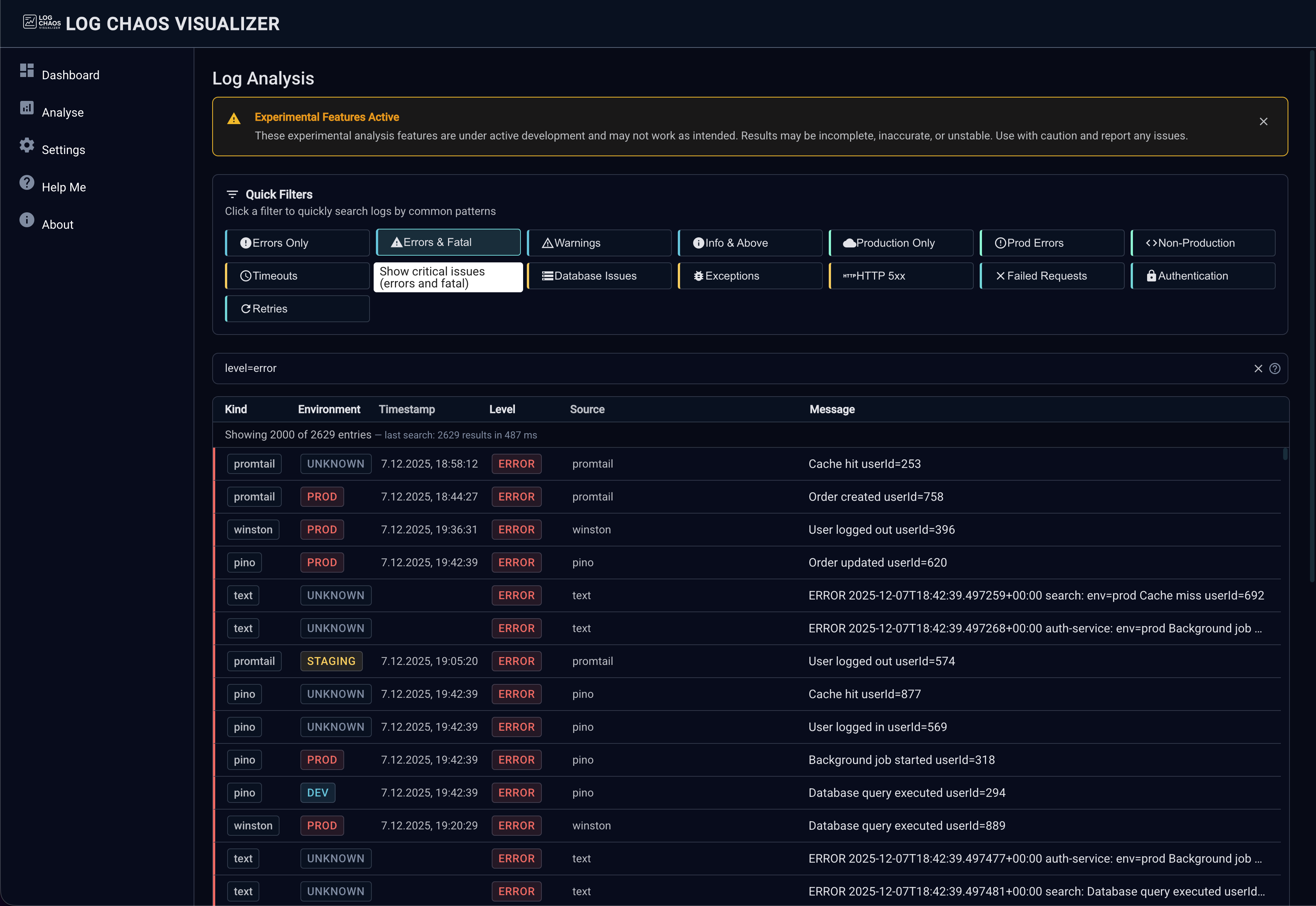
- Structured query language with field-specific filters, boolean operators and regex support.
- Designed to handle large sample files (20k up to 200k lines) using a Web Worker for parsing and indexing.
- Convenience Python script (
generate_logs.py) to generate synthetic log files for testing.
Demo and purpose
This repository demonstrates approaches for:
- Parsing heterogeneous log formats in the browser while keeping the UI responsive (parsing done in a Web Worker).
- Building an indexed representation of logs to enable fast queries and interactive visualizations.
- Providing a compact query language that allows targeted, fielded searches with real-time validation.
Prerequisites
- Node.js (recommended: current LTS)
- npm (bundled with Node.js)
- Python 3 (optional — for generating synthetic logs)
- Docker & Docker Compose (optional — to run the built app behind nginx)
Quick start (development)
- Install dependencies
npm ci- Start the development server (live-reload)
npm start
# or
ng serve- Open the app in your browser
Visit: http://localhost:4200/
Build and run (production)
- Build
npm run build- Serve the built files locally using the provided Dockerfile
docker build -t log-chaos-visualizer:local .
docker run --rm -p 8080:80 log-chaos-visualizer:local
Alternatively run with Docker Compose:
docker compose up --buildNote: compose.yaml references an external Docker network named webproxy. If that network is not available locally
either create it with docker network create webproxy or remove/adjust the network section in compose.yaml.
Working with sample logs
The repository includes pre-generated sample files under public/data/ (20k, 50k, 100k, 200k lines). These files are
convenient for exploring performance and UI behaviour.
Use the included Python generator to create files of custom size or format composition:
# generate 50k mixed-format logs
python3 generate_logs.py --lines 50000 --output public/data/generated-50000.log

# specify a mix of formats and a seed for reproducible output
python3 generate_logs.py --lines 20000 --output public/data/generated-20000.log --mix pino,winston,text --seed 42
There are convenience npm scripts that invoke the generator for the standard sample sizes ( see Available scripts).
Query language (brief)
The application exposes a compact, structured query language for filtering and searching logs. Core capabilities include:
- Field queries: e.g.
level=error,environment=prod. - Comparison operators:
=,!=,>,>=,<,<=. - String helpers:
contains(),startsWith(),endsWith(),matches()(regex). - Boolean logic:
AND,OR,NOTand parenthesis for grouping. - Real-time validation and fast execution (index-backed + Web Worker).
Examples
level=error AND environment=prod
message.contains(api) AND message.matches(/timeout/i)
(statusCode>=500 OR statusCode=404) AND method=GET
timestamp>="2024-12-01" AND timestamp<"2024-12-07"
Repository layout (high-level)
- src/ — Angular application source
- app/ — application modules, pages and shared components
- core/ — services, workers and utilities used across the app
- public/data/ — sample log files
- generate_logs.py — Python script to produce synthetic logs
- Dockerfile, compose.yaml — container setup for static serving via nginx
Available scripts (high level)
See package.json for the full list; notable scripts include:
npm start— start dev server (ng serve)npm run build— production buildnpm run gen:logs:20k— generate a 20k lines sample filenpm run gen:logs:50k— generate a 50k lines sample filenpm run gen:logs:100k— generate a 100k lines sample filenpm run gen:logs:200k— generate a 200k lines sample filenpm run gen:logs:all— generate all standard sample sizes sequentially
Notes, limitations and status
- This project was implemented in one week as a hackathon/demo entry and emphasizes exploration and UX over production concerns.
- Not production-ready: there is no authentication, limited security hardening, and minimal automated tests.
- No contributions accepted and no license file is included by owner request. The repository is provided "as-is" for demonstration purposes.
Author and contact
- Kevin Chromik — project author (Mini Hackathon 3.0)
Acknowledgements
- Built with Angular and Chart.js (via ng2-charts)
License and contribution policy
- No license is included. No external contributions are expected or accepted for this demo repository.
Disclaimer
This software is provided for demonstration and educational use only. Use at your own risk; it is not suitable for production deployment.