feat: add folder and icon for skills#3367
Conversation


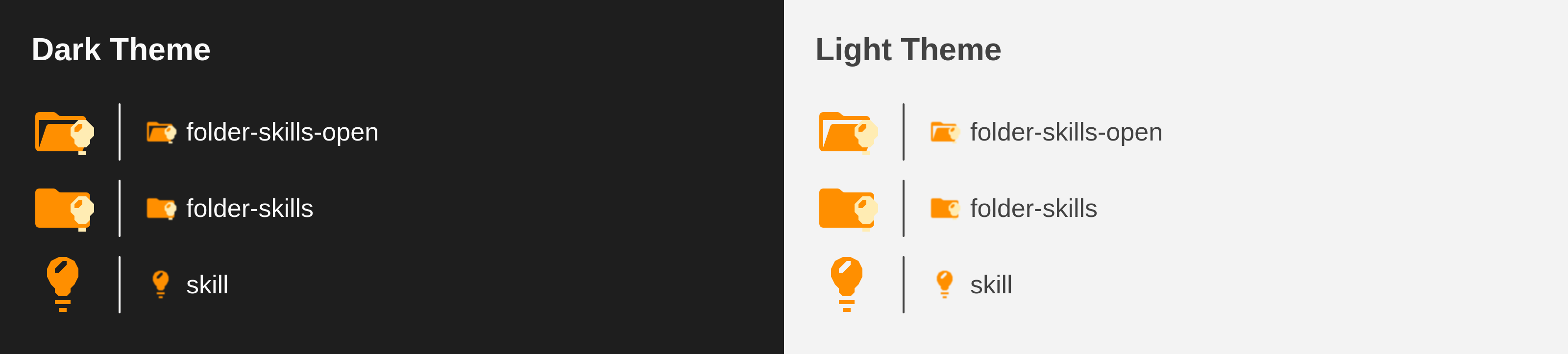
PreviewThank you for creating a pull request. This preview shows you how your icons will look on the different themes: Check how your icons fit in a 16x16 grid with our Pixel Perfect Checker by following this link. You can find more information on how to contribute in the contribution guidelines. |
There was a problem hiding this comment.
Pull request overview
This PR adds icon support for skills files and folders, specifically targeting .claude/skills directories and files like skill.md and skills.md. The implementation adds both light and dark theme variants for the file icon, along with folder icons in both open and closed states.
Changes:
- Adds file icon support for
skill.mdandskills.mdfiles - Adds folder icon support for
skillandskillsfolders - Includes both light and dark theme variants for file icons
- Uses Material Design brown color palette (#6D4C41, #D7CCC8)
Reviewed changes
Copilot reviewed 2 out of 6 changed files in this pull request and generated 2 comments.
Show a summary per file
| File | Description |
|---|---|
| src/core/icons/fileIcons.ts | Adds configuration for skill file icons with file names and extensions |
| src/core/icons/folderIcons.ts | Adds configuration for skills folder icons |
| icons/skill.svg | Dark theme file icon (has critical viewBox issue) |
| icons/skill_light.svg | Light theme file icon with correct 16x16 viewBox |
| icons/folder-skills.svg | Closed folder icon with correct 16x16 viewBox |
| icons/folder-skills-open.svg | Open folder icon with correct 16x16 viewBox |

Signed-off-by: Philipp Kief <philipp.kief@gmx.de>

|
Hey guys, and about this? |

|
Thanks for creating a PR. I was wondering if we can choose a better motive for this folder icon. The stars don't really fit to skills. It is currently used for everything which is related to AI because people think it's like magic. But maybe we can improve this a little bit, let's say when someone is using the skills folder not for AI skills, but for a "normal" skills whatever purpose. When I google "skills icon" I find many icons which might give a nice idea what we could use to make it more align into our grid system and to give it a little more meaningful icon. @ViniDevBR sure, we're always happy if someone goes through some issues or existing PRs and improves the work or suggests ideas how to get some additional icons into this project. |
I will search and create a generic skills folder and file |
|
@PKief A lamp could be a good choice 
searching for skills icon on google and we can reuse this for "IDEA | BRAINSTORM" |


|
Hi there, just to add another option, there's an "official" icon for agent skills: https://github.com/agentskills/agentskills/blob/main/docs/favicon.svg
Also, there's a specific language id, so we should also add an entry for the 
|

What about this? 
the original is black and white, there is problem? |
|
@PKief @lucas-labs, about this guys? I know that you want more colored icons than black and white... |
|
Yeah we shouldn't use exact black / white, we need to stick to material colors. What I'm not too sure is if we should go with official skill icon or, as pkief said before, use a generic one tu support this situation:
It is true that the name "skill" is quite generic. |
|
Waiting too... |
|
Hey guys, and about this? @PKief @lucas-labs. I want to finish this, and create more PR ahhaahaha |
|
@ViniDevBR lamp would be a nice fit maybe, but it will not be so easy to make it aligned to the grid, but maybe give it a try.
This doesn't really look intuitive I think. We should rather go with something that works for all kind of "skills" folder names. |
|
Nice... i will do this |
|
@PKief @lucas-labs |

Thanks for the adjustments. I guess another color would be much better. Brown feels strange here. How about some orange, dark yellow but be careful with the contrast here. |

|
today i was trying to customize copilot code review rules and found another one 
link: https://docs.github.com/en/copilot/how-tos/configure-custom-instructions/add-repository-instructions files with x.instructions.md both for github and IA agents I will make for this too |
|
UPDATED GUYS @PKief |
|
About this guys? @PKief @lucas-labs |
|
@ViniDevBR I've updated the SVGs to be more aligned with our grid: 
In this comparison you can see how VS Code would render both SVGs:
|


|
@ViniDevBR and @lucas-labs FYI, I just created a small github pages React project, that can preview the look and feel of an SVG file if it's rendered in 16x16 size: https://material-extensions.github.io/svg-pixel-preview/ Maybe you can give some feedback if that's useful |
I will create a PR for "GATEWAY" folder and I will test this. But looking for the first time, it was nice hehe. Today I use figma with grid, so I can see the grid all the time. But this is a good helper |

Merge SuccessfulThanks for your contribution! 🎉 The changes will be part of the upcoming update on the Marketplace. |
That's pretty cool! I'll try to add the same functionality in the pixel perfect checker site when I have the time. |


Description
Icon for example.skill.md
and folder for skills/
something like
Contribution Guidelines