Search Tab

The search tab is optional, and requires the configuration to be set in the webpart's property. By default it will be hidden. The site will require custom scripts to be turned on for this, so the admin will need to turn it on prior to setting the property. Once configured, the user will see a free textbox or a dropdown based on the configuration settings.
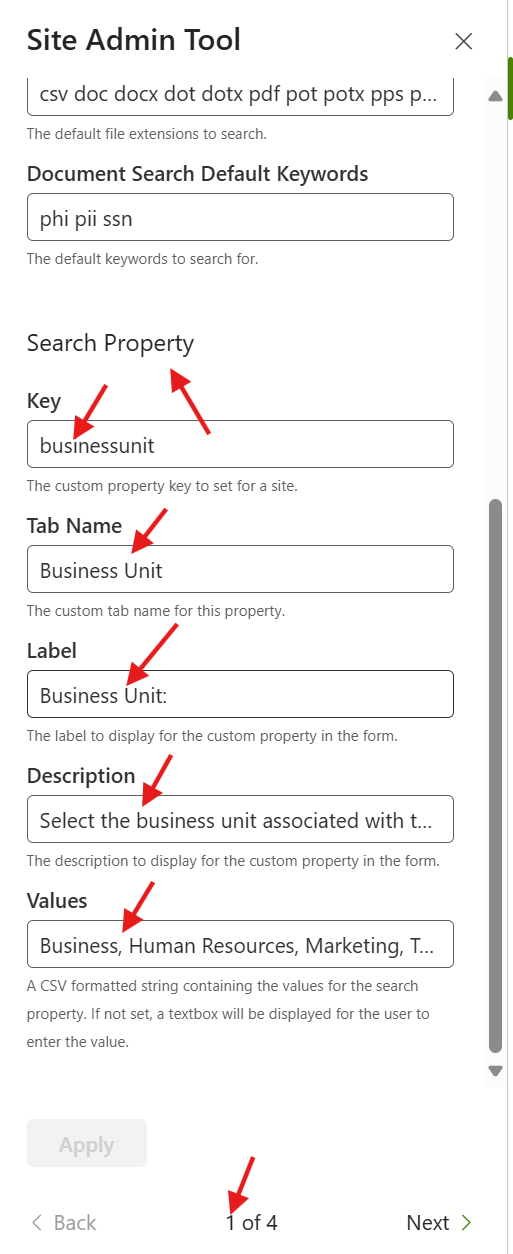
- Key - The web property value used
- Tab Name - Customize the tab name to reflect the key
- Label - The label for the dropdown or textbox
- Description - The description displayed under the dropdown or textbox
- Values - A CSV of allowed values. If set, a dropdown will be rendered otherwise a textbox will be displayed