AWS Device Farm
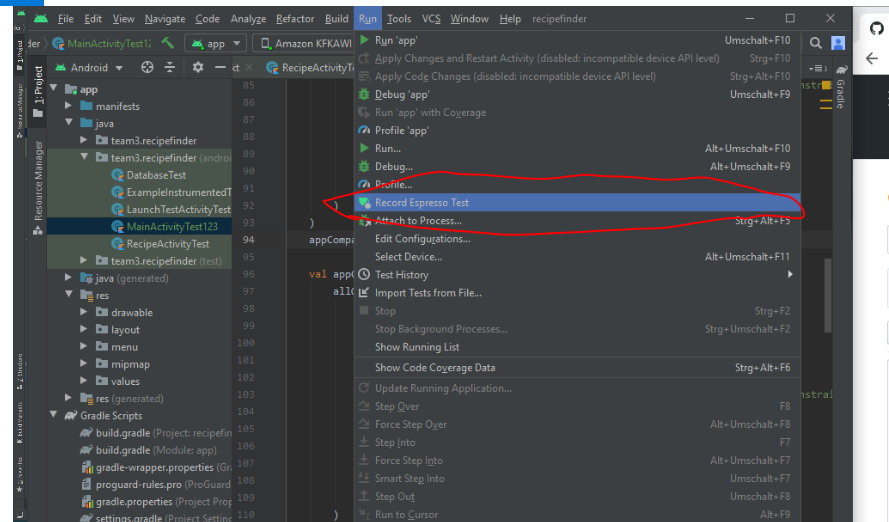 Run -> Record Expresso test
The steps will be recorded that you do on the emulator. You can add a validation.
Run -> Record Expresso test
The steps will be recorded that you do on the emulator. You can add a validation.
When you are done. You can build the APKS Build -> Build Bundle(s)/Apk(s) -> Apk(s)
Download the App-Apk from Github
Login to AWS: instuction
Search for Device Farm
Select team3
Create new run
Upload the Apk from Github or select a recent upload
Next Step
Select Test Instrumentation
Upload team-project-team_3\app\build\outputs\apk\androidTest\debug\app-debug-androidTest.apk
3 x Next Step and Start Test
The tests will be run. It will be take a few minutes.
https://github.com/aws-samples/aws-device-farm-sample-app-for-android
https://www.youtube.com/watch?v=O11nhUm8MKo
I think AWS-Device farm is a very interesting platform for professional use. It is very easy to use. The GUI is self-explaining. You need some time to read the documentation of the test-frameworks appium and expresso. I think our project is too small to use the tool. You need a pipeline integration because it is very time consuming to compile the tests and code and upload it to AWS.