SVT-AV1-Essential is the Scalable Video Technology for AV1 (SVT-AV1 Encoder) with sensible defaults and Quality of Life improvements. The goal is to provide the best out-of-the-box experience for the average user.
The canonical URL for the mainline project is at https://gitlab.com/AOMediaCodec/SVT-AV1.
Table of Content
--speed&--quality
New convenient speed and quality presets that adjust by default to the resolution.
Available speeds are: slower, slow, medium, fast, faster
Available qualities are: higher, high, medium, low, lower
Preset and CRF/QP can still freely be set by the user if desired.
--scd0 and 1
(Re-)introduce keyframes on scene changes, for more accurate seeking and lowered quality inconsistencies. The feature was tuned for the highest accuracy following a testing round.
--keyint-1 to inf
-1 sets an automatic keyframes placement at a constant interval of about 10 mini-gops (~5 seconds).
0 disables automatic keyframes placement at a constant interval.
If manually set, it is recommended to have keyint be a multiple of 32 + 1 (225 or 257 for instance) to respect the mini-gop structure.
Going higher than 300 is not recommended to ensure perfect compatibility with hardware decoders.
--min-keyint-1 to keyint
The minimum amount of frames before a new keyframe can be introduced by the SCD feature, which helps prevent cases of keyframes spamming.
-1 sets an automatic minimum keyframes placement of a multiple of the mini-gop length.
0 disables all limitations on SCD and is not recommended.
--zones
In CRF/CQP mode, allows setting different quality levels for the specified frame ranges.
For example, --zones 0,100,20;101,200,40 applies a CRF/CQP value of 20 to frames 0-100, a CRF/CQP value of 40 to frames 101-200, while maintaining the original quality level for all other frames.
--auto-tiling0 and 1
Automatically sets tiles appropriate for the source input resolution, which in turn improves decoding performance with minimal effect on efficiency. The feature was tuned following a testing round
--qp-scale-compress-strength0 to 8
Increases video quality temporal consistency, especially with clips that contain film grain and/or contain fast-moving objects.
It's typically not advised to go higher than 3.
--enable-dlf 2 & 3
2 enables a more accurate loop filter that prevents blocking, for a modest increase in compute time (most noticeable at presets 7+).
3 forces the most accurate loop filter for every encoding scenario, with important consequences in compute time at faster presets.
--low-memory
This new parameter sets options that reduce RAM usage of the encoding instance significantly.
Enabling low-memory can have some impact on encoding speeds and perceptual quality.
It is most effective in CRF/CQP Random Access mode.
SVT-AV1-Essential sports different defaults from mainline SVT-AV1 in order to provide a better out-of-the-box experience. They include:
- Forced 10-bit color depth and HBD mode, for higher internal precision and thus higher quality visuals and efficiency.
--speedset toslowby default at 1080p and below, andmediumabove.--qualityset tomediumby default.--enable-dlfset to2by default.--enable-variance-boostset to1by default.--variance-boost-strengthset to1by default.--variance-octileset to4by default.--tf-strength(temporal filtering) set to1by default.--luminance-qp-biasset to10by default.--sharpnessset to1by default.--qp-scale-compress-strengthset to1by default.--enable-qmset to1by default.--qm-minset to0by default.--chroma-qm-minset to0by default.--enable-dg(dynamic gop) set to0by default.
It is expected for these provided defaults to be much slower than the default mainline SVT-AV1 configuration.
The user can leverage a faster --speed to compensate for that while still getting better visuals in return.
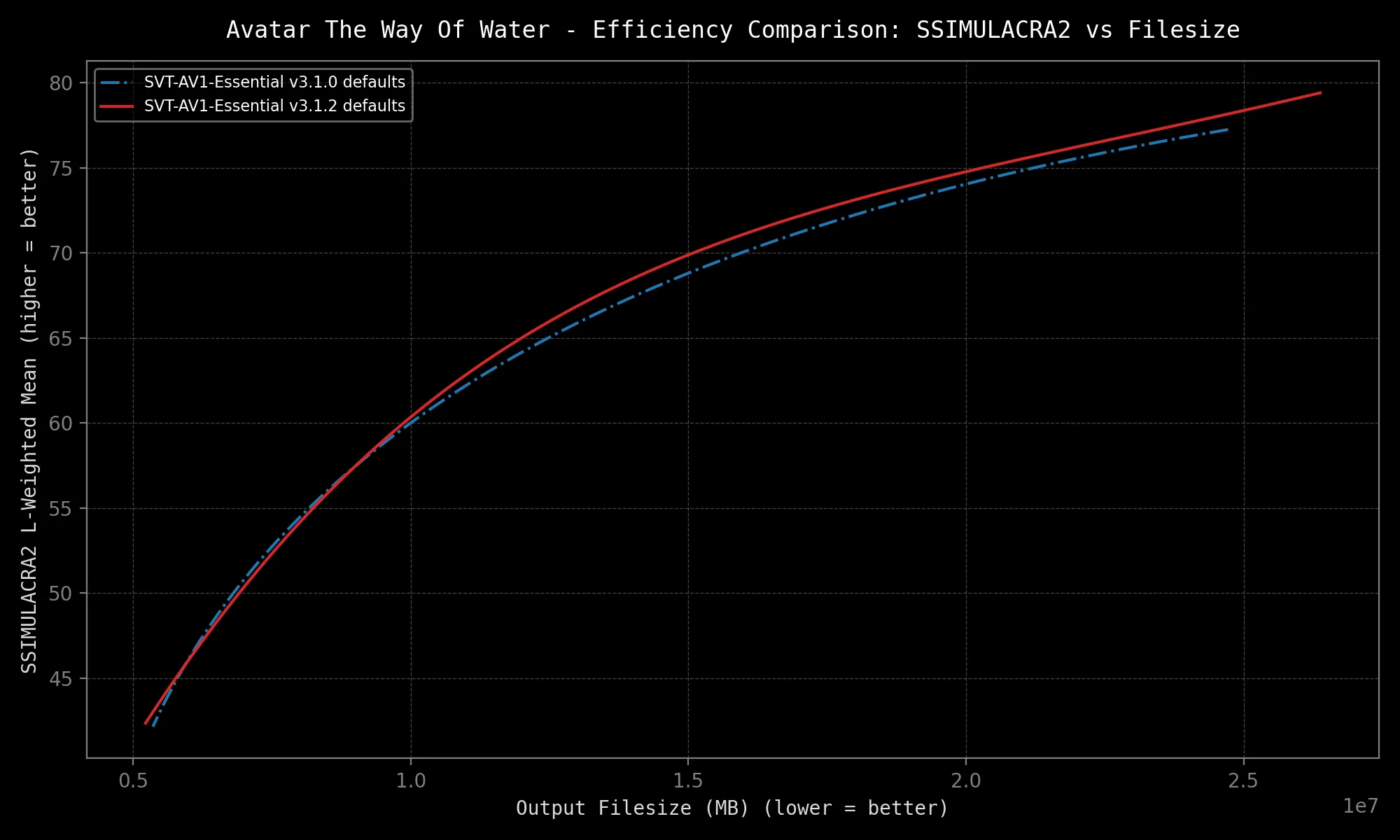
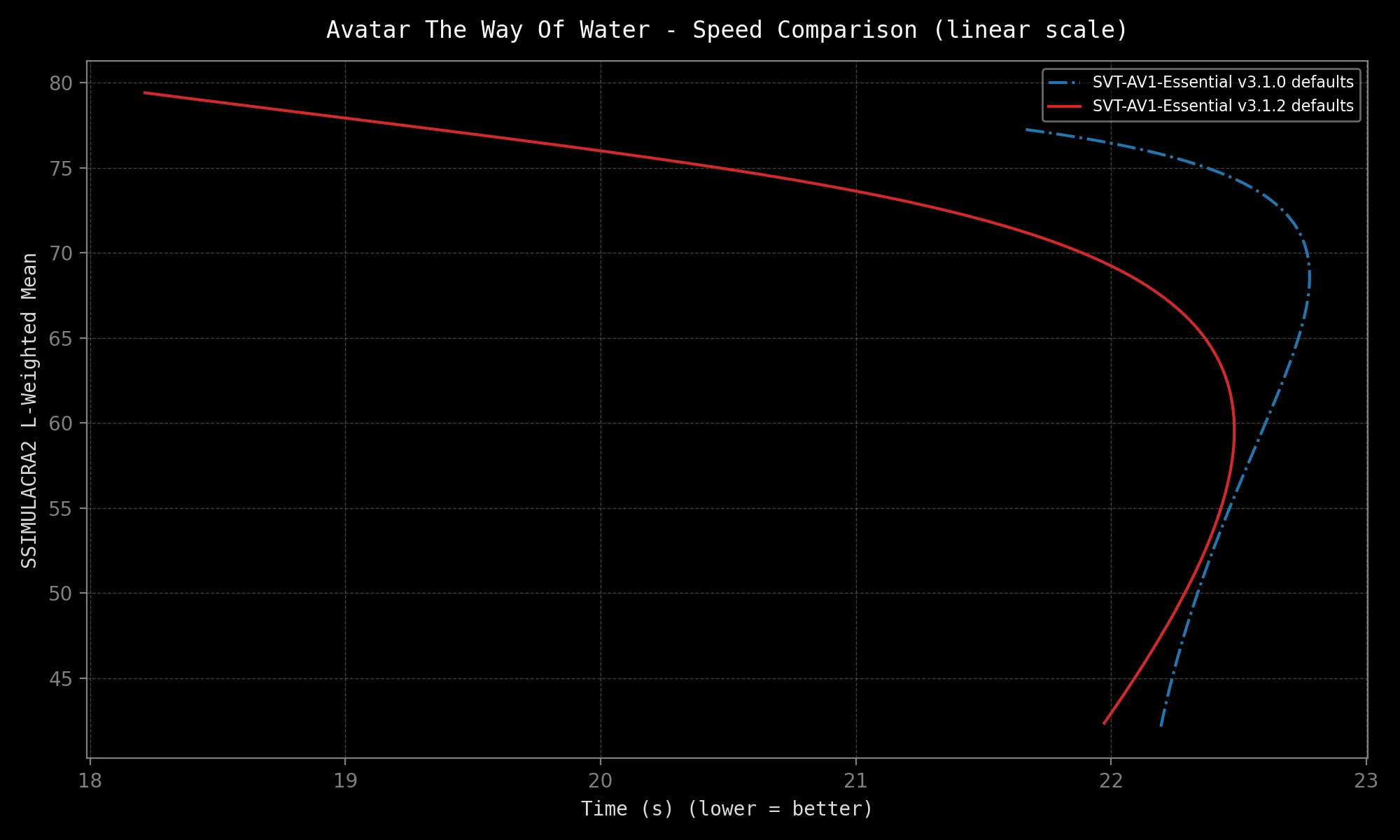
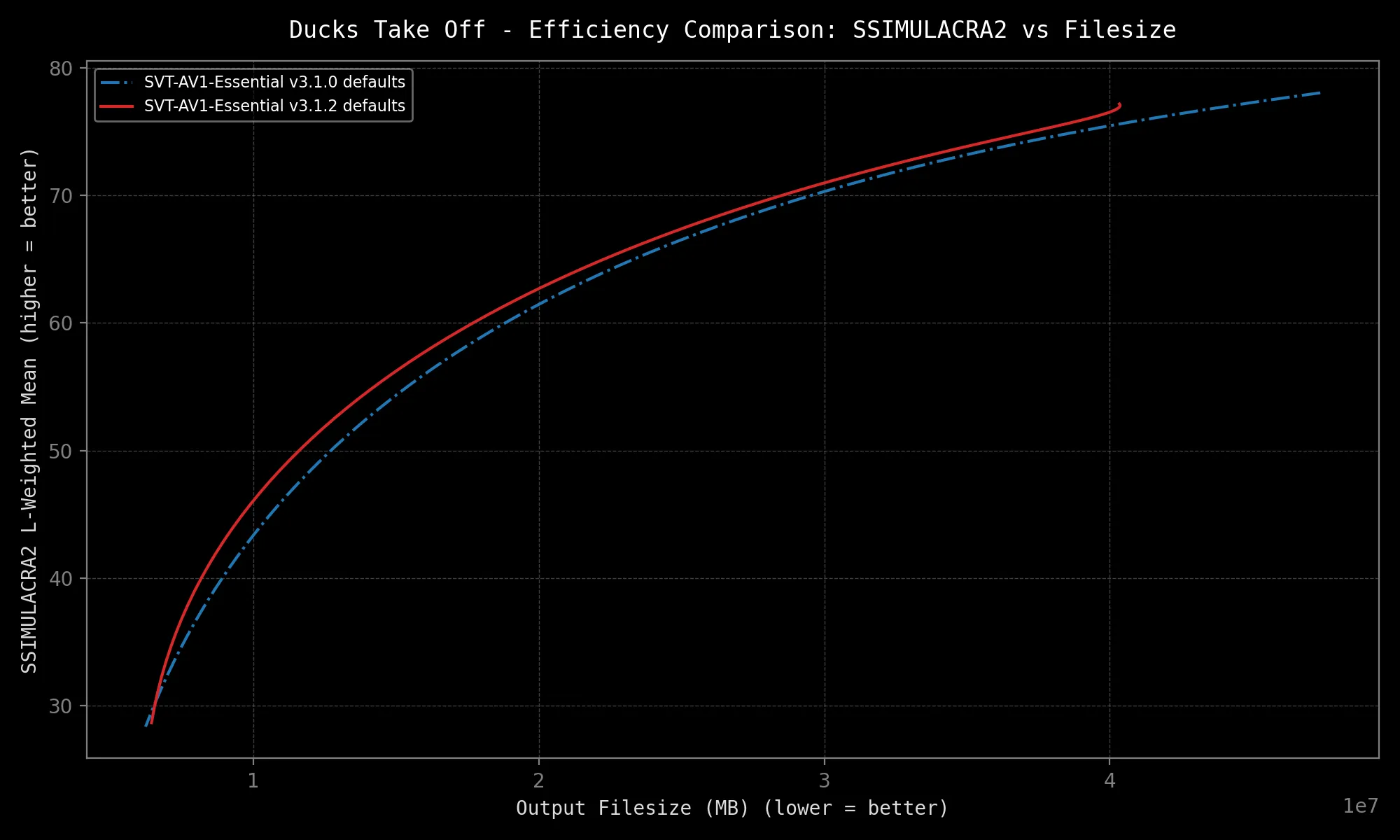
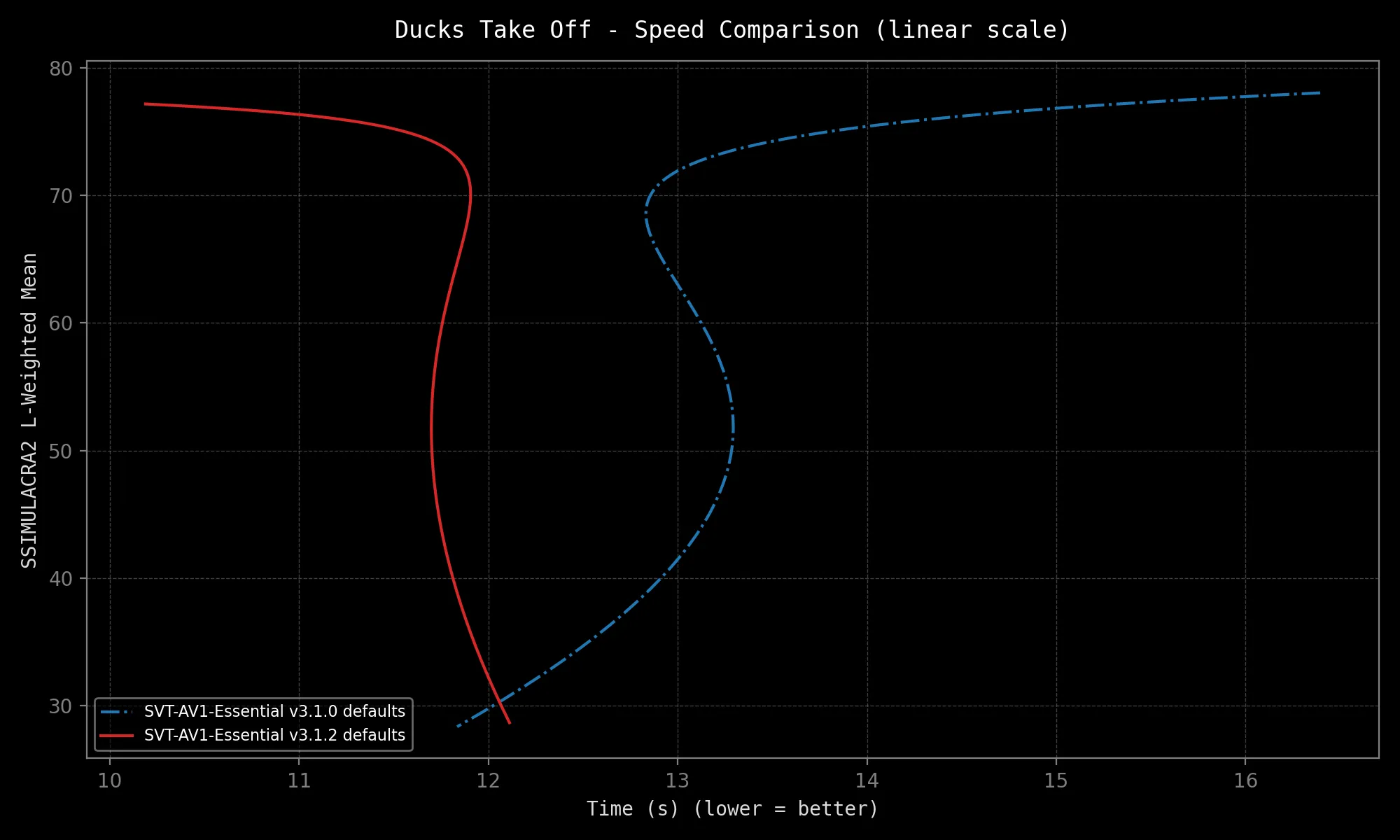
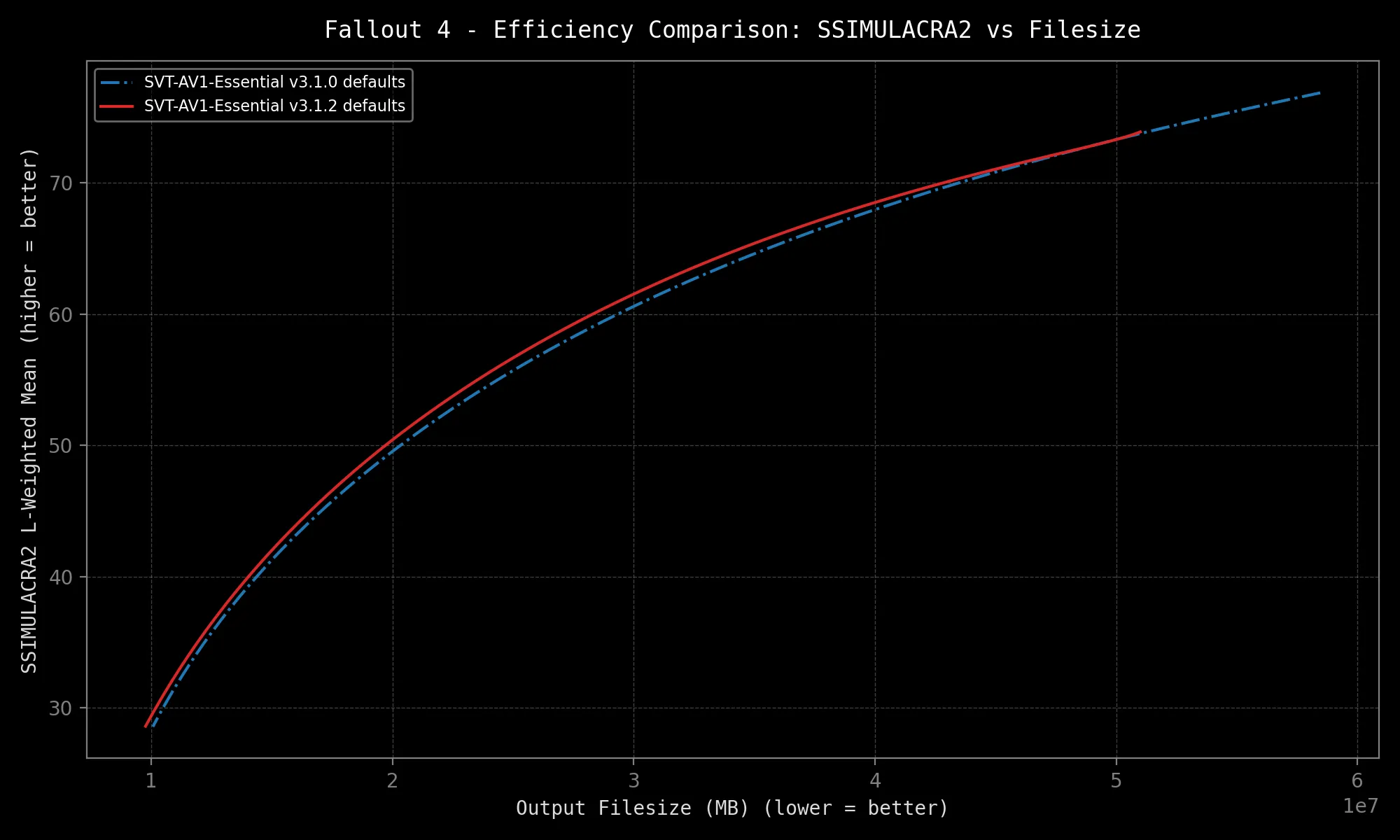
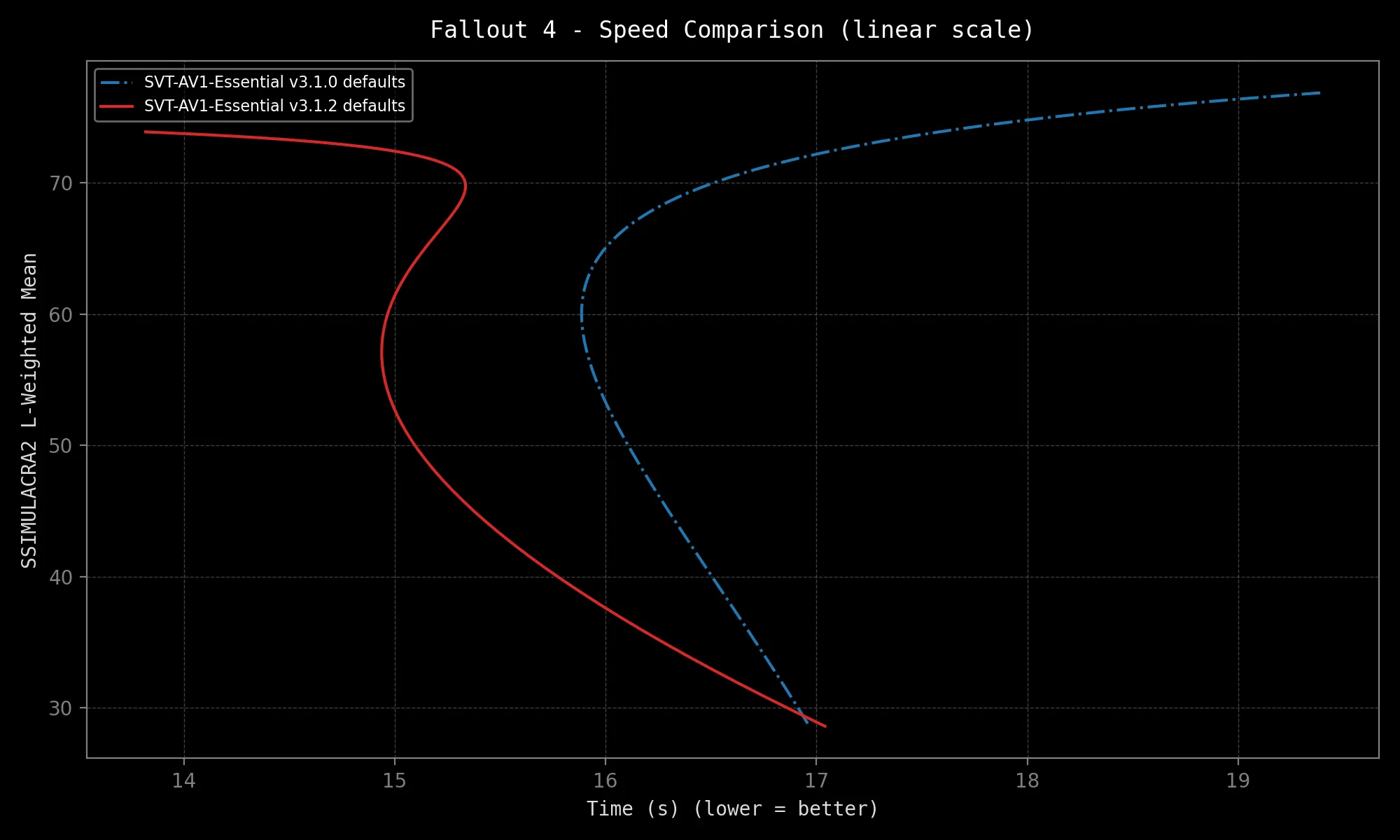
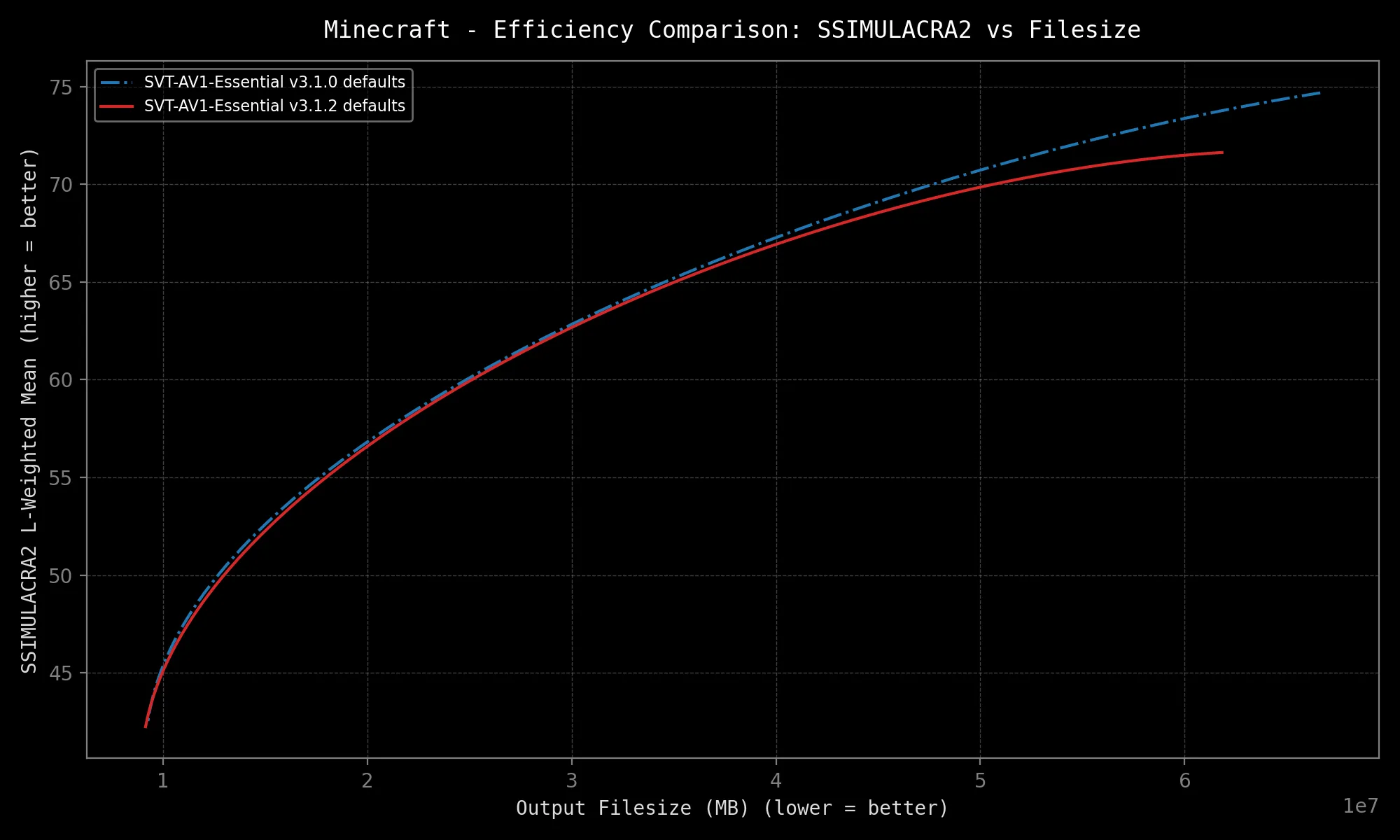
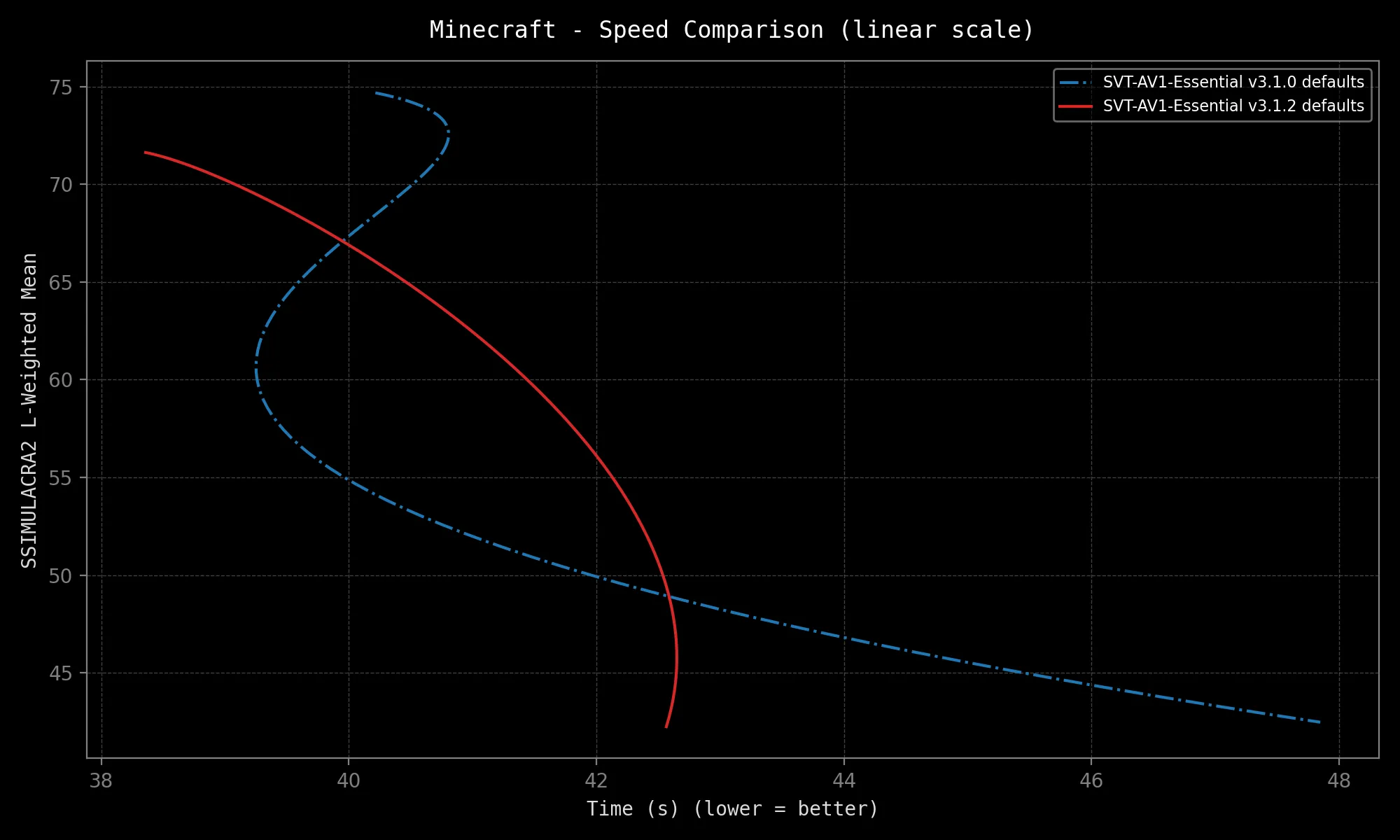
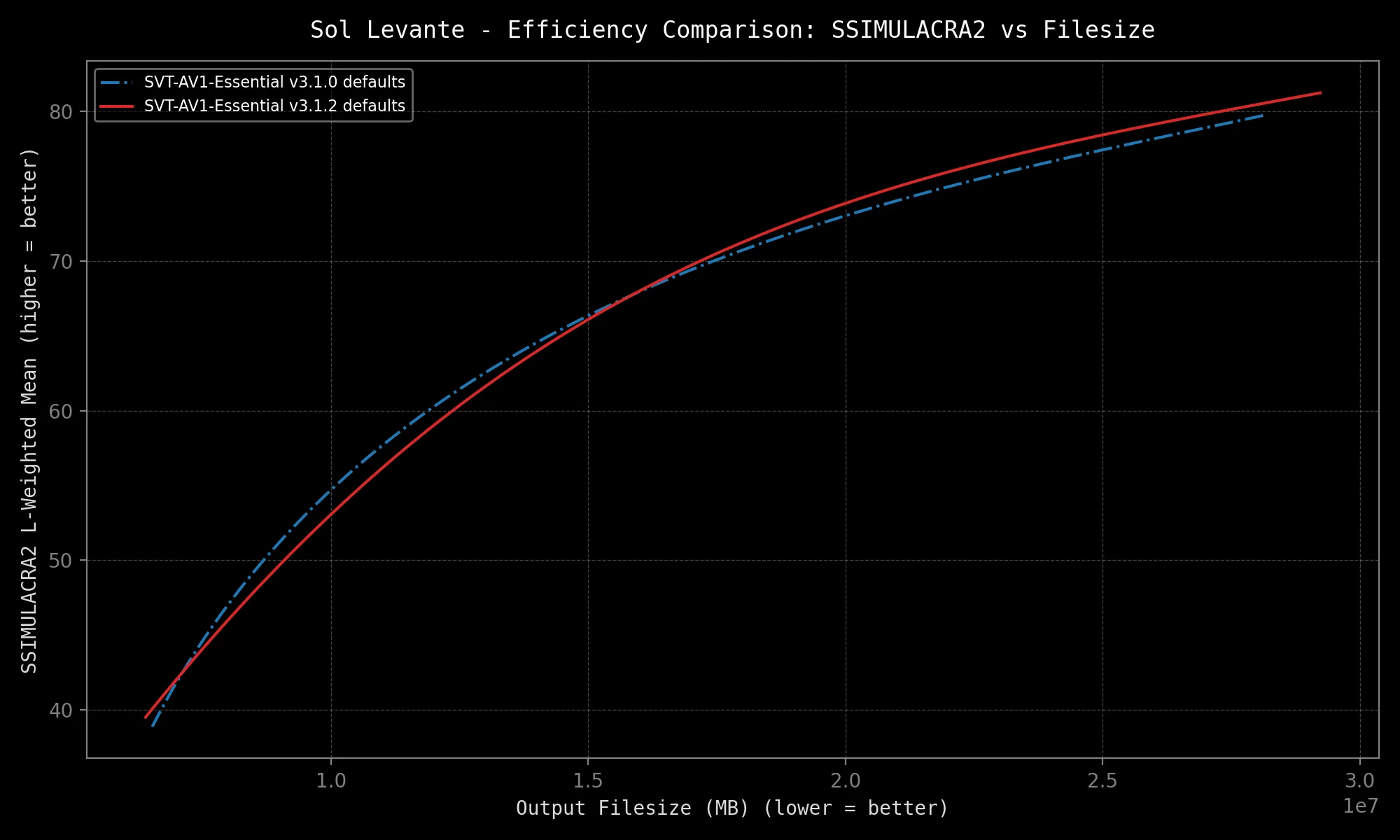
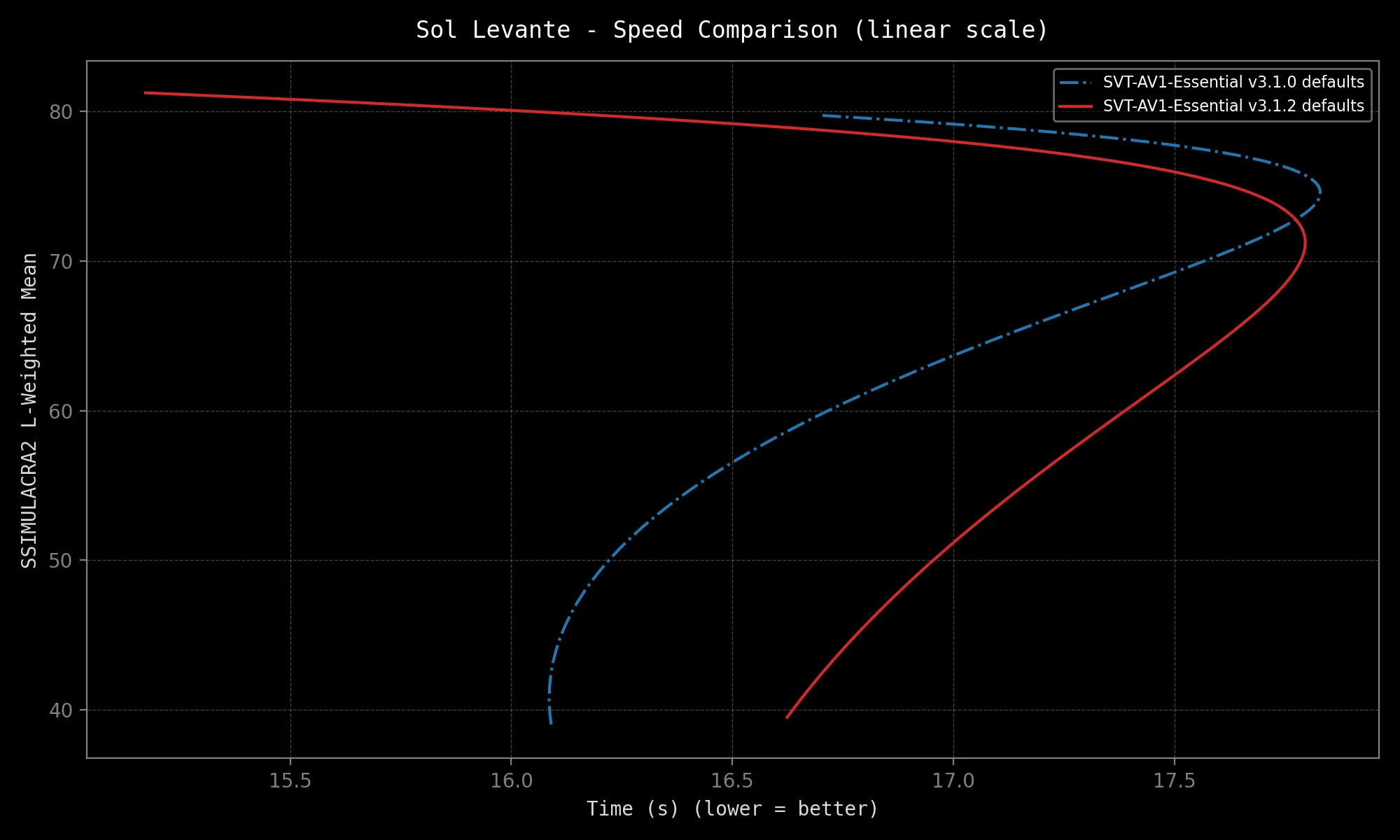
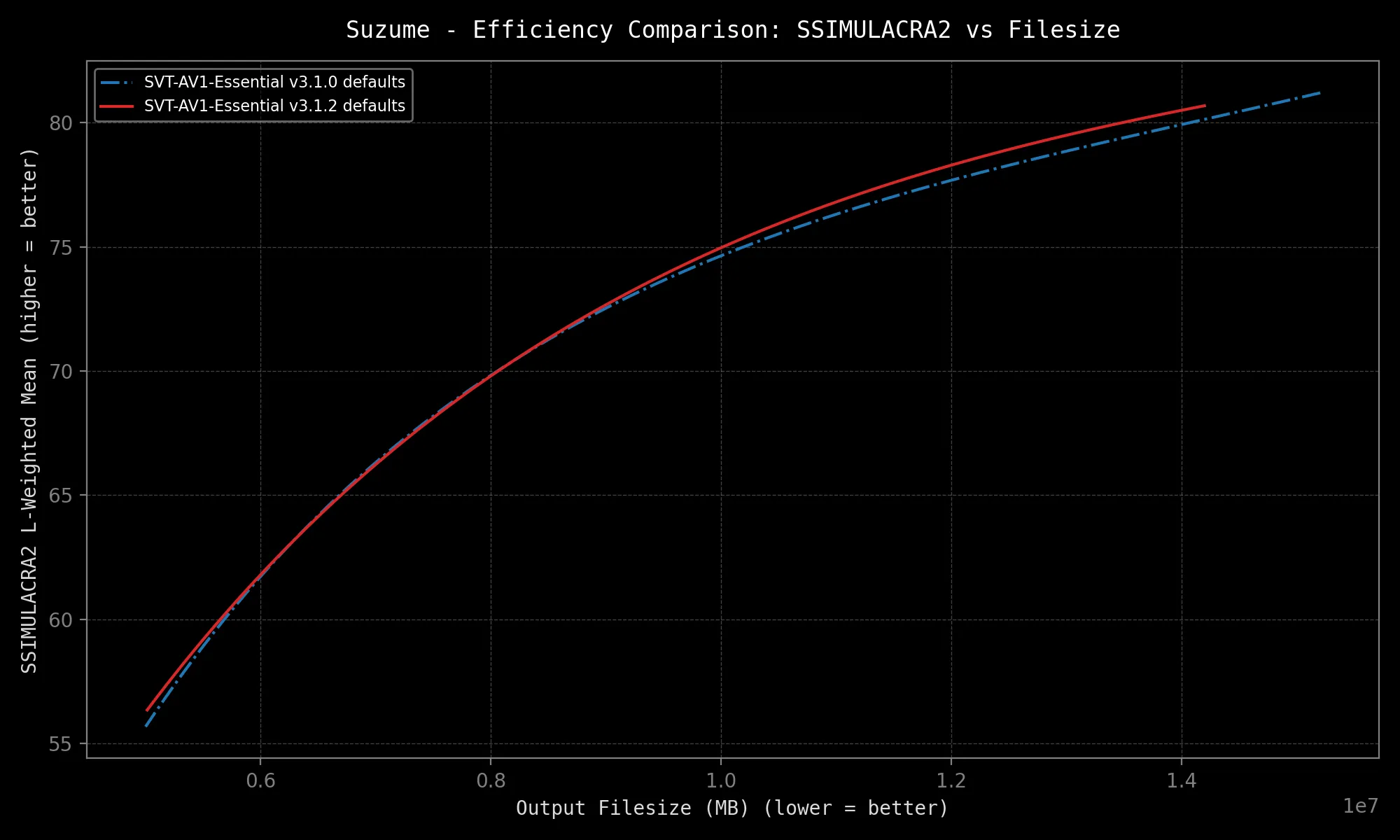
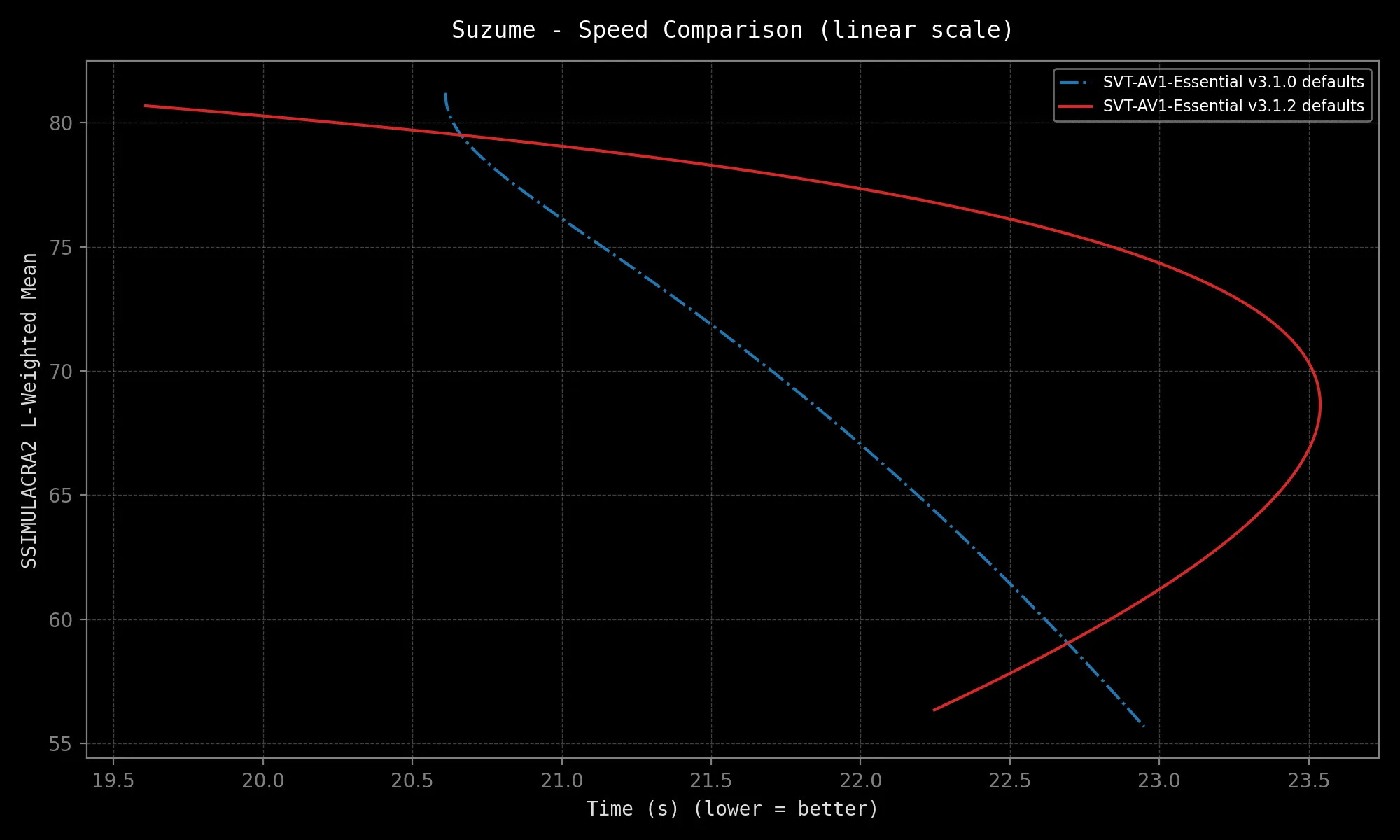
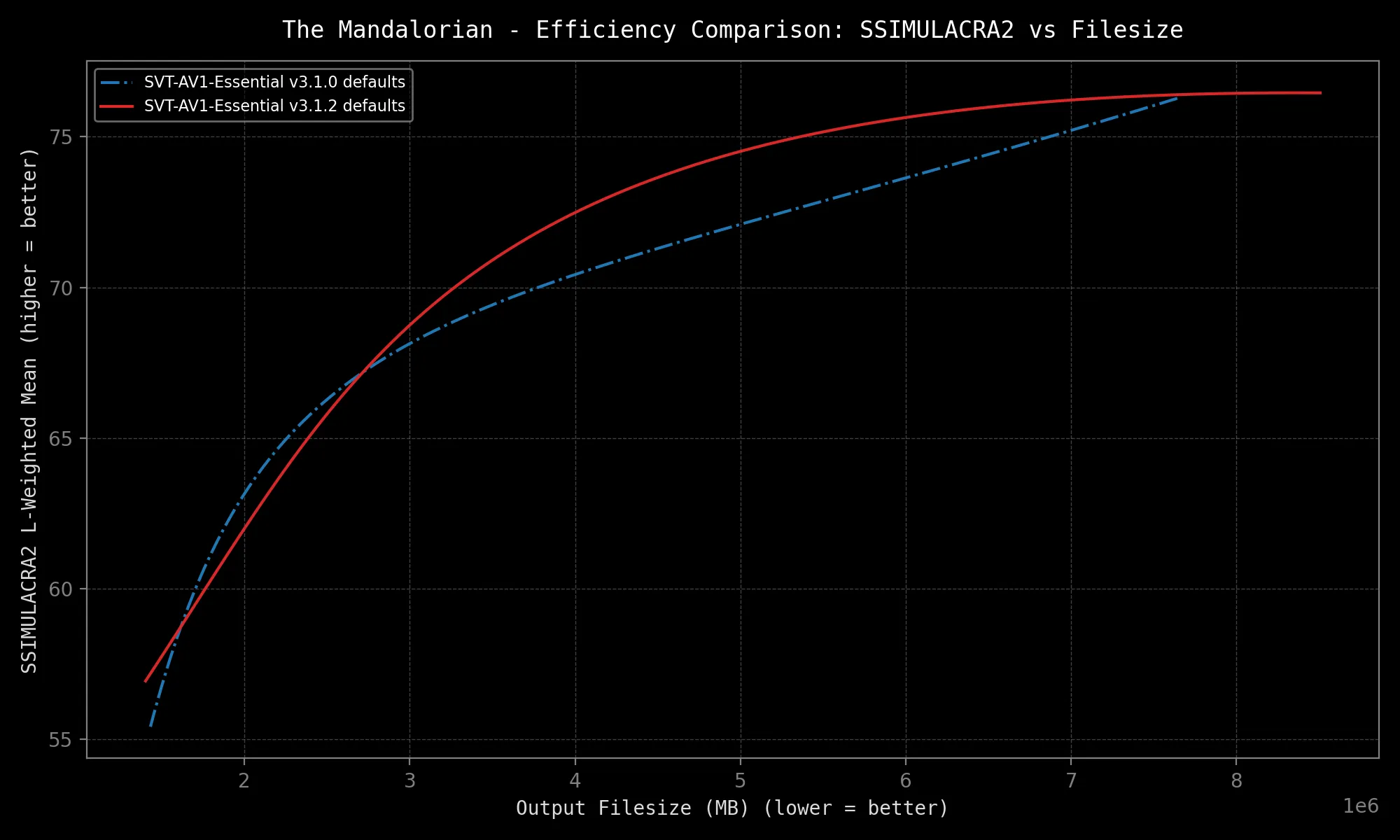
Benchmarks (new):
| Metrics | Speed |
|---|---|
 |
 |
 |
 |
 |
 |
 |
 |
 |
 |
 |
 |
 |
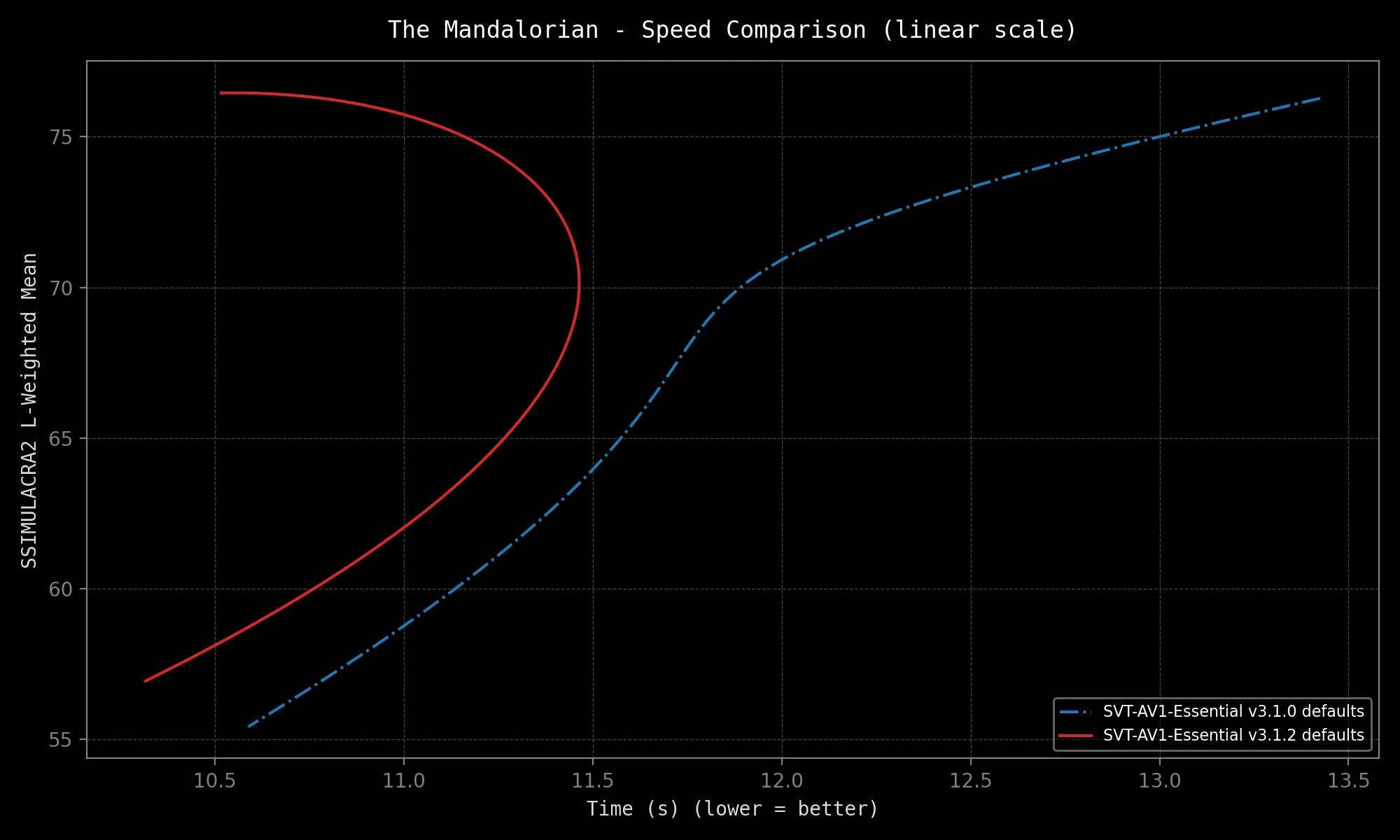 |
Pay particular attention to the x and y axes.
Speed may vary depending on your hardware configuration and source resolution.
--full-help
Prints the full help information of the encoder. The regular help has been cleaned to only provides the basic, important commands.
--progress 3
A new progress mode 3 provides more detailed information about the encoding process.
- Temporal filtering on keyframes
Temporal filtering is always disabled on keyframes to eliminate blurring issues and losses of detail.
- Cleaner CLI
The CLI presents information in a better way, with less bloat.
Many SVT-AV1-Essential features are planned and currently in the work:
--backcompat0 and 1
Restores back the original, default SVT-AV1 behavior. Once enabled, the output from SVT-AV1-Essential would always be identical to its mainline SVT-AV1 counterpart whatever the settings used.
--zones-params(WIP)
A parameter that would let you control the verbosity of --zones, and let you choose if you want to force each start and end+1 frames as keyframes (Patch available).
- Zones target bitrate / bitrate multiplier support
For use of --zones in VBR/CBR mode.
- Automatic quantization matrices
Inspired by Julio Barba's --enable-qm 2 experiments
- Built-in FFMS2 support (Patch available)
For a future without piping...
- Porting of other SVT-AV1 forks features
Including ac-bias (formerly psy-rd), quarter-step CRF, HDR tuning, HDR10+ & DV support,...
- Finding better defaults, improving the speed trade-offs...
...and documenting everything.
Any contribution to the above features would go a long way to improve the encoder's usability for everyone! I look forward to your help!
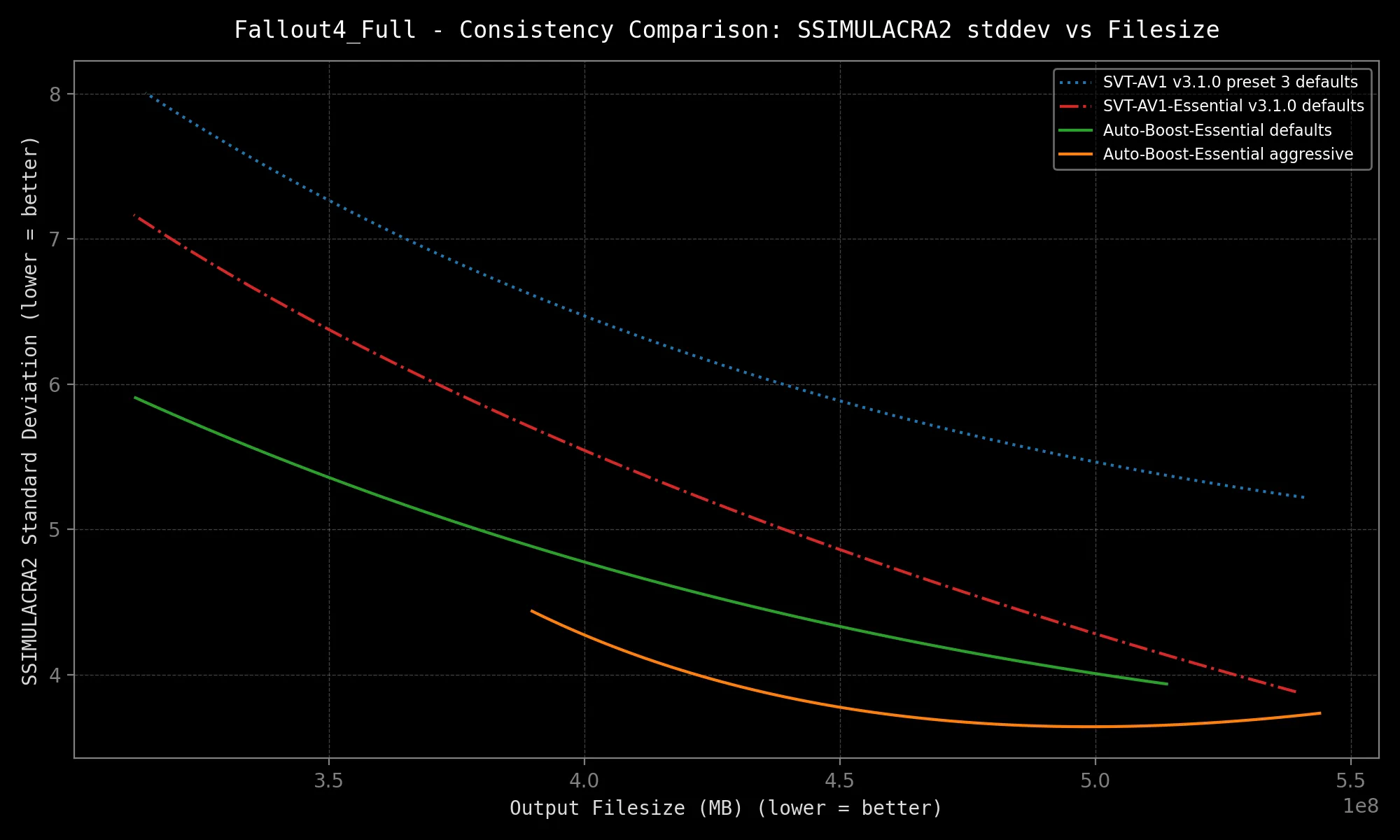
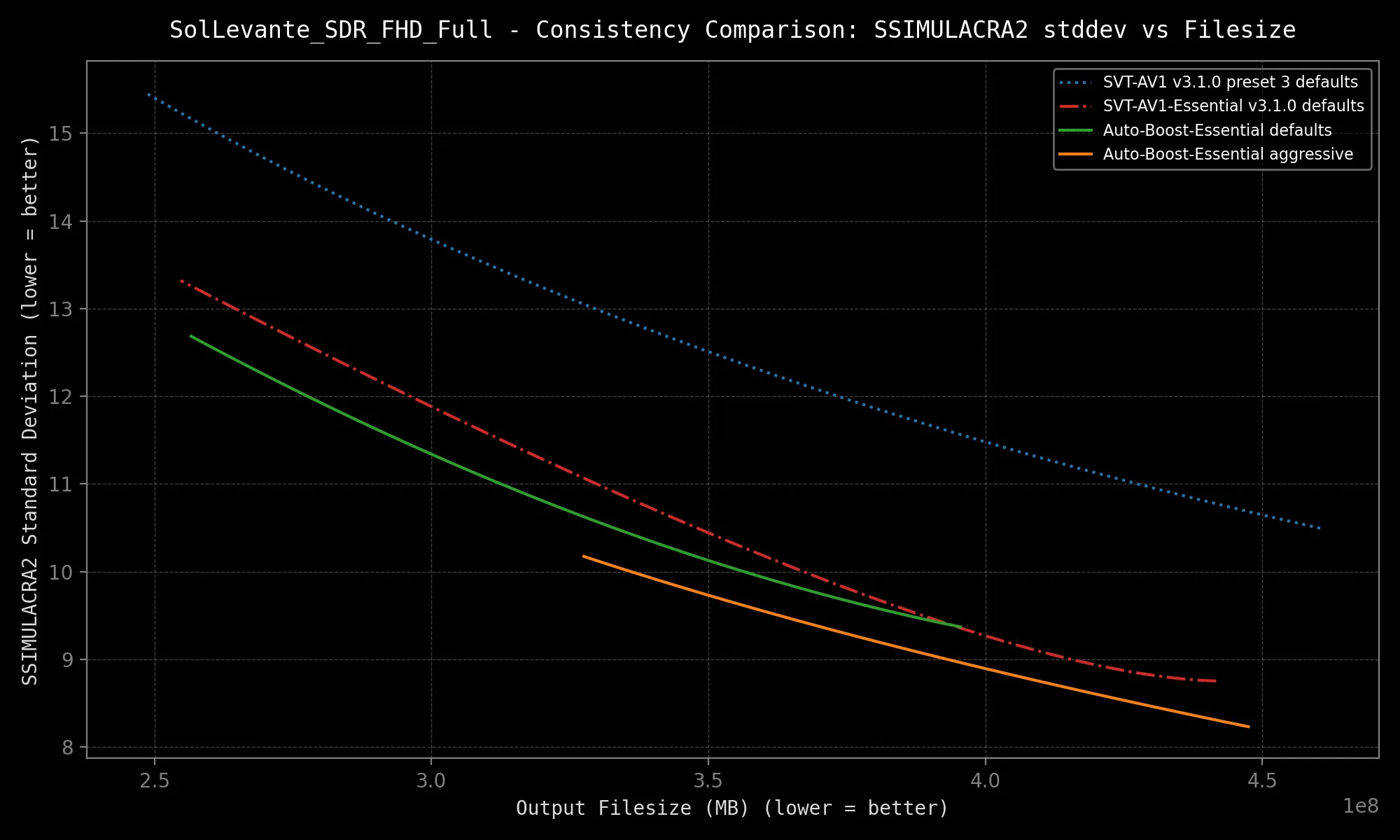
SVT-AV1-Essential sports excellent quality consistency, but what if you want exceptional consistency?
Auto-Boost-Essential is an encoding script that automatically adjusts the CRF of scenes in order to increase quality consistency throughout a video.
Using the SSIMULACRA2 quality metric, it determines which scenes require more or less bitrate based on complexity.
By leveraging the latest tools and with a focus on testing, the process has been streamlined and made much faster.
Auto-Boost-Essential can also be considered a helper script, as all you need to do is provide an input video file and it will manage everything for you including the final encoding pass:
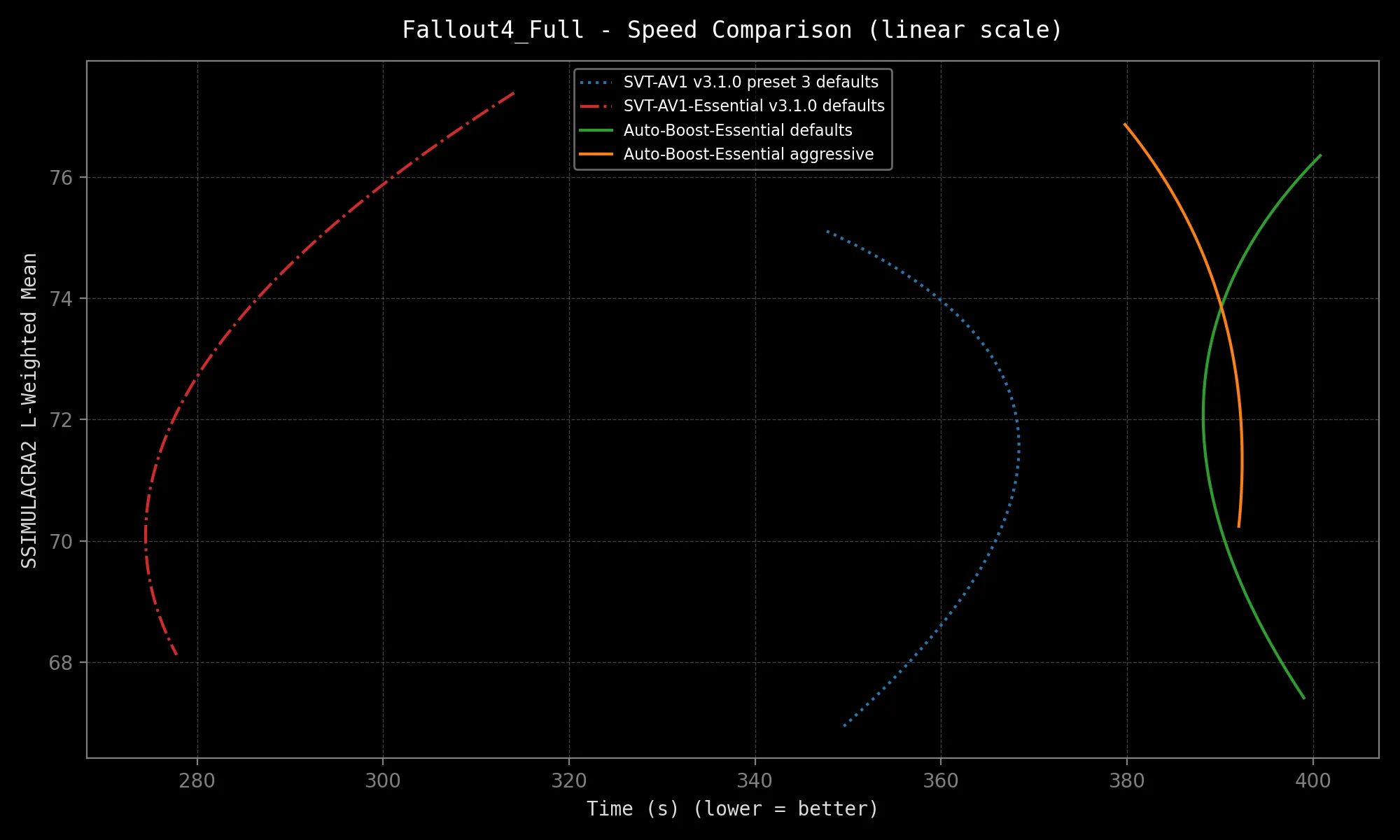
python Auto-Boost-Essential.py "my_video_file.mp4"Result (v3.1.0, Auto-Boost-Essential v1.0):
| Metrics | Speed |
|---|---|
 |
 |
 |
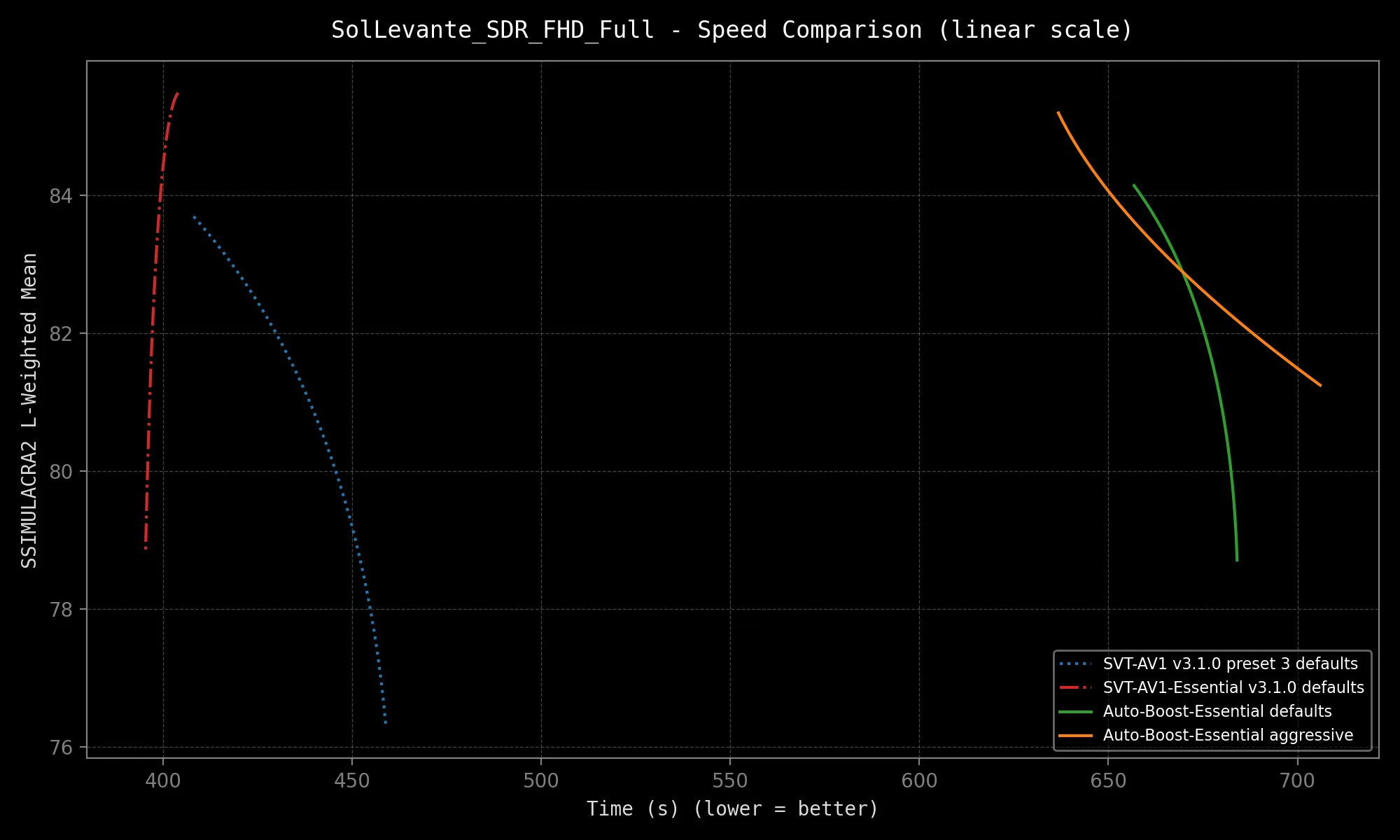 |
Speed may vary depending on your hardware configuration and source resolution.
The script is also capable of resuming unfinished encodes, supports lots of customization to fit your needs, and can also be run with boosting disabled!
More information on the official Auto-Boost-Essential repository
What this is: an encoder fork that improves perceptual quality and consistency, with universally better settings for non-low-latency use-cases at usual high resolutions.
What this is not: the fork does not currently focus on low-latency (a.k.a real-time) and very low (SD) or very high (>4K) applications and cannot guarantee improvements.
SVT-AV1-Essential tracks the official SVT-AV1 releases rather than latest mainline git, ensuring predictability for users. Each branch in the repository corresponds directly to an official SVT-AV1 release (e.g., v3.1.0), with our enhancements applied on top. This approach allows users to clearly understand which upstream version they're using while benefiting from our improvements.
Released branches are frozen unless a major bug is discovered. Official feature additions will only happen after a new mainline release. Work in progress development of new features can be tracked in the Pull Requests and Discussions tabs where patches can be uploaded and discussed. Such patches are not considered stable until they are merged and should be used with caution. Rather, it is recommended to compile from latest git or to get the official pre-compiled binaries from Releases.
For transparency and potential upstream adoption, we commit to initiating a merging process with mainline SVT-AV1 for any feature that has been in SVT-AV1-Essential for at least 3 months. This gives sufficient time for real-world testing and refinement while demonstrating our intent to contribute improvements back to the community. Users can always check which upstream release their build is based on through the version string.
There are multiple ways to contribute to SVT-AV1-Essential, and some don't require any coding experience.
The easiest way to get involved is to use SVT-AV1-Essential for your AV1 encoding projects! By choosing this encoder fork, you're helping validate our improvements and expanding their impact across the community. Your real-world usage provides invaluable feedback on performance, quality, and reliability. When you report issues or share your encoding results, you're directly contributing to the project's development. Plus, we'll proudly add your name or project to the community showcase below.
On that note, feel free to discuss the encoder in the Discussions tab above!
- Auto-Boost-Essential ~ an encoding script maintained by @nekotrix
- SVT-AV1-Essential on the AUR ~ maintained by @nekotrix
- Handbrake Builds (Windows/Linux/macOS/Flatpak) ~ maintained by @nekotrix
- FFmpeg Builds (Windows/Linux) ~ maintained by @nekotrix
- Homebrew tap (including FFmpeg) (Linux/macOS) ~ by @fraluc06
Join the list of projects and creators who trust SVT-AV1-Essential for their encoding needs.
If you wish to test metrics on your encodes, or to test local changes to see if you have improved the perceptual quality of the encoder, you can use SSIMULACRA2 & Butteraugli locally on legal content (e.g Media Collection). This isn't a requirement for opening a PR, but it helps quite a bit.
More about SSIMULACRA2:
More about Butteraugli:
Recommended CPU implementation (Universal):
- https://github.com/dnjulek/vapoursynth-zip (Requires Vapoursynth)
Recommended GPU implementation (Nvidia and AMD):
- https://github.com/Line-fr/Vship (Faster, Vapoursynth and standalone options)
With the exception of vanilla VMAF, PSNR, SSIM, and their close variants, if you believe other metrics are relevant, you may include them in your analysis as long as you also include results from either SSIMULACRA2 or Butteraugli in addition. Visual comparisons are helpful as well, though they cannot sorely be relied on by themselves.
Through the following sub-sections, we aim to provide a simplified build guide for compiling a standalone SVT-AV1-Essential binary in the form of SvtAv1EncApp. Please note that we have not included instructions for building the SVT-AV1-Essential plugin for FFmpeg or other non-affiliated software.
Please refer to the original, more verbose mainline SVT-AV1 Build Guide if you have unique needs that are not covered here (such as building FFmpeg with SVT-AV1-Essential).
On Windows, Linux or macOS, you can choose to build SVT-AV1-Essential using the provided helper scripts or manually with the CMake build system. Only the first method will be detailed below.
This is the recommended method, as it conveniently runs CMake under the hood and provides generally adequate flexibility. If you just wish to build a working, optimized binary, the script is likely the best option for you.
-
Ensure you have the necessary dependencies for this process, which may include:
- Git
- CMake 3.23 or newer
- Yasm 1.2.0 or newer
- GCC or Clang (preferably Clang)
- A POSIX-compliant shell (Bash, Zsh, etc.)
-
Clone the repository & enter the Linux build directory:
git clone https://github.com/nekotrix/SVT-AV1-Essential
cd SVT-AV1-Essential/Build/linux- Run the build script with the desired options. You can run
./build.sh --helpif you'd like to see the full suite of options available to you, but a sane configuration is provided below:
./build.sh --native --static --release --enable-ltoConsider that you may want to opt for using the Clang compiler on Linux instead of GCC. This is recommended for much faster build times. You can do this by adding the cc=clang cxx=clang++ to the build script parameters, provided you have Clang installed & in your PATH.
- The compiled binaries will be located in
Bin/Releaseif you navigate back to the root directory:
cd ../../Bin/Release/ # navigate quickly to Bin/Release from build dir
./SvtAv1EncApp --version- [Optional] On most Linux & macOS machines, if you'd like to have the compiled binary available system-wide, you can install it by running:
sudo cp SvtAv1EncApp /usr/local/binNow, you are all set! You can encode with the SvtAv1EncApp binary. Happy encoding!
MSYS2 is the most convenient option for building in Windows, as it provides a Unix-like environment for building SVT-AV1-Essential. This makes the compilation procedure the same as described above for Linux & macOS. The full process is detailed below:
-
Make sure you have downloaded & installed MSYS2 from the MSYS2 website before beginning the build process.
-
Start the Clang64 console & install the required dependencies:
pacman -Syu --needed git mingw-w64-clang-x86_64-toolchain mingw-w64-clang-x86_64-cmake mingw-w64-clang-x86_64-ninja mingw-w64-clang-x86_64-nasm- [Optional] Clang is the recommended compiler for SVT-AV1 & SVT-AV1-Essential, so you may download that with the following command:
pacman -Syu --needed mingw-w64-clang-x86_64-clang- Follow the instructions in Linux & macOS from step 1 & 2 and find the compiled binary in
C:\msys64\home\{user}\SVT-AV1-Essential\Bin\Release\:
cd ../../Bin/Release/ # navigate quickly to Bin/Release from build dir
./SvtAv1EncApp.exe --version- Put the compiled
SvtAv1EncApp.exein your PATH, and you should be all set! Happy encoding!
My sincere thanks go to the mainline SVT-AV1 development team, the psy-ex team behind SVT-AV1-PSY and the many AV1 communities' members!
Up to v0.8.7, SVT-AV1 is licensed under the BSD-2-clause license and the Alliance for Open Media Patent License 1.0. See LICENSE and PATENTS for details. Starting from v0.9, SVT-AV1 is licensed under the BSD-3-clause clear license and the Alliance for Open Media Patent License 1.0. See LICENSE and PATENTS for details.
We are not in any way affiliated with the Alliance for Open Media or any upstream SVT-AV1 project contributors who have not also contributed here.
SVT-AV1-Essential does not feature license modifications from mainline SVT-AV1.
For additional development insight, see the Docs page.