An example docs site using Yarn Workspaces and powered by Next.js and Markdoc that renders inline code samples using a custom Markdoc component that references real, testable code from a separate workspace.
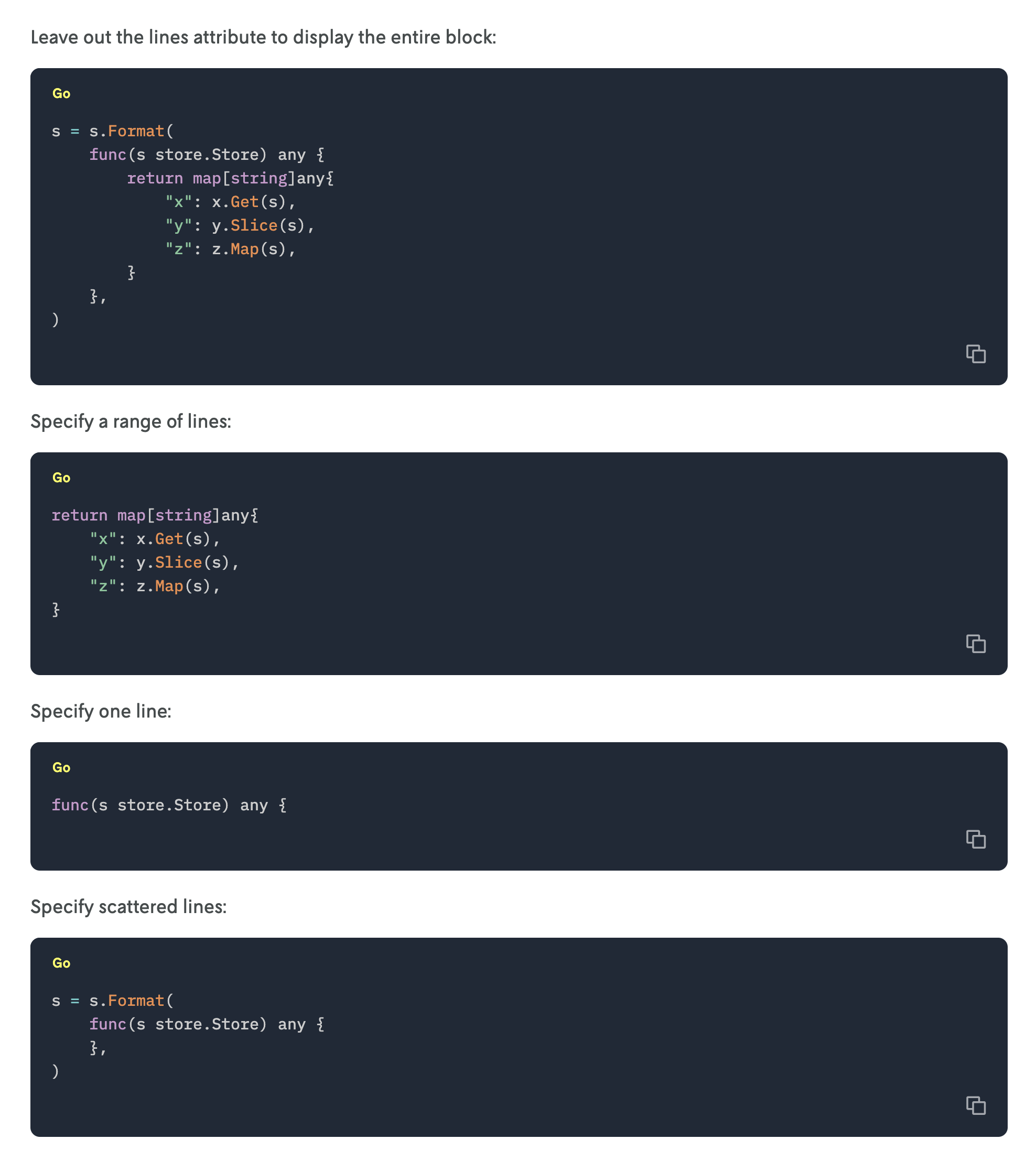
It turns markdown like this:
Leave out the lines attribute to display the entire block:

{% ref path="@docs/code/go/sdk/example.go" label="Go" language="go" /%}

Specify a range of lines:

{% ref path="@docs/code/go/sdk/example.go" label="Go" language="go" lines="3-7" /%}

Specify one line:

{% ref path="@docs/code/go/sdk/example.go" label="Go" language="go" lines="2" /%}

Specify scattered lines:

{% ref path="@docs/code/go/sdk/example.go" label="Go" language="go" lines="1-2, 8-9" /%}
Into this:
See the blog post Building a docs site with Next.js and Markdoc for more context.
To run the example docs site, first clone the repository and then install the dependencies:
git clone git@github.com:nextmv-io/docs-code-example.git
cd docs-code-example
yarn install
Run the site with:
yarn devVisit http://localhost:3000 in your browser to see the example Docs site with code snippets.