Demo 03 Construction
Demo 03 contains the ATM (All Things Machine), an Interact/Dialog driven entity, as well as a complex puzzle involving a Thing entity that is controlled by 3 switches in other levels. There is also a vertical exit on the right side of the level that the player falls through into demo04. This intentionally has some extra vertical space so the player does not even notice the transition between the levels (they certainly might see a slight hiccup though...) -- a problem that should be resolved unique to each game.
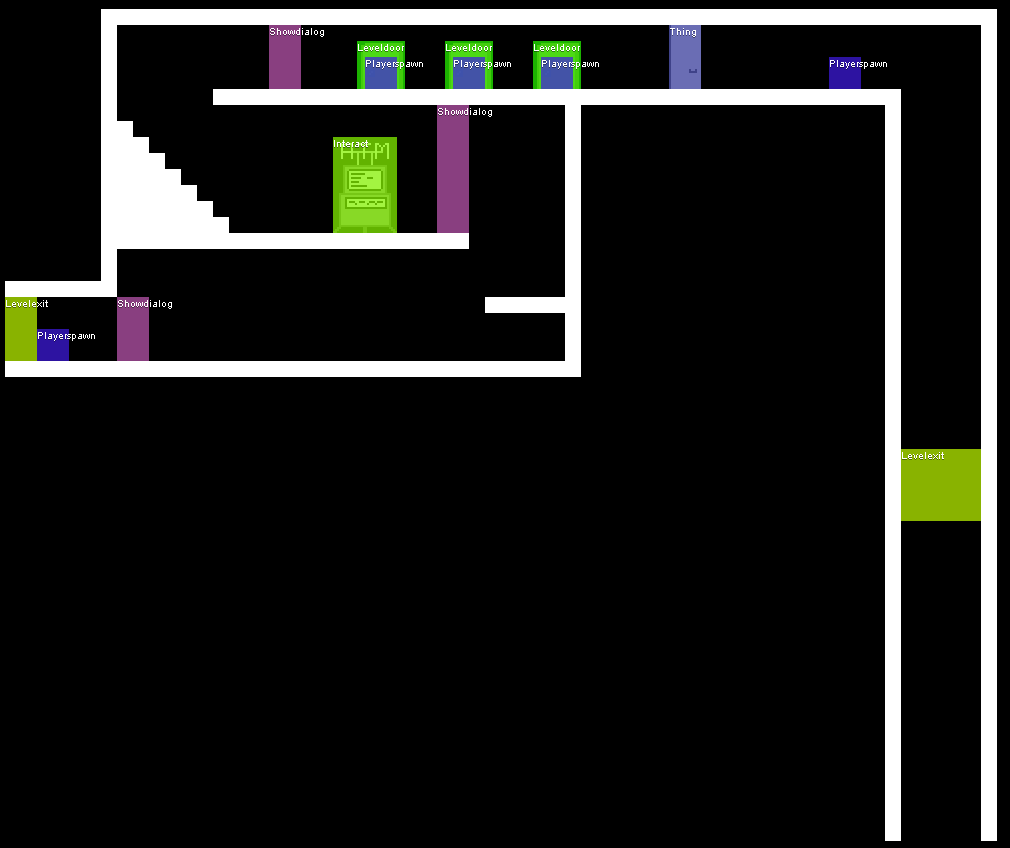
The All Things Machine is an example of a fairly complex Interact system. Most of the complexity lies in the connection between the Dialog and the class it uses to perform various actions. The Interactitself in this case is a very simple one state Animation Object.
| Setting | Value |
|---|---|
| interact | atm |
Interacts.atm =
{
    d:'ATM.main',
    ht: 'All Things Machine',
    ao:
    {
        i:'atm',
        w:32,
        h:48,
        a:
        [

            {
                n:'main',
                ft:'0.2',
                seq:[0, 1, 2, 3, 0, 4, 4, 0, 4, 4]
            }
        ]
    }
}
In the Interact settings the Dialog specified drives the interface of the ATM. The options and states are heavily driven by the use of Requirements.
Dialogs.ATM.main =
{
    s:
    {
        f:'04b03.font',
        w:220,
        h:0,
        x:20,
        y:15,
        osx:5,
        osy:6,
        win:
            [
                Windows.atmbg
            ],
        c:'objects.atm' // The class driving the actions taken by the dialog and token translation
    },
    sa:
    [
        {
            n:'main',
            t:'All Things Machine\nPoints In Savings: [points]',
            o:
            [
                {
                    t:'Point Savings',
                    ns:'savings'
                },
                {
                    t:'Gamble',
                    ns:'gamble'
                },
                {
                    t:'Exit ATM'
                }
            ]
        },
        {
            n:'savings',
            t:'All Things Machine Savings Menu\nPoints In Savings: [points]',
            o:
            [
                {
                    t:'Add 50 to Savings',
                    ca:'save',
                    cav:{ pt:-50}, // class method var
                    ns:'savings',
                    r:{i:[ ['i','pt','>=50'] ]}
                },
                {
                    t:'Widthdraw 50 from Savings',
                    ca:'save', // class method
                    cav:{ pt:50 }, // class method var
                    ns:'savings',
                    r:{i:[ ['atm','pt','>=50'] ]}
                },
                {
                    t:'Widthdraw [points] from Savings',
                    ca:'save', // class method
                    cav:{ pt:-1 }, // class method var
                    ns:'savings',
                    r:{i:[ ['atm','pt','<50'],['atm','pt','>0'] ]}
                },
                {
                    t:'Widthdraw from Savings (Disabled due to lack of funds)',
                    ns:'savings',
                    r:{i:[ ['atm','pt','==0'] ]}
                },
                {
                    t:'Back',
                    ns:'main'
                },
                {
                    t:'Exit ATM'
                }
            ]
        },
        {
            n:'gamble',
            t:'All Things Machine Gambling Menu\nPoints In Savings: [points]',
            o:
            [
                {
                    t:'Use 10 Points for a chance to win 100 points.',
                    ca:'gamble', // class method
                    cav:{ pt:-10, ptw:100 }, // class method var
                    ns:'gamble',
                    r:{i:[ ['atm','pt','>=10'] ]}
                },
                {
                    t:'Use 20 Points for a chance to win 200 points.',
                    ca:'gamble', // class method
                    cav:{ pt:-20, ptw:200 }, // class method var
                    ns:'gamble',
                    r:{i:[ ['atm','pt','>=20'] ]}
                },
                {
                    t:'Back',
                    ns:'main'
                },
                {
                    t:'Exit ATM'
                }
            ]
        }
    ]
}
The actual work of the ATM is generally handled in the ATM object. This is a specialized code file allowing dialogs to make calls into the code for translating tokens in text and performing various actions. Class File
The door locking mechanism in this level requires the switches in demo03a, demo03b, and demo03c to be set in a certain way.
Each of the micro levels (demo03a, demo03b, and demo03c) use the exact same switch Interact and settings. Due to the switch defaulting to the level as the partition they all produce a unique flag value for the gate in the level to use as a Requirement.
| Setting | Value |
|---|---|
| interact | switch.generic |
| sid | switch |
Unlike in Demo 02, the door entity is not used. It is too rigid in functionality so the versatile Thing entity is used. The disadvantage of using a Thing is that a little more data has to be setup.
| Setting | Value |
|---|---|
| thing | demo03.gate |
Things.demo03.gate =
{
    ao: // animation object
    {
        i:'gate', // image name ('media/' is prepended)
        w:16,
        h:32,
        a: // array of animation states
        [
            {
                n:'open',
                r:Requirements.demo03.gate,
                ft:1,
                seq:[0],
                c:'NONE' // this sets the collision
            },
            { // this is the fall through case (no requirements)
                n:'closed',
                b: { x:2, y: 32},
                ft:1,
                seq:[1],
                c:'FIXED' // this sets the collision
            }
        ]
    }
}
The gate light helps the player know if they have solved the puzzle by turning green when the switches are in the correct position. It should be noted that the requirements for the gate light are exactly those used by the gate itself cutting back on duplicate and certainly bugs.
| Setting | Value |
|---|---|
| thing | demo03.gateLight |
Things.demo03.gateLight =
{
    ao:
    {
        i:'gatelight',
        w:16,
        h:16,
        g:0,
        a:
        [
            {
                n:'green',
                r:Requirements.demo03.gate,
                ft:1,
                seq:[1]
            },
            { // this is the fallthrough case
                n:'red',
                ft:1,
                seq:[0]
            }
        ]
    }
}