


terminal audio visualizer for linux/unix/macOS/windows*

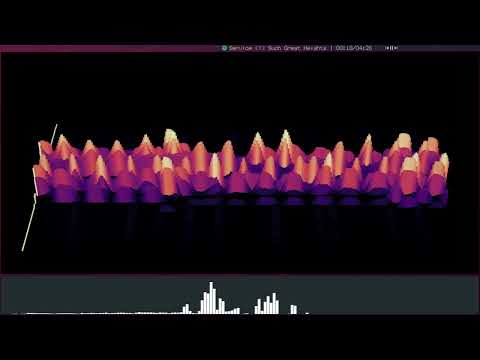
- ALSA (linux FFmpeg)
- AVFoundation (macOS FFmpeg)
- DirectShow (windblows FFmpeg)
- Pipewire (pw-cat)
- PortAudio (linux/macOS/windblows (maybe))
- PulseAudio (parec/FFmpeg)
-
go modules
- github.com/nsf/termbox-go
- github.com/integrii/flaggy
- github.com/pkg/errors
- github.com/noisetorch/pulseaudio
- gonum.org/v1/gonum
-
binaries
- ffmpeg (required for FFmpeg backends)
- parec (required for PulseAudio backend with parec)
- pw-cat, pw-link (required for Pipewire backend)
-
c libraries (optional, requires CGO -
CGO_ENABLED=1)- fftw (fftw3) (enable with
-tags fftw) - portaudio (portaudio-2.0) (enable with
-tags portaudio)
- fftw (fftw3) (enable with
# get source
git clone https://github.com/noriah/catnip.git

# cd to dir
cd catnip

# build and install catnip
go install ./cmd/catnip

# with portaudio
go install ./cmd/catnip -tags portaudio

# with fftw3
go install ./cmd/catnip -tags fftw

# with both portaudio and fftw3
go install ./cmd/catnip -tags portaudio,fftw- use
catnip list-backendsto show available backends - use
catnip -b {backend} list-devicesto show available devices - use
catnip -b {backend} -d {device}to run - use the full device name - use
catnip -hfor information on several more customizations - use
catnip ... -rawfor raw output - more options in help text
NOTE: functionality and interface (cli/etc..) subject to change.
the raw output prints raw data to stdout.
each float is one of the frequency bins in one of the channels.
the number of bins per channel can be set with -rawb/--output-raw-bins.
each channel is read out fully before the next channel is read out.
# 2 channels, 4 bins each
#ch0b0  ch0b1  ch0b2  ch0b3  ch1b0  ch1b1  ch1b2  ch1b3
27.899 49.253 81.805 61.699 14.518 48.265 79.597 61.140
31.290 51.166 78.141 57.759 16.334 51.028 78.153 55.133
...
values can be output in a mirrored format similar to several of the "graphical"
outputs using -rawm/--output-raw-mirror.
# 2 channels, 4 bins each, mirrored output
#ch0b0  ch0b1  ch0b2  ch0b3  ch1b3  ch1b2  ch1b1  ch1b0
27.899 49.253 81.805 61.699 61.140 79.597 48.265 14.518
31.290 51.166 78.141 57.759 55.133 78.153 51.028 16.334
...
the order can be flipped by using the standard -i/--invert flag.
this prints the lower frequencies last.
# 2 channels, 4 bins each, inverted output
#ch0b3  ch0b2  ch0b1  ch0b0  ch1b3  ch1b2  ch1b1  ch1b0
61.699 81.805 49.253 27.899 61.140 79.597 48.265 14.518
57.759 78.141 51.166 31.290 55.133 78.153 51.028 16.334
...
this can be combined with the mirror flag as well
# 2 channels, 4 bins each, inverted & mirrored output
#ch0b3  ch0b2  ch0b1  ch0b0  ch1b0  ch1b1  ch1b2  ch1b3
61.699 81.805 49.253 27.899 14.518 48.265 79.597 61.140
57.759 78.141 51.166 31.290 16.334 51.028 78.153 55.133
...