Conversation


|
|
||
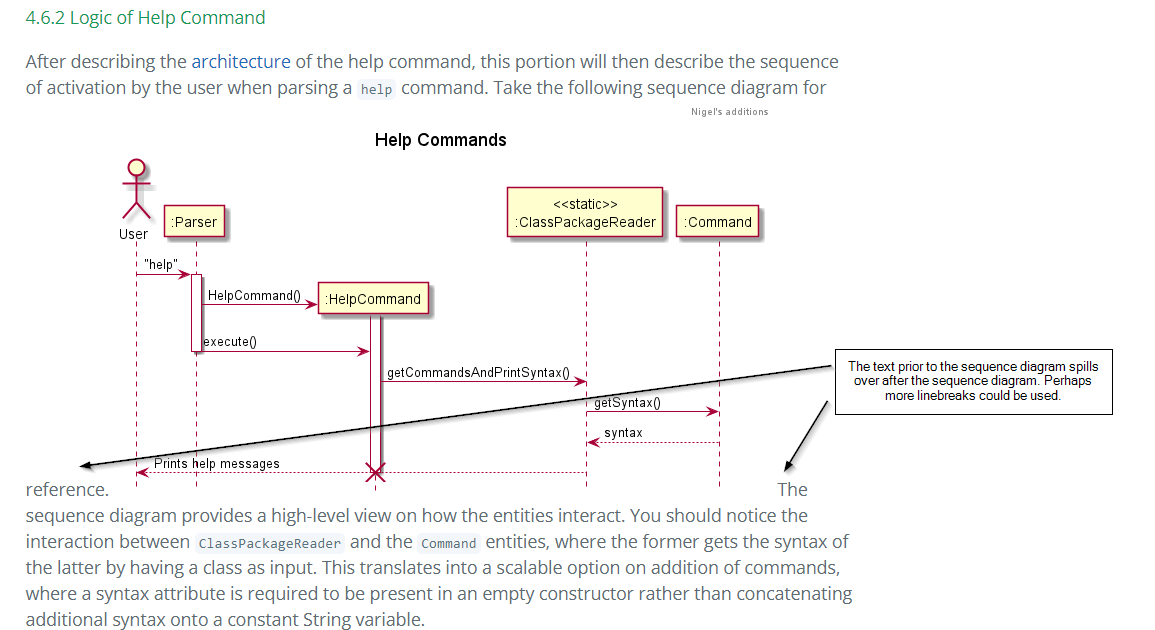
| After describing the [architecture](#461-architecture--of-help-command) of the help command, this portion will then describe the sequence of activation by | ||
| the user when parsing a `help` command. Take the following sequence diagram for reference. | ||
|  |

There was a problem hiding this comment.
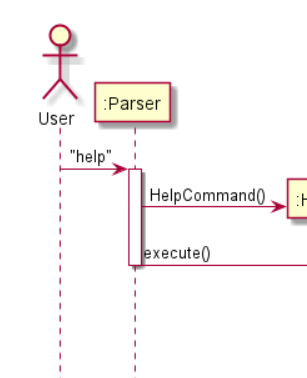
Should this arrow for execute() start before the activation bar ends?
| in the directory `fooddata` , with the text file named aptly as `food.txt`. Current improvements in this functionality | ||
| would be to integrate the dates in `Calendar` with the `food.txt` file, enabling the user to search what they ate on a | ||
| given day. | ||
|  |
There was a problem hiding this comment.
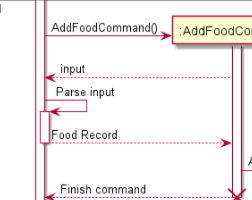
Is "Food Record" a method call? Should that arrow be starting before the activation bar ends?
| in the directory `fooddata` , with the text file named aptly as `food.txt`. Current improvements in this functionality | ||
| would be to integrate the dates in `Calendar` with the `food.txt` file, enabling the user to search what they ate on a | ||
| given day. | ||
|  |
There was a problem hiding this comment.
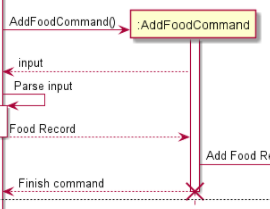
Should "Food Record" start a new activation bar in AddFoodCommand? Should the activation for the AddFoodCommand be separated into multiple activation bars?
|
|
||
| The sequence diagram below summarizes how listing modules work: | ||
|
|
||
|  |
There was a problem hiding this comment.
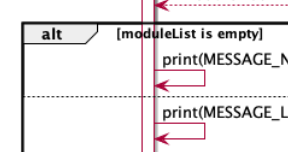
Should there also be a condition specified for the second alt block, e.g. [else]?

There was a problem hiding this comment.
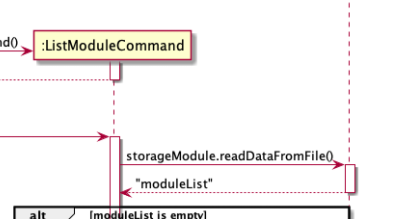
Can indicate the return type for clarity instead of just "moduleList".
| The saving of data from the list to the storage file is elaborated further in the diagram below. | ||
| Further discussion on the design considerations of writing an abstract class are discussed in | ||
| design considerations. | ||
|  |
There was a problem hiding this comment.
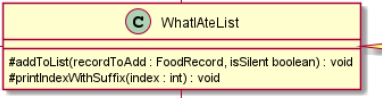
Should there be a colon between isSilent and boolean?
| The saving of data from the list to the storage file is elaborated further in the diagram below. | ||
| Further discussion on the design considerations of writing an abstract class are discussed in | ||
| design considerations. | ||
|  |
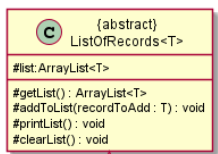
|
|
||
| The following diagram illustrates the interactions between the functional class `ClassPackageReader` and | ||
| a particular command `ClickCommand`. | ||
|  |
There was a problem hiding this comment.
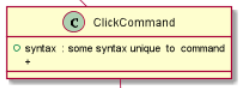
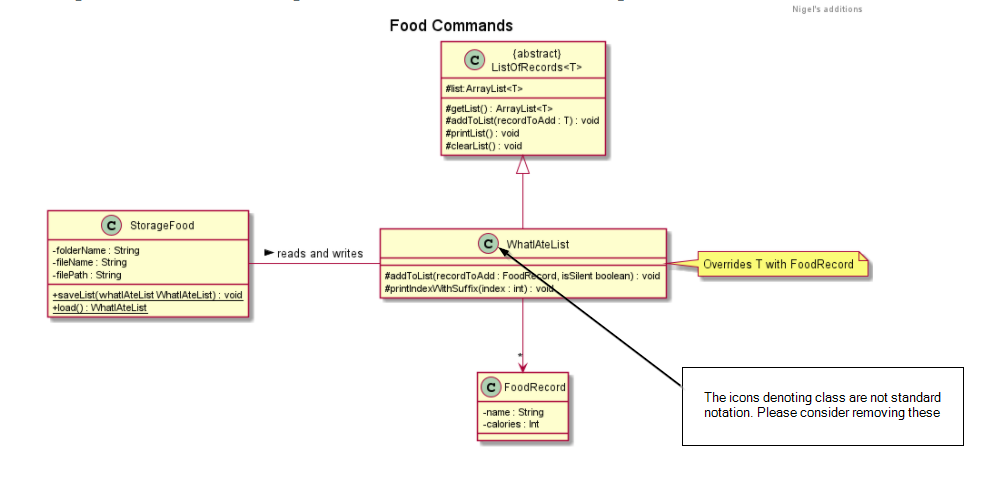
Similar issue as before, is the "C" icon standard notation?

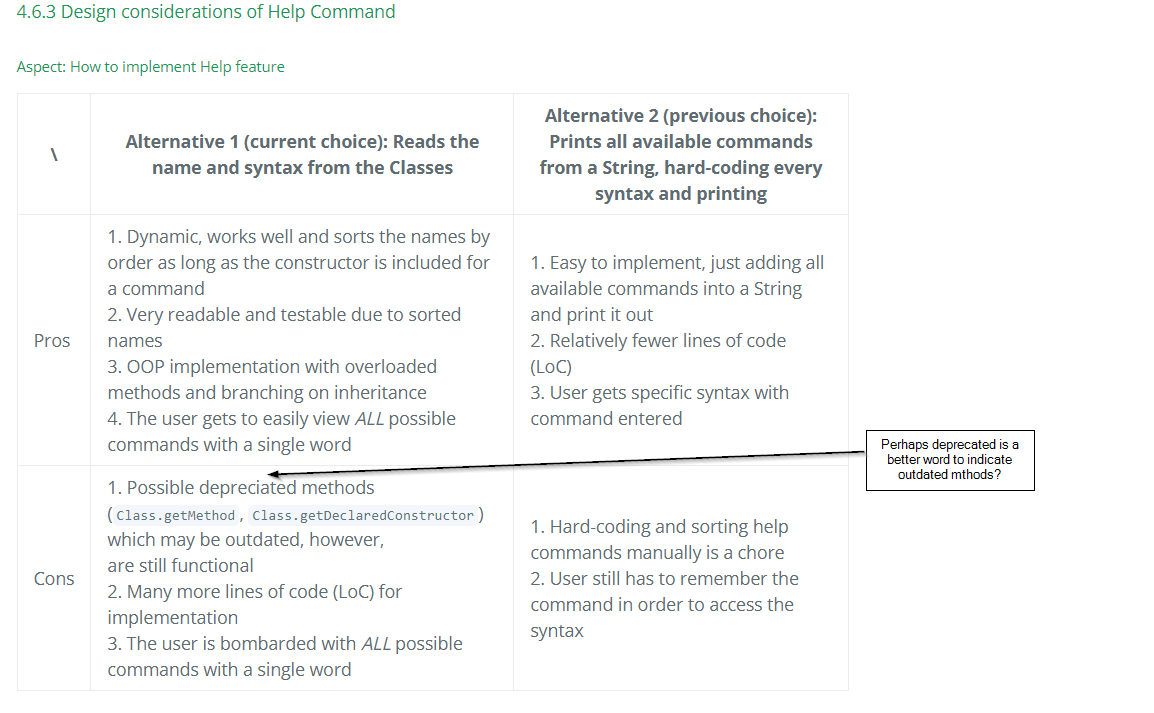
| | \ | Alternative 1 (current choice): Reads the name and syntax from the Classes | Alternative 2 (previous choice): Prints all available commands from a String, hard-coding every syntax and printing | | ||
| |---|---|---| | ||
| | Pros | 1. Dynamic, works well and sorts the names by order as long as the constructor is included for a command<br>2. Very readable and testable due to sorted names<br>3. OOP implementation with overloaded methods and branching on inheritance<br>4. The user gets to easily view *ALL* possible commands with a single word | 1. Easy to implement, just adding all available commands into a String and print it out<br>2. Relatively fewer lines of code (LoC)<br>3. User gets specific syntax with command entered | | ||
| | Cons | 1. Possible depreciated methods (`Class.getMethod`, `Class.getDeclaredConstructor`) which may be outdated, however,<br> are still functional<br>2. Many more lines of code (LoC) for implementation <br>3. The user is bombarded with *ALL* possible commands with a single word | 1. Hard-coding and sorting help commands manually is a chore<br>2. User still has to remember the command in order to access the syntax | |

|
|
||
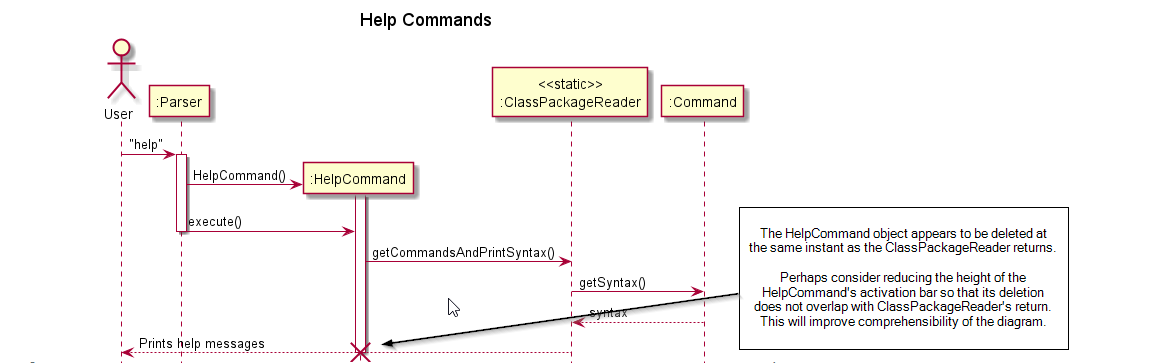
| After describing the [architecture](#461-architecture--of-help-command) of the help command, this portion will then describe the sequence of activation by | ||
| the user when parsing a `help` command. Take the following sequence diagram for reference. | ||
|  |
|
|
||
| After describing the [architecture](#461-architecture--of-help-command) of the help command, this portion will then describe the sequence of activation by | ||
| the user when parsing a `help` command. Take the following sequence diagram for reference. | ||
|  |
| > **NOTE:** Two tasks and two lectures are displayed for each day based on the order in which the user added them, and if there are more, they will show as and when the user deletes the tasks/lectures that are currently displayed. | ||
|
|
||
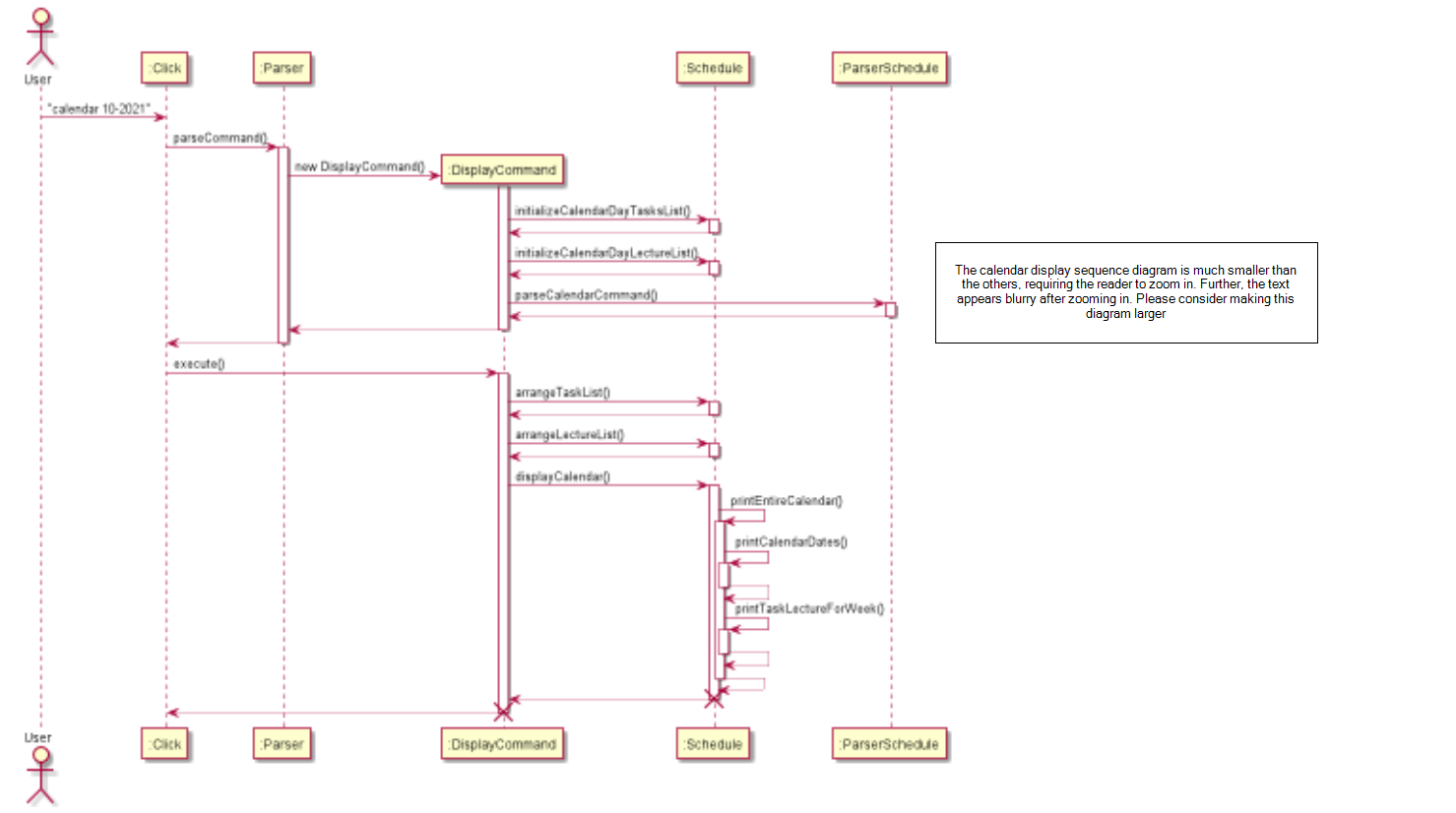
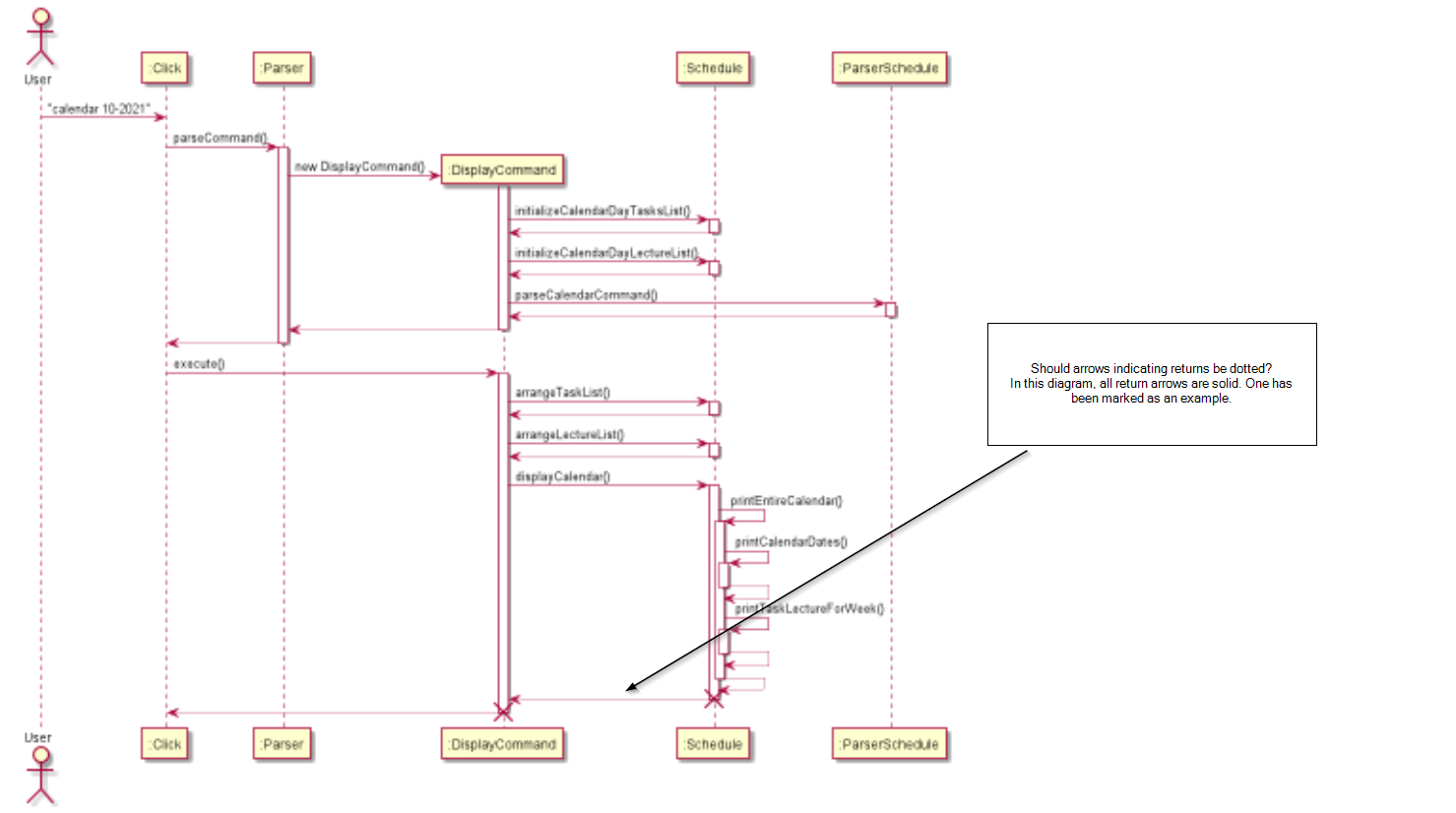
| The below sequence diagram shows the execution process of the calendar display feature. | ||
|  |
| > **NOTE:** Two tasks and two lectures are displayed for each day based on the order in which the user added them, and if there are more, they will show as and when the user deletes the tasks/lectures that are currently displayed. | ||
|
|
||
| The below sequence diagram shows the execution process of the calendar display feature. | ||
|  |
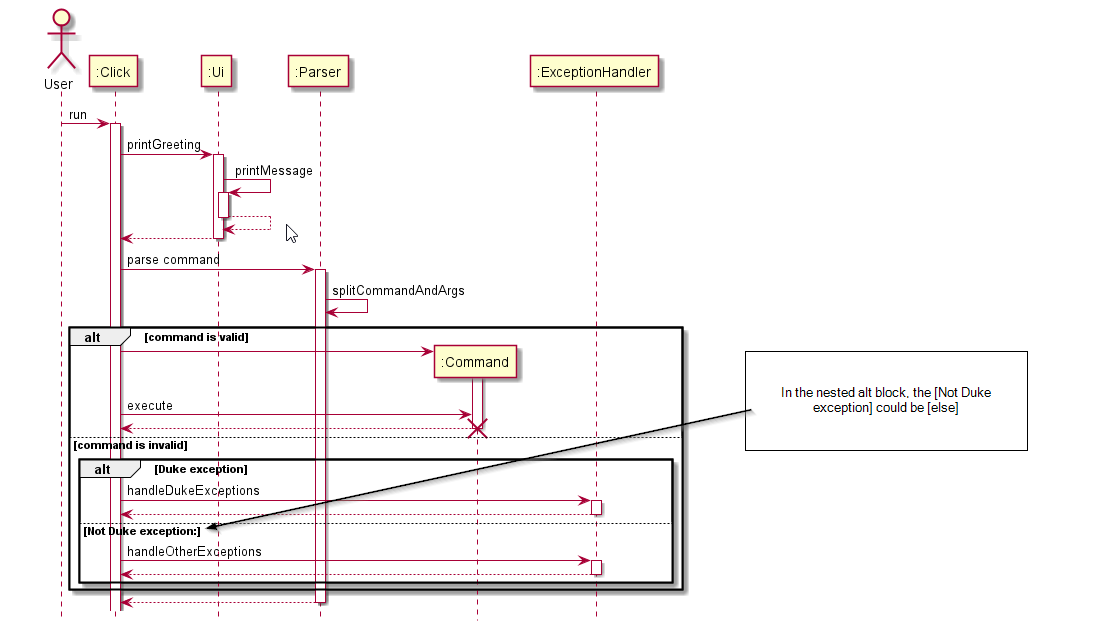
| 1. if command, go ahead and execute it respectively | ||
| 1. if not throw exception and ask for input again | ||
| 1. Parser returns control to Click | ||
|  |
| The saving of data from the list to the storage file is elaborated further in the diagram below. | ||
| Further discussion on the design considerations of writing an abstract class are discussed in | ||
| design considerations. | ||
|  |


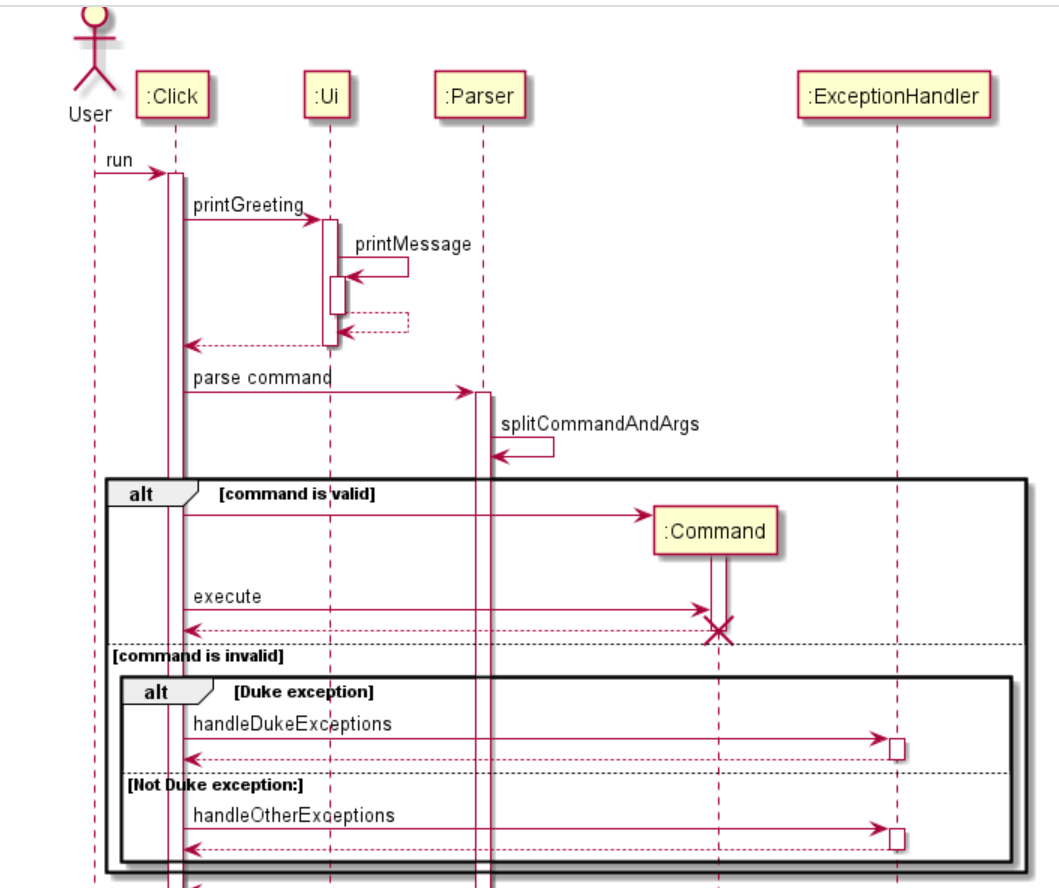
| 1. Parser returns control to Click | ||
|  | ||
|
|
||
| You should note that this is a general overview of the Click functionality, and the `:Command` entity simply represents a Command to be called by the Parser. |
There was a problem hiding this comment.
With reference to the screenshot posted by giterator, your Click calls the command instead of your Parser.
| ii. `AddModuleCommand` calls `getModule()` to create a new `module` based on user's input.\ | ||
| iii. `AddModuleCommand` calls `storage.StorageModule.readDataFromFile()` to read Module-related data `moduleList` from the storage file.\ | ||
| iv. `AddModuleCommand` calls `moduleList.addModule(module)` to add a new `module` to the list.\ | ||
| v. `AddModuleCommand` prompts the successful message to the user. |
There was a problem hiding this comment.

You forgot to add a slash at the end this time so there's no new line.
| ii. `DeleteModuleCommand` finds the `moduleIndex` based on user's input.\ | ||
| iii. `DeleteModuleCommand` checks if `moduleIndex` is valid or not. If not, throw an `IllegalModuleIndexException`.\ | ||
| iv. `DeleteModuleCommand` calls `moduleList.addModule(module)` to add a new `module` to the list.\ | ||
| v. `DeleteModuleCommand` prompts the successful message to the user.\ |
There was a problem hiding this comment.

You may not have intended to print successful message after adding a new module in "Delete" command.
|
|
||
| ii. The `inputYearMonth` is passed into `Ui` class method `printCalenderTitle` and this prints out the title of that month with the month name and the year. In this example, it will display as given in the figure below. | ||
|  | ||
| iii. Then, the method `arrangeTaskList` in `Schedule` class is called, and it takes in `storage.tasksList` (the TaskList object with all the currently stored tasks drawn from storage), `calendarTasks` (an ArrayList<ArrayList<String>> object initialized with empty ArrayLists of type String), `month` (the month input by the user, which in this example is the integer `10`) and year `month` (the year input by the user, which in this example is the integer `2021`), and adds the tasks to the days in the empty String ArrayLists initialized before in `calendarTasks`. |
There was a problem hiding this comment.

Almost thought point iii. disappeared into thin air. Do take note it appeared behind your screenshot.

There was a problem hiding this comment.
Adding on to this, you can consider using markdown numbered lists.

| 1. if not throw exception and ask for input again | ||
| 1. Parser returns control to Click | ||
|  | ||
|
|
There was a problem hiding this comment.
Shouldn't methods include () behind the method?
|
|
||
| Syntax: `zoom add LINK MODULE_CODE` | ||
| Example: `zoom add nus.sg/testlink ABC101` | ||
|
|
There was a problem hiding this comment.
You can consider adding sequence diagrams, or more detailed explanation on how the zoom links are stored.
|
|
||
| ii. The `inputYearMonth` is passed into `Ui` class method `printCalenderTitle` and this prints out the title of that month with the month name and the year. In this example, it will display as given in the figure below. | ||
|  | ||
| iii. Then, the method `arrangeTaskList` in `Schedule` class is called, and it takes in `storage.tasksList` (the TaskList object with all the currently stored tasks drawn from storage), `calendarTasks` (an ArrayList<ArrayList<String>> object initialized with empty ArrayLists of type String), `month` (the month input by the user, which in this example is the integer `10`) and year `month` (the year input by the user, which in this example is the integer `2021`), and adds the tasks to the days in the empty String ArrayLists initialized before in `calendarTasks`. |
There was a problem hiding this comment.
Adding on to this, you can consider using markdown numbered lists.
| After describing the [architecture](#461-architecture--of-help-command) of the help command, this portion will then describe the sequence of activation by | ||
| the user when parsing a `help` command. Take the following sequence diagram for reference. | ||
|  | ||
| The sequence diagram provides a high-level view on how the entities interact. You should notice the interaction between |
There was a problem hiding this comment.
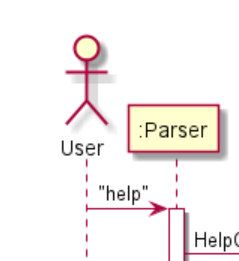
Is help a method parameter? If so, you should include the method as well
|
|
||
| After describing the [architecture](#461-architecture--of-help-command) of the help command, this portion will then describe the sequence of activation by | ||
| the user when parsing a `help` command. Take the following sequence diagram for reference. | ||
|  |
There was a problem hiding this comment.
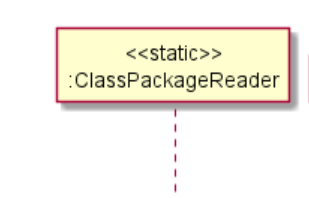
Is "static" correct convention? I believe you should use "class" when calling static methods.

|
|
||
| ## 3. Design | ||
|
|
||
| This section is designed to demonstrate our software design description, and aims to provide you with an overall guidance to the architecture of Duke. |

There was a problem hiding this comment.
Should it be "architecture of Click" instead?
| 1. if command, go ahead and execute it respectively | ||
| 1. if not throw exception and ask for input again | ||
| 1. Parser returns control to Click | ||
|  |
There was a problem hiding this comment.
splitCommandAndArgs method call should have an activation bar
| 1. if command, go ahead and execute it respectively | ||
| 1. if not throw exception and ask for input again | ||
| 1. Parser returns control to Click | ||
|  |
There was a problem hiding this comment.
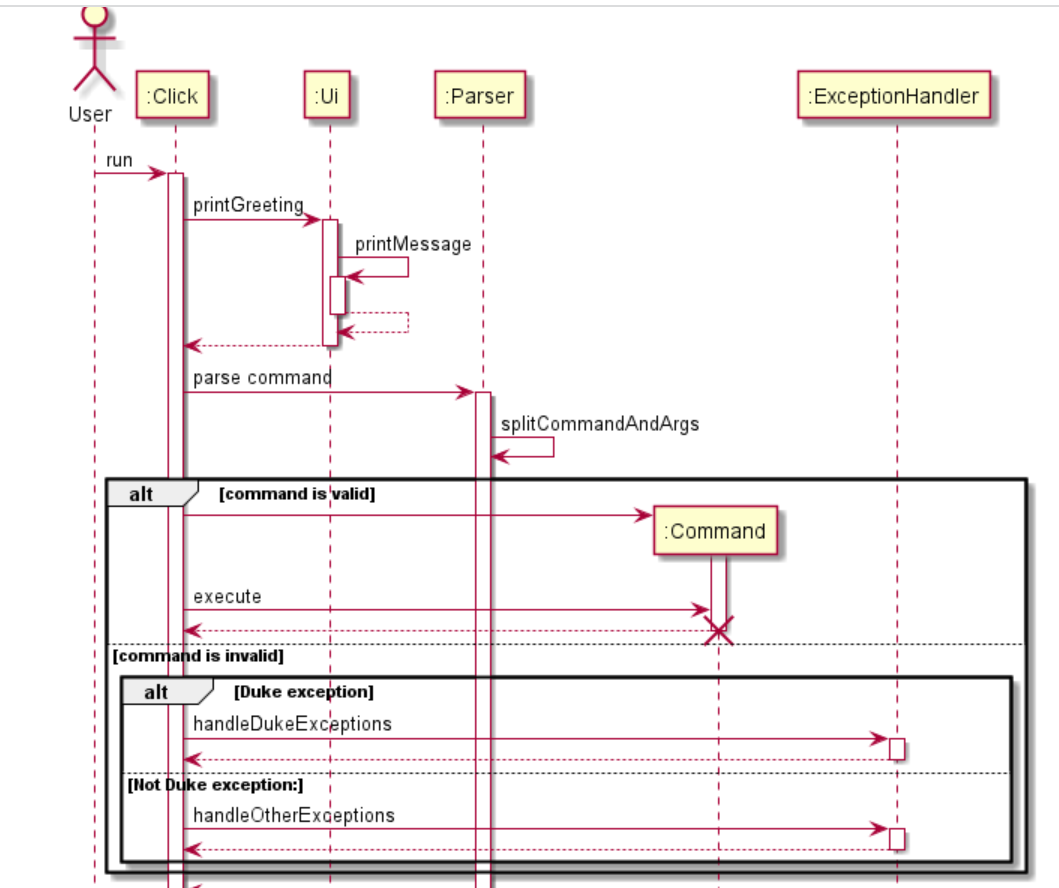
Should the execute() call directly into the activation bar of the Command constructor? shouldn't the constructor return the Object first, then execute called with its own activation bar?
|
|
||
| **_Welcome to Click_!** It's a Java-based Command-Line Interface for Cramming and Knowledge (CLICK), providing a one-stop access point | ||
| for managing various parts of your Computing student life here at NUS. We aim to provide a simple interface | ||
| that quantifies how you use your time and if you're taking care of your overall well-being. |
There was a problem hiding this comment.
I think a brief overview of the application's capabilities and functionalities would be beneficial to understanding the rest of the DG easier.
|
|
||
| The command for listing all modules is implemented by the `AddModuleCommand` class that extends `Command`. | ||
|
|
||
| When the user types `module add c/CS2113T n/Software Engineering e/A`, the following sequence of steps will then occur: |
There was a problem hiding this comment.
For this and the other implementation sections, it would be good to explain what the different flags represent. Otherwise it's a bit hard to follow
|
|
||
| The command for displaying the calendar for a specific month is implemented by the `DisplayCommand` class that extends `Command`. | ||
|
|
||
| Given below is an example usage scenario and how the display calendar mechanism behaves at each step. |
There was a problem hiding this comment.
This whole section is quite wordy with long paragraphs. It's quite hard to read and follow.
Maybe putting the Sequence diagram at the front, then explaining the diagram might be clearer
|
|
||
| After describing the [architecture](#461-architecture--of-help-command) of the help command, this portion will then describe the sequence of activation by | ||
| the user when parsing a `help` command. Take the following sequence diagram for reference. | ||
|  |
There was a problem hiding this comment.
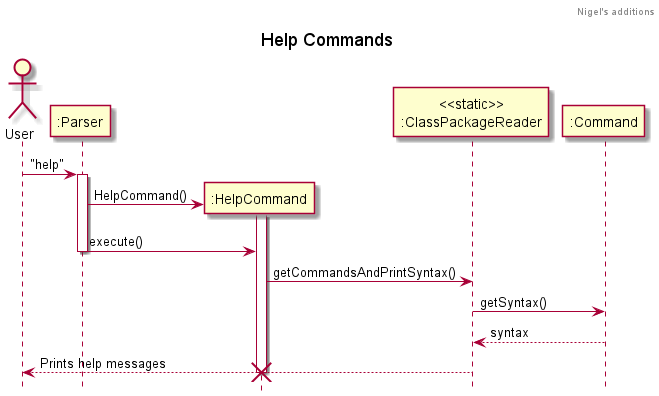
Shouldn't the activation bar for the parser call extend all the way until the help message is printed?
Activation bars for Help command should be split up by the method calls. As it is now, it seems to imply that all the method calls occur in the constructor.

|
|
||
| If the creation is successful, a confirmation message on the newly created Module will be displayed to the user. | ||
|
|
||
| **Implementation** |
There was a problem hiding this comment.
Can consider using UML diagram to illustrate this implementation
|
|
||
| The sequence diagram below summarizes how listing modules work: | ||
|
|
||
|  |
There was a problem hiding this comment.
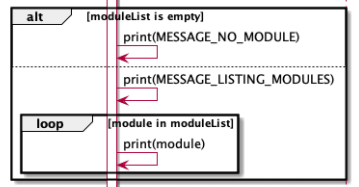
print(...) self invocation seems to be incorrect.
Refer to: https://nus-cs2113-ay2122s1.github.io/website/se-book-adapted/chapters/uml.html#self-invocation
| > **NOTE:** Two tasks and two lectures are displayed for each day based on the order in which the user added them, and if there are more, they will show as and when the user deletes the tasks/lectures that are currently displayed. | ||
|
|
||
| The below sequence diagram shows the execution process of the calendar display feature. | ||
|  |
There was a problem hiding this comment.
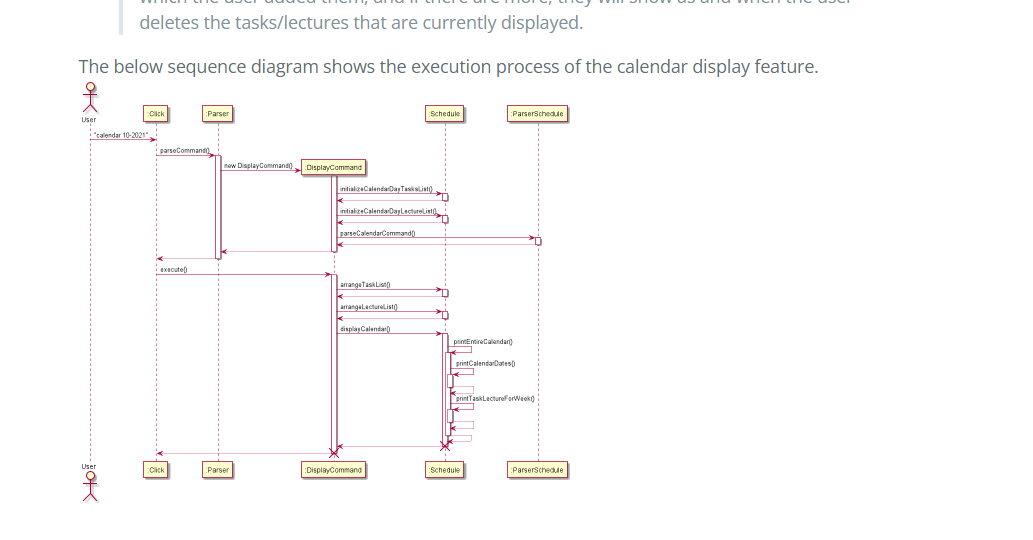
- Diagram is difficult to read due to scaling.
- Return control arrows should be dotted. (Refer to: https://nus-cs2113-ay2122s1.github.io/website/se-book-adapted/chapters/uml.html#basic-2)
|
|
||
| The sequence diagram below summarizes how listing modules work: | ||
|
|
||
|  |
There was a problem hiding this comment.
Can indicate the return type for clarity instead of just "moduleList".


Move all data file to 1 directory
…into branch-nigel-ppp
Branch nigel ppp
ug dg updates

adding Target User Profile and Value Proposition in DG and addition of UML diagrams for journal
minor code refractor
Shoib PPP
…into branch-final-test

# Conflicts:
#	docs/DeveloperGuide.md
Fix help message string
User guide styling
Add page break
add whitespace for formatting
…upgrade

Update UserGuide.md
Branch fix bug binh
Fix bug where item index of 1 cannot be added from reference stall
11 participants


CLICK is a desktop app for managing modules, lifestyle, schedule, and CAP planning, optimized for use via a Command Line Interface (CLI).