marp
true
theme
gaia
_class
lead
paginate
true
backgroundColor
02118 - Introduction to Chip Design
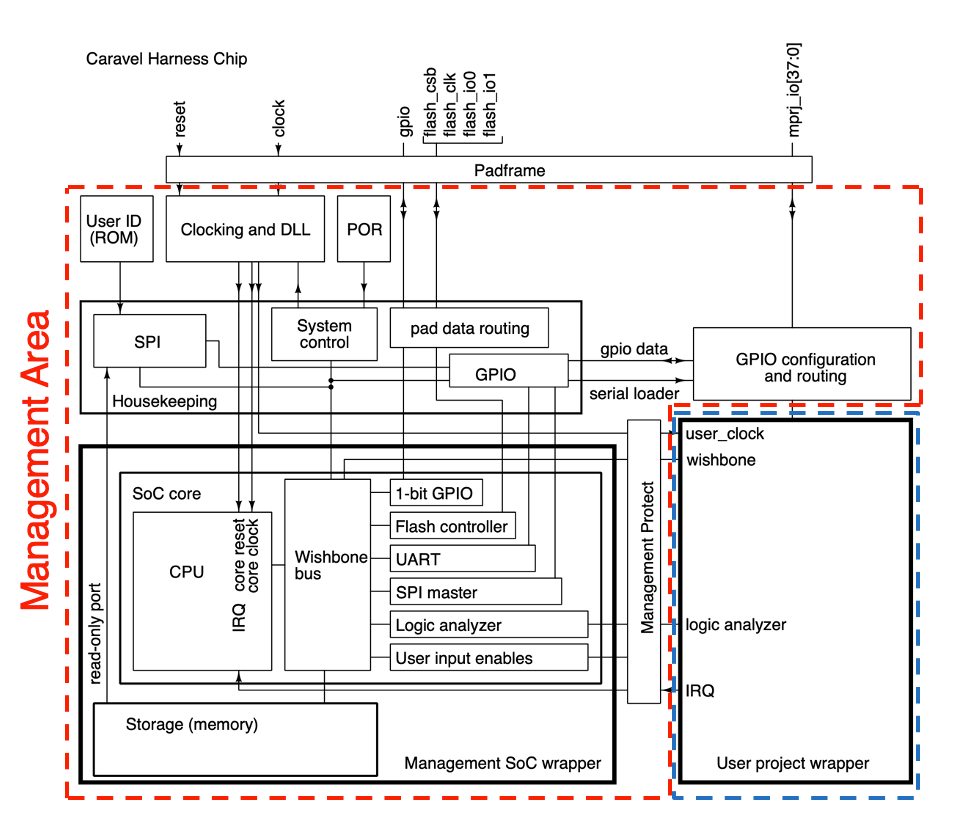
Goal: Integrate a memory-mapped GPIO module into the Caravel user area and test it using the Caravel testing setup
Get to know C API for management core and Python Cocotb API for testbench
GPIO Module Integration - Instantiation
Create instance and connect to wishbone and GPIO pins
Connected to GPIO pins [15:8] to avoid conflicts with management core
val gpio = Module (new WishboneGpio (8 ))
gpio.wb <> wb
gpio.wb.cyc := 0 .B
gpio.io.in := io.in(15 ,8 )
io.out := gpio.io.out ## 0 .U (8 .W )
io.oeb := gpio.io.oeb ## 0 .U (8 .W )GPIO Module Integration - Address Decoding
User space address base: is 0x3000_0000
Decoding: Peripheral -> addr[27:20], address -> addr[19:0]
Connect handshake and read data when peripheral is selected
// address decoding for the two peripheralsWB_ADDR_WIDTH - 1 , WB_ADDR_WIDTH - 8 )) {
is(0x0 .U ) {
gpio.wb.cyc := wb.cyc
wb.ack := gpio.wb.ack
wb.dout := gpio.wb.dout
}
...
}
Address
Description
0x3000_0000
Read-only GPIO input register
0x3000_0004
Read/write GPIO output register
0x3000_0008
Read/write GPIO (inverted) output enable register
Now we are all set for testing!
Caravel Tests Directory Structure verilog/dv/cocotb
├── cocotb_tests.py
└── user_proj_tests
└── test_name
├── test_name.c
├── test_name.py
└── test_name.yaml
.py - Cocotb testbench.c - Code run on management core.yaml - Metadata for the test
How do we know if the test passed or failed?
Communication between management core and testbench is done using the management GPIO pin
General strategy: Signal pass from management core using a rising edge on the management GPIO, and let the test timeout if the test fails
Cocotb Testbench API Overview caravelEnv = await test_configure (dut , timeout_cycles = ???)
await caravelEnv .wait_mgmt_gpio (value )
await cocotb .triggers .ClockCycles (caravelEnv .clk , num_cycles )
caravelEnv .drive_gpio_in ((high_bit , low_bit ), value )
gpio_value = caravelEnv .monitor_gpio (high_bit , low_bit )Example: Expecting GPIO Output
Wait for management core signal
Get GPIO output value and check if it matches expected value
@cocotb .test ()
@report_test
async def gpio_set_output_test (dut ):
caravelEnv = await test_configure (dut ,timeout_cycles = 27649 )
await caravelEnv .wait_mgmt_gpio (1 ) # wait for management core signal
out = caravelEnv .monitor_gpio (15 ,8 ).binstr
assert out == '01100110' , f"Expected GPIO output to be 0x66, but got { out }
cocotb .log .info (f"[TEST] pass" )// Management GPIO pin
ManagmentGpio_outputEnable ();
ManagmentGpio_write (value );
// GPIO modes
GPIOs_configureAll (config );
GPIOs_configure (i , config );
// Wishbone
User_enableIF ();
USER_writeWord (value , wordAddr );
uint32_t value = USER_readWord (wordAddr );Example: Setting GPIO Output void main (){
ManagmentGpio_outputEnable ();
ManagmentGpio_write (0 );
enableHkSpi (0 ); // disable housekeeping spi
GPIOs_configureAll (GPIO_MODE_USER_STD_BIDIRECTIONAL );
GPIOs_loadConfigs (); // load the configuration
User_enableIF ();
USER_writeWord (0x00 , 0x0000008 >> 2 ); // output enable
USER_writeWord (0x66 , 0x0000004 >> 2 ); // output value
ManagmentGpio_write (1 ); // signal done
return ;
}