Contributing
Anybody is welcome to contribute to BUVIC.
BUVIC is published under the GNU General Public License version 3 (GPL v3). See LICENSE.md for more details.
We use black code style since it is compliant with PEP guidelines and the black formatter makes it easy to format the code automatically. We choose a line length of 140 to better use modern wide screens.
If you want to use the black formatter, install it with
pip install black
and then run the command
black --line-length 140 . -t py37
Releases have a version in the form vMAJOR.MINOR (e.g v1.2).
The recommended way to create a release is to do it in the github interface.
Click on the button Draft a new release, enter the version (e.g. v1.2) as tag and release title and the changelog as description.
Docker hub will automatically build the corresponding docker image (Note: it takes about half an hour until the images are built).
If you don't have access to github, it is also possible to create a release with git by creating a new tag with the version as a name:
git tag v1.2 -a -m "UV Server v1.2"
and push it to github:
git push --tags
For this implementation section, we will split the functionality of the application in the following parts:
- User Interface
- Job creation / handling
- Calculations
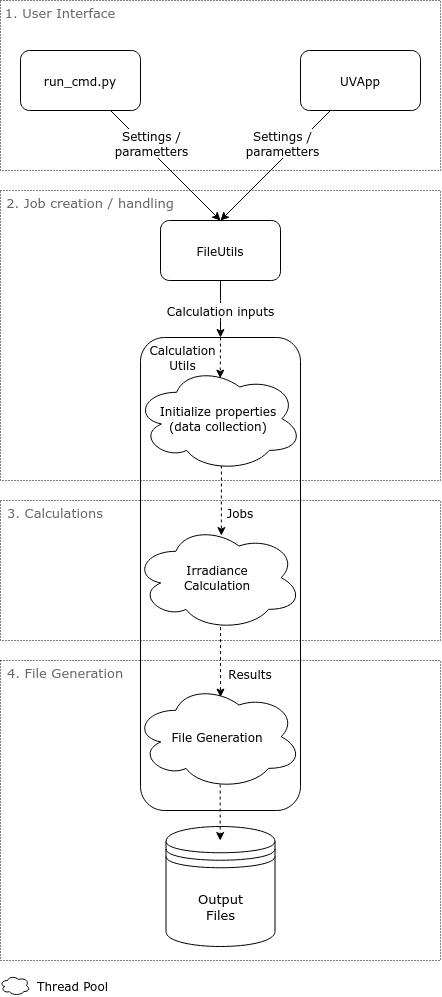
Two user interfaces are available:
- Command line interface (CLI)
- Graphical User Interface (GUI)
Both interfaces are responsible for getting the necessary parameters from the user. The parameters include dates and brewer id to find the required files for the calculations as well as some settings.
The first interface's implementation is written in run_cmd.py and mostly consists of command line argument parsing.
Once the arguments are parsed, their values are passed to the CalculationUtils (See next section).
The second interface's implementation is more complex and consists of the following three files:
-
run.py(ordocker/run_docker.pyfor the docker image) which serves as an entry point to start the UVApp. -
buvic/gui/app.pywhich contains the UVApp class. -
buvic/gui/widgets.pywhich contains the implementation of some of the more complex interface's widgets.
The UVApp class is the core of the GUI and uses the remi library.
The class initializes the widgets in its main method and adds them to its main container.
The most important of the interface's widgets are the MainForms (PathMainForm to give files as input and SimpleMainForm to give dates
and brewer id as input). They keep track of the values of their fields and settings and call the FileUtils and CalculationUtils (See
next section) with these values when the Calculate button is clicked.
Job creation and handling is done in the classes FileUtils and CalculationUtils.
Before creating the jobs, all the information required for the Jobs is written in a CalculationInput object.
Each CalculationInput corresponds to one UV file (measurements for one day). Since multiple measurements are done each day (in each UV
file), the UV file is divided into sections, each represented as a UVFileEntry object.
In the end, one Job will be created for each UVFileEntry. Each Job needs therefore to get a CalculationInput as parameter as well as the
index of the section it does the calculation for.
Jobs can be created in four different ways:
-
calculate_for_input: Create jobs for a givenCalculationInput. Used when file paths are already known. -
calculate_for_all_between: Finds all the files for measurements between two days and create the jobs for them. -
calculate_for_all: Finds all files in a directory and create the jobs for them -
watch(deprecated): Monitors a directory and each time a file is found, callscalculate_for_input.
The difference between way 1. (and 4.) and ways 2. and 3. is that way 1 only create Jobs for one CalculationInput.
Ways 2. and 3. make calculation for multiple days and therefore create Jobs for multiple CalculationInput objects.
All the Jobs are then scheduled on a ThreadPoolExecutor and will run in parallel.
The calculations executed in each Job from the previous section are mostly implemented in
IrradianceCalculation.
The entry point in this class for the calculations is the method calculate as explained in the previous section,
this method has access to a CalculationInput object for infos about the measurement files and extra parameters as well as the index of the
section to do the calculations for.
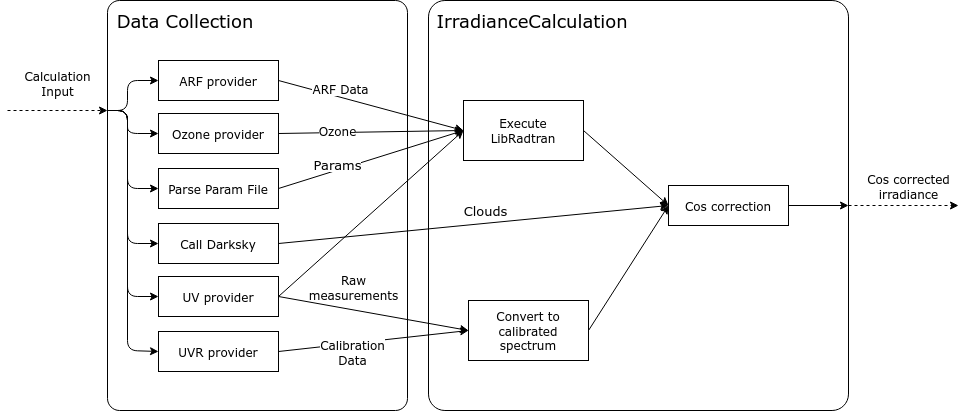
Before starting the the calculation, all the required data is collected by parsing the measurement files or querying eubrewnet for the data.
Each file type has its own data provider. Their implementations can be found in the files
buvic/logic/uv_file.py, buvic/logic/ozone.py,
buvic/logic/arf_file.py, buvic/logic/calibration_file.py
and buvic/logic/parameter_file.py.
Note that the file parsing is triggered automatically (and cached) when calling one of the following property on the CalculationInput:
-
uv_file_entries: get the uv data from a UV file or eubrewnet -
ozone: get ozone data from a B file or eubrewnet -
calibration: get calibration data from a UVR file or eubrewnet -
arf: parses the arf file -
parameters: parses the parameter file
An api call is also made to darksky.net (if an api key is provided) to get the cloud cover for the day of the measurements. This information is used to choose between a clear sky or a diffuse cos correction.
During the calculations, the raw measurements and the calibration data is used to convert the raw UV measurements to a calibrated spectrum.
A call to LibRadtran is made with the infos from the measurement and parameter files to get Fdiff, Fdir and Fglo.
Finally, the results from LibRadtran and from the darksky.net api call are used to apply the cos correction to the calibrated
spectrum.
This information as well as the input parameters used is returned from the calculate method as a Result object.
This Result object will later be converted to output files.
The two main performance bottlenecks in this application are:
- API calls to EUBREWNET and darksky.net
- Calls to libradtran
Any other file parsing or calculation takes a negligible time in comparison to these two actions.
To improve significantly the performance of BUVIC, we use parallelization for these actions. This works best for API calls since we expect to be able to make many API calls at the same time before the internet connection is saturated. The calls to libradtran also have a performance gain from parallelization, thanks to the overhead of creating and handling the new process executing uvspec.
Parallelization is implemented with the python's ThreadPoolExecutor which makes it easy to run jobs on a pool of threads. Relevant code
parts are in the class CalculationUtils in methods calculate_for_inputs (data collection)
and _execute_jobs (calculation jobs). The number of threads used in the pool equal the number of cpu cores plus 4 with a limit at 20
threads.