Contains official Standard Library for PlantUML. See http://plantuml.com/stdlib for more information.
This Standard Library is included in official release of PlantUML. Following the C convention for "C standard library" (see https://en.wikipedia.org/wiki/C_standard_library)

- AdaML [ada]
- Amazon Web Services
- Azure library [azure]
- Bootstrap Icons [bootstrap]
- C4 library (C4-PlantUML) [C4]
- Classy library [classy]
- Classy C4 library [classy-c4]
- Domain Story library (DomainStory-PlantUML) [DomainStory]
- Edgy Enterprise Design [edgy]
- EIP-PlantUML [eip]
- Elastic library [elastic]
- Google Cloud Platform [gcp]
- K8S [k8s]
- Google Material Icons [material, material2, material7]
- Tupadr3 library [tupadr3]
- UML tailored for Ada 2012 programming language
- A modeling language to draw UML diagrams, implemented in PlantUML
- An easy way to learn Ada through the use of UML and OOP concepts
- UML tailored to use and show particular Ada language characteristics
- Coherent set of functions to design software components for Ada
- Generates high quality drawings (ps, eps) easy to embedded in other docs
- Easy to learn by example, both AdaML and Ada language
Example of usage:
!include <AdaML/AdaML>
actor User
agent String_Instrument
agent Screen
agent Touch_Screen
agent Microphone

begin_package_spec("Floyd_Tuner")

  subprogram("Main")

  package("View")
  package("Controller")
  package("Signal_Analyzer")
  package("Sample_Collector")

  depends("User", "Touch_Screen", "interacts >")
  depends("Main", "Controller", "starts >")
  depends("User", "Screen", "see")
  depends("User", "String_Instrument", "plays\n&\ntunes")

  depends("Touch_Screen", "Controller", "commands")

  depends("Controller", "Sample_Collector", "manages")
  depends("Controller", "Signal_Analyzer", "configures")
  depends("Controller", "View", "commands")

  depends("View", "Screen", "output >")
  depends("View", "Signal_Analyzer", "read\nresults >")
  depends("Signal_Analyzer", "Sample_Collector", "read\nsamples >")
  depends("Sample_Collector", "Microphone", "ADC")

  depends("String_Instrument", "Microphone", "captures <")

end()
This example renders the following image:
ArchiMate is an enterprise architecture modeling language that supports the description, analysis, and visualization of architecture across business domains.
ArchiMate offers a common language for describing the construction and operation of business processes, organizational structures, information flows, IT systems, and technical infrastructure. This is just like an architectural drawing in classical building where the architecture describes the various aspects of the construction and use of a building. This insight helps the different stakeholders to design, assess, and communicate the consequences of decisions and changes within and between these business domains.
- Functions to draw all ArchiMate 3.2 types and relationships
- Support for regular shapes (rectangles with graphical stereotype icons) and some special shapes (stakeholders, roles, actors, value, meaning)
- Allows arbitrary nesting of concepts
Example of usage
@startuml Internet Browser Sample

!include <archimate/Archimate>
'!theme archimate-alternate from <archimate/themes>
'!theme archimate-handwriting from <archimate/themes>
'!theme archimate-lowsaturation from <archimate/themes>
'!theme archimate-saturated from <archimate/themes>
'!theme archimate-standard from <archimate/themes>

title Archimate Sample - Internet Browser

'LAYOUT_AS_SKETCH()
'LAYOUT_LEFT_RIGHT()
'LAYOUT_TOP_DOWN()

Business_Object(businessObject, "A Business Object")
Business_Process(someBusinessProcess,"Some Business Process")
Business_Service(itSupportService, "IT Support for Business (Application Service)")

Application_DataObject(dataObject, "Web Page Data \n 'on the fly'")
Application_Function(webpageBehaviour, "Web page behaviour")
Application_Component(ActivePartWebPage, "Active Part of the web page \n 'on the fly'")

Technology_Artifact(inMemoryItem,"in memory / 'on the fly' html/javascript")
Technology_Service(internetBrowser, "Internet Browser Generic & Plugin")
Technology_Service(internetBrowserPlugin, "Some Internet Browser Plugin")
Technology_Service(webServer, "Some web server")

Rel_Flow_Left(someBusinessProcess, businessObject, "")
Rel_Serving_Up(itSupportService, someBusinessProcess, "")
Rel_Specialization_Up(webpageBehaviour, itSupportService, "")
Rel_Flow_Right(dataObject, webpageBehaviour, "")
Rel_Specialization_Up(dataObject, businessObject, "")
Rel_Assignment_Left(ActivePartWebPage, webpageBehaviour, "")
Rel_Specialization_Up(inMemoryItem, dataObject, "")
Rel_Realization_Up(inMemoryItem, ActivePartWebPage, "")
Rel_Specialization_Right(inMemoryItem,internetBrowser, "")
Rel_Serving_Up(internetBrowser, webpageBehaviour, "")
Rel_Serving_Up(internetBrowserPlugin, webpageBehaviour, "")
Rel_Aggregation_Right(internetBrowser, internetBrowserPlugin, "")
Rel_Access_Up(webServer, inMemoryItem, "")
Rel_Serving_Up(webServer, internetBrowser, "")

@enduml
This example renders the following image:
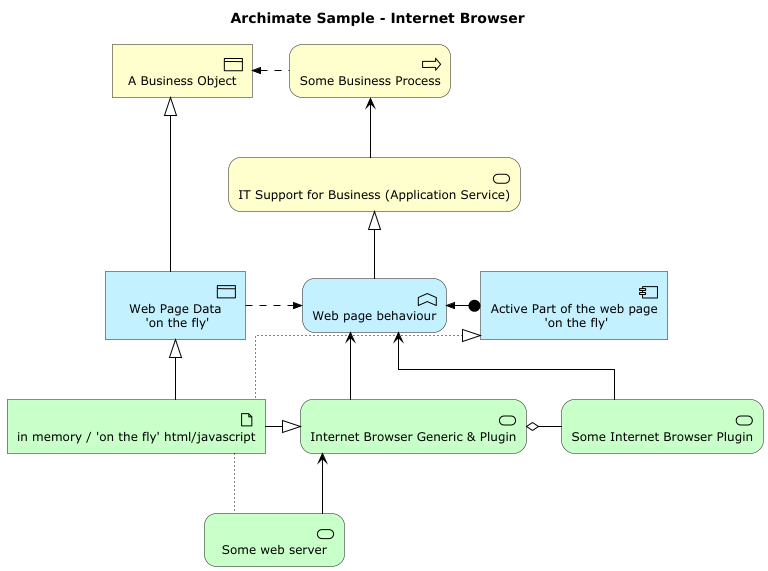
For more information: https://github.com/plantuml-stdlib/Archimate-PlantUML
PlantUML images, sprites, macros, and other includes for Amazon Web Services (AWS) services and resources. Used to create PlantUML diagrams with AWS components. All elements are generated from the official AWS Architecture Icons and when combined with PlantUML and the C4 model, are a great way to communicate your design, deployment, and topology as code.
Besides usage as custom sprites on PlantUML components, different types of diagrams can quickly and easily be created with the icons.
More info on awslabs github account.
The AWS library consists of Amazon AWS icons, it provides icons of two different sizes.
Use it by including the file that contains the sprite, eg: !include <aws/Storage/AmazonS3/AmazonS3>.
When imported, you can use the sprite as normally you would, using <$sprite_name>.
You may also include the common.puml file, eg: !include <aws/common>, which contains helper macros defined.
With the common.puml imported, you can use the NAME_OF_SPRITE(parameters...) macro.
Example of usage:
@startuml
    !include <aws/common>
    !include <aws/Storage/AmazonS3/AmazonS3>
    !include <aws/Storage/AmazonS3/bucket/bucket>

    AMAZONS3(s3_internal)
    AMAZONS3(s3_partner,"Vendor's S3")
    s3_internal <- s3_partner
@enduml
This example renders the following image:
Todo: TBC...
The Azure library consists of Microsoft Azure icons.
Use it by including the file that contains the sprite, eg: !include <azure/Analytics/AzureEventHub.puml>.
When imported, you can use the sprite as normally you would, using <$sprite_name>.
You may also include the AzureCommon.puml file, eg: !include <azure/AzureCommon.puml>, which contains helper macros defined.
With the azure/AzureCommon.puml imported, you can use the NAME_OF_SPRITE(parameters...) macro.
Example of usage:
@startuml
    !include <azure/AzureCommon>
    !include <azure/Analytics/AzureEventHub>
    !include <azure/Analytics/AzureStreamAnalyticsJob>
    !include <azure/Databases/AzureCosmosDb>

    left to right direction

    agent "Device Simulator" as devices #fff

    AzureEventHub(fareDataEventHub, "Fare Data", "PK: Medallion HackLicense VendorId; 3 TUs")
    AzureEventHub(tripDataEventHub, "Trip Data", "PK: Medallion HackLicense VendorId; 3 TUs")
    AzureStreamAnalyticsJob(streamAnalytics, "Stream Processing", "6 SUs")
    AzureCosmosDb(outputCosmosDb, "Output Database", "1,000 RUs")

    devices --> fareDataEventHub
    devices --> tripDataEventHub
    fareDataEventHub --> streamAnalytics
    tripDataEventHub --> streamAnalytics
    streamAnalytics --> outputCosmosDb
@enduml
This example renders the following image:
This library consists of a free Bootstrap Icons style icons from Bootstrap. See the entire collection or search via a filter on the Bootstrap Icons website.
Use it by including the file that contains all the sprites: !include <bootstrap/bootstrap>.
When imported, you can use the sprite as normally you would, using <$bi-sprite-name>.
Notice that this library requires an bi- preffix on sprites names, this is to avoid clash of names if multiple sprites have the same name on different libraries. bi stands for Bootstrap Icon and this name is also used in the Bootstrap framework.
Example of usage:
@startuml
skinparam UsecaseBackgroundColor white
!include <bootstrap/bootstrap>

usecase a as "<$bi-globe>\nbi-globe"
usecase b as "<$bi-globe,scale=2.5>"
usecase c as "<$bi-globe{scale=2.5}>" #line:red

usecase d as "<$bi-bootstrap-fill>"
usecase e as "<$bi-bootstrap-fill{scale=2.5,color=blue}>"
usecase f as "<$bi-bootstrap-fill,scale=2.5,color=#00f>"
@enduml
This example renders the following image:


-black)




The C4 library enables a simple way of describing and communicate software architectures with an intuitive language.
It is the PlantUML integrated version of C4-PlantUML and has the big advantage that it can be used without additional external includes.
(E.g. container diagrams can be drawn with !include <C4/C4_Container> and no !include https://raw.githubusercontent.com/plantuml-stdlib/C4-PlantUML/master/C4_Container.puml is required.)
Example of usage:
@startuml
!include <C4/C4_Container>
LAYOUT_LEFT_RIGHT()

Person(admin, "Administrator")
System_Boundary(c1, "Sample System") {
    Container(web_app, "Web Application", "C#, ASP.NET Core 2.1 MVC", "Allows users to compare multiple Twitter timelines")
}
System(twitter, "Twitter")

Rel(admin, web_app, "Uses", "HTTPS")
Rel(web_app, twitter, "Gets tweets from", "HTTPS")

SHOW_LEGEND()
@enduml
This example renders the following image:
The Classy library allows for using an Object Oriented approach to diagramming in PlantUML.
That is to say that it allows you to define and instantiate your own classes as well as allow you to call methods defined on those classes. You can also inherit from one or more classes where desired.
Use it by including the file that contains the Classy class that you want to use
within your diagram. Alternatively, if you want to define your own type, you can
just include the core.puml file, eg: !include <classy/core>, which contains
all of the necessary functions.
Example of usage:
@startuml

    !include <classy/core>

    $class(HelloWorld)
        $classVar(msg, string, "Hello World!")

        $classMethod(getMessage)
            !function HelloWorld__getMessage($this)
                !return $getInstanceVar($this, 'msg')
            !endfunction
        $endclassMethod(getMessage)

        $classMethod(setMessage)
            !function HelloWorld__setMessage($this, $args)
                $setInstanceVar($this, 'msg', $call($args, 'each'))
                !return $this
            !endfunction
        $endclassMethod(setMessage)
        $endclass(HelloWorld)

        !$hello = $new(HelloWorld)
        Alice -> Bob : $call($hello, 'getMessage')

        $call($hello, 'setMessage', array($new(array), '2nd message!'), $void=%true())
        Alice -> Bob : $call($hello, 'getMessage')

@enduml
This example renders the following image:
The Classy C4 library combines the Classy and C4 libraries by defining Classy classes that wrap the C4 macros.
Example of usage:
@startuml

    !include <classy-c4/container>
    !include <classy-c4/person>
    !include <classy-c4/system>

    !$system = $new(System)
    $call($system, 'setName', 'Label', $void=%true())
    $call($system, 'setDescription', 'Optional Description', $void=%true())

    !$person = $new(Person)
    $call($person, 'setName', 'Label', $void=%true())
    $call($person, 'setDescription', 'Optional Description', $void=%true())

    !$container = $new(Container)
    $call($container, 'setName', 'Label', $void=%true())
    $call($container, 'setDescription', 'Optional Description', $void=%true())
    $call($container, 'setTechnology', 'Technology', $void=%true())

    !$personAlias = $call($person, 'render')
    !$containerAlias = $call($container, 'render')
    $call($system, 'render', $void=%true())

    Rel($personAlias, $containerAlias, "Label", "Optional Technology")

@enduml
This example renders the following image:
This library provides a set of macros to easily describe and document a domain story which was developed in a Domain Storytelling workshop.
For more usage instructions see DomainStory-PlantUML.
Example of usage:
@startuml
    !include <DomainStory/domainStory>

    Boundary(System) {
        Person(Alice)
        Conversation(weather)
        Person(Bob)
    }
    activity(1, Alice, talks about the, weather, with, Bob)
@enduml
This example renders the following image:
Edgy is an Open Source tool for collaborative Enterprise Design. The library is an adaption of the EDGY Tools for PlantUML usage.
The Sprites are based on the Enterprise Design with EDGY. They'll be rendered as SVG sprites, so you need a quite actual PlantUML distribution.
Use it by including the file that contains the sprite, eg: !include <edgy/edgy>.
There are two visual sets:
!include <edgy/edgy>is the visualization according to the open source set of edgy.!include <edgy/edgy2>is the one which describes with stereotypes what kind of element it is. If you have color blinded people, this one could be the better one. All procedures are compatible between both sets. So you can begin with one and switch to the other just to have a look which of the one fits visually the best.
The library is not complete yet, but it's a good start.
In general, the procedures for elements and facets do have the form of
$elementorfacet("label", alias, lighterColor)"label"is the name of the element or facet. It is mandatory.aliasis used for linking elements and facets. It is optional.lighterColoris used as a boolean value (!) to use a lighter color for the element or facet. It is optional.- Facets are drawn with lighter colors than Elements as default.
0is false. Any other value is true. Or use%true()and%false()(see Boolean expression in Preprocessing).
Facets do have the edgy facet name followed with Facet as tail, to distinguish them from elements.
The following facets are implemented: $baseFacet,$identityFacet,$brandFacet,$experienceFacet,$productFacet,$architectureFacet,$organisationFacet
Elements do have the edgy element name.
The following elements are implemented:
Base: $people,$outcome,$activity,$object
Identity: $purpose,$story,$content
Brand: $brand
Experience: $task,$channel,$journey
Product: $product
Architecture: $capability,$asset,$process
Organisation: $organisation
Elements can be nested into facets:
$architectureFacet("Architecture") {
  $capability("Capability")
}
However, it is also possible to nest elements if needed:
$capability("Customer Interaction") {
    $capability("Passenger Services", pass, 1) {
        $capability("Passenger Information", info)
    }
}
Links do have the form of
$link(fromAlias, toAlias, "label")fromAliasis the starting element or facet. It is mandatory.toAliasis the target element or facet. It is mandatory."label""is a label written on the connection. This is optional.
There are only three sort of links:
$linkis a unidirectional link between elements or facets.$flowis a directed flow between elements or facets.$treeis a hierarchical representation of elements as a tree relationship.
Generally, all links do have the possibility to give the rendere a hint in which direction the link should be drawn. This is done by adding Up, Down, Left, Right as a tail to the link name (e.g. $linkUp, $linkDown, $linkLeft, $linkRight).
@startuml
    !include <edgy/edgy>

    $identityFacet("This is the Identity facet", identity) {
        $content(" This is the Content element", content)
        $purpose("This is the Purpose element", purpose)
        $story("This is the Story element", story)
    }

    $link(content, purpose)
    $link(content, story)
    $link(purpose, story)
@enduml
EIP-PlantUML provides Enterprise Integrations Patterns elements to PlantUML to provide easy support of designing EIP architectures for both, up-front design as well as development-time automated documentation generation. Example of usage:
@startuml
    !include <eip/EIP-PlantUML>
    !theme mars
    skinparam linetype ortho
    left to right direction
    folder "RabbitMQ" #line.dashed {
        Message(msg0, Message)
        Message(msg1, Message)
        Message(msg2, Message)
        MsgChannel(ch0, inQueue)
        MsgChannel(ch1, outQueue)
        MsgChannel(ch2, outQueue)
        MessageRouter(rt0, Router)
    }
    Send(msg0, ch0)
    Send(ch0, rt0)
    Send(rt0, msg1)
    Send(rt0, msg2)
    Send(msg1, ch1)
    Send(msg2, ch2)
@enduml
This example renders the following image:

The Elastic library consists of Elastic icons. It is similar in use to the AWS and Azure libraries (it used the same tool to create them).
Use it by including the file that contains the sprite, eg: !include <elastic/elasticsearch/elasticsearch.puml>.
When imported, you can use the sprite as normally you would, using <$sprite_name>.
You may also include the common.puml file, eg: !include <elastic/common>, which contains helper macros defined.
With the common.puml imported, you can use the NAME_OF_SPRITE(parameters...) macro.
Example of usage:
@startuml
    !include <elastic/common>
    !include <elastic/elasticsearch/elasticsearch>
    !include <elastic/logstash/logstash>
    !include <elastic/kibana/kibana>

    ELASTICSEARCH(ElasticSearch, "Search and Analyze",database)
    LOGSTASH(Logstash, "Parse and Transform",node)
    KIBANA(Kibana, "Visualize",agent)

    Logstash -right-> ElasticSearch: Transformed Data
    ElasticSearch -right-> Kibana: Data to View

@enduml
This example renders the following image:
@startuml
    !include <gcp/GCPCommon>
    !include <gcp/Compute/Cloud_Functions>
    !include <gcp/Networking/Cloud_Firewall_Rules>
    !include <gcp/Compute/Compute_Engine>
    !include <gcp/Storage/Cloud_Storage>

    Cloud_Functions(Cloud_FunctionsStart, "Start Server", "Cloud Functions")
    Cloud_Functions(Cloud_FunctionsStop, "Stop Server", "Cloud Functions")
    Cloud_Functions(Cloud_FunctionAdd, "Add a Friend", "Cloud Functions")
    Compute_Engine(Compute_Engine, "MineCraft Server", "Compute Engine")
    Cloud_Storage(Cloud_Storage, "MineCraft Backups", "Cloud Storage")
    Cloud_Firewall_Rules(Cloud_Firewall_Rules_Starter,"Minecraft Backups", "Cloud Firewall Rules")
    Cloud_Firewall_Rules(Cloud_Firewall_Rules_Friend,"Minecraft Backups", "Cloud Firewall Rules")
@enduml
This example renders the following image:

These are the PlantUML sprites, macros and stereotypes for creating PlantUML diagrams with the Kubernetes components. The official Kubernetes Icons Set (where this work is based) can be found here This repo is heavily influenced by the awesome work from Ricardo Niepel on Azure-PlantUML Example of usage:
@startuml
    !include <k8s/Common>
    !include <k8s/Simplified>
    !include <k8s/OSS/all>
    footer Kubernetes Plant-UML
    scale max 1024 width
    skinparam {
        nodesep 10
        ranksep 10
    }
    actor "User" as userAlias
    left to right direction
    Cluster_Boundary(cluster, "Kubernetes Cluster") {
        Namespace_Boundary(ns, "Web") {
            KubernetesSvc(svc, "service", "")
            KubernetesPod(pod1, "web-pod1", "")
            KubernetesPod(pod2, "web-pod2", "")
        }
    }
    Rel(userAlias,svc,"get HTTP/1.1 index.html", "1")
    Rel(svc,pod1,"load Balances to Pods", "2")
    Rel(svc,pod2,"load Balances to Pods", "2")
    Rel_U(pod1, svc, "serves content", "3")
    Rel(svc, userAlias, "return content to", "4")
@enduml
This example renders the following image:

This library consists of a free Material style icons from Google and other artists based on v2.1.19.
The old library is kept for compatibility reasons, but new projects should use the new SVG based library described below.
The library can be included via !include <material/...> (e.g. !include <material/folder_move>).
(Theoretically can it be included via !include <material2/...> or !include <material2.1.19/...> too, but no v2.* updates are planned anymore.)
When imported, you can use the sprite as normally you would, using <$ma_sprite_name> (e.g. <$ma_folder_move>).
Notice that this library requires an ma_ prefix on sprites names, this is to avoid clash of names if multiple sprites have the same name on different libraries.
Example of usage:
@startuml
' To import the sprite file you DON'T need to place a prefix!
!include <material/folder_move>

usecase a as "<$ma_folder_move>\nmove a file into a folder UC"
usecase c as "<$ma_folder_move{scale=2.5,color=#00f}>\nanother move file into a folder UC" #line:red

' The macro cannot be used without !include <material/common>
' MA_FOLDER_MOVE(Red, 1, dir, rectangle, "A label")
@enduml
This example renders the following image:
You may also include the common.puml file, e.g. !include <material/common>, which contains helper macros. With the common.puml imported, you can use the MA_NAME_OF_SPRITE(parameters...) macro, note again the use of the prefix MA_. Following calls are supported:
MA_SPRITE_NAME(_color)MA_SPRITE_NAME(_color, _scale)MA_SPRITE_NAME(_color, _scale, _alias)MA_SPRITE_NAME(_color, _scale, _alias, _shape)MA_SPRITE_NAME(_color, _scale, _alias, _shape, _label)
Example of usage:
@startuml
!include <material/common>
' To import the sprite file you DON'T need to place a prefix!
!include <material/folder_move>

MA_FOLDER_MOVE(Red, 1, dir, rectangle, "A label")
@enduml
This example renders the following image:
When mixing sprites macros with other elements you may get a syntax error if, for example, trying to add a rectangle along with classes.
In those cases, add { and } after the macro to create the empty rectangle.
Example of usage:
@startuml
!include <material/common>
' To import the sprite file you DON'T need to place a prefix!
!include <material/folder_move>

MA_FOLDER_MOVE(Red, 1, dir, rectangle, "A label") {
}

class foo {
  bar
}
@enduml
This example renders the following image:
This library consists of a (SVG) Material Design Icons style icons from Google and other artists based on v7.4.47. See the entire collection or search via a filter on the Material Design Icons website.
The library can be included via !include <material7/...> or !include <material7.4.47/...>.
It is planned that <material7/...> is always the last 7.* version and therefore some sprites could be changed in the future.
If you want to ensure that your diagrams are not affected by these changes, you should use a specific version, e.g. !include <material7.4.47/...>.
The material design icons are organized in categories, e.g. AccountUser, BrandLogo etc.
The sprites can be included via their category and name, e.g. !include <material7/AccountUser/AccountAlert> or all of one category via !include <material7/Emoji/all>.
When imported, you can use the sprite as normally you would, using <$mdiSpriteName>.
Notice that this library requires an mdi prefix on sprites names, this is to avoid clash of names if multiple sprites have the same name on different libraries. mdi stands for Material Design Icon.
Example of usage:
@startuml
!include <material7/AccountUser/AccountAlert>
!include <material7/Emoji/all>

label "explicit loaded sprite in text\n<$mdiAccountAlert>" as accountAlertSprite
label "sprite loaded via category collection\nwith changed size and color\n<$mdiEmoticonLol{scale=0.75,color=red}>" as emoticonLol
@enduml
This example renders the following image:
How to get all available sprite categories
@startuml
!$material = %load_json('<material7/all.json>')
!foreach $item in $material
  Alice -> Bob : $item
!endfor
@enduml
How to get all available sprite of a specific category
@startuml
' To get all available sprites of a specific category, e.g. "all" of "material7.4.47/Emoji"
!include <material7/Emoji/all>
listsprites
@endumlYou may also include the common.puml file, e.g. !include <material7/common>, which contains helper macros, configurable default behaviors ...
With the common.puml imported, you can use following macros; note again the use of the prefix $Mdi and the image macro has the postfix Img too:
$MdiSpriteNameImg($sprite, $color = $MDI_DEFAULT, $scale = "1"); e.g. MdiEmoticonLolImg(...)$MdiSpriteName($sprite, $alias, $label=$MDI_DEFAULT, $shape=$MDI_DEFAULT, $color=$MDI_DEFAULT, $scale=1, $stereo=$MDI_DEFAULT); e.g. MdiEmoticonLol(...)
Following predefined values can be used as arguments too:
| Constant | Value | Description |
|---|---|---|
$MDI_LABEL_NONE |
"" |
No label |
$MDI_LABEL_ALIAS |
"*" |
Use alias as label |
$MDI_SHAPE_NONE |
"label" |
No visible shape |
$MDI_COLOR_NONE |
"" |
No color change |
$MDI_STEREOTYPE_NONE |
"" |
No stereotype |
$MDI_STEREOTYPE_SPRITE |
"*" |
Use sprite name as stereotype |
$MDI_ALIGNMENT_NONE |
"" |
No alignment change |
$MDI_ALIGNMENT_LEFT |
"left" |
Left alignment |
$MDI_ALIGNMENT_CENTER |
"center" |
Center alignment |
$MDI_ALIGNMENT_RIGHT |
"right" |
Right alignment |
The default values can be overwritten before the common.puml is included:
| Variable | Description | Default | Possible Values |
|---|---|---|---|
$MDI_ALIGNMENT |
Text alignment | "center" |
"" (none), "left", "center", "right" |
$MDI_DEFAULT_LABEL |
Default label behavior | "*" |
"" (no label), "*" (alias as label) |
$MDI_DEFAULT_SHAPE |
Default shape for elements | "rectangle" |
"label" (no shape), "rectangle", "database", etc. |
$MDI_DEFAULT_COLOR |
Default icon color | "" |
"" (no color), "red", "#FF0000", etc. |
$MDI_DEFAULT_STEREOTYPE |
Default stereotype | "" |
"" (none), "*" (sprite name), custom text |
Example of usage with Mdi...Img sprite calls:
@startuml
!include <material7/common>
!include <material7/AccountUser/AccountAlert>

!$MDI_DEFAULT_COLOR = green

label "$MdiAccountAlertImg()\ndefault image color is changed to green" as defaultSprite
label "$MdiAccountAlertImg(red)" as redSprite
label "$MdiAccountAlertImg(red, 2.0)" as redLargeSprite
label "$MdiAccountAlertImg($color=blue)" as blueSprite
label "$MdiAccountAlertImg($scale=2.0)" as largeSprite
@enduml
Example of usage with Mdi... calls and different arguments:
@startuml
!include <material7/common>
!include <material7/AccountUser/AccountAlert>

' Using default values (alias as label, rectangle shape)
$MdiAccountAlert(defaultAccount)

' Custom label
$MdiAccountAlert(labelAccount, "with changed $label")

' No label
$MdiAccountAlert(nolabelAccount, "")

' Alias as label
$MdiAccountAlert(aliaslabelAccount, $MDI_LABEL_ALIAS)

' Custom shape
$MdiAccountAlert(shapeDatabaseAccount, "with changed $label and $shape=database", $shape=database)

' No visible shape
$MdiAccountAlert(shapeNoneIsLabelAccount, "with changed $label and $shape=$MDI_SHAPE_NONE", $shape=$MDI_SHAPE_NONE)

' Custom color
$MdiAccountAlert(colorRedAccount, "with changed $label and $color=red", $color=red)

' Custom scale
$MdiAccountAlert(scaleSmallAccount, "with changed $label and $scale=0.5", $scale=0.5)
$MdiAccountAlert(scaleLargeAccount, "with changed $label and $scale=2.0", $scale=2.0)

' Custom stereotype
$MdiAccountAlert(stereotypeFixAccount, "with changed $label and $stereo=Abcd", $stereo=Abcd)
$MdiAccountAlert(stereotypeAliasAccount, "with changed $label and $stereo=$MDI_STEREOTYPE_SPRITE", $stereo=$MDI_STEREOTYPE_SPRITE)
@enduml
It can be combined with C4 stdlib too:
@startuml
!include <C4/C4_Container>

' If common.puml is needed, disable alignment:
' !$MDI_ALIGNMENT = ""
' !include <material7/common>

!include <material7/AccountUser/AccountAlert>
!include <material7/Emoji/all>

Person(A, $sprite="mdiAccountAlert", $label="Person A")
Person(B, $sprite="mdiEmoticonNeutral", $label="Person B")

Rel(A, B, "Calls")
@endumlThis library contains several libraries of icons (including Devicons and Font Awesome )
Use it by including the file that contains the sprite, eg: !include <tupadr3/font-awesome/align_center>.
When imported, you can use the sprite as normally you would, using <$sprite_name>.
You may also include the common.puml file, eg: !include <tupadr3/common>, which contains helper macros defined.
With the common.puml imported, you can use the NAME_OF_SPRITE(parameters...) macro.
Example of usage:
@startuml
    !include <tupadr3/common>
    !include <tupadr3/font-awesome/server>
    !include <tupadr3/font-awesome/database>

    title Styling example

    FA_SERVER(web1,web1) #Green
    FA_SERVER(web2,web2) #Yellow
    FA_SERVER(web3,web3) #Blue
    FA_SERVER(web4,web4) #YellowGreen
    FA_DATABASE(db1,LIVE,database,white) #RoyalBlue
    FA_DATABASE(db2,SPARE,database) #Red

    db1 <--> db2
    web1 <--> db1
    web2 <--> db1
    web3 <--> db1
    web4 <--> db1
@enduml
This example renders the following image:
- aws: made by https://github.com/milo-minderbinder/AWS-PlantUML
- classy: made by https://github.com/james-gadrow-kr/classy-plantuml
- classy-c4: made by https://github.com/james-gadrow-kr/classy-c4
- tupadr3: made by https://github.com/tupadr3/plantuml-icon-font-sprites
- Material Icons: from https://github.com/Templarian/MaterialDesign
- Bootstrap Icons: from https://github.com/twbs/icons
- Elastic Icons: from https://github.com/Crashedmind/PlantUML-Elastic-icons
- Domain Story: from https://github.com/johthor/DomainStory-PlantUML
You can create Pull Request to update or add some library here if you find it relevant.




