[Mission4/우대현] - Project_Notion_VanillaJS#33
[Mission4/우대현] - Project_Notion_VanillaJS#33WooDaeHyun wants to merge 3 commits into3/#4_woodaehyunfrom
Conversation


 WooDaeHyun
changed the title
WooDaeHyun
changed the title

 dazzel3
left a comment
dazzel3
left a comment
dazzel3
left a comment
There was a problem hiding this comment.
대현님 과제 하시느라 고생하셨습니다 ㅎㅎ css도 적용하신 모습 보기 좋았습니다. 제가 남긴 리뷰는 참고해주시면 감사하겠습니다.
| ? `<li data-id="${id}"> | ||
| <div class="document" data-id="${id}" data-name="list"> | ||
| <span data-name="span-list" data-id="${id}">> ${title}</span> | ||
| <button data-id="${id}" data-name="plus"> + </button> | ||
| <button data-id="${id}" data-name="minus"> x </button> | ||
| </div> | ||
| </li>` + renderLogic(documents) | ||
| : `<li data-id="${id}"> | ||
| <div class="document" data-id="${id}" data-name="list"> | ||
| <span data-name="span-list" data-id="${id}">> ${title}</span> | ||
| <button data-id="${id}" data-name="plus"> + </button> | ||
| <button data-id="${id}" data-name="minus"> x </button> | ||
| </div> | ||
| </li>`; |
There was a problem hiding this comment.
data-id="${id}" 부분이 모든 태그에 들어가 있는데 이 부분을 수정할 방법을 찾아보면 좋을 것 같습니다! 이벤트 처리 때문에 모든 태그에 id를 넣은 것 같은데 그 부분도 함께 수정해보면 좋을 것 같아요 ㅎㅎ
There was a problem hiding this comment.
저도 이 의견 동일합니다 필요한 부분을 생각하고 해당 부분에만 써주시면 더 좋을 것 같아요 !
| this.render = () => { | ||
| $div.innerHTML = ` | ||
| <input type="text" name="title" placeholder="제목 없음" /> | ||
| <div class="content-container" name="content" contentEditable="true" placeholder="내용을 입력해주세요."></div> |
There was a problem hiding this comment.
contentEditable을 사용하고 난 후의 rich Editor 처리 부분이 추가되면 좋을 것 같아요 ㅎㅎ textarea 대신 사용한 의미를 위해서요!
| $header.innerHTML = ` | ||
| Notion`; | ||
| }; |
There was a problem hiding this comment.
| $header.innerHTML = ` | |
| Notion`; | |
| }; | |
| $header.innerHTML = `Notion`; | |
| }; |
엄청 사소한 부분이지만 한줄로 하는 것이 어떨까용 ㅎ
| ? `<li data-id="${id}"> | ||
| <div class="document" data-id="${id}" data-name="list"> | ||
| <span data-name="span-list" data-id="${id}">> ${title}</span> | ||
| <button data-id="${id}" data-name="plus"> + </button> | ||
| <button data-id="${id}" data-name="minus"> x </button> | ||
| </div> | ||
| </li>` + renderLogic(documents) |
There was a problem hiding this comment.
삼항 연산자로 인해 코드가 중복되어보여요..! renderLogic에서는 element만 선언하고 조건에 따른 처리는 해당 함수를 불러오는 곳에서 한다면 더 좋을 것 같습니다!
There was a problem hiding this comment.
가독성 좋은 코드는 아닌것 같습니다 :)
renderLogic(documents) 에 대한 연산만 하면 되지 않나요?

 SDWoo
left a comment
SDWoo
left a comment
SDWoo
left a comment
There was a problem hiding this comment.
안녕하세요 대현님 😊
코드 작성하실때 신경을 많이 쓰신게 느껴지셨습니다..
대현님 질문에 대한 제 생각을 적겠습니다!
질문
컴포넌트 방식으로 코드를 작성할 때 상위 컴포넌트 또는 하위 컴포넌트에서 id와 같은 필요한 데이터를 주고 받을 때, 코드를 구현하기 전 설계를 하는 과정에서부터 어디에 어떤 데이터가 필요하고 어떻게 전달하고 주고 받을지 미리 다 정리를 한 후에 코드를 작성하는것이 일반적인 방법인가요?? 과제를 수행하면서 가장 어려웠던 부분이 스코프 때문에 원하는 값을 컴포넌트들 끼리 넘겨주지 못해서 막히는 경우가 많았습니다.
=> 저도 대현님 질문과 같은 고민을 하고 있는데 이번에 생각한 바로는 설계과정에서 모든것이 되면 좋겠지만, 아직 그정도 레벨이 안된다고 생각을 해서, 이 모든게 연습 과정이라고 생각합니다.
저는 그래서 연습할 겸 컴포넌트를 나누고, 요구사항(기능)을 정리 해놓으면 필요한 데이터들이 좀 더 잘 정리될 것 같다고 생각합니다. 고생하셨어요 🙏
| </head> | ||
| <body> | ||
| <main id="app"></main> | ||
| <script src="./src/main.js" type="module"></script> |
There was a problem hiding this comment.
| <script src="./src/main.js" type="module"></script> | |
| <script src="/src/main.js" type="module"></script> |
History API를 이용해 SPA형태로 만드려면 상대경로가 아닌 절대경로로 하셔야 한다고 들었습니다 !
URL이 바뀌는 걸 기준으로 src를 참조하기 때문에 문제가 생길 수도 있다네요 🧐
| ${arr | ||
| .map(({ id, title, documents }) => { | ||
| return documents | ||
| ? `<li data-id="${id}"> | ||
| <div class="document" data-id="${id}" data-name="list"> | ||
| <span data-name="span-list" data-id="${id}">> ${title}</span> | ||
| <button data-id="${id}" data-name="plus"> + </button> | ||
| <button data-id="${id}" data-name="minus"> x </button> | ||
| </div> | ||
| </li>` + renderLogic(documents) |
There was a problem hiding this comment.
저도 다연님 의견 동의합니다! 아니면 해당 dom을 template으로 따로 빼거나, 맨 마지막 줄에만 삼항 연산자를 써도 될 것 같아요
아니면 HTML을 통째로 바꾸는 것이 아닌 insertAdjacentHTML로 해당 요소 뒤에 추가하는 방식도 있어요 😊
| ${arr | |
| .map(({ id, title, documents }) => { | |
| return documents | |
| ? `<li data-id="${id}"> | |
| <div class="document" data-id="${id}" data-name="list"> | |
| <span data-name="span-list" data-id="${id}">> ${title}</span> | |
| <button data-id="${id}" data-name="plus"> + </button> | |
| <button data-id="${id}" data-name="minus"> x </button> | |
| </div> | |
| </li>` + renderLogic(documents) | |
| ${arr | |
| .map(({ id, title, documents }) => | |
| `<li data-id="${id}"> | |
| <div class="document" data-id="${id}" data-name="list"> | |
| <span data-name="span-list" data-id="${id}">> ${title}</span> | |
| <button data-id="${id}" data-name="plus"> + </button> | |
| <button data-id="${id}" data-name="minus"> x </button> | |
| </div> | |
| </li>` + documents ? renderLogin(documents) : '' |
| ? `<li data-id="${id}"> | ||
| <div class="document" data-id="${id}" data-name="list"> | ||
| <span data-name="span-list" data-id="${id}">> ${title}</span> | ||
| <button data-id="${id}" data-name="plus"> + </button> | ||
| <button data-id="${id}" data-name="minus"> x </button> | ||
| </div> | ||
| </li>` + renderLogic(documents) | ||
| : `<li data-id="${id}"> | ||
| <div class="document" data-id="${id}" data-name="list"> | ||
| <span data-name="span-list" data-id="${id}">> ${title}</span> | ||
| <button data-id="${id}" data-name="plus"> + </button> | ||
| <button data-id="${id}" data-name="minus"> x </button> | ||
| </div> | ||
| </li>`; |
There was a problem hiding this comment.
저도 이 의견 동일합니다 필요한 부분을 생각하고 해당 부분에만 써주시면 더 좋을 것 같아요 !
| this.state = [ | ||
| { | ||
| id: 1, | ||
| title: "아이우에요", | ||
| }, | ||
| ]; |
| if (name === "plus") this.handlePlus(e); | ||
| if (name === "minus") this.handleRemove(e); | ||
| if (name === "createNewPostBtn") this.handleNewPost(e); | ||
| if (name === "list" || name === "span-list") this.handleEditPost(e); |
There was a problem hiding this comment.
이렇게 문자열을 비교하는 방식에서는 if문이 많아지면 switch문으로 바꿔보는 것도 좋은 방법일 것 같아요 😊
| }); | ||
| $postslist.dispatchEvent(editEvent); | ||
| }; | ||
|
|
There was a problem hiding this comment.
// 실험
this.handleCustomEvent = (eventName, id) => {
  const newCustomEvent = eventName === '@CreateNewDoc' ?
    new CustomEvent(eventName) :
    new CustomEvent(eventName, {
    detail: {id: targetId},
    });
  $postList.dispatchEvent(newCustomEvent);
}


$postList.addEventListener('click, (e) => {
...
const {id} = e.target.dataset;
if(name === 'list') handleCustomEvent("@EditDoc", id);
...
})
handlePlus, handleRemove, handeEditPost 셋 다 targetId를 갖고 있는데, e(event)가 아닌 여기서 한번 선언해주고 id를 넘겨 주거나, 이런식으로 커스텀 이벤트 텍스트를 넘겨주면 중복 코드를 막을 수 있을 것 같아요 ! 정답은 아닐 수 있습니다 🧐

 sgd122
left a comment
sgd122
left a comment
sgd122
left a comment
There was a problem hiding this comment.
고생많으셨습니다 :)
-
페이지 접근이 되지 않습니다.
Api/api.js로 api 접근이 가능한것 같던데, gitignore 처리가 되어있어 확인자체가 불가능합니다..
netlify 등으로 페이지 배포가 되어있으면 그걸로 확인이 가능할테고 아니라면,
api 주소부분은 nodeenv 등을 활용하게끔 해두고 .env.tmpl 등의 파일로 변수명칭 등을 공유하거나 하여야 할 것으로 보여집니다.
이러한 방식을 사용해야 다른개발자가 혼동되지 않고 사용할 수 있습니다~! -
제목없는 빈 페이지의 경우 사이드바 타이틀에 공백으로만 표시되는 것 같습니다. 이 부분은 디자인적으로나 기능적으로나 별로 좋은 방법은 아닌 것 같습니다 :)
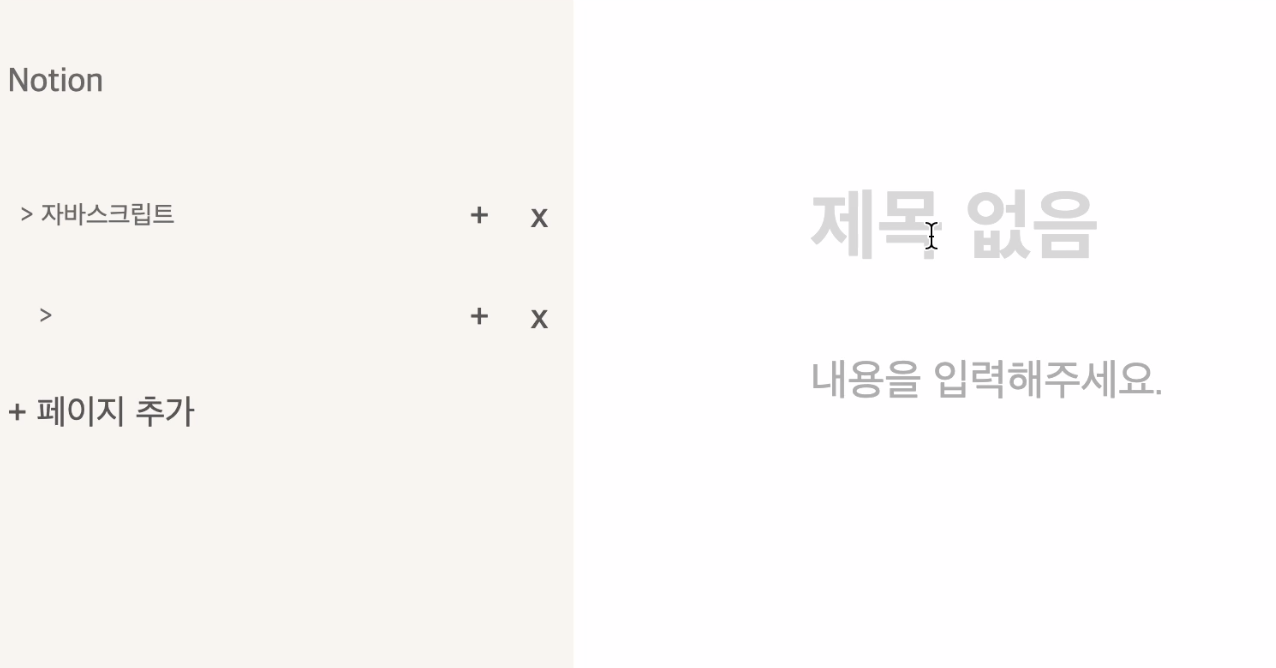
-
그리고 빈페이지로만 생성 후 삭제진행 시에 정상적으로
DELETE요청이 되나요?
다른 분들은 공통적으로GET요청을 보내는것 같아 말씀드려봅니다 :) -
파일네이밍 체계가 조금씩 달라요~! 가급적 통일성을 지켜주세요.
postlists.js
postListUtil.js
마지막으로 api에 대해서도 필요한 페이지 등에서 넣어주는 것보다는 하나의 체계관리를 만들어서
사용하는것이 재사용성을 높일 수 있는 좋은 방법입니다 👍
| this.state = [ | ||
| { | ||
| id: 1, | ||
| title: "아이우에요", | ||
| }, | ||
| ]; |
| ? `<li data-id="${id}"> | ||
| <div class="document" data-id="${id}" data-name="list"> | ||
| <span data-name="span-list" data-id="${id}">> ${title}</span> | ||
| <button data-id="${id}" data-name="plus"> + </button> | ||
| <button data-id="${id}" data-name="minus"> x </button> | ||
| </div> | ||
| </li>` + renderLogic(documents) |
There was a problem hiding this comment.
가독성 좋은 코드는 아닌것 같습니다 :)
renderLogic(documents) 에 대한 연산만 하면 되지 않나요?
4 participants


📌 과제 설명
<기본 요구 사항>
Document를 생성하고 편집화면으로 넘깁니다.
/documents/{documentId} 로 접속시 , 해당 Document content를 불러와 편집기에 로딩합니다.
👩💻 요구 사항과 구현 내용
2022-11-17.7.48.14.mov
부족했던 점
코드를 작성하면서 삭제와 수정을 반복하여 commit 내역들이 깔끔하게 보이지 않을것 같다는 걱정에 중간 중간 commit을
하지 않고 그냥 작성했습니다. 근데 나중에는 오히려 코드를 수정하는데 비교 대상이 없어 코드를 수정하는데 더 많은 시간이 걸렸던것 같고,
그 동안의 과정들을 기록하지 못했던것 같습니다. 다음 과제부터는 commit 컨벤션을 지켜가며 최대한 git을 활용해 보고자 합니다.
시간상의 이유로 Hitory API를 추가하지 못했습니다. 리뷰기간에 다시 공부하여 추가해 볼 예정입니다.
첫 페이지가 열렸을 때, 아무런 document도 선택하지 않은 상태에서 보여지는 편집기에 title이나 content를 넣으면 아무런 예외 처리 없이 값이 들어가고 404에러를 발생시키는데, 이 부분을 처리하지 못했습니다.
컴포넌트들을 잘못 구성하여 필요한 하위 컴포넌트에서 상위 컴포넌트로 id 값을 다시 전달하기 위해 커스텀 이벤트를 남발해서 작성한 것 같습니다.
원래 처음 생각한 컴포넌트 구성은 아래 사진과 같으나 코드를 작성하면서 점점 컴포넌트의 의미가 무색해 질 만큼 컴포넌트들 간의 의존성이 높아진 것 같습니다.
✅ PR 포인트 & 궁금한 점
컴포넌트 방식으로 코드를 작성할 때 상위 컴포넌트 또는 하위 컴포넌트에서 id와 같은 필요한 데이터를 주고 받을 때, 코드를 구현하기 전 설계를 하는 과정에서부터 어디에 어떤 데이터가 필요하고 어떻게 전달하고 주고 받을지 미리 다 정리를 한 후에 코드를 작성하는것이 일반적인 방법인가요?? 과제를 수행하면서 가장 어려웠던 부분이 스코프 때문에 원하는 값을 컴포넌트들 끼리 넘겨주지 못해서 막히는 경우가 많았습니다.