Tark is a "catch-all" SMTP server and a testing tool used in development that captures all outgoing emails without actually delivering them to their intended recipients. It provides a web interface for previewing and debuging emails where the developers can view the source code, content, and attachments without sending them to real users and the risk of spamming real email addresses.
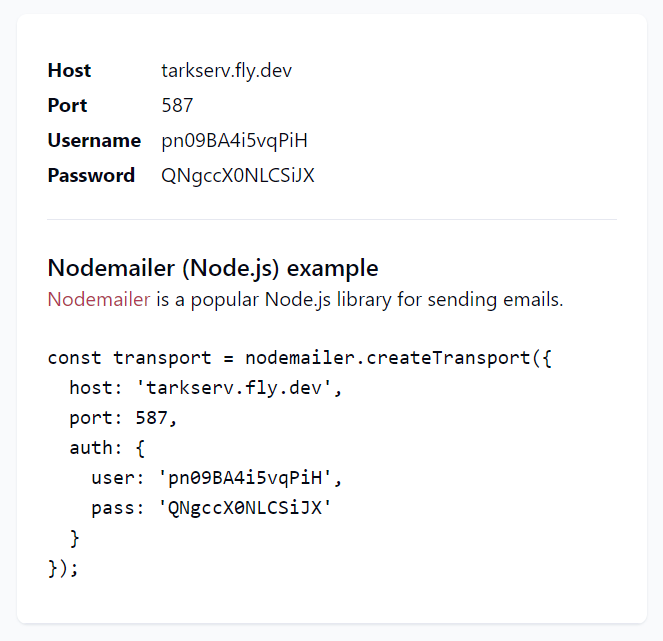
This tool is indispensable for a project with users and transactional emails. If you've never used a "catch-all" SMTP server in development - you are missing out. And it's very easy to use - just swap your real SMTP server credentials with the testing ones and all outgoing emails will be "trapped" and viewable via the web interface.
Inspired heavily by mailtrap.io, Tark is a simple version that can be hosted and run for free for personal use. It supports sharing inboxes with multiple users (something that mailtrap.io only has on paid plans)
- A "catch-all" SMTP server that can be deployed on fly.io
- Free to deploy and run thanks to fly.io very generous free tier.
- A web interface for viewing and debugging emails, including the source code, plain text and HTML content, SMTP server session details, raw SMTP message and headers. Attachments is work in progress.
- Made with dev teams in mind. Inboxes have access control and can be shared with other users. Invite new users in the app.
- Simple login and sign on via magic links.
- Accessibility is a priority, with the app following WCAG guidelines and tested for issues with
axe-core.
You can check it out at https://tarkserv.fly.dev
- Deploys and runs on fly.io.
- Built with Remix.
- MUI components. In an ideal world I'd use Tailwind UI but in real world CSS-in-JS is massively popular and MUI is widely used. Remix/MUI integration was something I wanted to test.
- Prisma and SQLite - very solid db experience.
- Clone this repo, run
npm install- (local dev only) Set up Prisma database
- Sign up for an email service of your choice, like Sendinblue or Postmark
- Sign up for fly.io
- Configure the fly.io app
- Update the environment variables in your
.envfile if running locally or follow the docs for how to update them for deploying on fly.io - Deploy the app
- Use the app: login, create some inboxes, and start using them in your dev work.
This step is self-explanatory.
If you want to run the app locally you need to set up Prisma
npx prisma db push
Database is set up automatically when deploying to fly.io.
To send our own transactional emails we need a dedicated emailing service. Even though we are running our own SMTP server, we can't use it for sending emails because of too much hassle with setting it up and deliverability issues. I've used Sendinblue and Postmark, but there are lots of other options like Sendgrid, Mailgun, Amazon SES.
We need the SMTP relay / SMTP server details from the provider and they go into these environment variables.
TRANSACT_SMTP_HOST="smtp-relay.sendinblue.com"
TRANSACT_SMTP_PORT=587
TRANSACT_SMTP_USER="<your-user-name>"
TRANSACT_SMTP_PASS="<your-password>"
Install flyctl and sign up. Note that they require a credit card (like most cloud providers) but their free allowance is more than enough for our needs.
Run fly launch to create and configure our app.
fly launch
It will find the existing fly.toml and offer to use it
An existing fly.toml file was found for app tarkserv
Agree to it. Choose an app name and a region for deployment. Do NOT create a Postgres database or Redis database. Do NOT deploy yet because we need to set environment variables.
? Would you like to set up a Postgresql database now? No
? Would you like to set up an Upstash Redis database now? No
? Would you like to deploy now? NoYour app is ready! Deploy with
flyctl deploy
IP address is allocated automatically when you deploy but the app does not work with the shared IP that is assigned by default. Just run this command.
fly ips allocate-v4
The first assigned IP address is free.
Create a data volume for the db in the same region you deployed the app to. 1GB should be enough.
fly volumes create data --region <region> --size 1
.env is used for local development only. When deploying to fly.io you'll need to set the variables in the fly.toml file and use the fly CLI for secrets: docs.
Set the following secrets with the CLI
MAGIC_LINK_SECRET="<any-long-random-string>"
SESSION_SECRET="<any-long-random-string>"
TRANSACT_SMTP_USER="<your-user-name>"
TRANSACT_SMTP_PASS="<your-password>"
Update the fly.toml variables
[env]
TRANSACT_SMTP_HOST="<smtp-server>"
TRANSACT_SMTP_PORT="<server-port>"
TRANSACT_FROM="yourname <youremail@domain.com>"
# no need to change the lines below
DATABASE_URL = "file:/data/sqlite.db"
PORT = "8080"
SMTP_LISTEN_PORT = "587"
TRANSACT_FROM is the "from" email address in our transactional emails. Some services only accept verified emails in the "from" field, so make sure it's valid.
If you want to change SMTP_LISTEN_PORT or PORT you also need to update the [[services]] section in fly.toml accordingly.
Now everything is ready and we can deploy to fly.io
flyctl deploy
(the usual npm run dev runs the app locally)
Log in, create a new mailbox, then use the mailbox details in your dev work.
If you find this project useful, please support it with a ⭐. It motivates the developers contributing to the project and drives its growth. Thank you!
A big shoutout to kentcdodds, kiliman and sergiodxa for their amazing Remix content and contributions!
Issues and PRs are very welcome.