
Transparker is only for post-processing transcriptions from Handy App with Codex.
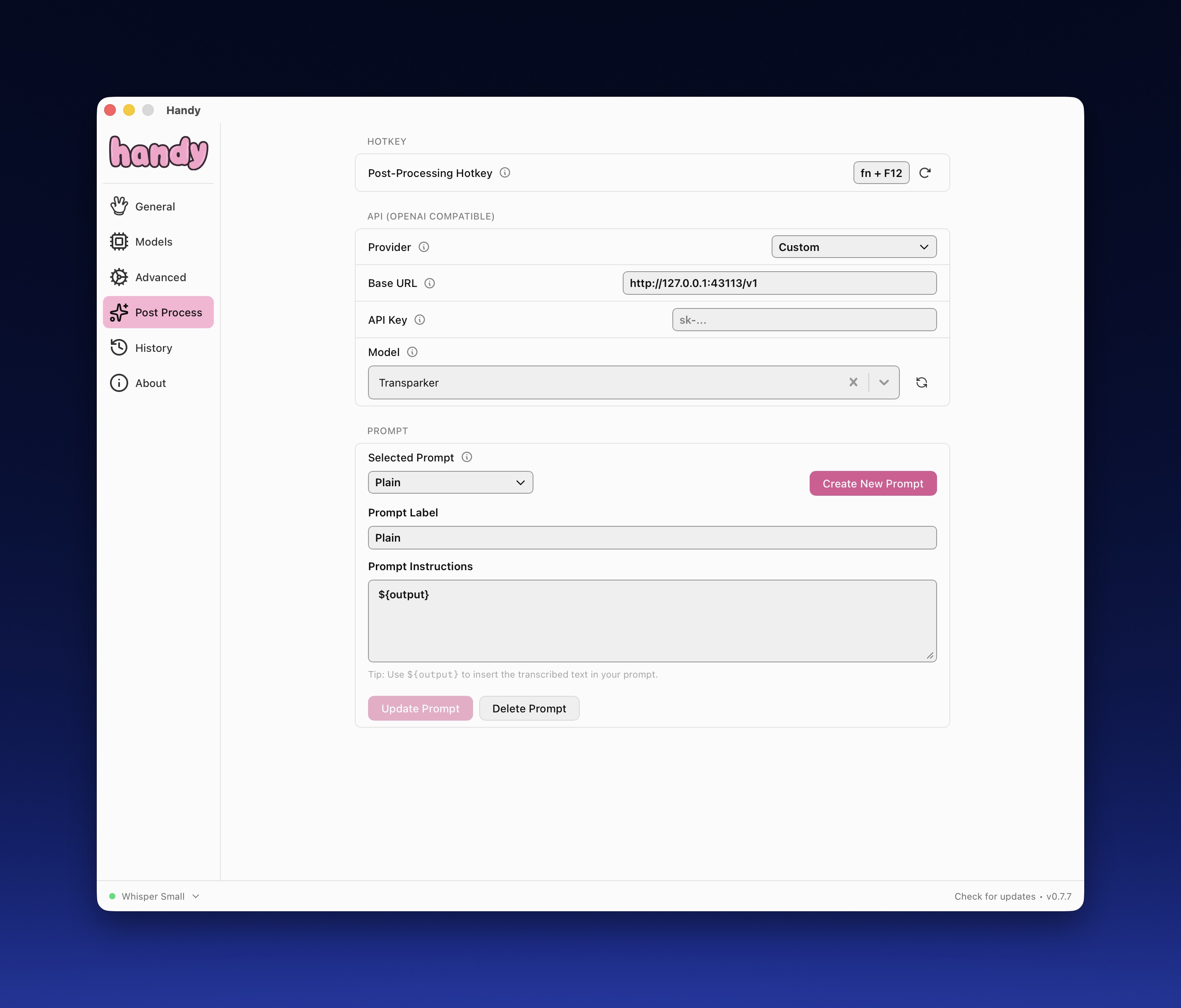
Transparker is a small local Bun.js service that lets Handy use Codex CLI specifically for transcript post-processing.
It gives Handy an OpenAI-compatible local endpoint, runs correction with your Codex auth/subscription, and returns cleaned text in chat.completions format.
- Use Codex CLI only for post-processing transcript correction from Handy.
- Avoid wiring an OpenAI API key into Handy for this workflow.
- Keep behavior editable with
codex/AGENTS.md,~/.transparker/config.toml,~/.transparker/prompt.md, and~/.transparker/wordlist.md. - Run it as a persistent user service so it is always available (
launchdon macOS,systemd --useron Linux). - Install globally with
npmorbunwhile running on Bun runtime (embedded in binary builds).
- Handy sends transcript text to
POST /v1/chat/completions. - Transparker calls
codexwith your local auth (~/.transparker/codex/auth.json, optionally symlinked fromTRANSPARKER_GLOBAL_AUTH_FILE). - Transparker returns an OpenAI-shaped response with the cleaned transcript.
OPENAI_API_KEYis intentionally ignored by this runtime path.- The service is locally hosted, but Codex processing still depends on Codex backend/auth.
Requirements:
- macOS or Linux
codexCLI installed and authenticatednpmorbunpackage manager
Install:
npm install -g transparker
# or
bun install -g transparker
Install and start the service:
transparker install-serviceVerify health:
curl -fsS "http://127.0.0.1:43113/healthz"Supported global-install platforms:
- macOS arm64
- macOS x64
- Linux arm64 (glibc + musl)
- Linux x64 (glibc + musl)
Use these values in Handy.app:
- Provider:
Custom - Base URL:
http://127.0.0.1:43113/v1 - Model:
Transparker - API key: leave blank (not required for this local adapter)
GET /healthzGET /v1/modelsPOST /v1/chat/completions(streaming not implemented)
/v1/models advertises the configured model id (default Transparker) for model pickers.
Transparker uses file-first config in ~/.transparker/config.toml.
If missing, Transparker auto-creates:
~/.transparker/config.toml~/.transparker/wordlist.md~/.transparker/prompt.md
Environment variables remain available and override config file values.
Default ~/.transparker/config.toml:
host = "127.0.0.1"
port = 43113
log_level = "info"
log_full_transcripts = false
model_id = "Transparker"
model_owner = "transparker-local"
wordlist_file = "/Users/<you>/.transparker/wordlist.md"

[codex]
bin = "codex"
model = "gpt-5.3-codex-spark"
reasoning_effort = "low"
timeout_ms = 120000
home_dir = "/Users/<you>/.transparker/codex"
user_home_dir = "/Users/<you>/.transparker/codex/.home"
global_auth_file = "/Users/<you>/codex/auth.json"
config_file = "/Users/<you>/.transparker/codex/config.toml"
prompt_file = "/Users/<you>/.transparker/prompt.md"
output_schema_file = "/Users/<you>/.transparker/codex/output.schema.json"~/.transparker/prompt.md: template containing{{KNOWN_DOMAIN_TERMS}}and{{TRANSCRIPT}}.~/.transparker/wordlist.md: domain terms injected into each request (one term per line).codex/AGENTS.md: canonical Codex instruction file loaded fromCODEX_HOME.
- Codex runs with
CODEX_HOME=~/.transparker/codexby default. - Transparker uses
~/.transparker/codex/auth.json. - If local auth is absent and
TRANSPARKER_GLOBAL_AUTH_FILEexists, Transparker creates a symlink. OPENAI_API_KEYis ignored by this runtime path.
TRANSPARKER_HOME_DIR(default~/.transparker)TRANSPARKER_CONFIG_FILE(default~/.transparker/config.toml)HOST,PORT,LOG_LEVEL,TRANSPARKER_LOG_FULL_TRANSCRIPTSTRANSPARKER_MODEL_ID,TRANSPARKER_MODEL_OWNERTRANSPARKER_CODEX_MODEL,TRANSPARKER_CODEX_BIN,TRANSPARKER_CODEX_REASONING_EFFORT,TRANSPARKER_CODEX_TIMEOUT_MSTRANSPARKER_CODEX_HOME_DIR,TRANSPARKER_CODEX_USER_HOME_DIR,TRANSPARKER_GLOBAL_AUTH_FILETRANSPARKER_WORDLIST_FILE,TRANSPARKER_PROMPT_FILE,TRANSPARKER_CODEX_CONFIG_FILE,TRANSPARKER_CODEX_OUTPUT_SCHEMA_FILE
Service reload workflow:
- Edit
~/.transparker/config.toml. - Reload:
macOS:
launchctl bootout gui/$(id -u) ~/Library/LaunchAgents/com.transparker.api.plist 2>/dev/null || true
launchctl bootstrap gui/$(id -u) ~/Library/LaunchAgents/com.transparker.api.plist
launchctl kickstart -k gui/$(id -u)/com.transparker.api
Linux:
systemctl --user daemon-reload
systemctl --user restart transparker.service
Manual run workflow:
transparkerManual run from source checkout:
bun run startInstall/start service:
transparker install-serviceRestart service:
transparker restart-serviceUninstall service:
transparker uninstall-serviceCheck service state (macOS):
launchctl print gui/$(id -u)/com.transparker.api | rg "state =|pid ="Check service state (Linux):
systemctl --user status transparker.service --no-pagerLog files:
~/Library/Logs/Transparker/transparker.out.log~/Library/Logs/Transparker/transparker.err.log- Linux logs via
journalctl --user -u transparker.service
Enable full transcript debug logging:
LOG_LEVEL=debugTRANSPARKER_LOG_FULL_TRANSCRIPTS=true
When enabled, request logs include:
transcript_received.input_fulltranscript_processed.output_full
Tail logs:
tail -f ~/Library/Logs/Transparker/transparker.out.logLinux log tail:
journalctl --user -u transparker.service -fDevelopment from source requires Bun.
Install, test, and enable auto-launch from source checkout:
bun run install:localRun with watch mode:
bun run devRun checks:
bun run check
bun run test
Transcript processing entrypoint:
src/processor/processTranscript.ts