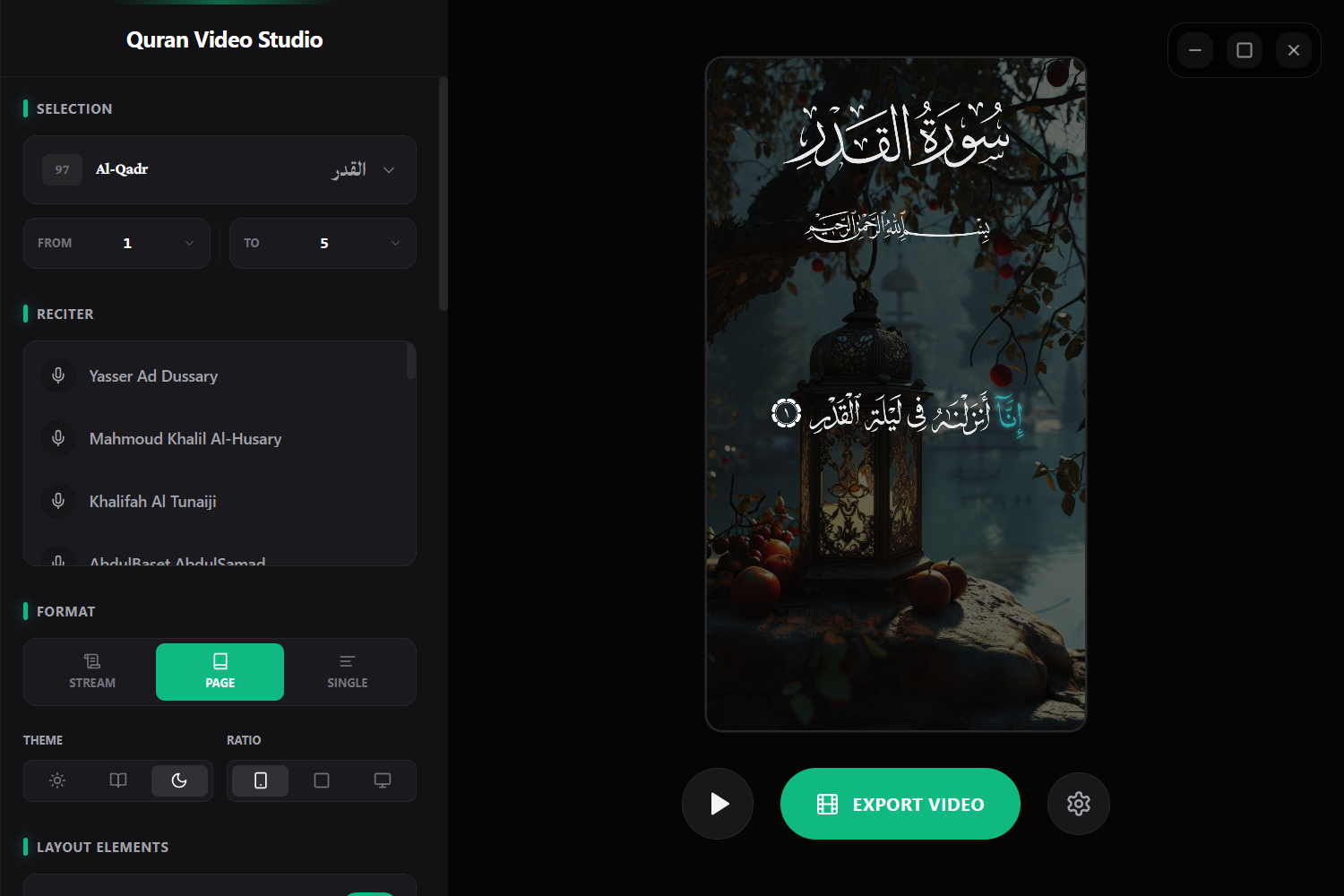
A professional web-based tool for creating high-quality Quran recitation videos with synchronized audio, typography, and styling.




Built with the help of AI • Contact via Telegram • Support on Ko-fi ☕
- ✨ Features
- 🛠️ Tech Stack
- 🚀 Quick Start
⚠️ Troubleshooting- 📁 Project Structure
- 🖥️ Desktop App Setup (Tauri)
- 📝 License
- Surah & Verse Navigation - Easily browse and select any Surah and verse range
- Multiple Reciters - Choose from renowned Quran reciters with high-quality audio
- Waveform Visualization - See your audio in real-time
- Playback Controls - Full control over audio timing and synchronization
- Audio Synchronization - Perfectly aligned audio with text display
- Typography - Multiple Arabic and English font options
- Color Control - Customize text colors, backgrounds, and highlighting
- Background Support - Solid colors or custom uploaded images
- Layout Options - Toggle Surah headers, Bismillah, and translations
- Aspect Ratios - 9:16 (Story/TikTok), 1:1 (Instagram), 16:9 (YouTube)
- MP4 Export - High-quality video generation
- Client-Side Processing - Fast processing with mp4-muxer
- No Server Upload - Your videos stay private
| Layer | Technology |
|---|---|
| Frontend Framework | React 18 + TypeScript |
| Build Tool | Vite |
| Styling | Tailwind CSS |
| Icons | Lucide React |
| Video Processing | mp4-muxer |
| State Management | React Hooks |
| Desktop (Optional) | Tauri 2.0 |
- Node.js 18+ and npm/yarn installed
The app will open at http://localhost:3000 with Hot Module Replacement (HMR).
# 1. Install dependencies
npm install

# Build optimized production bundle
npm run build

# Preview the production build locally
npm run preview
Why use build + preview instead of dev?
npm run dev- For active development with fast refreshnpm run build- Optimizes all assets, creates production bundlenpm run preview- Tests the optimized build locally before deployment
Issue: MIME Type Error - "Expected a JavaScript module script but the server responded with a MIME type of ''"
This error occurs when your dev server isn't properly serving .ts or .js files.
src/
├── app/                 # Main application component
├── features/            # Feature modules
│   ├── Audio/          # Audio processing & waveform
│   ├── Quran/          # Quranic content & selection
│   └── VideoEditor/    # Video rendering & export
├── layouts/            # Layout components (Sidebar, etc.)
├── shared/             # Utilities, constants, types
└── index.tsx          # Entry point
DO NOT run npx tauri init directly! This project has custom Tauri configurations. Follow these steps:
npx tauri initAnswer the prompts as follows:
App name: quran-video-studio
Window title: quran-video-studio
Web assets path: ../build
Dev server URL: http://localhost:3000
Frontend dev command: npm run dev
Frontend build command: npm run build
- Navigate to
src-tauri-config/folder in project root - Copy all contents (files, folders, icons)
- Paste into newly created
src-tauri/folder - Click Yes to All when prompted to replace existing files
npm install @tauri-apps/api@2.0.0

npx tauri add path
npx tauri add fs
npx tauri add dialog
npx tauri add opener
npx tauri add log

cd src-tauri && cargo add log && cd ..# Development with hot reload
npm run tauri dev
# Build native executable
npm run tauri buildThis project is open source and available for personal .
Happy creating! 🎬✨
أداة احترافية قائمة على الويب لإنشاء مقاطع فيديو تلاوة القرآن عالية الجودة مع صوت متزامن وتطبيق طباعي واحترافي.
- ✨ المميزات
- 🛠️ مجموعة التقنيات
- 🚀 البدء السريع
⚠️ استكشاف الأخطاء- 📁 هيكل المشروع
- 🖥️ إعداد تطبيق سطح المكتب
- 📝 الترخيص
- التنقل في السور والآيات - تصفح واختر أي سورة ونطاق آيات بسهولة
- متعددو القراء - اختر من القارئين المشهورين بصوت عالي الجودة
- تصور الموجة الصوتية - شاهد صوتك في الوقت الفعلي
- عناصر التحكم في التشغيل - التحكم الكامل في توقيت الصوت والمزامنة
- مزامنة الصوت - محاذاة مثالية للصوت مع عرض النص
- الطباعة - خيارات خطوط عربية وإنجليزية متعددة
- التحكم في الألوان - تخصيص ألوان النص والخلفيات والتمييز
- دعم الخلفيات - ألوان صلبة أو صور خلفية مخصصة
- خيارات التخطيط - إظهار/إخفاء رؤوس السور والبسملة والترجمات
- نسب العرض - 9:16 (قصة/تيك توك)، 1:1 (إنستجرام)، 16:9 (يوتيوب)
- تصدير MP4 - توليد فيديو عالي الجودة
- المعالجة من جانب العميل - معالجة سريعة مع mp4-muxer
- بدون تحميل الخادم - مقاطعك تبقى خاصة
| الطبقة | التقنية |
|---|---|
| إطار العمل الأمامي | React 18 + TypeScript |
| أداة البناء | Vite |
| التصميم | Tailwind CSS |
| الأيقونات | Lucide React |
| معالجة الفيديو | mp4-muxer |
| إدارة الحالة | React Hooks |
| تطبيق سطح المكتب | Tauri 2.0 |
- Node.js 18+ و npm/yarn مثبتة
# 1. تثبيت المكتبات
npm install

# بناء حزمة الإنتاج المحسّنة
npm run build

# معاينة محلية للبناء الإنتاجي
npm run preview
لماذا استخدام build + preview بدلاً من dev؟
npm run dev- للتطوير النشط مع التحديث السريعnpm run build- يحسّن جميع الأصول وينشئ حزمة الإنتاجnpm run preview- اختبار الحزمة المحسّنة محليًا قبل النشر
يحدث هذا الخطأ عندما لا يقوم خادم التطوير بخدمة ملفات .ts أو .js بشكل صحيح.
src/
├── app/                 # المكون الرئيسي للتطبيق
├── features/            # وحدات الميزات
│   ├── Audio/          # معالجة الصوت والموجة الصوتية
│   ├── Quran/          # محتوى وتحديد قرآني
│   └── VideoEditor/    # عرض وتصدير الفيديو
├── layouts/            # مكونات التخطيط
├── shared/             # الأدوات والثوابت والأنواع المشتركة
└── index.tsx          # نقطة الدخول
لا تشغل npx tauri init مباشرة! يحتوي هذا المشروع على إعدادات Tauri مخصصة. اتبع هذه الخطوات:
npx tauri initأجب على المطالبات كما يلي:
App name: quran-video-studio
Window title: quran-video-studio
Web assets path: ../build
Dev server URL: http://localhost:3000
Frontend dev command: npm run dev
Frontend build command: npm run build
- انتقل إلى مجلد
src-tauri-config/في جذر المشروع - انسخ جميع المحتويات (الملفات والمجلدات والأيقونات)
- الصق في مجلد
src-tauri/الذي تم إنشاؤه حديثًا - انقر فوق نعم للكل عند المطالبة باستبدال الملفات الموجودة
npm install @tauri-apps/api@2.0.0

npx tauri add path
npx tauri add fs
npx tauri add dialog
npx tauri add opener
npx tauri add log

cd src-tauri && cargo add log && cd ..# التطوير مع إعادة التحميل الفوري
npm run tauri dev
# بناء التطبيق الأصلي
npm run tauri buildهذا المشروع مفتوح المصدر ومتاح للاستخدام الشخصي .
سعيد بالإنشاء! 🎬✨
تم بناء هذا المشروع بـ ❤️