https://forms.gle/nxLYUZV8JUFaZAVA9
https://forms.gle/aGpUajx7vnnLpvbS6
https://docs.google.com/spreadsheets/d/1fxR5cZUn6voCuHE14wpqomHTi-SxC2ewV6UKryEYd4U/edit?usp=sharing
https://dlcdn.apache.org/maven/maven-3/3.9.1/binaries/apache-maven-3.9.1-bin.zip
https://binaries.sonarsource.com/Distribution/sonarqube/sonarqube-8.9.10.61524.zip
https://dev.mysql.com/doc/refman/8.0/en/windows-install-archive.html
- Core Java - Overview, First Java Program, Variables, Datatypes, Literals, Operators, Expressions and Conditional Statements. https://www.geeksforgeeks.org/java-programming-basics/
- Core Java - String, Arrays, Looping Statements, Methods, Class, Object, static https://www.programiz.com/java-programming
- Core Java - Access Modifiers, Packages, Encapsulation https://www.javatpoint.com/inheritance-in-java
- Core Java - Polymorphism, Inheritance, Abstraction, Interface https://www.geeksforgeeks.org/polymorphism-in-java/
- Core Java - Collection Framework, ArrayList, Map, Set. https://www.geeksforgeeks.org/collections-in-java-2/
- Core Java - File Handling, Threads and Garbage Collections, Exception Handling, Enums. https://www.javatpoint.com/java-io
- Java 8 - Java 8 Features - Lambda Expressions, Streams, Filters, java.time. https://www.journaldev.com/2389/java-8-features-with-examples
- Junit 5 and Maven - Writing basic tests, Assert Statements, Testing Exceptions https://howtodoinjava.com/junit-5-tutorial/
- RDBMS - DDL Commands, DML Commands https://www.javatpoint.com/mysql-tutorial
- RDBMS - Operators, Aggregate, String, Date Functions https://www.geeksforgeeks.org/sql-tutorial/
- Web Basics - Learn the basics of HTML5 & CSS3 https://www.w3schools.com/html/
- JavaScript - Learn the basics of Javascript https://www.javatpoint.com/javascript-tutorial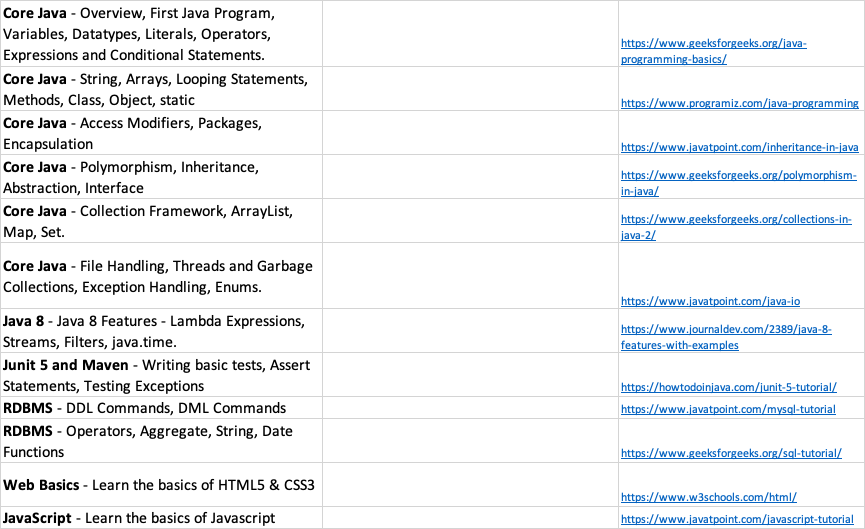
- HTML CSS JS Bootstrap Angular
- Java EE, Spring, Microservices, Docker
- AWS, Kubernetes, CICD, DevOps
Java - Object Oriented Programming Language
- JDK
- JAVAC - Java Compiler
- Runtime Libraries
- JVM - Java Virtual Machine
class Program{
  public static void main(String []args){
	System.out.println("UST Global");
  }
}-
Program.java
-
javac Program.java -> Compile
-
Program.class -> Byte code
-
java Program -> Executing the code
-
Program 1:
class Program{
  public static void main(String []args){
	String companyName = "UST Global";
	System.out.println(companyName);
  }
}- Program 2 :
class Program{
  public static void main(String []args){
    String message = "Hello everyone";
	String companyName = "UST Global";
	System.out.println(message+", welcome to "+companyName);
  }
}
// Hello everyone, welcome to UST Global-
Integer : int
-
Program 3:
class Program{
  public static void main(String []args){
    	int num = 10;
	System.out.println(num);
  }
}- What is Java?
- Why Java?
- How to write Java Program
- How to compile and run java code
- Software setup issues
- Network Connection issues
- Variables and Data Type
- SDLC and Program Flow
- Understand the Software Development Lifecycle
- Understand the difference between Waterfall and Agile Model
- Understand the basic program flow
- JDK-11 - Done
- Git - Done
- Spring Tools - Done
- VS Code - Done
- Node JS - Done
- Postman - Done
- MySQL - Done
-
Numeric - int - short - byte - long
-
Decimal - float - double
-
Character- char
-
Boolean - boolean (true/false)
-
What is the difference between float and double?
-
class
-
object
-
arrays
-
String
-
What is typecasting?
-
Where do we need it?
- Import Scanner from util package
import java.util.Scanner;- Create an object of Scanner
Scanner scan = new Scanner(System.in);- To read integer :
int num1 = scan.nextInt();- To read float :
float num1 = scan.nextFloat();- To read double :
float num1 = scan.nextDouble();- To read String :
String name = scan.nextLine();- SDLC
- Waterfall vs Agile
- Algorithms and Flowchart
- Java variables and data-type
- typecasting
- How to read input from the user
- we are able to write code
- we are able to run code
- GIT
- Cotrol flow/ decission making in Java
-
What is git?
-
Version Control System
-
What is GitLab?
-
Online source code repository (remote repository)
-
Git has repositories
-
We can save our changes to the repository using git commit
-
we can push the code to repote repository using git push
-
we can clone/make a copy of the remote repository on out local system using git clone
-
we can pull the changes from remote repository using git pull
- GitHub
- BitBucket
- AWS CodeCommit
Making your own copy of a remote repository
Profile -> Preferences -> SSH Keys
-
Open Terminal/CMD
-
Type
bash ssh-keygen -t rsa -b 2048 -C "<email>" -
Enter file in which to save the key
-
Enter passphrase
- keep it blank
- Enter same passphrase again
- keep it blank
- Go to the location where keys are saved
- Open the .pub key file using notepad
- Copy the content
- Paste it to the Key section on GitLab
- Add the key
- Also add the private key on your local machine using terminal
eval $(ssh-agent -s)
ssh-add <key-file-name>
- Go to the repository
- Click on Clone
- Clone SSH (_ Copy the link_)
- Open Termainal/CMD inside your desired folder
- Few important points
- copy the private-key in the desired folder
- Also add the private key on your on that desired folder using terminal/git-bash
- Hints - repeat the eval and ssh-add commands
- Type
git clone <repo-link>
- Add all the changes to stagging
git add . - Commit the changes
git commit -m "a suitable message"
- NB: Commit will save all the changes to local repository
- Update/Push the commit to remote
git push
NB: To see the status of the repository we can use git status
git pull
- Go to the respective exercise/assignment repo
- Fork the repo
- Clone the forked repo on your local machine (Hints - Follow the previous steps)
- NB. Don't clone a repository inside another repository
- Modify/Complete the exercise
- Commit and Push
- if-else
- switch
- conditional operator
if(condition){
	statements
	...
}
else{
	statements
	...
}
Exercise8: Write an algorithm for accepting a character and then display whether it is a vowel or a constant.
Exercise 9: Write an algorithm for accepting three numbers and display the highest number among the three numbers.
Exercise 10: Write an algorithm for accepting the age of user and if the age is valid, check whether the user is a kid, a teenager, an adult or a senior citizen.
- Arithmetic Operator
- / %
- Relational Operator
< <= > >= == !=
- Logical Operator
- && - AND
- || - OR
- ! - NOT
- Bitwise Operator
- & - Bitwise AND
- | - Bitwise OR
- Assignment Operator
- =
- Arithmetic Assignment Operator
- += -= *= /= %=
- Increment/Decrement Operator
- ++ --
- Read an input
- if number is divisible by 3 Print Fizz
- if number is divisible by 5 Print Buzz
- if number is divisible by both 3 & 5 Print FizzBuzz
- otherwise print the number
Sample Output
- Input : 6
- Output : Fizz
- Input : 15
- Output : FizzBuzz
- Input : 4
- Output : 4
What did we learn today?
-
Git:
-
How to setup git for clone, commit and push
-
Creating ssh keys
-
How to complete exercises on stackroute platform?
-
Java :
-
Conditional evaluation in Java
-
if else
-
switch
-
conditional operator statement
-
Different Operators in java
-
Completed multiple programs
What went well?
- Able to write code and execute
- Able to understand the concepts
Any challenges?
- gitlab is not accessible through UST Networks
What are we going to learn tomorrow?
- switch
- conditional operator statement
- Looping
What did we complete yesterday?
if-else
What are we going to learn today?
switch conditional operator looping
Syntax
switch(variable){
	case value1:
		statement;
		break;
	case value2:
		statement;
		break;
	...
	...
	default:
		statement;
		break;
}
Syntax
output = expression ? value if true : value if false
	int num1, num2;
	num1 = 20;
	num2 = 10;
	int largest = num1>num2 ? num1 : num2;
System.out.println(largest);int day;
day = 1 message = "Monday - its time to start the week" day = 2 message = "Tuesday - ...." .. .. day = 6 message = "Saturday - Enjoy your weekend" day = 7 message = "Sunday - Plan for the upcoming week"
while do-while for
Print the message "Welcome to UST Global" 5 times
while(condition){ statement; ... }
do{ statements; .... }while(condition)
while - entry-controlled do-while - exit-controlled
for(initialization ; condition ; increment/decrement){ statements; ... }
for(int count=10 ; count<5 ; count++){ System.out.println("Welcome to UST Global"); }
- Conditional evaluation with switch statement
- using ternary/conditional operator
- loops
- understand the need for loops
- explored different types of loops
- the use of break and continue
- 10+ Problems related to looping and conditional statements are Done
- Shoutout to Alphons for completing the tasks quickly
- Shoutout to Shafna for completing the tasks quickly
- Shoutout to Amal for completing the tasks quickly
- No issues
- arrays
- String
-
collection of values
-
How to define an array?
data-type []array-name = new data-type[size];
int []numbers; numbers = new int[5];
- new keyword is used for dynamic allocation
int x = 5;
int []data = {10,15,20,30};
data.length; returns the length of the array
Printing an array :
for(int index=0; index<nums.length; index++)
			System.out.println(nums[index]);
2D Array -> Matrix
int [][]matrix = new int[3][3];
String str = "karan"; String str2 = "rohit"; String str3 = "Rohit"; String email = "rohit12@yahoo.com";
- How to check the equality of two strings :
str.equals(str2) -> false str2.equals(str3) -> false str2.equalsIgnoreCase(str3) -> true
-
How to compare two Strings? String str1 = "karan abc"; String str2 = "karan"; int difference = str1.compareTo(str2);
-
How to get the length of a string?
str1.length();
-
How to get the character at a position? str1.charAt(3) -> a
-
How to get the position of a character?
str1.indexOf("n") -> 4 str1.indexOf("a") -> 1
-
How to check whether a string contains another string?
String line = "hello karan, how are you doing?"
line.contains("karan") -> true
line.indexOf("rahul") -> -1
Complete the first four challenges -- https://www.hackerrank.com/domains/java
A company has revamped the health insurance policy for all its insured employees and has increased their health cover by 20%. In order to provide them this facility, the human resource department needs to collect the data of all insured employees and prepare a unique list of their employee ids. Write a program to help the HR manager to create a unique list of employee ids to avoid duplication.
Sample Input :
    int[] salesDepartmentEmpIds = {101,105,106,107,108,109};
Sample Output:
    true
---------------------------------------------
Sample Input :
    int[] accountDepartmentEmpIds = {201,205,206,207,208,209,201};
Sample Output:
    false
Write a Java program to get the strings as input from the user and push them to an array. Find the shortest word in the list of strings and display the same on the screen.
Sample Input
words[] = {"Atrocity", "Pensive", "Imperceptible", "Discordant" }
Sample Output
Shortest word is Pensive
Strings cannot be modified StringBuffer and StringBuilder are mutable
StringBuilder sbd = new StringBuilder("hello"); StringBuffer sbr = new StringBuffer("welcome");
-
StringBuffer vs StringBuilder StringBuffer is Thread-Safe StringBuilder methods are asynchronous
-
Reversing a given String
-
replace an word with another word String str = "hello everyone, how are you? Everyone should complete the task" Replace everyone with folks
str=str.replace("everyone","folks");
str.split(" ") -> will create an array of strings containing all the words in str separated by space
str.split(",") -> will create an array of strings containing all the words in str separated by comma
trim() -> removes all the trailing spaces
classes methods objects
find the minimum of two numbers
int findMin(int num1, int num2){
}
find the average of 3 numbers
double findAverage(int num1, int num2, int num3){
}
-
Print string in uppercase
void printString(String str){ System.out.println(str.toUpperCase()); }
-- Sort an array
static int[] sort(int []arr){ ... }
method - > self contained block of statement
return-type method-name(arguments)
class - data(fields) + methods
class is a user-defined type
class Employee{
	int employeeId;
	String employeeName;
	String email;

	public printEmployee(){
		System.out.println("ID : "+	employeeId);
		System.out.println("Name : "+employeeName);
		System.out.println("Email : "+email);
	}
}
Employee e1 = new Employee();
Employee e2 = new Employee();
What is a Constructor?
-
is a special type of method is used for initializing the fields
-
it has the same name as the class
-
it invokes automatically when we create an object
What did we learn today?
- String vs StringBuffer/StringBuilder
- Using methods in Java.
- What is a class in java
- What are objects.
- How to create objects in Java
- Significance of static keyword in java
What went well?
- We have gone through multiple examples to understand the concept of classes and objects
Any challenges?
- New concepts.. Need more practice and hands-ons
What is there for tomorrow?
- understand the use of this keyword
- explore different features of OOP
- Understand encapsulation
- Access modifiers
- public
- private
- protected
- default
- Implement an abstract superclass called Item and define all common operations on this class (constructors, getters, setters, equals, toString, print, checkIn, checkOut, addItem, etc). Have private data for: identification number, title, and number of copies.
- Implement an abstract subclass of Item named WrittenItem and define all common operations on this class. Added private data for author.
- Implement 2 subclasses of WrittenItem: Book and JournalPaper.
3.1. Class Book: no new private data. When needed, override/overload methods from the superclass. 3.2. Class JournalPaper: added private data for year published. When needed, override/overload methods from the superclass. - Implement another abstract subclass of Item named MediaItem and define all common operations on this class. Added private data for runtime (integer).
- Implement 2 subclasses of MediaItem: Video and CD.
5.1. Class Video: added private data for director, genre and year released. When needed, override/overload methods from the superclass. 5.2. Class CD: added private data for artist and genre. When needed, override/overload methods from the superclass.
Write the definitions of these classes and a client program (your choice!) showing them in use.
- Inheritance
- Method overriding
- use of super keyword
- use of protected access modifier
- Able to write code related to inheritance
- More practice on logical problem solving
- abstract classes
- interfaces
- final keyword
-
Complete all the problems mentioned on additional-exercises of GitLab.
-
explore instance of operator
-
final variables are treated as constants and the value of the variable cannot be changed
-
final methods cannot be overridden
-
final class cannot be inherited
Abstraction can be achieved in two ways -
- Using abstract classes
- Using interfaces
class Phone{ Sim sim; makeACall(){ sim.call(); }
}
class Sim{ call(){ ... } sendSms(){ ... }
Printer
Some Printers are Scanner too
HpPrinter - can only print CanonPrinter - can print and scan
We need a printer object which can be initialised with either of the different printer available
Exception Handling
try - write the code that can lead to some exception
catch - write what to be done if the exception occurred
finally - a code block to be executed irrespective of whether or not the exception occurred
Checked Exception - Compile-Time exception Unchecked Exception - Runtime Exception
ArrayIndexOutOfBoundsException
All checked exception extends the Exception class directly examples - FileNotFoundException, SQLException, IOException, ClassNotFoundException
All unchecked exception extends the RuntimeException class examples - ArithmeticException,ArrayIndexOutOfBoundsException, NullPointerException, InputMismatchException, NumberFormatException
How to catch more than one exceptions?
How to throw and exception conditionally?
Throw vs Throws
-
with throw we can generate an exception
-
syntax : throw new Exception-class-name(message)
-
example : throw new InvalidAgeException("Invalid Age")
-
with throws we declare an exception (checked-exception)
-
syntax : method-name() throws Exception-Type
-
example : public void readAge() throws InvalidAgeException
-
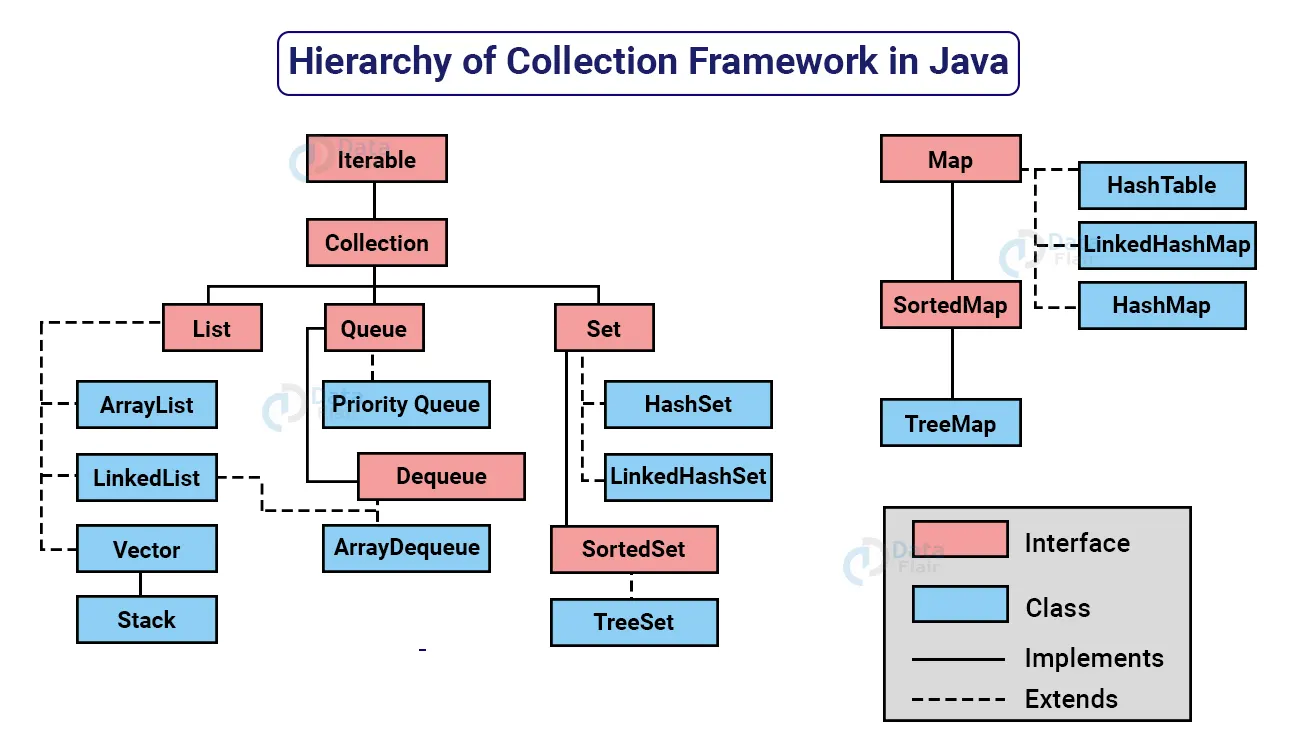
provides a set interfaces and classes
-
3 types
-
List - collection(index based, allows duplicates)
- ArrayList
- LinkedList
- Vector
-
Queue
- First-In-First-Out Data Structure
- Allows duplicates
- PriorityQueue
- LinkedList
-
Set
- collection of unique elements(hash based)
- HashSet
- TreeSet
- Generic types defines the type of data that a collection should have
- we mention generic types using <> diamond braces
Collections.sort(list)
-
implement the Comparable interface
-
override the compareTo() method
class Customer implements Comparable<Customer>{

	....

	public int compareTo(Customer c) {

		....
	}

}- create an exception DuplicateCustomerException and throw it when you try to add the customer with same id
- consists of key value pair
- Keys are unique
	Map<K,V> map = new HashMap<>()

Map<Integer, String> myMap = new HashMap<>()-
we divide different classes an interfaces as per their purpose
-
ui layer
-
business layer / service layer
-
repository layer/DAO Layer/Persistence Layer
-
model/entity layer

-
Unit Testing
-
Integration Testing
-
End-to-End Testing
-
JUnit - Java Library for writing unit tests
-
Lifecycle hooks
-
BeforeAll
-
BeforeEach
-
AfterEach
-
AfterAll
Reading a file
- FileInputStream - Byte Oriented
- FileReader - Character Oriented
Serialization
De-serialization
ER Model Entity Relationship Diagram
Entity - is an object of interest Attribute - Defines various properties of an entity Relationship - Defines the relationship between different entities
Trainee
Trainer
--Employee Table--
| emp_id | emp_name | job | salary | hiredate | |
|---|---|---|---|---|---|
| 1001 | Suraj | suraj@yahoo.com | Clerk | 65000 | 2020-04-27 |
| 1002 | Mohit | mohit@gmail.com | Salesman | 52000 | 2021-04-20 |
| 1003 | Gaurav | gaurav@yahoo.com | Analyst | 55000 | 2020-10-15 |
| 1004 | Harsh | harsh@gmail.com | Clerk | 68000 | 2019-02-10 |
| 1005 | Javed | javed@yahoo.com | Manager | 85000 | 2015-05-20 |
| 2001 | Priyanka | priyanka@yahoo.com | Analyst | 75000 | 2018-05-20 |
| 2002 | Karan | karan@yahoo.com | Analyst | 72000 | 2019-10-20 |
-
DDL
- CREATE : creating new table or database
- ALTER : changing the table structure
- DROP : delete the table
- TRUNCATE : clear all the data
-
DML
- INSERT
- UPDATE
- DELETE
-
DQL
- SELECT
https://binaries.sonarsource.com/Distribution/sonarqube/sonarqube-8.9.10.61524.zip
-
Download SonarQube
-
Extract and Run StartSonar.bat
-
Visit localhost:9000 and change the security settings
-
Make the following changes


](https://www.javatpoint.com/javascript-tutorial!%5Bimage%5D(https://user-images.githubusercontent.com/42864715/172369342-f5a11d3a-15fe-46da-9253-4ef28c976f30.png))
- Add the following dependencies and plugins to your maven project
	<properties>
		<maven.compiler.source>11</maven.compiler.source>
		<maven.compiler.target>11</maven.compiler.target>

		<!-- JaCoCo Properties -->
		<jacoco.version>0.8.6</jacoco.version>
		<sonar.java.coveragePlugin>jacoco</sonar.java.coveragePlugin>
		<sonar.dynamicAnalysis>reuseReports</sonar.dynamicAnalysis>
		<sonar.coverage.jacoco.xmlReportPaths>${project.basedir}/../target/jacoco.exec</sonar.coverage.jacoco.xmlReportPaths>
		<sonar.language>java</sonar.language>

	</properties>


	<dependencies>

		<dependency>
			<groupId>org.jacoco</groupId>
			<artifactId>jacoco-maven-plugin</artifactId>
			<version>0.8.6</version>
		</dependency>

		<!-- https://mvnrepository.com/artifact/org.sonarsource.scanner.maven/sonar-maven-plugin -->
		<dependency>
			<groupId>org.sonarsource.scanner.maven</groupId>
			<artifactId>sonar-maven-plugin</artifactId>
			<version>3.9.1.2184</version>
		</dependency>


		<dependency>
			<groupId>org.junit.jupiter</groupId>
			<artifactId>junit-jupiter-api</artifactId>
			<version>5.8.2</version>
			<scope>test</scope>
		</dependency>

		<dependency>
			<groupId>org.junit.jupiter</groupId>
			<artifactId>junit-jupiter-engine</artifactId>
			<version>5.8.2</version>
			<scope>test</scope>
		</dependency>


	</dependencies>

	<build>
		<plugins>
			<plugin>
				<groupId>org.jacoco</groupId>
				<artifactId>jacoco-maven-plugin</artifactId>
				<version>${jacoco.version}</version>
				<executions>
					<execution>
						<id>jacoco-initialize</id>
						<goals>
							<goal>prepare-agent</goal>
						</goals>
					</execution>
					<execution>
						<id>jacoco-site</id>
						<phase>package</phase>
						<goals>
							<goal>report</goal>
						</goals>
					</execution>
				</executions>
			</plugin>
			<plugin>
				<groupId>org.jacoco</groupId>
				<artifactId>jacoco-maven-plugin</artifactId>
				<executions>
					<execution>
						<id>report</id>
						<goals>
							<goal>report-aggregate</goal>
						</goals>
						<phase>verify</phase>
					</execution>
				</executions>
			</plugin>

			<plugin>
				<artifactId>maven-surefire-plugin</artifactId>
				<version>2.19</version>
				<dependencies>
					<dependency>
						<groupId>org.junit.platform</groupId>
						<artifactId>junit-platform-surefire-provider</artifactId>
						<version>1.0.0</version>
					</dependency>
				</dependencies>
			</plugin>
		</plugins>
	</build>
clean verify sonar:sonar
Visit localhost:9000
Examples - [abc] -> either a or b or c str = "a"
[abc]* -> zero or more numbers of a or b or c str = "abaac";
[abc]+ -> one or more numbers of a or b or c
[a-z]* -> zero or more character
[a-zA-Z]* -> zero or more character including uppercase
[a-zA-Z0-9]* -> zero or more character including digits
[0-9]{10} -> a 10 digit number
[0-9]{8,10} -> a digit with 8 to 10 numbers
[0-9]{,10} -> max 10
[0-9]{10,} -> min 10
\w == [a-zA-Z0-9]
\d == [0-9]
\s == white-space
\W == non character
\D == non-digit
\S == no space
Password Validation Given a method with a password in string format as input. Write code to validate the password using following rules:
- Must contain at least one digit
- Must contain at least one of the following special characters @, #, $
- Length should be between 6 to 20 characters.
String password -> "^(?=.*\\d)(?=.*[@#$])[a-zA-Z0-9@#$]{6,20}$";Explanation:
^ - the start of the string
(?=.*\d) -> positive lookahead that checks if the string contains at least one digit
(?=.*[@#$]) -> positive lookahead that checks if the string contains at least one of the special characters @, #, or $
[a-zA-Z0-9@#$]{6,20} -> matches any combination of upper or lowercase letters, digits, and the special characters @, #, and $, with a length between 6 and 20 characters
$ -> the end of the string
Where both the object can exists individually
- Flight and Passengers
- Fridge and Fruits
It a Has-A relationship where one object is dependent on the other
- Flight and Crew-Member
It is a strong Has-a relationship where both objects are dependent on each other and no one can exists individually
- Person and Brain
- Car and Engine
- Employee and Salary
Inheritance
Animal
-
- color
-
- size
-
- speak()
Cat extends Animal
- speak(){
}
Dog extends Animal
- speak(){ Sysout("Bark..") }
https://www.freecodecamp.org/news/solid-principles-explained-in-plain-english/
The Single Responsibility Principle states that a class should do one thing and therefore it should have only a single reason to change.
For example in our Customer-Management-App we divided our classes into multiple layers and every class has a single responsibility, eg. CustomerRepository class does Database related task only and CustomerService class does service and business related task only.
Open-Closed Principle requires that classes should be open for extension and closed to modification.
Eg. currently we are storing the customers to HashMap, if we want to change our storage to a database then we should not modify the existing Class rather we should extend a new class and write code to database operation.
Liskov Substitution Principle states that subclasses should be substitutable for their base classes.
for example the sort method in Collections class requires a List and it can be substituted by ArrayList, LinkedList or any other subclasses of List.
Collections.sort(List items)
Segregation means keeping things separated, and the Interface Segregation Principle is about separating the interfaces.
interface Printer{
 void print();
}

interface Scanner{
 void scan();
}

class HPPrinter implements Printer,Scanner{
	public void print(){

	}
	public void scan(){

	}
}

class CanonPrinter implements Printer{
	public void print(){

	}

}The Dependency Inversion principle states that our classes should depend upon interfaces or abstract classes instead of concrete classes and functions.
- Add the database driver
- Create a connection
- Create a statement
- Execute statement
- Display output
HTML Tags(elements) are of two types
- container tag -- contains both opening and closing tags -- h1,p,html,body
- empty tag -- no closing -- br,hr,img,input
- - paragraph
- - division
-
h1 to h6 are headings
-
- horizontal line -
- line break -
HTML Lists
-
unordered list
-
ordered list
-
description list
-
HTML Tables
-
HTML text formatting
-
-
HTML links
-
Inline and Block elements -- Block - div, p, h1,..,h6 -- Inline - span, img, input
{property:value;}
Inline CSS Internal CSS External CSS
How to include JS in your html?
- Inline JS
- Internal JS
- External JS
number - 5, 2.5, -3.65546
string - 'hello', "rahul", """harsh""",javed
boolean - true/false
object -
let employee1 = { employeeId : 1001, employeeName: 'Rahul' }
let employee2 = { employeeId : 1002, email: 'gaurav@yahoo.com' }
Date - represents a date
x = 10 // global declaration var y = 20 // function level declaration let z = 30 // block level declaration
- if-else
- switch
- conditional operator(?:)
while do-while for
= - assignment == - compares values irrespective of type === - compares values and type
let arr = [10,20,30,'Ramesh','Suresh'];
npm set strict-ssl false
npm install g json-server
json-server employees.json --port=3500
GET :
localhost:3500/employees
localhost:3500/employees?name=Harsh
localhost:3500/employees/1001
POST :
localhost:3500/employees
Body : { "id":1005, "name":"Suraj", "email":"suraj@yahoo.com" }
DELETE:
localhost:3500/employees/1002
PUT:
localhost:3500/employees/1005
Body : { "id":1005, "name":"Suraj Sharma", "email":"suraj@yahoo.com" }
fetch('https://jsonplaceholder.typicode.com/todos', {
        method: 'POST',
        body: JSON.stringify(todo),
        headers: {
            'Content-type': 'application/json; charset=UTF-8'
        }
})Server :
- Tomcat Server
Servlet:
Java code that runs on server
Java Framework :
- Spring Core Dependency Injection
- Spring MVC
- Spring Boot
- Spring Security
- Spring Cloud
Phone{ Sim sim; .. .. }
Sim{ .... }
Injecting dependency automaticaly
- By Type
- By Name
Setter Injection Constructor Injection Field Injection
@Component
@Service
@Repository

@ComponentScan

@Autowired

@Configuraion

@Bean

@Value

@Qualifier

@PropertySource
- spring project
- production ready standalone spring-based application
- focuses on convention over configuration
- create a spring starter project
- select the dependencies you need
- create the project
localhost:8000/swagger-ui.html
@SpringBootApplication
- declares a SpringBootApplication and do all the necessary configuration
@RestController
- creates a REST API(returns resources[json])
@Controller
- creates a Controller that returns a view(a page)
@RequetBody
- to map the data received from the body of the request to a java object
@ResponseBody
- creates a REST API inside a Controller (returns resources[json])
@RequestMapping
- maps a method to a request(any type of request)
@GetMapping
- maps a method to a GET request
@PostMapping
- maps a method to a POST request
@DeleteMapping
- maps a method to a DELETE request
@PutMapping
- maps a method to a PUT request
@ResponseStatus
- used to change the status code of the response
@PathVariable
- to read dynamic from the URI
@RequestParam
- to read the query parameter from the request