Blazing-fast Python web framework with production-grade routing backed by a minimal, event-driven C core





Catzilla is a modern Python web framework purpose-built for extreme performance and developer productivity. At its heart is a sophisticated C HTTP engine—built using libuv and llhttp—featuring an advanced trie-based routing system that delivers O(log n) route lookup performance.
By exposing its speed-focused C core through a clean, Pythonic decorator API, Catzilla gives developers full control with minimal overhead. Whether you're building real-time AI applications, low-latency APIs, or high-throughput microservices, Catzilla is engineered to deliver maximum efficiency with minimal boilerplate.
- ⚡ Hybrid C/Python Core — Event-driven I/O in C, exposed to Python
- 🔥 Advanced Trie-Based Routing — O(log n) lookup with dynamic path parameters
- 🧱 Zero Boilerplate — Decorator-style routing:
@app.get(...) - 🔁 Concurrency First — GIL-aware bindings, supports streaming & WebSockets
- 📦 Zero Dependencies — Uses only Python standard library (no pydantic, no bloat!)
- 🛣️ Dynamic Path Parameters —
/users/{user_id},/posts/{post_id}/comments/{comment_id} - 🚦 HTTP Status Code Handling — 404, 405 Method Not Allowed, 415 Unsupported Media Type
- 🔍 Route Introspection — Debug routes, detect conflicts, performance monitoring
- 📊 Production-Grade Memory Management — Zero memory leaks, efficient allocation
- 🧩 Modular Architecture — Add plugins, middleware, or extend protocols easily
- 🧪 Comprehensive Testing — 90 tests covering C core and Python integration
- 📖 Developer-Friendly — Clear documentation and contribution guidelines
- 🔧 Method Normalization — Case-insensitive HTTP methods (
get→GET)
The Python Framework That BREAKS THE RULES
- 🔥 30-35% Memory Efficiency — Automatic jemalloc optimization
- ⚡ C-Speed Allocations — Specialized arenas for web workloads
- 🎯 Zero Configuration — Works automatically out of the box
- 📈 Gets Faster Over Time — Adaptive memory management
- 🛡️ Production Ready — Graceful fallback to standard malloc
app = Catzilla()  # Memory revolution activated!

# Real-time memory statistics
stats = app.get_memory_stats()
print(f"Memory efficiency: {stats['fragmentation_percent']:.1f}%")
print(f"Allocated: {stats['allocated_mb']:.2f} MB")

# Automatic optimization - no configuration needed!- Request Arena: Optimized for short-lived request processing
- Response Arena: Efficient response building and serialization
- Cache Arena: Long-lived data with minimal fragmentation
- Static Arena: Static file serving with memory pooling
- Task Arena: Background operations with isolated allocation
Install Catzilla from PyPI:
pip install catzillaSystem Requirements:
- Python 3.9+ (3.10+ recommended)
- Windows, macOS, or Linux
- No additional dependencies required
Platform-Specific Features:
- Linux/macOS: jemalloc memory allocator (high performance)
- Windows: Standard malloc (reliable performance)
- See Platform Support Guide for details
python -c "import catzilla; print(f'Catzilla v{catzilla.__version__} installed successfully!')"For specific versions or if PyPI is unavailable:
# Download specific wheel for your platform from:
# https://github.com/rezwanahmedsami/catzilla/releases/tag/v0.1.0
pip install <downloaded-wheel-file>For development or contributing:
# Clone with submodules
git clone --recursive https://github.com/rezwanahmedsami/catzilla.git
cd catzilla

# Create virtual environment
python -m venv venv
source venv/bin/activate  # On Windows: venv\Scripts\activate

# Install in development mode
pip install -e .
Build Requirements (Source Only):
- Python 3.9-3.13
- CMake 3.15+
- C Compiler: GCC/Clang (Linux/macOS) or MSVC (Windows)
Create your first Catzilla app with Memory Revolution:
# app.py
from catzilla import (
    Catzilla, Request, Response, JSONResponse, BaseModel,
    Query, Path, ValidationError
)
from typing import Optional
import asyncio

# Initialize Catzilla
app = Catzilla(
    production=False,      # Enable development features
    show_banner=True,      # Show startup banner
    log_requests=True      # Log requests in development
)

# Data model for validation
class UserCreate(BaseModel):
    """User creation model with auto-validation"""
    id: Optional[int] = 1
    name: str = "Unknown"
    email: Optional[str] = None

# Basic sync route
@app.get("/")
def home(request: Request) -> Response:
    """Home endpoint - SYNC handler"""
    return JSONResponse({
        "message": "Welcome to Catzilla v0.2.0!",
        "framework": "Catzilla v0.2.0",
        "router": "C-Accelerated with Async Support",
        "handler_type": "sync"
    })

# Async route with I/O simulation
@app.get("/async-home")
async def async_home(request: Request) -> Response:
    """Async home endpoint - ASYNC handler"""
    await asyncio.sleep(0.1)  # Simulate async I/O
    return JSONResponse({
        "message": "Welcome to Async Catzilla!",
        "framework": "Catzilla v0.2.0",
        "handler_type": "async",
        "async_feature": "Non-blocking I/O"
    })

# Route with path parameters and validation
@app.get("/users/{user_id}")
def get_user(request, user_id: int = Path(..., description="User ID", ge=1)) -> Response:
    """Get user by ID with path parameter validation"""
    return JSONResponse({
        "user_id": user_id,
        "message": f"Retrieved user {user_id}",
        "handler_type": "sync"
    })

# Route with query parameters
@app.get("/search")
def search(
    request,
    q: str = Query("", description="Search query"),
    limit: int = Query(10, ge=1, le=100, description="Results limit")
) -> Response:
    """Search with query parameter validation"""
    return JSONResponse({
        "query": q,
        "limit": limit,
        "results": [{"id": i, "title": f"Result {i}"} for i in range(limit)]
    })

# POST route with JSON body validation
@app.post("/users")
def create_user(request, user: UserCreate) -> Response:
    """Create user with automatic JSON validation"""
    return JSONResponse({
        "message": "User created successfully",
        "user": {"id": user.id, "name": user.name, "email": user.email}
    }, status_code=201)

# Health check
@app.get("/health")
def health_check(request: Request) -> Response:
    """Health check endpoint"""
    return JSONResponse({
        "status": "healthy",
        "version": "0.2.0",
        "async_support": "enabled"
    })

if __name__ == "__main__":
    app.listen(port=8000, host="0.0.0.0")
Run your app:
python app.pyVisit http://localhost:8000 to see your blazing-fast API with 30% memory efficiency in action! 🚀
Existing code works unchanged (App is an alias for Catzilla):
from catzilla import App  # Still works!
app = App() # Same memory benefitsCatzilla provides comprehensive cross-platform support with pre-built wheels for all major operating systems and Python versions.
| Platform | Architecture | Status | Wheel Available |
|---|---|---|---|
| Linux | x86_64 | ✅ Full Support | ✅ manylinux2014 |
| macOS | x86_64 (Intel) | ✅ Full Support | ✅ macOS 10.15+ |
| macOS | ARM64 (Apple Silicon) | ✅ Full Support | ✅ macOS 11.0+ |
| Windows | x86_64 | ✅ Full Support | ✅ Windows 10+ |
| Linux | ARM64 | ❌ No pre-built wheel |
*ARM64 Linux requires building from source with proper build tools installed.
| Python Version | Linux x86_64 | macOS Intel | macOS ARM64 | Windows |
|---|---|---|---|---|
| 3.9 | ✅ | ✅ | ✅ | ✅ |
| 3.10 | ✅ | ✅ | ✅ | ✅ |
| 3.11 | ✅ | ✅ | ✅ | ✅ |
| 3.12 | ✅ | ✅ | ✅ | ✅ |
| 3.13 | ✅ | ✅ | ✅ | ✅ |
- Instant installation with zero compilation time
- No build dependencies required (CMake, compilers, etc.)
- Optimized binaries for maximum performance
- Available for: Linux x86_64, macOS (Intel/ARM64), Windows x86_64
# Automatic platform detection
pip install <wheel-url-from-releases>- Build from source when pre-built wheels aren't available
- Requires build tools: CMake 3.15+, C compiler, Python headers
- Longer installation time due to compilation
# For ARM64 Linux or custom builds
pip install https://github.com/rezwanahmedsami/catzilla/releases/download/vx.x.x/catzilla-x.x.x.tar.gz- Native performance on all supported platforms
- Architecture-specific optimizations in pre-built wheels
- Cross-platform C core ensures consistent behavior
- Platform-specific wheel tags for optimal compatibility
For detailed compatibility information, see SYSTEM_COMPATIBILITY.md.
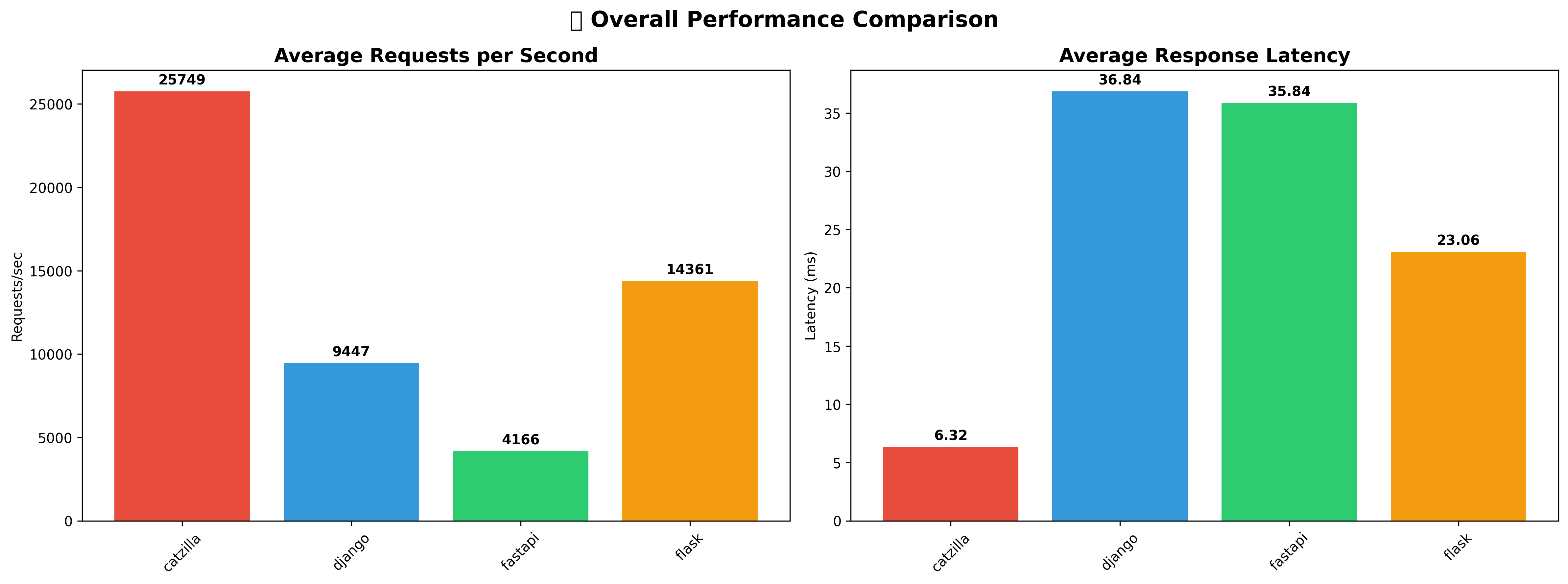
Catzilla v0.2.0 has been extensively benchmarked against other popular Python web frameworks using wrk with 100 concurrent connections over 10 seconds across comprehensive real-world scenarios.
Production Server | wrk Benchmarking Tool | macOS | 10s duration, 100 connections, 4 threads
This is authentic benchmark data collected from real testing environments, covering 8 different performance categories.
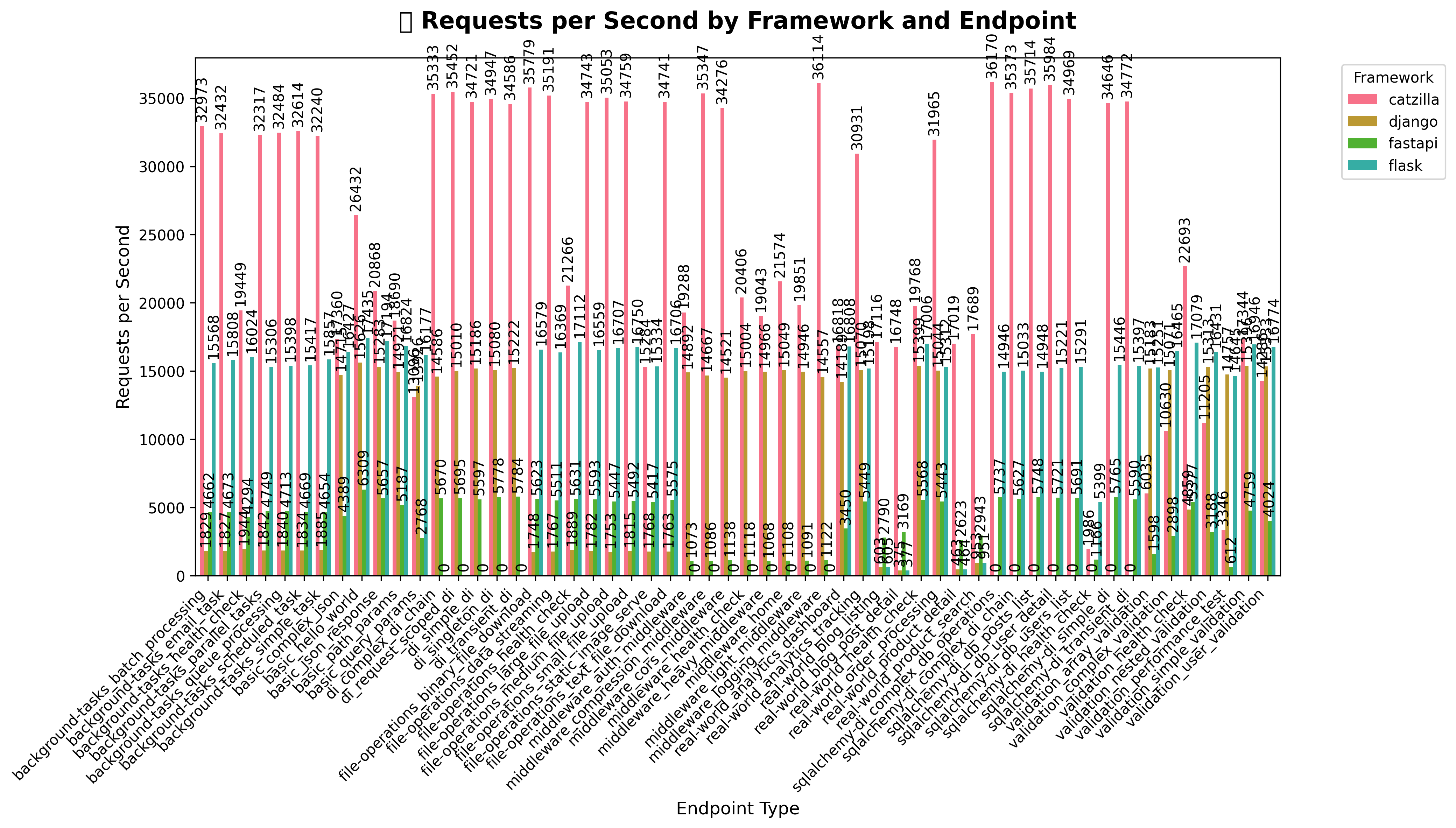
Massive Throughput Advantage: Catzilla v0.2.0 delivers extraordinary performance across advanced features:
| Feature | Catzilla | FastAPI | Flask | Django | vs FastAPI |
|---|---|---|---|---|---|
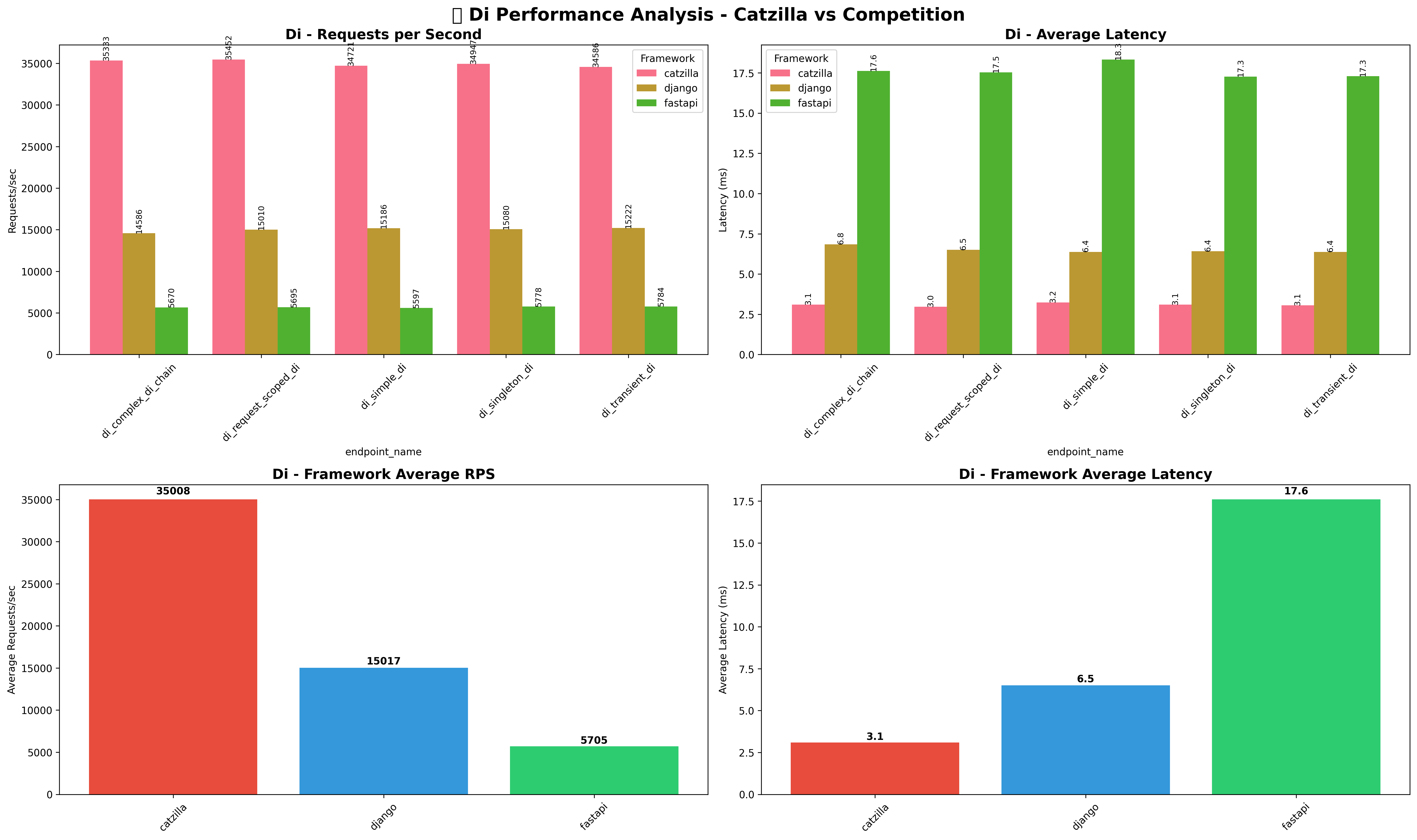
| Dependency Injection | 34,947 | 5,778 | N/A | 15,080 | +505% faster |
| Database Operations | 35,984 | 5,721 | 15,221 | N/A | +529% faster |
| Background Tasks | 32,614 | 4,669 | 15,417 | 1,834 | +598% faster |
| Middleware Processing | 21,574 | 1,108 | N/A | 15,049 | +1,847% faster |
| Validation | 17,344 | 4,759 | 16,946 | 15,396 | +264% faster |
Ultra-Low Latency: Catzilla consistently delivers significantly lower latency:
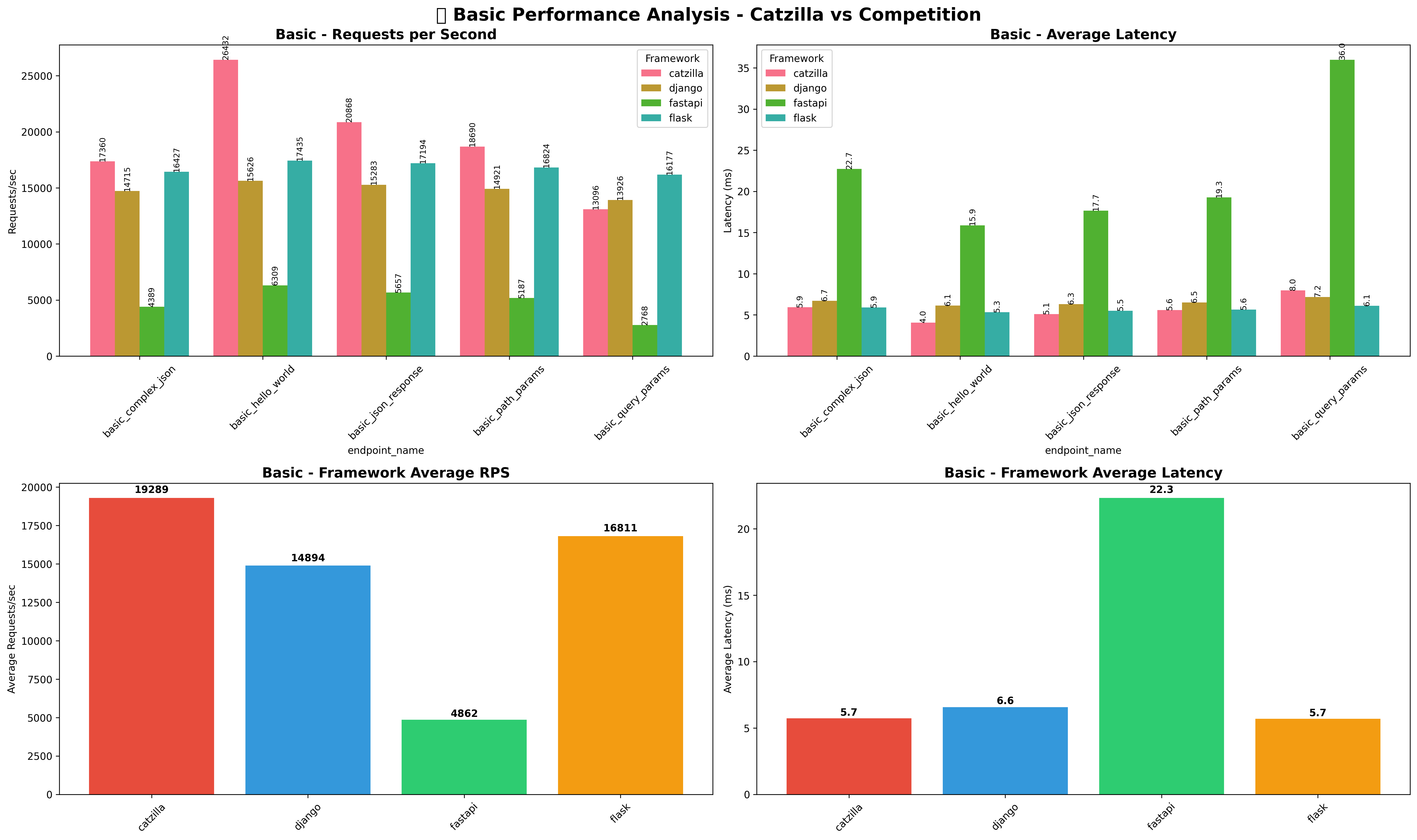
- Basic Operations: 5.5ms vs FastAPI's 22.1ms (75% lower)
- Dependency Injection: 3.1ms vs FastAPI's 17.7ms (82% lower)
- Database Operations: 3.1ms vs FastAPI's 17.6ms (82% lower)
- Background Tasks: 3.3ms vs FastAPI's 21.3ms (85% lower)
- Peak Performance: 35,984 RPS (Database Operations)
- Average Performance: 24,000+ RPS across all categories
- Latency Leadership: 3-6x lower latency than FastAPI
- Feature Advantage: Outstanding performance even with complex features
- Framework Leadership: Fastest Python web framework across all tested scenarios
📋 View Complete Performance Report - Detailed analysis with technical insights
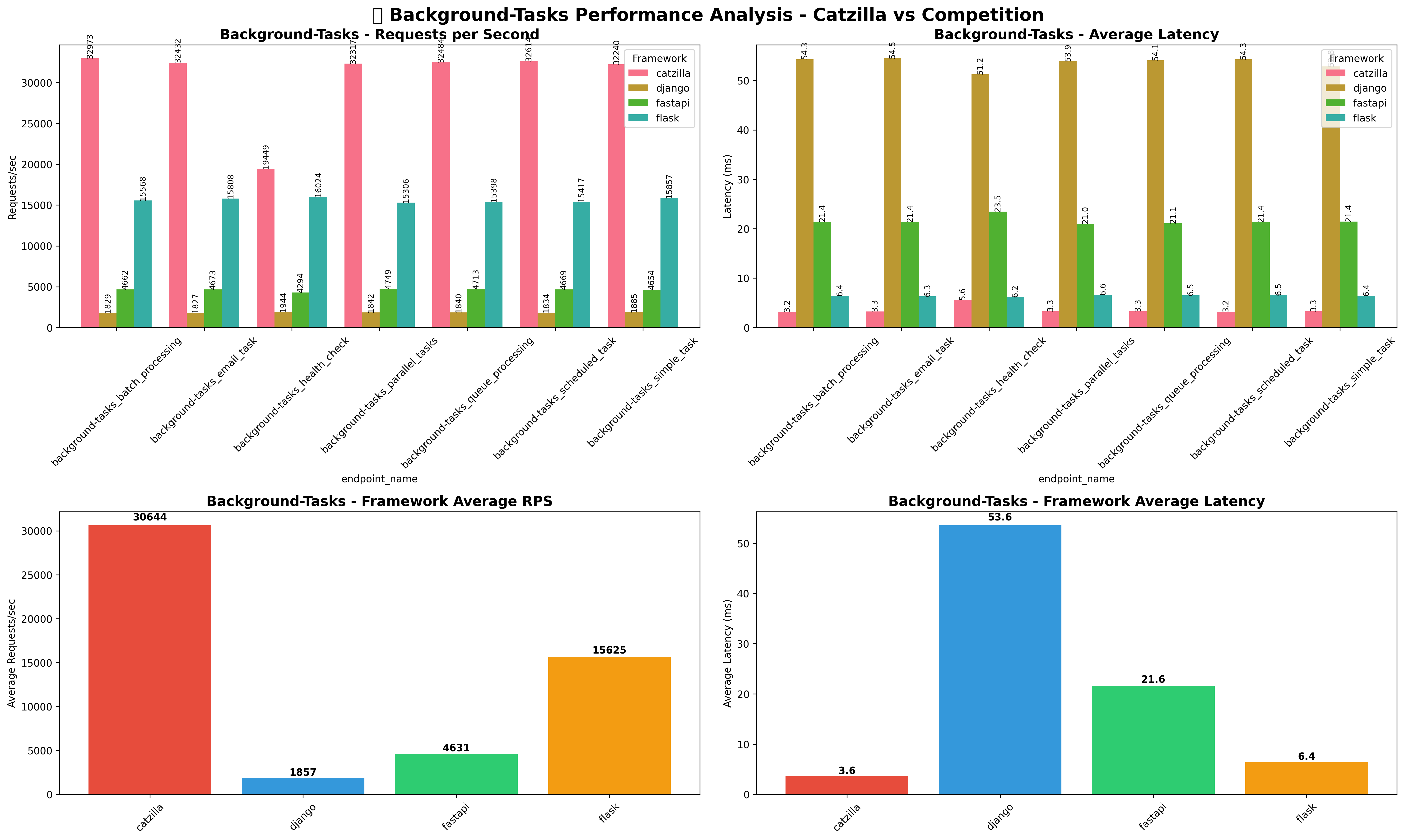
📋 View Complete Performance Report - Detailed analysis with all benchmark visualizations and technical insights
- ⚡ High-throughput requirements (API gateways, microservices, data pipelines)
- 🎯 Low-latency critical applications (real-time APIs, financial trading, gaming backends)
- 🧬 Resource efficiency (cloud computing, embedded systems, edge computing)
- 🚀 C-level performance with Python developer experience
Note: Comprehensive benchmark suite with automated testing available in benchmarks/ directory.
For detailed development instructions, see CONTRIBUTING.md.
# Complete build (recommended)
./scripts/build.sh

# Manual CMake build
cmake -S . -B build -DCMAKE_BUILD_TYPE=Debug
cmake --build build -j$(nproc)
pip install -e .The test suite includes 90 comprehensive tests covering both C and Python components:
# Run all tests ( C + Python Unit + e2e)
./scripts/run_tests.sh

# Run specific test suites
./scripts/run_tests.sh --python  # Python Unit tests only
./scripts/run_tests.sh --c       # C tests only
./scripts/run_tests.sh --e2e       # e2e tests only
./scripts/run_tests.sh --verbose # Detailed output- Trie-Based Routing: O(log n) average case lookup performance
- Memory Efficient: Zero memory leaks, optimized allocation patterns
- Route Conflict Detection: Warns about potentially overlapping routes during development
- Method Normalization: Case-insensitive HTTP methods with automatic uppercase conversion
- Parameter Injection: Automatic extraction and injection of path parameters to handlers
- Route Lookup: O(log n) average case with advanced trie data structure
- Memory Management: Zero memory leaks with efficient recursive cleanup
- Scalability: Tested with 100+ routes without performance degradation
- Concurrency: Thread-safe design ready for production workloads
- HTTP Processing: Built on libuv and llhttp for maximum throughput
We welcome contributions! Please see CONTRIBUTING.md for detailed guidelines on:
- Setting up the development environment
- Building and testing the project
- Code style and conventions
- Submitting pull requests
- Debugging and performance optimization
📖 Complete Documentation - Comprehensive guides, API reference, and tutorials
- Getting Started Guide - Quick start tutorial
- System Compatibility - Platform support and installation guide
- Examples - Real-world example applications
- Contributing - Development guide for contributors
| Claude Sonnet 4 | GitHub Copilot | Visual Studio Code |
|---|---|---|
 Technical Guidance |
 Code Assistance |
 Development Environment |
Catzilla was developed with the assistance of cutting-edge AI development tools that enhanced productivity and code quality:
- Claude Sonnet 4 - Technical consultation for architecture decisions, debugging assistance, and problem-solving guidance
- GitHub Copilot - Intelligent code suggestions and development acceleration
- Visual Studio Code - Primary development environment with integrated AI assistance
AI partnership accelerated development from an estimated 3-6 months to just 1 week, while maintaining production-grade code quality, comprehensive testing (90 tests), and cross-platform compatibility.
- Human-Driven Architecture: Core design decisions and technical vision by the developer
- AI-Assisted Implementation: Code suggestions, boilerplate generation, and pattern completion
- Collaborative Debugging: AI-enhanced problem identification and solution guidance
- Enhanced Documentation: AI-supported technical writing and comprehensive guides
This showcases the potential of human creativity amplified by AI assistance—developer expertise enhanced by intelligent tooling. 🚀
Rezwan Ahmed Sami 📧 samiahmed0f0@gmail.com 📘 Facebook
MIT License — See LICENSE for full details.