


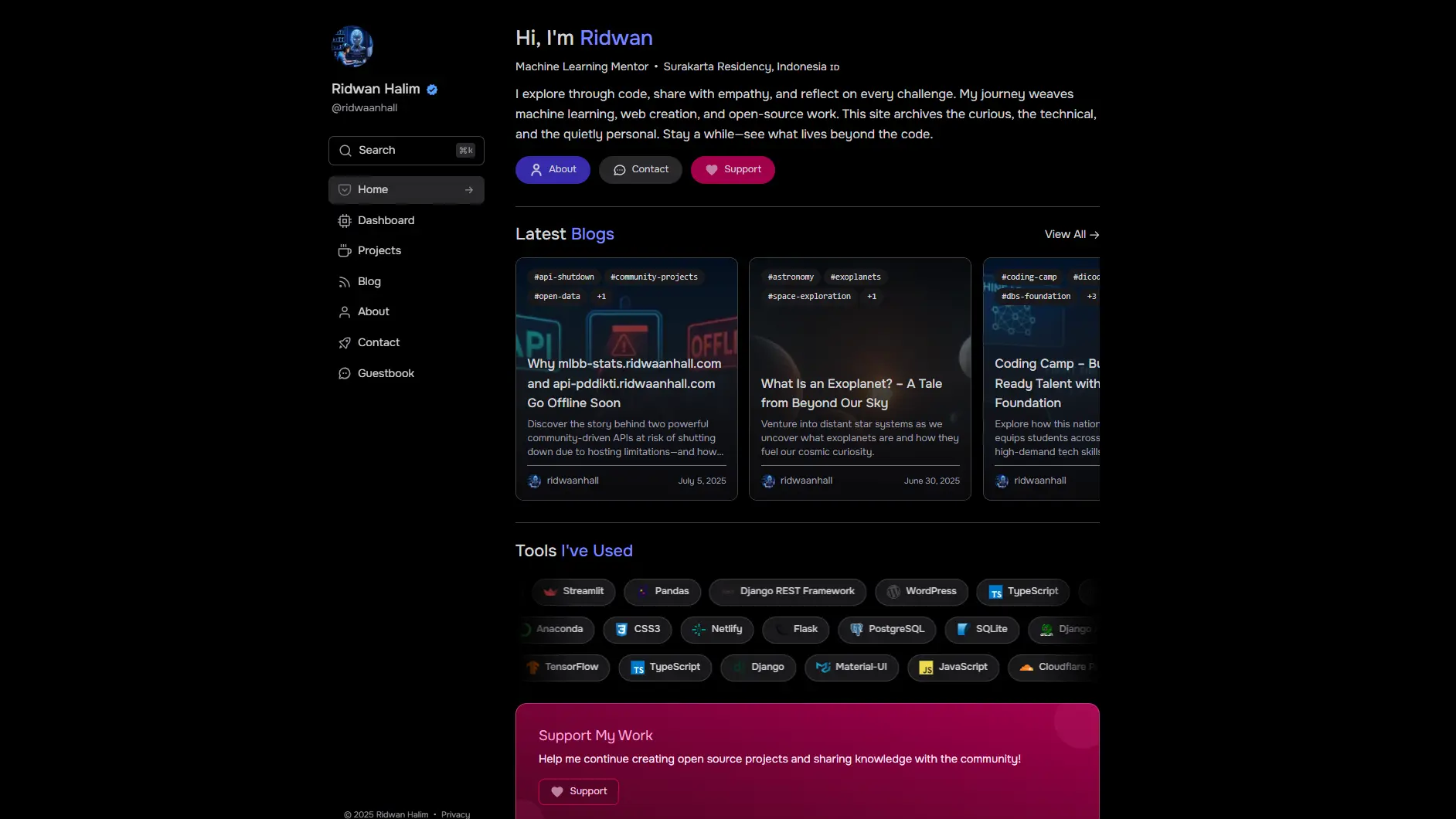
A modern portfolio template with individual file data management, real-time API integrations, configurable guestbook, and enterprise-grade security.
- 🗂️ Individual File System: Each project and blog post in separate Python files
- 📊 Real-time Analytics: GitHub and WakaTime API integration
- 💬 Interactive Guestbook: Configurable chat-like messaging with email notifications (can be disabled)
- 🚀 High Performance: 99+/100 PageSpeed scores
- 🛡️ Security-First: CSP, HSTS, XSS protection
- 📱 Responsive Design: Mobile-optimized with Tailwind CSS
- 🖼️ Image Optimization: wsrv.nl - Image proxy/CDN for automatic resizing
- Backend: >Django 5.2, Python 3.12
- Frontend: TailwindCSS, Vanilla JavaScript
- Data: Individual Python files for content management
- APIs: GitHub API, WakaTime API
- Security: django-csp, permissions-policy, XSS protection
- Deployment: Vercel, WhiteNoise


| Platform | Performance | Accessibility | Best Practices | SEO | Average |
|---|---|---|---|---|---|
| Desktop | 98 | 100 | 100 | 100 | 99.5 |
| Mobile | 96 | 100 | 100 | 100 | 99 |
| Average | 97 | 100 | 100 | 100 | 99.25 |
# Clone repository
git clone https://github.com/ridwaanhall/ridwaanhall-com.git
cd ridwaanhall-com

# Setup virtual environment
python -m venv venv
source venv/bin/activate  # Linux/Mac
# or
venv\Scripts\activate     # Windows

# Install dependencies
pip install -r requirements.txt

# Install Tailwind CSS
npm install tailwindcss @tailwindcss/cli

# Build Tailwind CSS (for development with watch mode)
npx @tailwindcss/cli -i ./static/css/input.css -o ./staticfiles/css/global.css --watch

# In a separate terminal, run development server
python manage.py runserverFor styling changes, ensure Tailwind CSS is running in watch mode:
# Development (with watch and minification)
npx @tailwindcss/cli -i ./static/css/input.css -o ./staticfiles/css/global.css --watch --minify

# Production build
npx @tailwindcss/cli -i ./static/css/input.css -o ./staticfiles/css/global.css --minify
Make sure your static/css/input.css contains:
@import "tailwindcss";Create .env file:
# Core Settings
BASE_URL="https://your-domain.com"
SECRET_KEY="your-django-secret-key"
DEBUG=True
ALLOWED_HOSTS=""

# Feature Toggles
GUESTBOOK_PAGE=True  # Set to False to disable guestbook
WSRV_IMAGE_OPTIMIZATION=True

# Email
CONTACT_EMAIL_RECIPIENT="hi@ridwaanhall.com"

# API Keys
ACCESS_TOKEN="your-github-token"
WAKATIME_API_KEY="your-wakatime-key"
WEB3FORM_PAC=""

# OAuth (Required only when GUESTBOOK_PAGE=True)
GOOGLE_CLIENT_ID=""
GOOGLE_CLIENT_SECRET=""
GH_CLIENT_ID=""
GH_CLIENT_SECRET=""

# PostgreSQL Database (Production only)
POSTGRES_DATABASE="your-database"
POSTGRES_HOST="your-host"
POSTGRES_PASSWORD="your-password"
POSTGRES_USER="your-user"
POSTGRES_PORT="5432"

# Image URLs (Optional)
BLOG_BASE_IMG_URL=""
PROJECT_BASE_IMG_URL=""| Variable | Required | Description |
|---|---|---|
BASE_URL |
Yes | Your domain URL |
SECRET_KEY |
Yes | Django secret key |
DEBUG |
No | Enable debug mode (default: False) |
ALLOWED_HOSTS |
No | Comma-separated allowed hosts for development |
ACCESS_TOKEN |
Yes | GitHub personal access token |
WAKATIME_API_KEY |
Yes | WakaTime API key |
WEB3FORM_PAC |
No | Web3Forms access key for contact forms |
GUESTBOOK_PAGE |
No | Enable/disable guestbook (default: True) |
WSRV_IMAGE_OPTIMIZATION |
No | Enable wsrv.nl image optimization (default: True) |
CONTACT_EMAIL_RECIPIENT |
No | Email that receives contact/guestbook notifications (default: hi@ridwaanhall.com) |
GOOGLE_CLIENT_ID |
If guestbook enabled | Google OAuth client ID |
GOOGLE_CLIENT_SECRET |
If guestbook enabled | Google OAuth secret |
GH_CLIENT_ID |
If guestbook enabled | GitHub OAuth client ID |
GH_CLIENT_SECRET |
If guestbook enabled | GitHub OAuth secret |
POSTGRES_DATABASE |
Production only | PostgreSQL database name |
POSTGRES_HOST |
Production only | PostgreSQL host |
POSTGRES_PASSWORD |
Production only | PostgreSQL password |
POSTGRES_USER |
Production only | PostgreSQL username |
POSTGRES_PORT |
Production only | PostgreSQL port (default: 5432) |
BLOG_BASE_IMG_URL |
No | Base URL for blog images (defaults to BASE_URL/static/img/blog) |
PROJECT_BASE_IMG_URL |
No | Base URL for project images (defaults to BASE_URL/static/img/project) |
This project requires several environment variables for proper functionality. Create a .env file in your project root with the following configuration:
- BASE_URL: Your application's domain URL (e.g., https://ridwaanhall.com)
- SECRET_KEY: Django's secret key for cryptographic signing - generate using
python -c 'from django.core.management.utils import get_random_secret_key; print(get_random_secret_key())' - DEBUG: Set to
Truefor development,Falsefor production - ALLOWED_HOSTS: Comma-separated list of allowed hosts for development (only used when DEBUG=True)
- ACCESS_TOKEN: GitHub Personal Access Token
- Go to GitHub Settings → Developer settings → Personal access tokens
- Generate new token with repo and user permissions
- WAKATIME_API_KEY: WakaTime API key for coding statistics
- Visit WakaTime Settings → API Key section
- Copy your secret API key
- WEB3FORM_PAC: Web3Forms access key for contact forms (optional)
- Visit Web3Forms dashboard
- Get your access key for form submissions
- GUESTBOOK_PAGE: Boolean to enable/disable guestbook functionality
- Set to
Trueto enable guestbook with authentication - Set to
Falseto disable and skip OAuth setup
- Set to
- WSRV_IMAGE_OPTIMIZATION: Enable wsrv.nl image optimization proxy
- Set to
Truefor optimized images (recommended) - Set to
Falseto use original images
- Set to
- GOOGLE_CLIENT_ID & GOOGLE_CLIENT_SECRET: Google OAuth credentials
- Create project at Google Cloud Console
- Enable Google+ API
- Create OAuth 2.0 credentials
- GH_CLIENT_ID & GH_CLIENT_SECRET: GitHub OAuth credentials
- Go to GitHub Settings → Developer settings → OAuth Apps
- Create new OAuth app with your callback URLs
- POSTGRES_DATABASE: PostgreSQL database name
- POSTGRES_HOST: PostgreSQL host address
- POSTGRES_PASSWORD: PostgreSQL password
- POSTGRES_USER: PostgreSQL username
- POSTGRES_PORT: PostgreSQL port (default: 5432)
SQLite is used automatically in development mode (DEBUG=True)
- BLOG_BASE_IMG_URL: Base URL for blog images
- Defaults to
{BASE_URL}/static/img/blogif not set
- Defaults to
- PROJECT_BASE_IMG_URL: Base URL for project images
- Defaults to
{BASE_URL}/static/img/projectif not set
- Defaults to
Comprehensive documentation for each application component:
| Document | Description |
|---|---|
| Core App | Base views, contact form, email handler, image optimization, validators |
| Guestbook App | OAuth messaging, threaded replies, email notifications, author management |
| About App | Personal info display (experiences, education, certifications, awards) |
| Blog App | Paginated blog with search, multi-image support, template tags |
| Projects App | Project showcase with search, featured sorting, multi-image support |
| Dashboard App | GitHub and WakaTime API integration with 15-min cache |
| SEO App | Meta tags, Open Graph, JSON-LD schemas, sitemaps, robots.txt |
| OpenHire App | Open-to-work and hiring status display |
| Data App | Individual File System (IFS) for file-based content management |
| FlexForge Config | Django settings, URL routing, context processors, deployment |

- Fork this repository
- Install Vercel CLI:
npm i -g vercel - Deploy:
vercel --prod - Configure environment variables in Vercel dashboard
- Fork the repository
- Create feature branch:
git checkout -b feature/name - Commit changes:
git commit -m 'Add feature' - Push branch:
git push origin feature/name - Open pull request
Apache License 2.0 - See LICENSE for details.
FlexForge - Professional portfolio platform built with Django and modern web technologies.
