This repository is part of my master thesis where the goal was to create an agent able to follow another car only using information retrieved by a monocular camera and, that the actions taken by the agent could be explainable and for that I used SHAP values.
The development was done in CARLA (https://carla.readthedocs.io/en/stable/) which is an open-source simulator for autonomous driving research developed by Intel, Toyota, and a Computer Vision Center in Barcelona.
This project has 4 main aspects:
- Segmentation Camera available in CARLA
- Steer Agent
- Throttle/Break Agent (and transfer learning using Xception architecture)
- SHAP value to explain decisions.
Segmentation camera provided by the simulator was used to retrieve the main information needed to create the environment states that feed the RL agents.
The segmentation camera classifies each object in a RGB image with a different tag that allows to map the tag to the object identified through CARLA’s documentation (https://carla.readthedocs.io/en/latest/ref_sensors/#semantic-segmentation-camera). When the simulation starts, every object in the environment is created with a tag. When this camera retrieves an image, the tag information is encoded in the red channel meaning that a pixel with a red value of ‘10’ belong to the object with tag ‘10'. The tag '10' will be the most important in our use case since it identifies the leader.
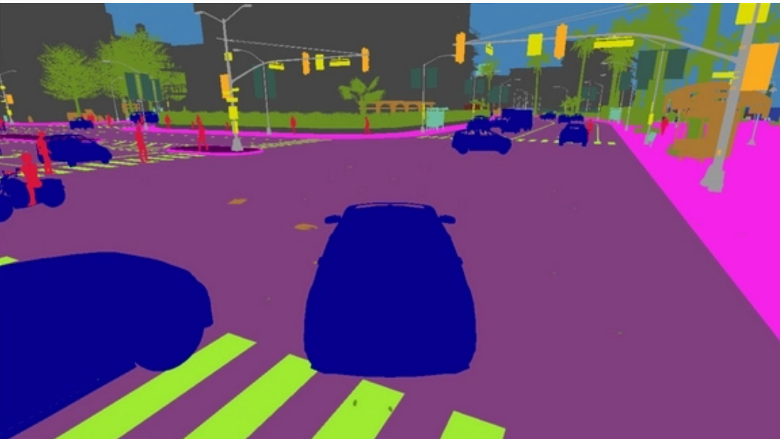
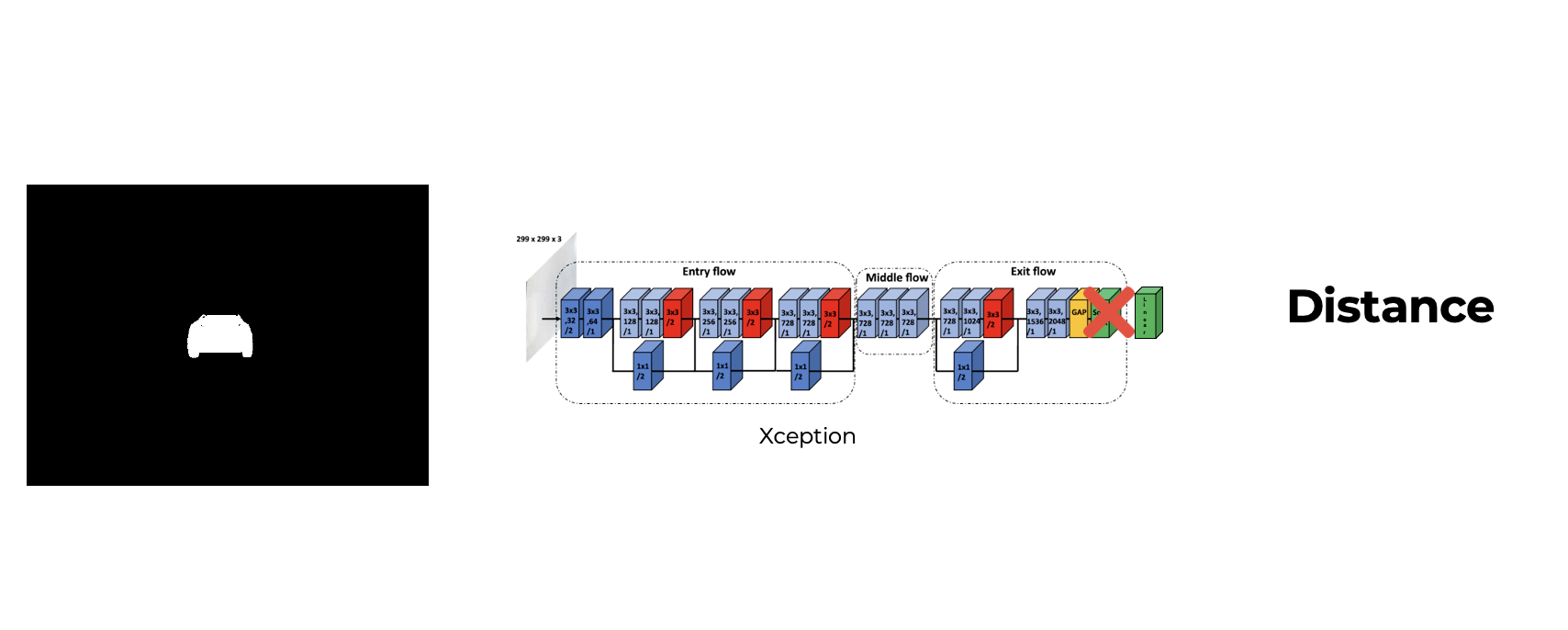
The segmentation image is then manipulated so that we end up with just the leader in the image as following:
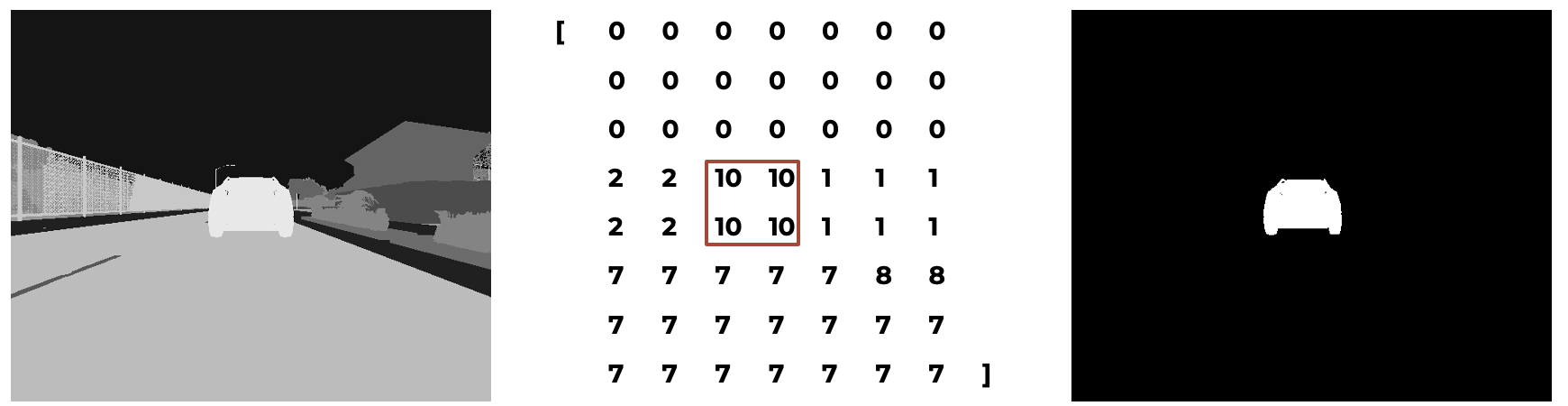
With this final image we can create the states for our agents!
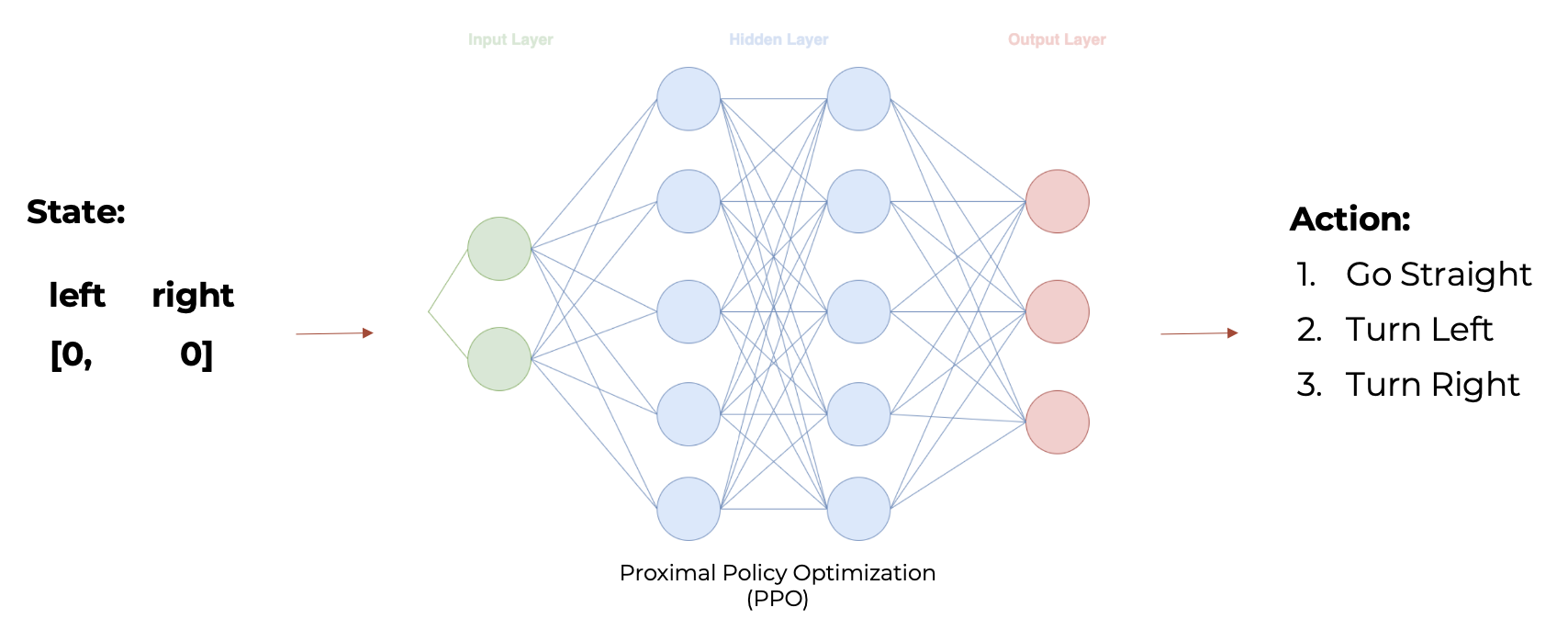
The state for this agent consists in two binary features called ‘left’ and ‘right’. When ‘left’ is 1 then ‘right’ is 0, this means that the agent is not aligned with the leader and that the leader is on the left of the agent. When ‘right’ is 1 then ‘left’ is 0, this means that the agent is not aligned with the leader and that the leader is on the right of the agent. When both ‘left’ and ‘right’ are 0, this means that the agent is aligned with the leader.
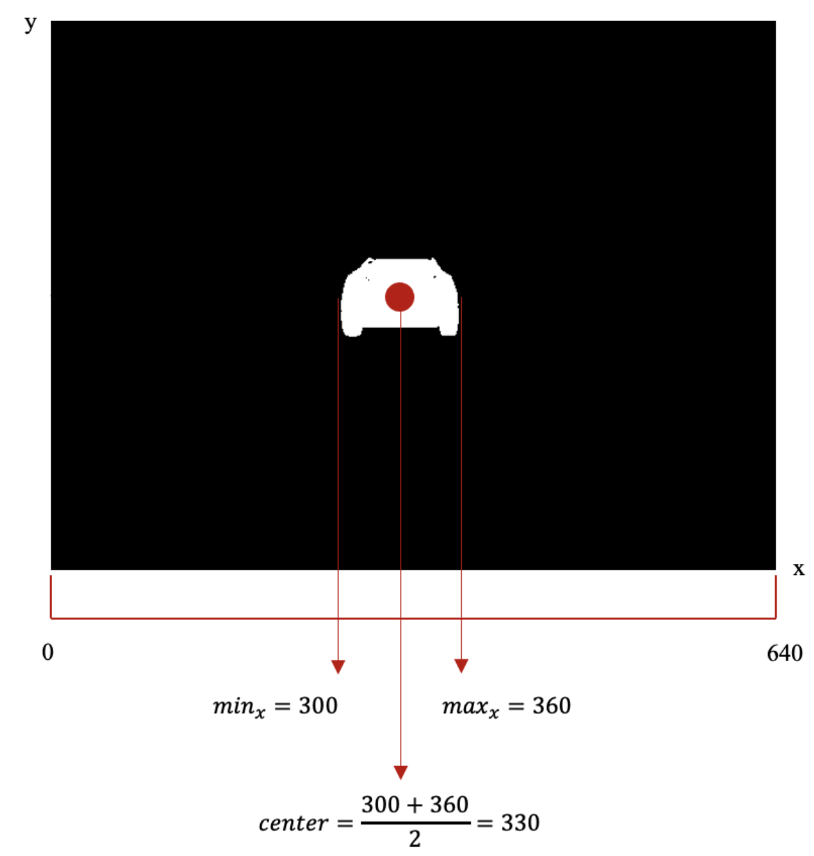
Using matrix manipulation on the filtered image, we can easily extract the following information to determine if ‘left’ is 1 or 0 and if ‘right’ is 1 or 0 by following these rules:
-
If the center of the leader is on a pixel where the x coordinate is lower than 300 then ‘left’ is 1 and ‘right’ is 0;
-
If the center of the leader is on a pixel where the x coordinate is higher than 340 then ‘left’ is 0 and ‘right’ is 1;
-
Finally, If the center of the leader is on a pixel where the x coordinate is between 300 and 340 then ‘left’ is 0 and ‘right’ is 0.
Then we feed the state into our PPO algorithm that needs to take one of the following actions:
- Go straight
- Turn left
- Turn righ
The decision is going to be determined based on the one with maximum probability calculated with the output layer with a softmax activation function.
The state for this agent consists in three features called ‘distance’, ‘previous distance’ and ‘velocity.
The ‘distance’ is the prediction from Xception as well as the ‘previous distance’ which is the prediction from the previous state. The velocity is the speed that the agent is driving in that moment.
Apart from velocity, which is a sensor that every car has, to extract the remaining features for the state, the same segmented image used in the steer agent is used to feed the Xception CNN that predicts the distance to create the state. The values in the state are normalized by dividing the distance values by 25 (which is the maximum value allowed during training, otherwise the episode will end) and the velocity is divided by 100 (which will make the velocity feature ranging between 0 and 1.2 since the maximum velocity allowed is 120 km/h).
To perform transfer learning with Xception I needed to change the last layer which was a 1000 node layer with a softmax activation function to one node layer with a linear activation function. Also, I created a dataset with roughly 25k images to train the network for our use case.
Then with distance predicted by Xception we can create the final state to feed our second PPO algorithm, this one with a continuos action space (in the image the state is not normalize to be easily interpretable):
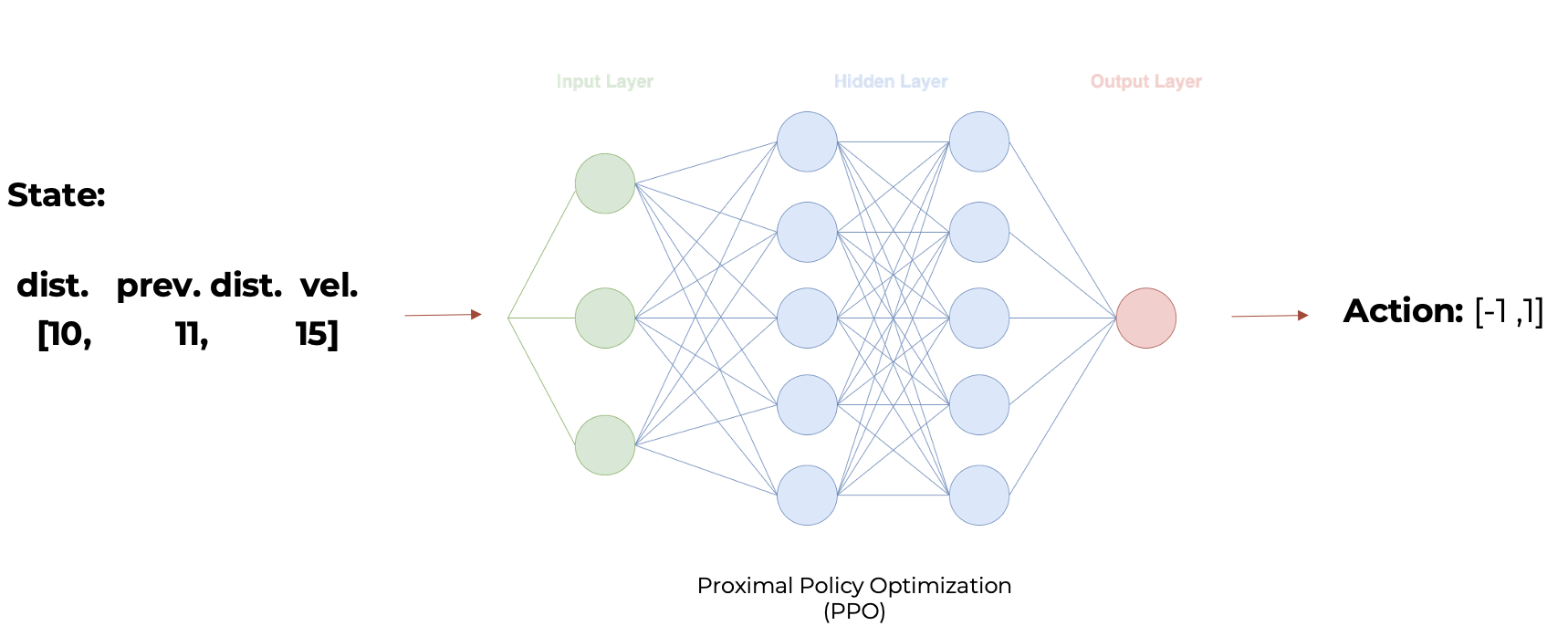
This network has different output layer with only one node with a tanh activation function that will determine if the agent will break (prediction < 0) or accelerate (prediction > 0).
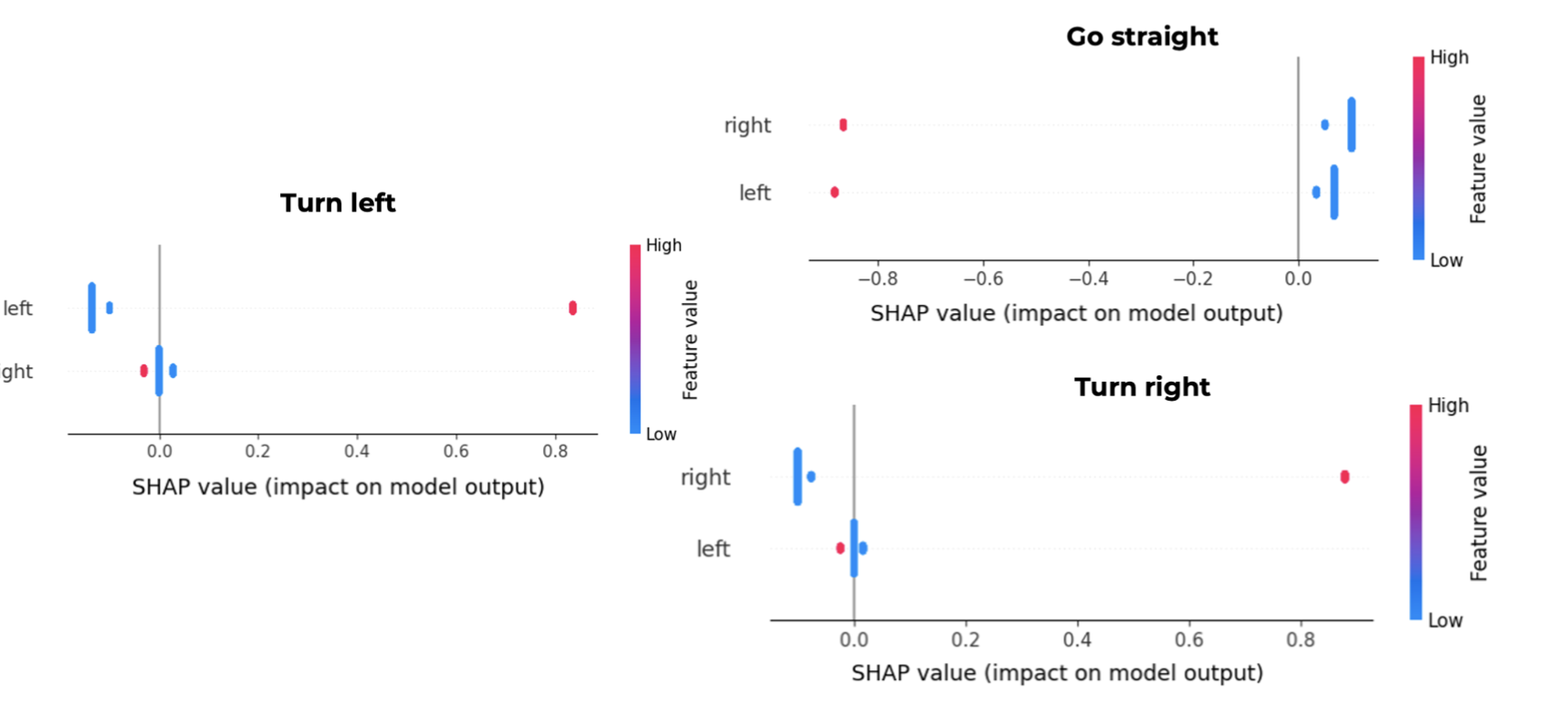
Once we have an array with explainable features we can use it to understand the decisions taken by our agents:
Steer Agent:
-
The action to turn left is triggered by the state constituted by ‘left’ equal to 1 and ‘right’ equal to 0, since a red dot means a high feature value which is 1 in a binary feature. In the chart, it is also possible to verify the impact on model output in the x axis, where in this case the red dot points to an impact of more than 0.8.
-
The action to go straight is triggered by the state that does not contain any 1 value for either ‘left’ or ‘right’ because it will decrease the chance of taking this action since the impact on model output is less than -0.8. This means, that a state defined by ‘left’ equal to 0 and ‘right’ equal to 0 will increase the chance of taking this action, since a blue dot means a low feature value which is 0 in a binary feature. Indeed, from the chart it is easily understandable that a 1 value in either ‘left’ or ‘right’ decreases the probability of going straight.
-
The action to turn right is triggered by the state constituted by ‘left’ equal to 0 and ‘right’ equal to 1. In the chart, it is also possible to verify the impact on model output in the x axis, where in this case the red dot points to an impact of more than 0.8.
Throttle/Break Agent:
-
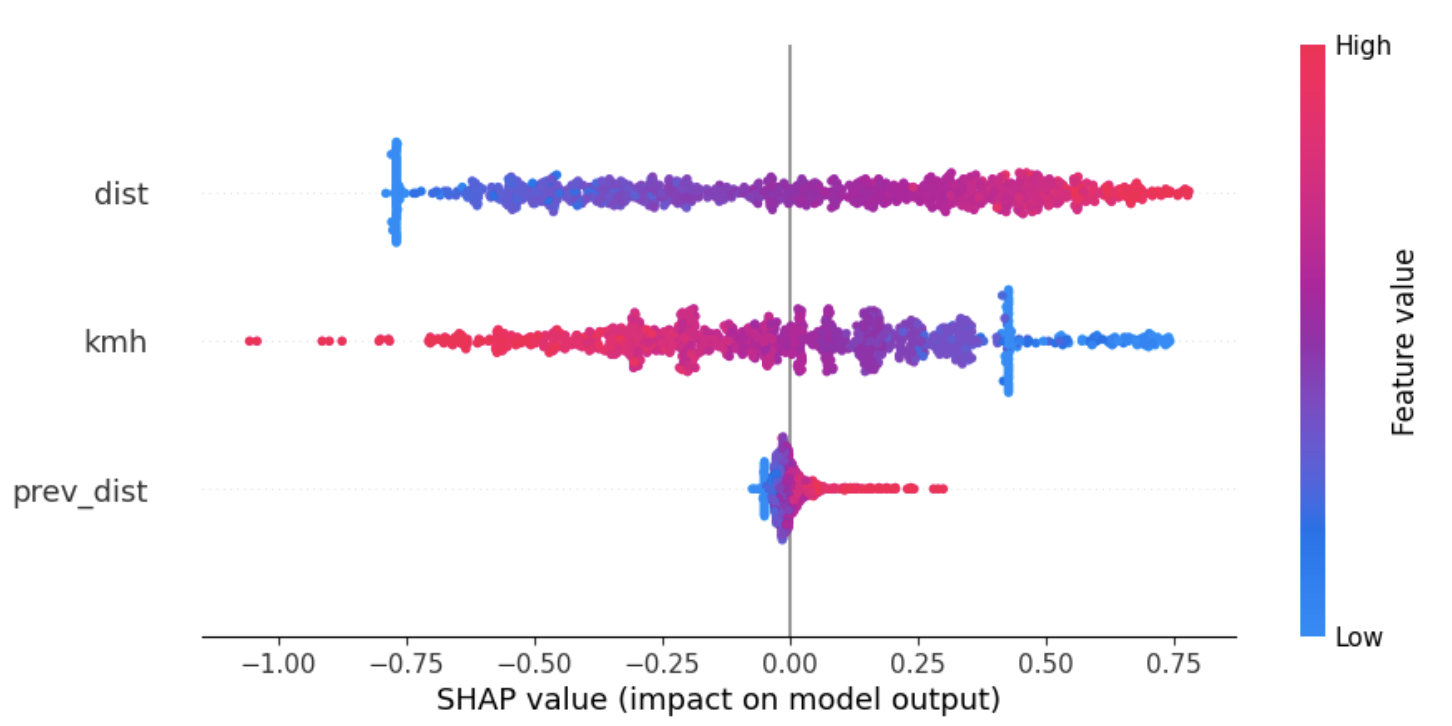
The break is mostly used by the agent when the value for the ‘velocity’ feature is high and/or the value of ‘distance’ is low. It is also possible to see that ‘previous distance’ does not have the same importance for the break action as it has for the throttle. However, low values of this feature also contribute to trigger the break. These values are what is expected because a short ‘distance’ will require to break to keep up with the desired distance and, also, when the ‘velocity’ is high, so that it is possible to keep a safety distance that allows to break before crashing into the leader.
-
The throttle is mainly triggered when the ‘velocity’ is low and/or the ‘distance’ and/or the ‘previous distance’ are high. Such fact makes sense since the agent should keep a distance to the leader between 8 and 10 and therefore if the distance is higher than 10 it must press the throttle.