- [X] play with different modifier locations; not sure which work best with emacs
- Home row mods allow for other things on thumb keys
- Consider combos on both hands for rare keys like escape
- [X] add macros for various common actions - miryoku has a lot of good examples
- Investigate tap/hold/tap-then-hold behaviours for thumb keys to allow for better repeat
- [X] Investigate repeat behaviour in general
- [X] Update home row mods for opposite-hand-specific behaviour
- [X] add ZMK Studo and keymap-drawer once keymap is solidified, zmk-viewer for stacked view of all layers
- [X] Homerow combo mods - Could put these on keys above homerow, but probably not necessary.
- [X] Build front and greek layers
- [X] buy 2x magic arms and magsafe/camera mount adapter
- [X] buy 2x desktop magsafe stands for use when standing
- [ ] Print adjustable (sliding width) magsafe mounting system to put keyboard on either side of either laptop or phone (or some sort of built-in screen + SBC)
- [X] Custom or individual keycaps - see below for symbols/colours
- fkeycaps and yuzukeycaps for custom printing
- CO2 laser engraving on some materials?
- [X] add zmk-helpers
- [X] add badjeff trackball driver and update to 3 levels of sensitivity
- [X] add auto-mouse layer
- [X] decide on switches - want something lighter than Kailh Box brown
- [ ] Smart space - switch space to shift/underscore/slash for typing camelCase, etc - exit on double space
- [ ] hold punctuation to place at end of line
- [X] Move caps lock to shift-caps word, add something different to hold on caps word.
- [ ] Magic key that is either repeat or … depending on preceding keys - fill in th, the, ch, etc.
- [ ] Add shift-top layer with other symbols
- [ ] Customize base symbol and numeric layers
- [ ] Switch to toggleable mods when on navigation layer?
- [ ] Add layer based on Aydin Controls 5119-1-0-011-00 Industrial Keyboard
- [ ] Add more repeat key, adaptive key, and tempo key behaviours
- [X] Add Delete on shift-backspace
- [X] Add back thumb keys on each layer to allow for repeat/only one layer at a
time.
- [X] Swap keys on thumbs around to match Dreymar config/reduce SFBs (numbered
top->bottom, outside->inside):
- Tab -> L1 (FRNT)
- Space -> L2 (NUM)
- Enter -> L3 (SPR)
- Backspace -> L4 (Ctrl-Backspace)
- -> L5 (TOP)
- Repeat -> R1 (Can’t have a hold function)
- Sticky Shift -> R2 (TOP)
- Alt-Tab -> R3 (NAV)
- [ ] Newly-free keys:
- Right pinky - completely free -> Some sort of toggle to mirror caps word
- Left pinky - hold free
- Bottom right, left thumb: Tap free
- Top left, left thumb: tap free
- Main layer
- Repeat key: Left thumb cluster; can be held to repeat things that otherwise have a behaviour on hold.
- Sticky shift: Right thumb cluster. Will remain until next character is sent.
- Single alt tab on right thumb tap; alt-tab with timeout on two taps; layer key on hold.
- Caps lock replaced with caps word that only ends on certain non-alphnumeric characters
- Caps lock is available through shift-Caps Word; opens up hold for layer key
- Homerow mods, with immediately-triggering behaviour when the next key is on the opposite hand
- Hold-Backspace (on left thumb cluster) to send Ctrl-Backspace and remove
entire word.
- Shift-backspace sends delete/ctrl-delete
- Mouse-key-based forward and backward are mapped to holding
.and,, respectively - Press and hold numerals for F1-F10; F11 is
-and F12 is`when on any other layer
- System layer: Hold
-; for keyboard settings. - Misc layer: Media, brightness, and volume settings; screen lock.
- Navigation layer: Movement keys, text selection
- Win layer - windows management keys
- Numpad layer: Should be accessible using left hand - creates numpad layer on right hand and adds delete and backspace to fingers on left hand.
- Symbols layer: Puts number symbols on left hand (R1-R2), parens on R3, and other symbols
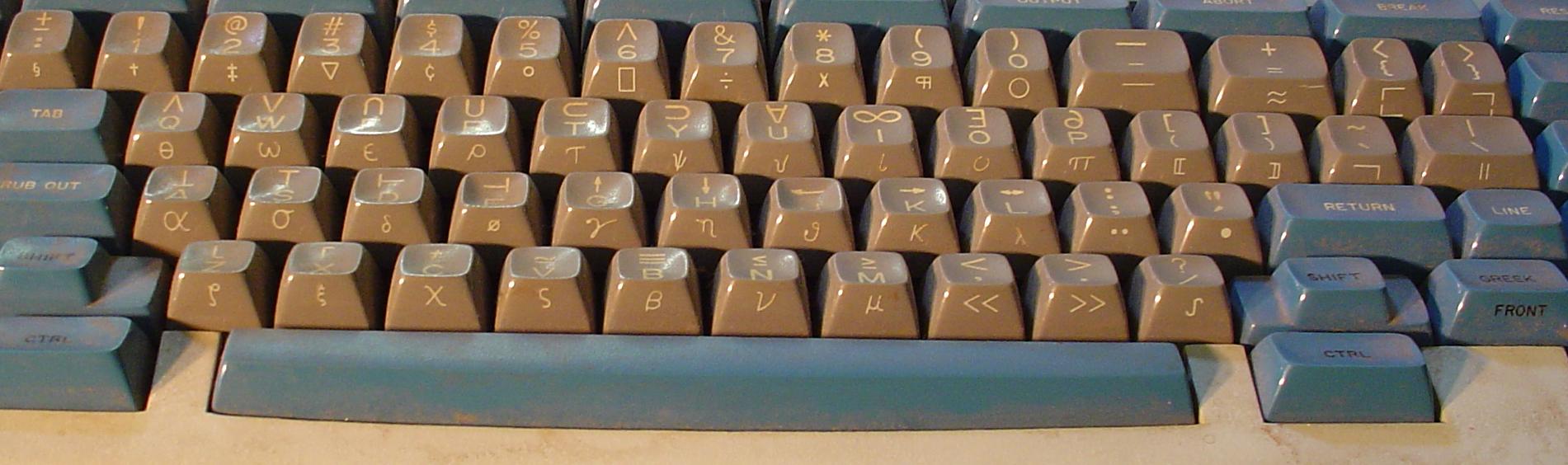
- Front layer: Replicates Lisp keyboards (Space Cadet); Greek and other useful math symbols. Should be marked on the front of the key.
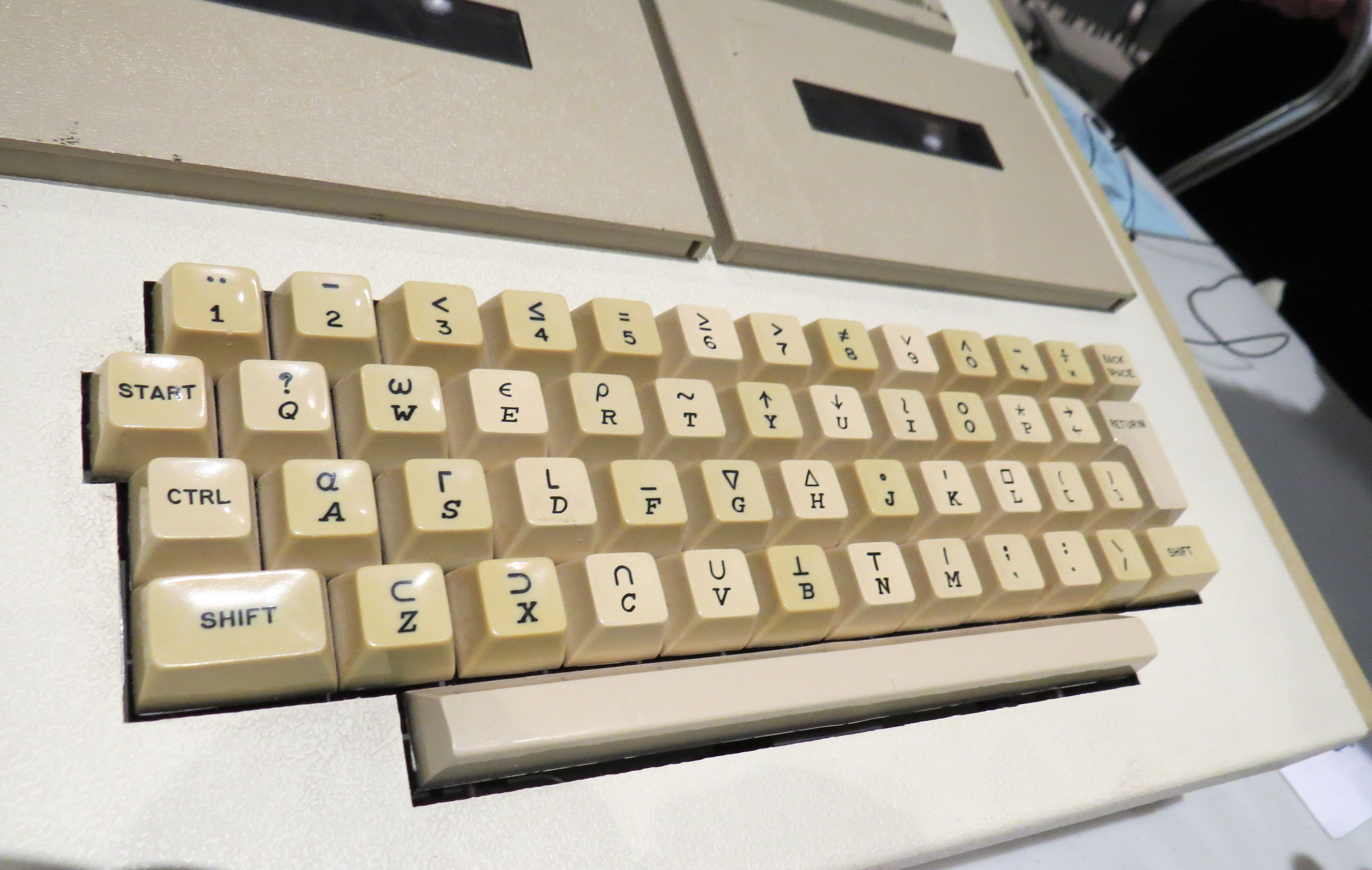
- Top layer: Replicates Lisp keyboards (Space Cadet); Logic and APL symbols. Should be marked above alphas
- Mouse layers
- Automouse layer, also accessible through
zand/ - Scroll layer on
xand. - Slow layer on
cand, - Slow scrolling when both are held; implemented with a conditional layer instead of process_next, which feels like it should work.
- Automouse layer, also accessible through
- Kailh Box Navy: too loud but good for caps word toggle key.
- Kailh Box Brown: quieter; too heavy to be comfortable.
- Reddragon Lime: Silent, good amount of pretravel; not sure if they’re as light as I’d want yet.
- Adjust thumbs to be further out
- Adjust pinky column to have more splay
- Raise trackball to be more flush with thumb cluster; vertically when tented.
- Better cutout for reset and power switches
- 0.5 mm deep cutout in for Magsafe ring
- Raised edge around outer keycaps to hide switches
- More speculative:
- Bottom plate out of wood, middle out of ???, top edge out of metal
- Either displays or large colored LEDs - figure out most visible position when mounted on chair
- Alternately, one-piece bottom and sides, with a plate mounted on top to hold all the switches and (printed) curved parts; might give more options for machining/cutting base.
- Materials that might look good: ultem, teak, cherry, rosewood, amber-colored resins, brass, glass
- Shiny is probably better than matte for keycaps; either DES or SA profiles seem to have the right sort of character. See below for symbol/font discussion
- Keycap Quarry has gorgeous stone keycaps; mostly convex.
- General principles and inspiration
- Take inspiration from luxury goods, hand tools,
- Lecson amps, Fons turntables, that one Japanese brand that made stone-look amp cases generally in vertical profile. I swear I didn’t imagine it.
- That one Sandbenders quote from Idoru
- Suissa Computers
- https://github.com/Lurieh/zmk-config/blob/main/config/apiaster.keymap
- https://github.com/Ikcelaks/keyboard_layouts/blob/main/magic_sturdy/magic_sturdy.md
- https://dreymar.colemak.org/layers-extend.html for text editing and window management shortcuts
- Colour 1: 24x alpha 2x homing
- Colour 2: 10x numeral
- Colour 3: 7x , . / ; ’ \ -
- Colour 4: 13x modifiers
- Escape ⎋
- Tab ⭾
- Shift ⇧
- Control ⎈
- Meta ◆
- Backspace ⌫
- Super ❖
- Enter ⎆
- Delete ⌦
- Hyper ⯌ ✦
- Layers ⇞⇟ ↥↧ ⤊⤋
- Available as DSA from SA Plastics: Escape, (empty) Meta, Delete, Backspace, Layers, Control, Tab, Shift, alphanumeric, Enter (arrow), space, layer up/down (diagonal or crossed arrows, layer icons, dual legend Layer +/Layer -), filled arrow keys, Rub Out backspace key
- FKCaps and Yuzu Keycaps: DSA, grey keycaps vs. KAM keycaps in any color - otherwise same options - use to fill in missing SA Plastics keycaps (filled Meta, Hyper, Control)
- Fonts:
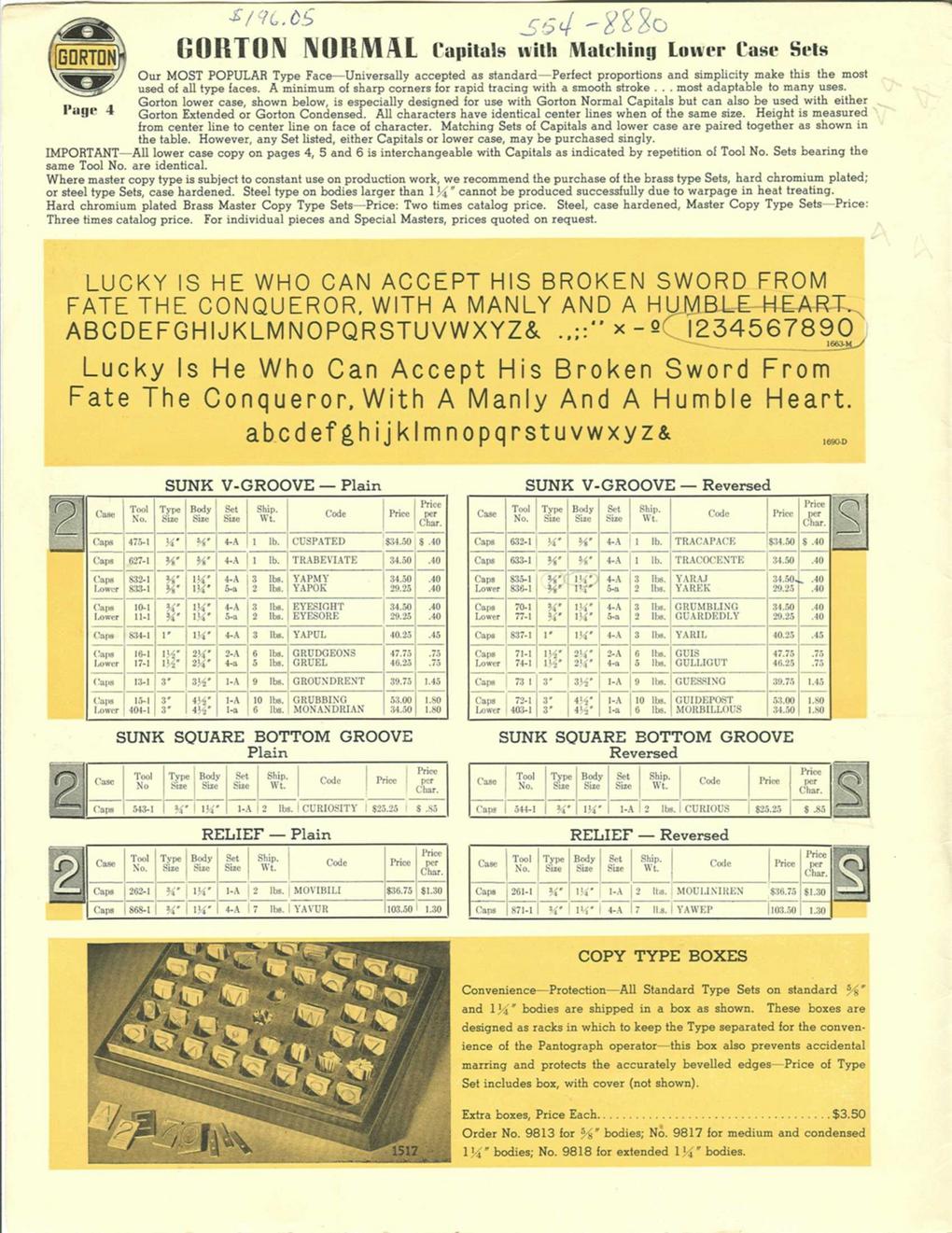
- Open Gorton
- Gorton Modified (Signature Plastics)
- Technic
- Gorton Normal - more ads: http://gorton-machine.org/forms/form_1309d/index.html
- Skia Regular
- Gordon Std
- DSKY fonts - another version of Gorton, traced from Apollo control panels
- Gorton Perfected - $20, some good historical keyboard symbols as well
- Inspo
- Space Cadet, front keys, useful mapping notes
- Hyper7
- MCM/70 APL keyboard
- SA A History of Violets by Signature Plastics
- Battlestation model M emacs bindings
- Idea23 keycaps
- Sony OA-S3400
- https://www.flickr.com/photos/triplehaata/collections/72157635417889224/


Pretty good frosted finish; will be curious to see how the ball from PCBway compares. Need to do some research to figure out if these can/do fit on my particular keyboard, as I’m getting interference between the innermost and centre keys
- File: https://github.com/grassfedreeve/PseudoMakeMeKeyCapProfiles/blob/master/STLS/DESSkeleytl.stl
- Material: 8001 Resin, Translucent
- Price: $1.49
Probably the best looking material; very smooth.
- File: https://github.com/grassfedreeve/PseudoMakeMeKeyCapProfiles/blob/master/STLS/Ergo%20Thumbs.stl
- Material: 8001 Resin, Transparent
- Price: $2.38
Too loose
- File: https://github.com/sporkus/PseudoMakeMeKeyCapProfiles/blob/master/stl/MX/DES_r3_dot_x2.stl
- Material: 8228 Resin
- Cost: $0.34
Pretty easy to feel
- File; https://github.com/sporkus/PseudoMakeMeKeyCapProfiles/blob/master/stl/MX/DES_r3_ring_x2.stl
- Material: Imagine Black resin
- Cost: $1.47
Harder to identify by touch; better texture than Imagine Black resin
- File: https://github.com/sporkus/PseudoMakeMeKeyCapProfiles/blob/master/stl/MX/DES_r3_deep_x2.stl
- Material: Black Resin
- Cost: $0.80
Easy to fit, more optically white than CBY resin
- File: https://github.com/sporkus/PseudoMakeMeKeyCapProfiles/blob/master/stl/MX/DES_r3_1.00u_x10.stl
- Material: LEDO 6060 Resin
- Cost: $1.73
Softer/more rubbery feeling than LEDO 6060
- File: https://github.com/sporkus/PseudoMakeMeKeyCapProfiles/blob/master/stl/MX/DES_r2_1.00u_x10.stl
- Material: CBY Resin
- Cost: $2.04
Feels very similar to LEDO 6060
- File: https://github.com/sporkus/PseudoMakeMeKeyCapProfiles/blob/master/stl/MX/DES_r4_1.00u_x10.stl
- Material: Grey Resin
- Cost: $2.02
Fits, relatively hard/light feeling, very fine matte finish
- File: https://github.com/sporkus/PseudoMakeMeKeyCapProfiles/blob/master/stl/MX/DES_r1_1.00u_x2.stl
- Material: JLC Black Resin
- Cost: $4.13 (6x 2 key print)
Relatively attractive mottled white/grey; highly textured
- File: https://github.com/sporkus/PseudoMakeMeKeyCapProfiles/blob/master/stl/MX/DES_r2_1.00u_x2.stl
- Material: MJF PA11-HP nylon, natural gray
- Cost: $0.74
Textured, feels like it’ll get dirty quickly.
- File: https://github.com/sporkus/PseudoMakeMeKeyCapProfiles/blob/master/stl/MX/DES_r4_1.00u_x2.stl
- Material: 1172Pro Nylon
- Cost: $0.80
Quiet with good pre-travel; could still be lighter and have a sharper tactile bump.
Clicky and heavy; currently using one for caps word toggle switch.
Too heavy for my taste, tiny amount of pre-travel
35g, only feels slightly lighter than the Silent Lemon, but feels better. Ideal switch would be similar sound, more pretravel, and an event lighter spring.
- https://mech.land/
- https://www.deskhero.ca
- https://osume.com/
- https://www.apexkeyboards.ca/
- https://beaverkeys.ca/
- https://www.ashkeebs.com/
- https://shockport.ca/
- https://rndkbd.com/
- https://turtlekeebs.com/
- https://minokeys.com/
- https://torontokeyboardman.ca/
- https://omegakeys.ca/
- https://keyspresso.ca/