Force any OpenAI-compatible tool to use Gemini, Groq, Ollama, or DeepSeek instantly.
llm-env creates a unified interface for your AI development. It automatically maps provider-specific keys (like GEMINI_API_KEY) to the standard OPENAI_API_KEY and OPENAI_BASE_URL in your current shell session.
Stop editing .env files. Stop hardcoding providers. Just switch.



- ⚡️ Instant Context Switching: Changes apply immediately. No need to manually
sourcefiles or restart your shell. - 🔌 Universal Adapter: Aliases provider-specific keys (e.g.,
GEMINI_API_KEY) toOPENAI_API_KEY, making almost any tool work with any provider. - 🛠️ Tech Stack Agnostic: Works with
curl, Pythonopenailibrary, LangChain, Node.js, and CLI tools likeaichatorfabric.
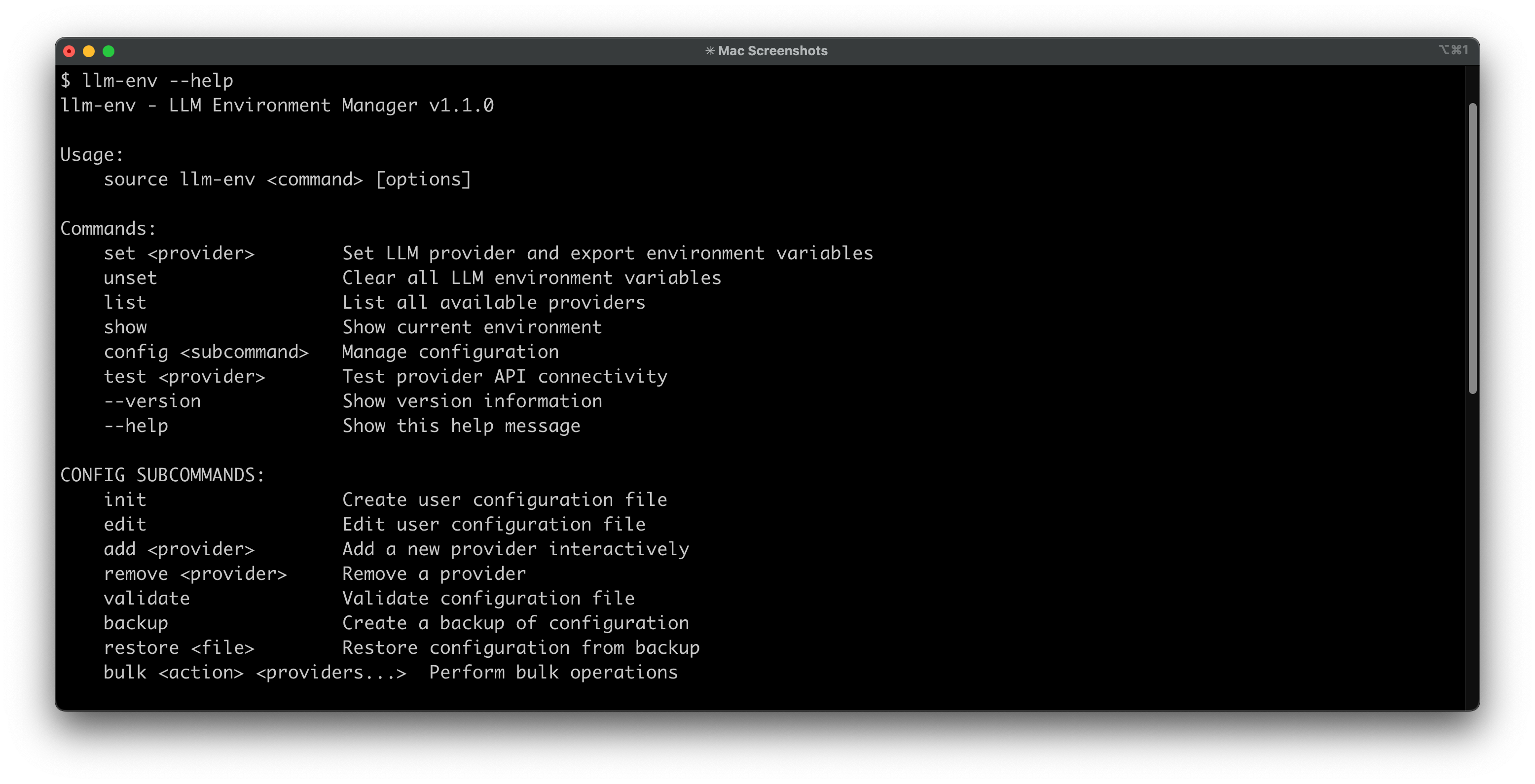
New in v1.1.0: Enhanced with a comprehensive help system, API connectivity testing, configuration backup/restore, bulk operations, and debug mode for easier troubleshooting.
Manage credentials for OpenAI, OpenRouter, Cerebras, Groq, and 15+ other providers.
llm-env maps these services to the industry-standard OPENAI_* environment variables, ensuring compatibility with almost any tool. API keys are stored securely in your shell profile, never in code.
Pure Bash. Zero Dependencies. Just works.

If you work with multiple AI providers, you've likely experienced these pain points:
- Multiple providers, different endpoints: Each provider has unique API endpoints and authentication methods
- OPENAI_ is the standard*: Most AI tools expect OPENAI_* environment variables, but not every provider uses those names
- Constant configuration editing: You end up editing ~/.bashrc or ~/.zshrc repeatedly
- Context switching kills flow: Small mistakes cause mysterious 401s/404s, breaking your development rhythm
- Configuration drift: Different setups across development, staging, and production environments
This tool supports any OpenAI API compatible provider, including:
- OpenAI: Industry standard GPT models
- Cerebras: Fast inference with competitive pricing
- Groq: Lightning-fast inference
- OpenRouter: Access to multiple models through one API
- xAI Grok: Advanced reasoning and coding capabilities
- DeepSeek: Excellent coding and reasoning models
- Together AI: Competitive pricing with wide model selection
- Fireworks AI: Ultra-fast inference optimized for production
- And any OpenAI API compatible provider!
# Download and install (recommended) - _may need sudo_
curl -fsSL https://raw.githubusercontent.com/samestrin/llm-env/main/install.sh | bash-
Clone this repository:
git clone https://github.com/samestrin/llm-env.git cd llm-env -
Copy the script to your PATH:
sudo cp llm-env /usr/local/bin/
sudo chmod 755 /usr/local/bin/llm-env
-
Add the helper function to your shell profile (
~/.bashrcor~/.zshrc):# LLM Environment Manager llm-env() { source /usr/local/bin/llm-env "$@" }
-
Set up your API keys in your shell profile:
# Add these to ~/.bashrc or ~/.zshrc
export LLM_CEREBRAS_API_KEY="your_cerebras_key_here"
export LLM_OPENAI_API_KEY="your_openai_key_here"
export LLM_GROQ_API_KEY="your_groq_key_here"
export LLM_OPENROUTER_API_KEY="your_openrouter_key_here"
-
Reload your shell:
source ~/.bashrc # or ~/.zshrc
# List all available providers
llm-env list

# Set a provider (switches all OpenAI-compatible env vars)
llm-env set cerebras
llm-env set openai
llm-env set groq

# Show current configuration
llm-env show

# Unset all LLM environment variables
llm-env unset

# Get help
llm-env --help

# Test provider connectivity
llm-env test cerebras# Start with free tier
llm-env set openrouter2 # Uses deepseek free model (if you are using the default config)
# When free tier is exhausted, switch to paid
llm-env set cerebras # Fast and affordable
# For specific tasks, use specialized models
llm-env set groq # For speed
llm-env set openai # For qualityOnce you've set a provider, any tool using OpenAI-compatible environment variables will work:
# With curl
curl -H "Authorization: Bearer $OPENAI_API_KEY" \
     -H "Content-Type: application/json" \
     -d '{"model":"'$OPENAI_MODEL'","messages":[{"role":"user","content":"Hello!"}]}' \
     $OPENAI_BASE_URL/chat/completions
# With Python OpenAI client
python -c "import openai; print(openai.chat.completions.create(model=os.environ['OPENAI_MODEL'], messages=[{'role':'user','content':'Hello!'}]))"qwen -p "What is the capital of France?" # Uses current provider automatically# Set up for development
llm-env set cerebras # Fast and cost-effective for testing
# Test your application
./your-app.py
# Switch to production model when ready
llm-env set openai # Higher quality for production# Configure different providers for different tasks
llm-env set deepseek # Excellent for code generation
llm-env set groq # Fast inference for real-time apps
llm-env set openai # Complex reasoning tasks
# Switch between providers as needed
llm-env list # See all available providers
llm-env show # Check current configuration# Use with curl
curl -H "Authorization: Bearer $OPENAI_API_KEY" \
-H "Content-Type: application/json" \
$OPENAI_BASE_URL/models
# Use with Python scripts
python your_script.py # Uses current provider automatically
# Test connectivity
llm-env test cerebras # Verify provider is workingThe script uses a flexible configuration system that allows you to customize providers and models without modifying the script itself.
# Create a user configuration file
source llm-env config init

# Edit your configuration
source llm-env config edit# Add a new provider
source llm-env config add my-provider
# Validate configuration
source llm-env config validate
# Backup configuration
source llm-env config backup
# Restore from backup
source llm-env config restore /path/to/backup.conf
# Bulk operations
source llm-env config bulk enable cerebras openai
source llm-env config bulk disable groq openrouterFor detailed configuration options, examples, and advanced setup, see the Configuration Guide
# Verify setup
llm-env list
llm-env show

# Test API connectivity
llm-env test cerebras

# Enable debug mode for detailed troubleshooting
LLM_ENV_DEBUG=1 llm-env list

# Or manual test
curl -H "Authorization: Bearer $OPENAI_API_KEY" $OPENAI_BASE_URL/models
For detailed troubleshooting, common issues, and solutions, see the Troubleshooting Guide
llm-env is written in Bash so it runs anywhere Bash runs—macOS, Linux, containers, CI—without asking you to install Python or Node first. It's intentionally compatible with older shells and includes compatibility shims for legacy behavior.
Universal Compatibility:
- Works out-of-the-box on macOS's default Bash 3.2 and modern Bash 5.x installations
- Linux distros with Bash 4.0+ are fully supported
- Backwards-compatible layer ensures features like associative arrays "just work," even on Bash 3.2
- Verified by automated test matrix across Bash 3.2, 4.0+, and 5.x on macOS and Linux
Security Benefits:
- Keys live in environment variables—never written to config files
- Outputs are masked (e.g., ••••abcd) to keep secrets safe on screen and in screenshots
- Switching is local; nothing is sent over the network except your own API calls during tests
- No external dependencies means fewer attack vectors
Complete documentation is available in the docs directory:
- Configuration Guide - Detailed setup and customization
- Troubleshooting Guide - Common issues and solutions
- Development Guide - Contributing and development
- Compatible Tools - Applications that work with llm-env
Comprehensive test suite ensures reliability across platforms and Bash versions:
# Run all tests
./tests/run_tests.sh

# Run specific test suites
./tests/run_tests.sh --unit-only
./tests/run_tests.sh --integration-only
./tests/run_tests.sh --system-only

# Run individual test files
bats tests/unit/test_validation.bats
bats tests/integration/test_providers.bats- Unit Tests (
tests/unit/) - Core functionality and validation - Integration Tests (
tests/integration/) - Provider management and configuration - System Tests (
tests/system/) - Cross-platform compatibility and edge cases - Regression Tests - Prevent known issues from reoccurring
All test suites passing across supported platforms:
- Unit Tests: 40/40 passing
- Integration Tests: 13/13 passing
- System Tests: 40/40 passing
- Total Coverage: 93 test cases
Platform Support:
- macOS (Bash 3.2+ and 5.x)
- Ubuntu/Linux (Bash 4.0+)
- Multi-version compatibility testing
- BATS testing framework
- Bash 3.2+ (automatically tested across versions)
- No external dependencies required for basic tests
Contributions are welcome! See the Development Guide for details on:
- Adding new providers
- Improving functionality
- Testing and validation
- Code style guidelines
Current Version: 1.1.0
For detailed version history, feature updates, and breaking changes, see CHANGELOG.md.
If you find llm-env useful, please consider starring the repository and supporting the project:

MIT License - see LICENSE file for details.
llm-env is the missing bridge for tools that default to OpenAI. It has been verified to work instantly with:
1. Aider (AI Pair Programmer)
Force Aider to use cheaper/faster models via the generic OpenAI interface without complex flags.
llm-env set groq
# Now Aider uses Groq's Llama 3 via the OpenAI compatibility layer
aider --model openai/llama3-70b-8192Stop manually passing --api_base and --api_key arguments.
llm-env set cerebras
interpreter -y  # Runs at lightning speed
3. Fabric
Use Fabric patterns with any provider without editing configuration files.
llm-env set gemini
echo "Explain quantum computing" | fabric --pattern explain- Simon Willison's llm: The CLI tool for managing LLMs.
- LangChain: Perfect for testing generic OpenAI chains against other providers.
- LiteLLM: Simplifies calling all LLM APIs.
- Qwen-Code: See my qwen-prompts repo for hybrid prompt chaining setups.
Additional: Applications, Scripts, and Frameworks compatible with llm-env