
An AI system where one LLM generates ideas and another LLM critiques them. You act as the director, guiding their collaboration.
This project is a complete example of how to build a reliable and smart multi-agent system where a user can manage the workflow. It includes a strong testing setup using DeepEval to ensure the AI agents behave as expected.
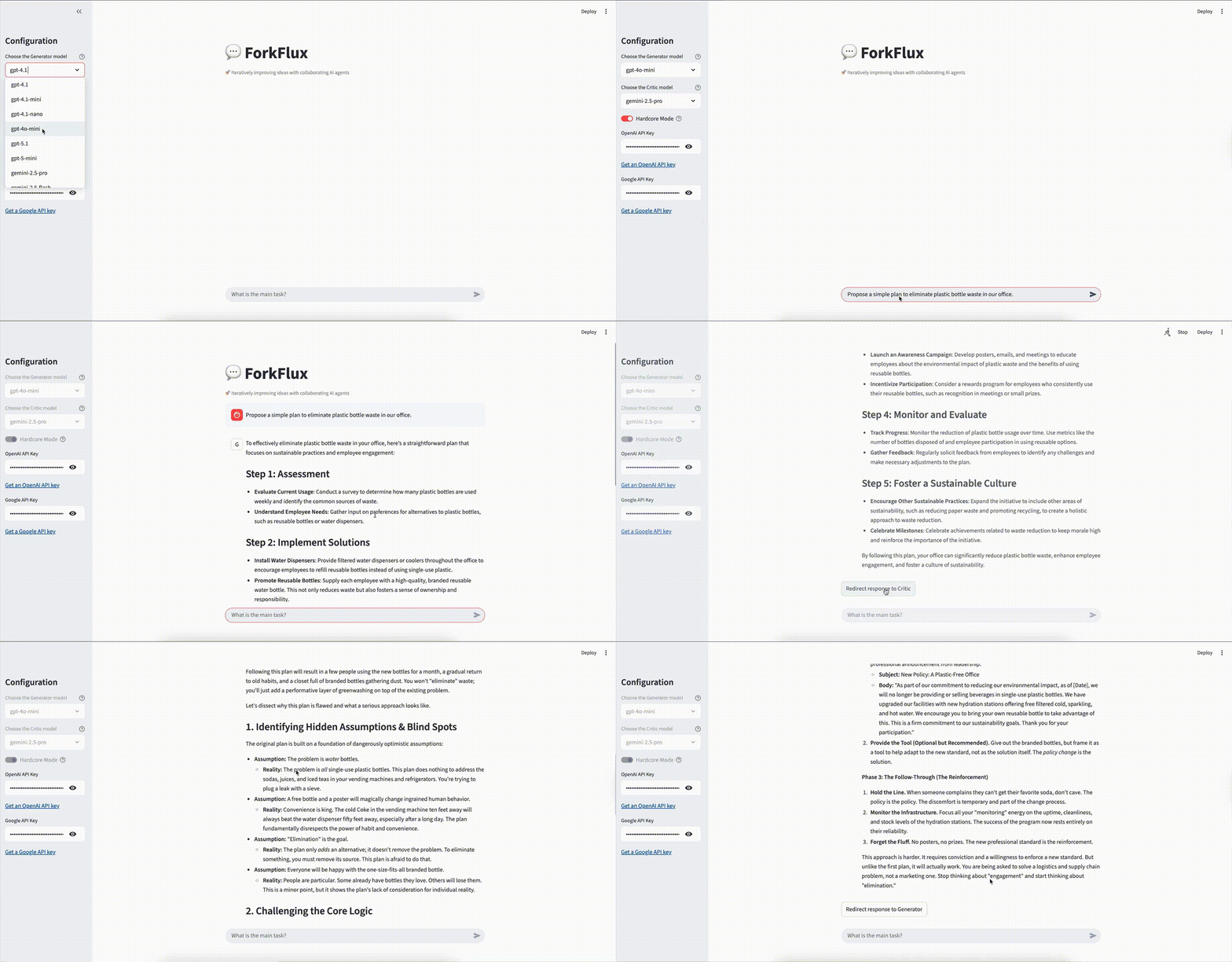
- Generator-Critic Team: One AI agent has the role of a "Generator" to create ideas, code, or text. Another AI agent acts as a "Critic" to review the work, find problems, and suggest improvements.
- You are the Director (Human-in-the-Loop): You have full control. You can talk to the Generator, then send its response to the Critic. You decide what to do next.
- Use Different AIs: The system is flexible. You can use a model from OpenAI (like GPT-4.1) as the Generator and a model from OpenAI (like GPT-5) as the Critic.
- Separate Memory for Each Agent: Each AI only remembers its own conversation with you. This helps them stay focused on their specific role.
- High-Quality Testing: The project is tested with DeepEval. We don't just check for bugs; we check if the AI agents are smart, stick to their roles, and handle strange requests correctly.
The system is managed by a central Orchestrator. When you send a message, the Orchestrator directs it to the correct agent. Each agent has its own separate memory.
graph LR
subgraph "ForkFlux: AI Collaboration System"
U[👨💻 User] --> O{Orchestrator}
subgraph "Generator Agent"
A1_LLM[🧠 LLM: OpenAI GPT-5.1]
A1_Mem[📝 Separate Memory]
end
subgraph "Critic Agent"
A2_LLM[🧠 LLM: Gemini 2.5 Pro]
A2_Mem[📝 Separate Memory]
end
O -- "talk_to('generator', ...)" --> A1_LLM
O -- "talk_to('critic', ...)" --> A2_LLM
A1_LLM -- "Response" --> O
A2_LLM -- "Response" --> O
O -- "Final Result" --> U
end
- Python: The main programming language.
- uv: For fast project and environment management.
- LangChain: To connect and manage the AI models.
- Streamlit: To create the simple web user interface.
- DeepEval: For testing the quality of the AI's responses.
- Pytest: For running the tests.
- Langfuse: For monitor, evaluate, and debug.
- Tavily: For web search.
Follow these steps to run the project on your own computer.
First, download the code to your machine.
git https://github.com/scream4ik/forkflux.git
cd forkfluxThis project uses uv for fast installation.
# Create a virtual environment
uv venv

# Activate it (macOS/Linux)
source .venv/bin/activate
# Or activate it (Windows)
# .\.venv\Scripts\activate

# Install all required libraries
uv synccp .env.example .envCheck the .env.example file for more details.
After installation, you can run the web application. No API keys are needed to start the app.
streamlit run app/main.pyOpen your web browser and go to the local URL provided by Streamlit (usually http://localhost:8501).
The tests ensure that the AI agents behave correctly. To run the tests, you need to install the developer dependencies and set up an API key.
From your activated virtual environment, run:
# This command installs everything needed for testing
uv sync --devThe test suite needs an OpenAI API key to run the evaluations. You only need to set it for your local terminal session.
(For macOS / Linux)
export OPENAI_API_KEY="sk-..."(For Windows Command Prompt)
set OPENAI_API_KEY="sk-..."(For Windows PowerShell)
$env:OPENAI_API_KEY="sk-..."Now you can run all the tests with deepeval and pytest.
deepeval test run tests/ai/ -c
python -m pytest -s tests/app
The first time you run the tests, it will be slow because it calls the real AI models. After that, the tests will be very fast because the results are cached.
- Conversation History See a list of their past conversations. Load an old conversation and continue working on it.
- Give agents tools: Allow agents to use tools like a web search to find up-to-date information.
- Improve the UI: Make the user interface more advanced.
- Automate workflows: Use a tool like LangGraph to create automatic sequences for common tasks.
Licensed under the Apache 2.0 License.
Issues and PRs welcome. See CONTRIBUTING.md for details.
Star the repo and share feedback — we’re building in the open.