A lightweight, type-safe TypeScript utility for loading and validating environment variables. Works with any frontend framework (Vite, Next.js, etc.) and Node.js.
- ✅ Type-safe: Full TypeScript support with type inference
- ✅ Validation: Built-in validators for common types (string, number, boolean)
- ✅ Flexible: Support for required, optional, and default values
- ✅ Zero dependencies: Lightweight with no external dependencies
- ✅ Framework-agnostic: Works with Vite, Next.js, Node.js, or any JavaScript environment
npm install ts-safe-configimport { defineConfig, env } from "ts-safe-config";
const config = defineConfig({
VITE_API_URL: env.string().required(),
VITE_PORT: env.number().default(3000),
VITE_FEATURE_FLAG: env.boolean().optional(),
VITE_DEBUG: env.boolean().default(false)
}, import.meta.env); // Vite, or use process.env for webpack/Next.js
// config is fully typed!
console.log(config.VITE_API_URL); // string
console.log(config.VITE_PORT); // number
console.log(config.VITE_FEATURE_FLAG); // boolean | undefined
console.log(config.VITE_DEBUG); // booleanimport { defineConfig, env } from "ts-safe-config";
const config = defineConfig({
API_URL: env.string().required(),
PORT: env.number().default(3000),
DEBUG: env.boolean().default(false)
}, process.env); // Pass process.env for Node.js
// Use your config
console.log(config.API_URL);Creates a type-safe configuration object from environment variables.
Parameters:
schema: An object mapping environment variable names to type validatorsenvSource: Environment variable source (e.g.,import.meta.env,process.env, or custom object)
Returns: A typed configuration object
Example:
// Browser (Vite, etc.)
const config = defineConfig({
  API_URL: env.string().required()
}, import.meta.env);

// Node.js or webpack/Next.js
const config = defineConfig({
  API_URL: env.string().required()
}, process.env);Validates that a value is a string.
Methods:
.required()- Value must be present (throws if undefined).optional()- Value can be undefined.default(value)- Provides a default value if undefined
Examples:
const config = defineConfig({
  VITE_API_URL: env.string().required(), // Must be provided
  VITE_OPTIONAL: env.string().optional(), // Can be undefined
  VITE_NAME: env.string().default("App")  // Defaults to "App"
}, import.meta.env);Validates and converts a value to a number.
Methods:
.required()- Value must be present (throws if undefined).optional()- Value can be undefined.default(value)- Provides a default value if undefined
Examples:
const config = defineConfig({
  VITE_PORT: env.number().required(),     // Must be provided
  VITE_TIMEOUT: env.number().optional(),  // Can be undefined
  VITE_MAX_RETRIES: env.number().default(3) // Defaults to 3
}, import.meta.env);Validates and converts a value to a boolean. Recognizes "true", "1", and "yes" (case-insensitive) as true.
Methods:
.required()- Value must be present (throws if undefined).optional()- Value can be undefined.default(value)- Provides a default value if undefined
Examples:
const config = defineConfig({
  VITE_ENABLED: env.boolean().required(),      // Must be provided
  VITE_DEBUG: env.boolean().optional(),        // Can be undefined
  VITE_ANALYTICS: env.boolean().default(false) // Defaults to false
}, import.meta.env);Create a .env file:
API_URL=https://api.dev.example.com
PORT=3000
FEATURE_FLAG=true
Then in your code:
import { defineConfig, env } from "ts-safe-config";

export const config = defineConfig({
  API_URL: env.string().required(),
  PORT: env.number().default(3000),
  FEATURE_FLAG: env.boolean().default(false)
}, import.meta.env); // or process.envimport { defineConfig, env } from "ts-safe-config";
const mockEnv = {
VITE_API_URL: "https://api.test.example.com",
VITE_DEBUG: "true"
};
const config = defineConfig({
VITE_API_URL: env.string().required(),
VITE_DEBUG: env.boolean().default(false)
}, mockEnv);Client-side validation with enhanced error messages displayed in the browser's DevTools console (F12).
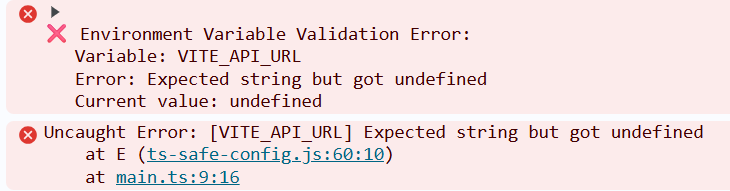
Each validation error produces two outputs:
- Formatted console error - Clear, readable error with variable name, message, and current value
- Thrown exception - Standard Error with stack trace in format:
[VARIABLE_NAME] error description
// Missing required value
defineConfig({
  API_URL: env.string().required()
}, {});
// Browser console shows both:
// ❌ Environment Variable Validation Error:
//    Variable: API_URL
//    Error: Expected string but got undefined
//    Current value: undefined
//
// Uncaught Error: [API_URL] Expected string but got undefined

// Invalid number
defineConfig({
  PORT: env.number().required()
}, { PORT: "invalid" });
// Error: "[PORT] Expected a number but got "invalid""The library provides full type inference:
const config = defineConfig({
  VITE_API_URL: env.string().required(),
  VITE_PORT: env.number().optional(),
  VITE_DEBUG: env.boolean().default(false)
}, import.meta.env);

// TypeScript knows the exact types:
// config.VITE_API_URL: string
// config.VITE_PORT: number | undefined
// config.VITE_DEBUG: boolean- Use
.required()for critical values: Ensure your app fails fast if essential configuration is missing - Provide sensible
.default()values: Makes your app more resilient and easier to develop - Use
.optional()sparingly: Prefer.default()to avoid undefined checks throughout your code - Centralize configuration: Export a single config object that's imported throughout your app
- Follow naming conventions: Use appropriate prefixes for your environment (
VITE_,NEXT_PUBLIC_, etc.)
MIT
Contributions are welcome! Please feel free to submit a Pull Request.