Phantom Roll Output Formatting
Changes the output text of your rolls to concise, but useful info. See below for examples.
Rolls from self:
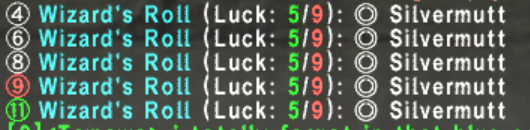
Rolls from others:

 The roll is coming from someone else
 The circled number is the current value of the roll you received
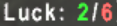 The green number is the lucky number, red is unlucky
 Luzaf's Ring mode is enabled, so this roll should have a larger radius. Only applies to rolls from yourself. Cannot determine what other people are wearing
See the Installation page for details on first steps if you have not yet installed SilverLibs into your job lua. To implement this specific feature:
If the specified functions already exist, just put the silibs part inside of it in the appropriate spot. Please add the following:
function job_setup()
  silibs.enable_custom_roll_text()
end
You can optionally hide other player's rolls performed on you by setting "true" in the enabling function like this:
silibs.enable_custom_roll_text(true)If the specified functions already exist, just put the silibs part inside of it in the appropriate spot. Please add the following in your char_job_gear.lua file:
function user_job_setup()
  silibs.enable_custom_roll_text()
  state.LuzafRing = M(true, "Luzaf's Ring")
  send_command('bind @` gs c toggle LuzafRing')
end
You can optionally hide other player's rolls performed on you by setting "true" in the enabling function like this:
silibs.enable_custom_roll_text(true)The presence of Luzaf's Ring can only be done for yourself, so only do this for your Corsair's lua. You must add a toggle mode, a keybind to change its value, and hook into GearSwap's precast function to override the default set and equip Luzaf's Ring when you do a Phantom Roll. Here's how:
function job_setup()
  state.LuzafRing = M(true, "Luzaf's Ring")
  send_command('bind @` gs c toggle LuzafRing')
end

function init_gear_sets()
  sets.precast.LuzafRing = {ring1="Luzaf's Ring"}
end

function job_post_precast(spell, action, spellMap, eventArgs)
  if (spell.type == 'CorsairRoll' or spell.english == "Double-Up") then
    if state.LuzafRing.value then
      equip(sets.precast.LuzafRing)
    end
  end
end
If the specified functions already exist, just put the silibs part inside of it in the appropriate spot. Please add the following in your char_job_gear.lua file:
function user_job_setup()
  state.LuzafRing = M(true, "Luzaf's Ring")
  send_command('bind @` gs c toggle LuzafRing')
end

function init_gear_sets()
  sets.precast.LuzafRing = {ring1="Luzaf's Ring"}
end

function user_job_post_precast(spell, action, spellMap, eventArgs)
  if (spell.type == 'CorsairRoll' or spell.english == "Double-Up") then
    if state.LuzafRing.value then
      equip(sets.precast.LuzafRing)
    end
  end
end