
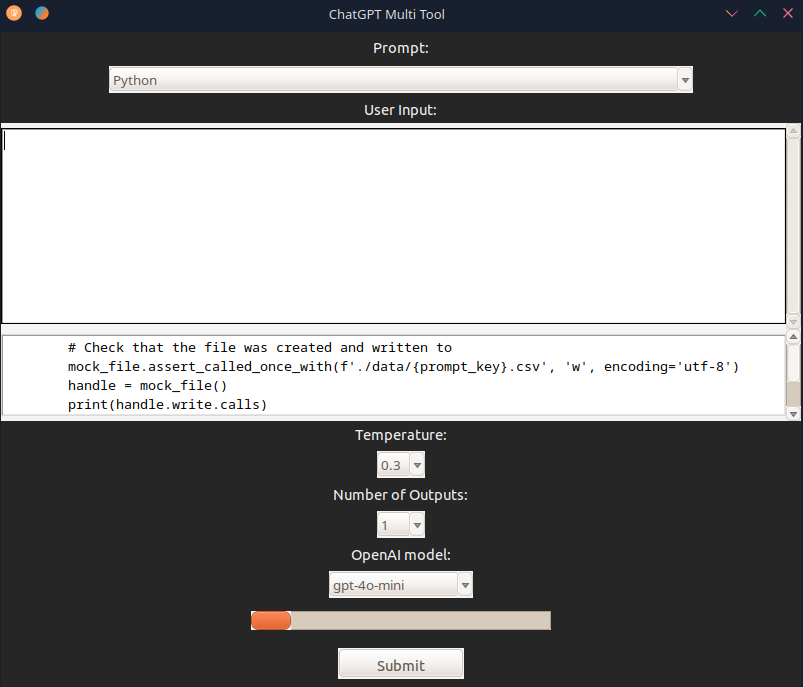
A tool to query ChatGPT and Google Gemini at the same time. Comes with a set of basic prompts.
- Navigate to the
srcfolder in the command prompt. - Enter
python cmt_systray.py. - Locate the new icon in the system tray.
- Right-click the icon.
- Select Run ChatGPT.
- Select a prompt type from the dropdown menu.
- Enter a query in the user input box.
- Select the number of outputs.
- Select the temperature, a lower value means ChatGPT will be more creative.
- Press Submit.
- Navigate to the
srcfolder in the terminal. - Enter
python3 cmt_systray.py. - Locate the new icon in the system tray.
- Right-click the icon.
- Select Run ChatGPT.
- Select a prompt type from the dropdown menu.
- Enter a query in the user input box.
- Select the number of outputs.
- Select the temperature, a lower value means ChatGPT will be more creative.
- Press Submit.
- Edit
prompts.yamlin thedatadirectory to add or remove prompts as you desire.
- Kevin Fink (Shorecode LLC)
- Windows 10
- Linux Mint/Plasma desktop