







📚 Documents: musicdl.readthedocs.io
🎧 Live Demo · MusicSquare (音乐广场)

🛠 Source Code (MusicSquare)
MusicSquare is a browser-based music playground — search, play, and download tracks directly in your browser.
- 2025-11-21: Released musicdl v2.4.6 — fixed bugs caused by mismatched parameters in MusicClient.download and optimized music_sources.
- 2025-11-19: Released musicdl v2.4.5 — fix potential in-place modified bugs in HTTP requests.
- 2025-11-19: Released musicdl v2.4.4 — some minor improvements and bug fixes.
- 2025-11-15: Released musicdl v2.4.3 — migu and netease have introduced an automatic audio quality enhancement feature, which significantly increases the chances of getting lossless quality, Hi-Res audio, JyEffect (HD surround sound), Sky (immersive surround sound), and JyMaster (ultra-clear master quality).
- 2025-11-15: Released musicdl v2.4.2 — save meta info to music files from TIDAL, fix user input bugs and migu search bugs.
- 2025-11-14: Released musicdl v2.4.1 — beautify print, add support for TIDAL (TIDAL is an artist-first, fan-centered music streaming platform that delivers over 110 million songs in HiFi sound quality to the global music community).
- 2025-11-12: Released musicdl v2.4.0 — complete code refactor; reintroduced support for music search and downloads on major platforms.
A lightweight music downloader written in pure Python. Like it? ⭐ Star the repository to stay up to date. Thanks!
This project is for educational use only and is not intended for commercial purposes. It interacts with publicly available web endpoints and does not host or distribute copyrighted content. To access paid tracks, please purchase or subscribe to the relevant music service—do not use this project to bypass paywalls or DRM. If you are a rights holder and believe this repository infringes your rights, please contact me and I will promptly address it.
| MusicClient (EN) | MusicClient (CN) | Search | Download | Code Snippet |
|---|---|---|---|---|
| FiveSingMusicClient | 5SING音乐 | ✓ | ✓ | fivesing.py |
| KugouMusicClient | 酷狗音乐 | ✓ | ✓ | kugou.py |
| KuwoMusicClient | 酷我音乐 | ✓ | ✓ | kuwo.py |
| LizhiMusicClient | 荔枝FM | ✓ | ✓ | lizhi.py |
| MiguMusicClient | 咪咕音乐 | ✓ | ✓ | migu.py |
| NeteaseMusicClient | 网易云音乐 | ✓ | ✓ | netease.py |
| QianqianMusicClient | 千千音乐 | ✓ | ✓ | qianqian.py |
| QQMusicClient | QQ音乐 | ✓ | ✓ | qq.py |
| XimalayaMusicClient | 喜马拉雅 | ✓ | ✓ | ximalaya.py |
| JooxMusicClient | JOOX (QQ音乐海外版) | ✓ | ✓ | joox.py |
| TIDALMusicClient | TIDAL (提供HiFi音质的流媒体平台) | ✓ | ✓ | tidal.py |
| YouTubeMusicClient | 油管音乐 | ✓ | ✓ | youtube.py |
Here are some projects built on top of musicdl,
| Project (EN) | Project (CN) | WeChat Article | Project Location |
|---|---|---|---|
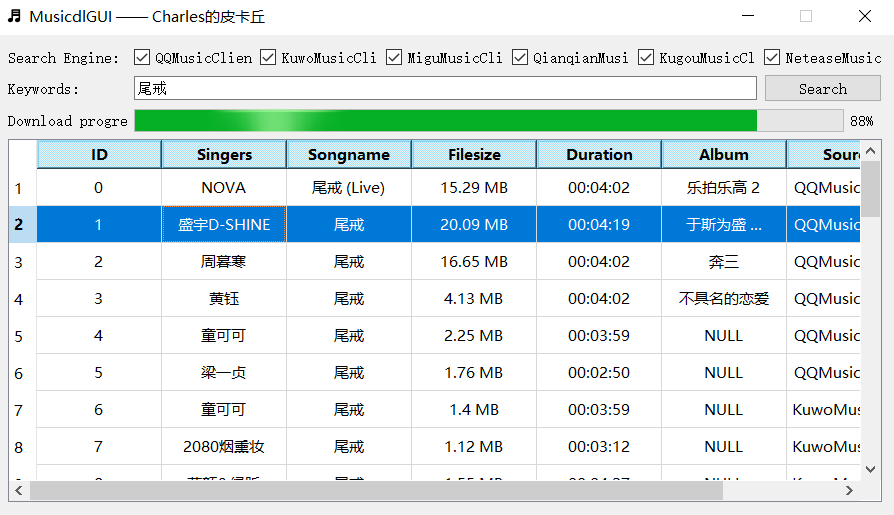
| Music downloader GUI | 音乐下载器GUI界面 | click | musicdlgui |
| Singer lyrics analysis | 歌手歌词分析 | click | singerlyricsanalysis |
| Lyric-based song snippet retrieval | 歌词获取歌曲片段 | click | searchlyrics |
For example, the Music Downloader GUI looks/works like this,
You have three installation methods to choose from,
# from pip
pip install musicdl
# from github repo method-1
pip install git+https://github.com/CharlesPikachu/musicdl.git@master
# from github repo method-2
git clone https://github.com/CharlesPikachu/musicdl.git
cd musicdl
python setup.py install
Some music platforms require FFmpeg to be directly callable in your environment in order to obtain higher-quality audio. You can choose whether to install FFmpeg depending on your needs.
After a successful installation, you can run the snippet below,
from musicdl import musicdl

music_client = musicdl.MusicClient(music_sources=['MiguMusicClient', 'NeteaseMusicClient', 'KuwoMusicClient', 'KugouMusicClient', 'QQMusicClient', 'QianqianMusicClient'])
music_client.startcmdui()
Or just run musicdl (maybe musicdl --help to show usage information) from the terminal.
Usage: musicdl [OPTIONS]

Options:
  --version                       Show the version and exit.
  -k, --keyword TEXT              The keywords for the music search. If left
                                  empty, an interactive terminal will open
                                  automatically.
  -m, --music-sources, --music_sources TEXT
                                  The music search and download sources.
                                  [default: MiguMusicClient,NeteaseMusicClient
                                  ,KuwoMusicClient,KugouMusicClient,QQMusicCli
                                  ent,QianqianMusicClient]
  -i, --init-music-clients-cfg, --init_music_clients_cfg TEXT
                                  Config such as `work_dir` for each music
                                  client as a JSON string.
  -r, --requests-overrides, --requests_overrides TEXT
                                  Requests.get kwargs such as `headers` and
                                  `proxies` for each music client as a JSON
                                  string.
  -c, --clients-threadings, --clients_threadings TEXT
                                  Number of threads used for each music client
                                  as a JSON string.
  -s, --search-rules, --search_rules TEXT
                                  Search rules for each music client as a JSON
                                  string.
  --help                          Show this message and exit.
The demonstration is as follows,


If you are a VIP user on each music platform, for example, a VIP user of Netease Cloud Music, you can pass in the cookies from your logged-in account so that musicdl can download more tracks with higher quality (e.g., flac music files). Example code is as follows:
from musicdl import musicdl

your_vip_cookies_with_str_format = ""
your_vip_cookies_with_dict_format = dict(item.split("=", 1) for item in your_vip_cookies_with_str_format.split("; "))
init_music_clients_cfg = dict()
init_music_clients_cfg['NeteaseMusicClient'] = {'default_search_cookies': your_vip_cookies_with_dict_format, 'default_download_cookies': your_vip_cookies_with_dict_format, 'search_size_per_source': 20}
music_client = musicdl.MusicClient(music_sources=['NeteaseMusicClient'], init_music_clients_cfg=init_music_clients_cfg)
music_client.startcmdui()
If you want to download lossless-quality music from TIDAL, you need to make sure that PyAV is available or that FFmpeg is in your environment variables, and then use musicdl as follows,
from musicdl import musicdl

music_client = musicdl.MusicClient(music_sources=['TIDALMusicClient'])
music_client.startcmdui()
For more practical examples, please refer to the usage documentation.
- Games: Create interesting games in pure python.
- DecryptLogin: APIs for loginning some websites by using requests.
- Musicdl: A lightweight music downloader written in pure python.
- Videodl: A lightweight video downloader written in pure python.
- Pytools: Some useful tools written in pure python.
- PikachuWeChat: Play WeChat with itchat-uos.
- Pydrawing: Beautify your image or video.
- ImageCompressor: Image compressors written in pure python.
- FreeProxy: Collecting free proxies from internet.
- Paperdl: Search and download paper from specific websites.
- Sciogovterminal: Browse "The State Council Information Office of the People's Republic of China" in the terminal.
- CodeFree: Make no code a reality.
- DeepLearningToys: Some deep learning toys implemented in pytorch.
- DataAnalysis: Some data analysis projects in charles_pikachu.
- Imagedl: Search and download images from specific websites.
- Pytoydl: A toy deep learning framework built upon numpy.
- NovelDL: Search and download novels from some specific websites.
If you use this project in your research, please cite the repository.
@misc{musicdl2020,
    author = {Zhenchao Jin},
    title = {Musicdl: A lightweight music downloader written in pure python},
    year = {2020},
    publisher = {GitHub},
    journal = {GitHub repository},
    howpublished = {\url{https://github.com/CharlesPikachu/musicdl}},
}
| WeChat Appreciation QR Code (微信赞赏码) | Alipay Appreciation QR Code (支付宝赞赏码) |
|---|---|
 |
 |
Charles的皮卡丘 (Charles_pikachu)